HOW I BUILT THE BACKEND (PHP) CODE FOR my website (linux command reminder tool)
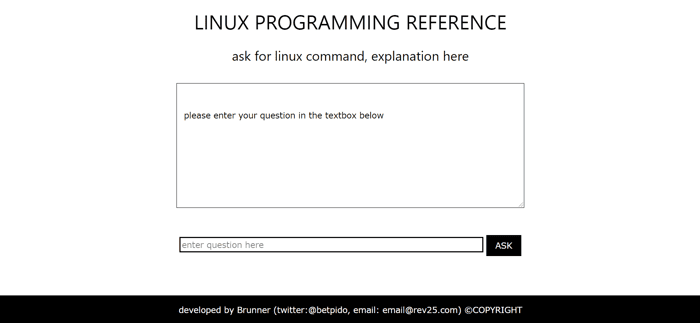
I previously wrote a short post on how I designed and built rev25.com, which is a simple tool to remind linux programmers of linux syntax and commands.
In this short post, I will talk about how I designed and built the backed in PHP.
DESIGN
I uploaded a file that contains the syntax and commands of linux to my server.
- When the user clicks the 'ASK' button to get an answer to his question, his question is sent to a backend php code.
2)The backend php code looks for a reasonable answer to his question, from the file that contains the linux commands and syntax.
3)Then the answer is displayed (echoed) to the user.
Finally, the user's question is emailed to me, so I know the kind of questions linux programmers often ask to make improvements to the tool.
PROGRAMMING
The user clicks 'ASK' button to submit a form that contains his question to a php backend code.
This form uses 'POST' method as I would later require email and password sign in from the user. If not, I would have opted for 'GET' method.
I verify that the user has hit the 'ASK' button by using the simple php code :
if (isset($_POST['search']) || isset($_POST['question']))
where 'search' refers to the name I have given to the 'ASK' button in the form and 'question' refers to the name I have given to the textfield that will hold the user's question.
This is so that if the user does not click the 'ASK' button but hits the enter key on his keyboard, the backend php code will still run.
Then, I check to make sure the user's question is not empty and contains at least a letter/number using the php code:
if (strlen($question) > 0)
where 'strlen()' is the php method that returns the length of a string, and $question is the variable that points to the user's question typed into the textField.
If the 'IF' statement above returns true, method 'result($question,$file)' is called to execute and echo an answer to the user.
Method result() takes two arguments, $question, which is the user's question and $file, which is the file that contains the linux syntax and commands.
The code blocks in method result() look for the right answer to the user's question, then echo this answer into the textField on the screen.
Finally, in order to know if people are using my program, I wrote a small php code, to send an email to me anytime the 'result()' method is called.
That is, anytime someone asks for a linux command or syntax, I will be emailed the question of the user.
This enables me to know the common linux questions asked and how to improve upon my product. This will also let me know if people use my product at all.
I decided to email myself because, I am only testing this product idea and so I have not invested to time to attach a mysql database to the program.
It will only be necessary if the program gains traction and I see more people using it.
EXTRA
- While coding this program, I noticed that most programmers online were asking about how you can use php to echo content into a textArea,
unfortunately, I did not see any reasonable answer for these people.
The simple answer to this question, is to write your php code inside the textArea tags. Example: <textArea> <?php echo "say something"; ?> </textArea>
As long as your php code lives within the tags of the textArea, anything you echo will automatically appear inside the textArea.
- I also noticed that finding errors in your php code (debugging) has something to do with the program you are coding the php in (IDE).
If the IDE helps you to identify errors easily, you will debug your code faster.
The first version of the program is hosted online (rev25.com)and I am currently advertising it to linux programmerson twitter and other platforms, encouraging them to try it.
If you are linux programmer, please try it and let me know how it goes. Cheers.
