I made our product demo in HTML instead of a video editor
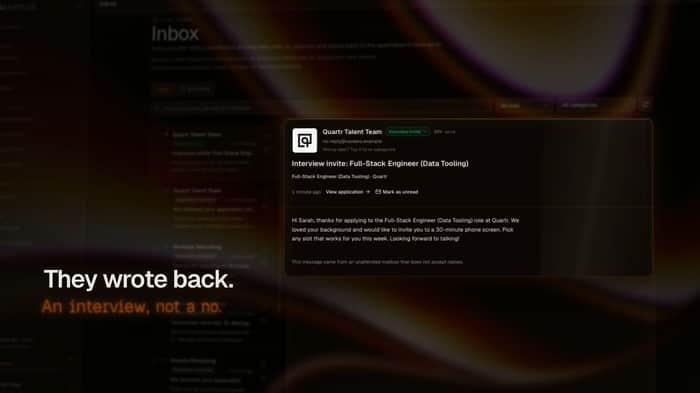
I needed a 90 second demo for AI Applyd before our Product Hunt launch on 6 October. I don't use After Effects, and screen recordings of a real app always come out jittery, with loading spinners and the wrong data on screen.
So I built the demo as web pages. HyperFrames renders HTML to video, one scene per page. Every screen in it is a real capture from our app, running on a seeded test account, so what you see is what the product actually shows.
What worked:
Pacing lives in code. Changing a scene from 6 seconds to 5 is one number, and the whole cut re-renders.
Fonts and colors match the site, because they are the site's own fonts and tokens.
There was no cleanup pass. No half-loaded states to cut around.
What took longer than I expected:
Music. Cutting to the beat by editing timestamps is slow, and it took several rounds before the edit stopped feeling mechanical.
The voice. The first voices I tried sounded like an audiobook narrator, which drained the energy out of it.
Here is the result: https://www.youtube.com/watch?v=xt1pbpVzf4I
AI Applyd applies to jobs for you on the company's own hiring system: https://aiapplyd.com?ref=ih
If you've shipped a launch video, how did you handle the music?

On the music, the part I would watch most is licensing rather than timing. Product Hunt videos are YouTube embeds, so a track without a clear commercial license can get a Content ID claim, and on launch day that means ads or a muted section on your demo. Safe free sources are the YouTube Audio Library and Pixabay Music. If you want something less generic, a one-month Artlist or Epidemic subscription covers it, and the license stays valid for anything you published while subscribed. Since HyperFrames renders the picture, I'd keep the audio out of the render and add it afterward with ffmpeg, so you can swap tracks without re-rendering: ffmpeg -i demo.mp4 -i track.mp3 -map 0:v -map 1:a -c:v copy -c:a aac -af "afade=t=in:d=1,afade=t=out:st=86:d=4" -shortest launch.mp4 (set st to your length minus 4). Aim for about -14 LUFS overall so it isn't louder than other videos on the page, and end on a held note or the logo frame instead of cutting the track mid-bar. Most people will watch the first loop muted anyway, so the captions others mentioned matter more than which song you pick.
Rendering from a seeded account is a smart way round jittery captures. If any screen shows the test profile's phone number, I'd make it one from the fiction ranges (555-0100 to 555-0199 in North America, 07700 900xxx in the UK), since the video will stay public for years.
On the music: since pacing already lives in code, pick the track first and derive scene lengths from its tempo instead of editing timestamps. At 120 BPM a beat is 0.5 s, so a scene is 8, 10 or 12 beats (4, 5 or 6 s), and cuts land on the beat by construction. Swapping tracks then means changing one BPM number and re-rendering, not re-cutting.
Two smaller things worth knowing before 6 October. A lot of people watch launch videos muted in the feed, so on-screen captions for the key lines carry more than the voice does. And the seeded test account is a quiet win beyond the demo: re-render the video after each release and any screen that changed or broke shows up immediately, which makes the demo double as a visual check of the app.
The biggest lesson here seems to be that the technical side of the video can be made very systematic, but music is much harder to make feel natural. I’d probably start with the track first, mark the major beats and transitions, and then build the scene timing around those rather than trying to fit the music afterward.
Also, using real product screens with seeded data sounds like a smart way to avoid the usual “demo video looks nothing like the actual product” problem. Curious to see how HyperFrames handles more complex animations and interactions.
The "pacing lives in code" point is underrated. When a demo is video, changing the timing on one screen means re-exporting everything downstream. When it's code, you change a number and re-render.
For the music sync problem: I've seen teams use markers in Audacity to export beat timestamps as a text file, then write a small script that adjusts scene durations to align with those timestamps. Slower to set up the first time, faster on every iteration after. Might be worth it if you're doing multiple product hunt launches.