We started with folders. The deeper problem was keeping work reusable
A few months ago, I wrote a post about why files aren’t messy, but stuck in the wrong system.
At the time, I was thinking mostly about folders.
A file can be part of a project, useful as a reference, and something you need again months later. But the file still has to live somewhere. That is where folder structures start to fall apart. The project changes, the priorities change, and the folders stay behind.
That is why we started working on properties and reusable Collections in Voyager. Instead of moving files around every time the context changed, we wanted people to describe a context once and use it again.
As we built it, I kept running into a problem.
Finding the right files turned out not to be the whole problem.
My own work is spread across local files, project tools, messages, and AI sessions. I can usually find the output later. What takes longer is figuring out what the output was based on, which files were used, and what I was trying to do next.
A Collection helps with the first part. It can gather the files that belong to a project. It does not preserve everything around those files.
That is the part we’re working on now.
We’re also thinking about how Voyager could extend beyond local files. One direction we’re exploring is how work from tools like Notion could sit alongside the files you already use. This is part of our longer-term product direction, not a feature in the current download.
That direction is not in the current download yet. We’re still thinking through which tools, permissions, and actions should come first.
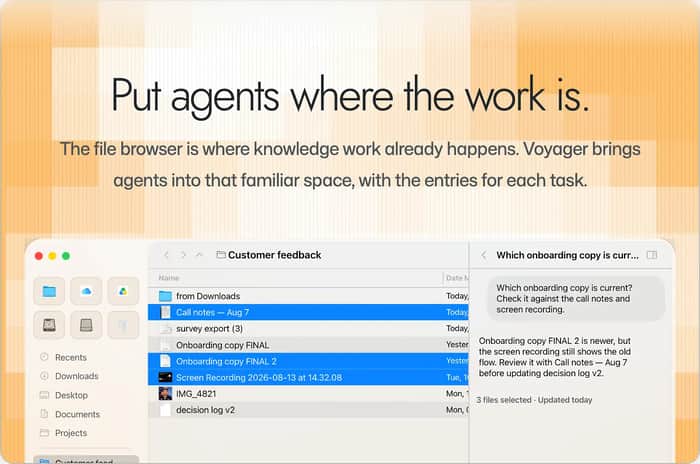
Today, Voyager is primarily a macOS file browser. You can browse a project’s files, choose which files an AI agent should work with, and review the context it will receive before it starts. You can keep using the AI tools you already use. Voyager gives you a place to choose the files and context those tools work with.
The part I still find difficult is coming back to the same work later and remembering what mattered, what I used, and what I was going to do next. That’s the part we’re still trying to figure out with Voyager.
Voyager is still early. It is available as a free macOS download, while Plus and Pro are still being prepared.
If your work is spread across local files, project tools, and AI sessions, which tool would you want to see alongside your files first, and what would you want to do with it?
Download Voyager for macOS: https://voyager.fm/

The 'what was this output and why did I make it' problem is a context problem more than a search problem, so I'd test storing the brief or prompt next to each output at creation time. Capturing context when the work happens beats reconstructing it months later. Do users build Collections themselves, or do you plan to infer them from activity?
Users define Collections themselves by saving a search or filter; they aren't inferred from activity. Choosing the files for an agent task is also a deliberate user action. I agree that the request needs to stay connected to its result, but that is separate from the reason those files were chosen.
The key difference is between finding files and rebuilding the state of the work. I can usually find the file. What I lose is why it mattered and what I planned to do next. I'd test a small handoff note that stays with each Collection: why these files belong together, what changed, and where to pick things back up. Early on, that may help more than adding another source integration.
One part of that is already in how Collections work. A Collection saves the conditions that define what belongs in the set, not just the files found today. Those conditions explain the scope and can be used again as the files change, so that explanation doesn't need a separate note.
What they don't tell you is which decision was made during a particular run or what to do next. That's the part of your handoff note I'd separate from the Collection itself. Would the next action alone be enough to get you started again?
The distinction you're drawing matters - it's not 'where is this file' but 'what was this file supposed to do.' Folder structures answer the first question and mostly ignore the second.
We run into this constantly with AI session outputs especially. The result is findable. What's hard to reconstruct weeks later is the prompt context that produced it, which decisions were made, and why those decisions held. The output without the context is often not reusable.
How are you approaching AI session outputs specifically? That seems like the hardest case because the context lives in a conversation that's now gone.
We separate the reusable file scope from the context of an individual request. A Collection keeps the conditions for finding the relevant files. Each request captures the context and attachments supplied at that moment, rather than relying on whatever the Collection contains later.
The conditions explain what belongs to the work. The request records what was used for that task. The direction beyond that is to bring the work from tools like Notion alongside those files, so the plan, decisions, and source material can be part of the same context rather than something you rewrite in a separate note.
The "what was I trying to do next" problem is exactly where AI agents get stuck too. If a Collection captures the files but not the intent, an agent starting from it is like a developer reading production logs without the ticket. Capturing the context of the request with the output (not just the Collection as it stands now) could be the leverage point - then resuming means you already know what was tried before and why it didn't work.
A Collection isn't just a captured list of files. Its conditions define what belongs to the work, so they carry the selection criteria forward even when the matching files change. A particular request has its own captured context, separate from that changing set.
Your ticket comparison points to the other layer: what we wanted to do with those files and what we learned from trying. The conditions explain the scope, but they don't replace the request or the decisions made during it.
The distinction between finding an artifact and preserving the reasoning around it really resonates. One lightweight approach might be an automatically captured “decision record” attached to each collection: goal, inputs, output, next step, and timestamp. It could start as plain text rather than trying to reconstruct every tool’s history. The useful test seems to be whether a returning user can resume in under a minute.
The one-minute test is the useful part for me: can someone tell what to do next, rather than just find what we saved?
I see your decision record as a compact view of the work, not another explanation of which files belong together. Collections already keep those criteria, and each request captures the context supplied at that moment. The useful addition is the goal, the decision that was actually kept, and the next action. Where those already live in a project page or task, the direction is to bring that information beside the files rather than reconstruct every tool's history.
Folders are a trap because they feel organized while the actual asset (prompt, clip, template, decision) stays one-off. Reuse is a product problem, not a naming problem.
Same pattern showed up for us listing Discord servers: a dump of links is not a reusable discovery loop. Cards with clear "who it's for / first action" get reused; dumps do not.
What made reusable work click for your users — tags, saved pipelines, or forcing a "save as template" moment?
We're developing the Notion connection now. The aim is to bring those specs and meeting notes alongside your local files, so they can be read in the same file browser and used as context for an agent task.
Your read-only example is helpful because the value isn't necessarily editing Notion in another app. It's having the source that explains the files available when you work with them. Would you mainly use it to review the page yourself, or include it in the agent's context?
Sorry, I mixed up my replies. Your question was about what actually made reuse click for users.
I don't yet have enough evidence to say that tags, pipelines, or a template-saving moment was the turning point. What Voyager currently makes reusable is the Collection definition: the conditions for finding the relevant files, rather than a fixed list that needs to be rebuilt by hand. That makes the selection criteria reusable, but it doesn't by itself prove that people return to the work.
Your card example highlights the other part: making it clear what something is for and what to do first. That's a useful way to judge whether we're helping people resume work, rather than just save more things.
Agree that finding the file is the easy half. Letting people pick which files an agent gets, and review that context before it starts, is a smart place to begin: it's the only moment you can catch a stale spec before it ends up baked into the output. On your question, Notion first for me. Specs and meeting notes live there, and they're usually what an output was actually based on. Read-only access would already cover most of the value.
We're developing the Notion connection now. The aim is to bring those specs and meeting notes alongside your local files, so they can be read in the same file browser and used as context for an agent task.
Your read-only example is helpful because the value isn't necessarily editing Notion in another app. It's having the source that explains the files available when you work with them. Would you mainly use it to review the page yourself, or include it in the agent's context?
We ended up solving the "what was I trying to do next" half with plain files rather than tooling. Every AI session on UtilitySEO starts by reading a handover note and a single to-do file (now past 2,600 lines), and ends by updating both. Standing rules live in short notes, each with a line saying why the rule exists, because a rule without its reason gets misapplied at the edges.
Two weak spots, both your territory. The files record decisions, not which inputs a decision was based on, so "what was this based on" is still manual for us. And two sessions editing the same file at once has already bitten us: the edit applied cleanly, to a section that had moved.
We're on Windows, so I can't try Voyager yet.
When you come back months later, what does Voyager show first: the files, or the last request?
The files are the starting point in Voyager. A Collection saves the conditions for finding the working set, while each request keeps the context supplied for that task. That separates what belongs to the project now from what was used in a particular request.
The line about keeping the reason with a rule is important. Your handover and to-do files already carry useful context; I wouldn't ask you to rewrite them as new Voyager notes. The direction is to make that existing material part of the same work, alongside the files and requests.
The moved-section example is a separate editing-safety problem, not something Collection conditions solve. And Voyager is macOS-only today, so I appreciate the detailed example even though you can't try it on your Windows setup.
The run history, before Notion: what was asked, which files went in, what came out. That is the part folders can't give you.
That distinction makes sense. Collections keep the conditions for finding the working set, but a particular run needs its own record. Voyager captures the context and attachments when a request is submitted, and the response can show the references from that request rather than just the Collection's current contents.
That is separate from connecting Notion. The connection adds source material; it doesn't replace being able to review what was asked, what went in, and what came back.
A reused Collection keeps changing, so the half that goes missing is what it held on the day a given output was made. The review step before the agent starts is the moment that could be recorded. Is the reviewed context kept with the output, or only the Collection as it stands now?
You are pointing at the part that makes this harder than it looks. A Collection is a set of conditions, so it describes what belongs to a project now, not what it held on the day you asked the agent to do something.
Both halves are kept, though. A request captures its own context when you send it, so the files and references that went into that request stay with it instead of pointing at a Collection that has moved on. And a saved Collection opens on the result it stored, then tells you the files underneath have changed since. So you can see what it held, and whether it has drifted.
What is still missing is the reason. You can recover the set, and you can see that it changed. You cannot see why those files were the right ones at the time, which is the part I keep circling.
The "what was this output based on" problem is real. I found the same thing with AI sessions: I could find the result, but not the files, prompt and context that made it. Keeping the inputs attached to the output mattered more than any folder structure. Are you storing that link automatically, or does the user have to set it up?
The inputs are the part I keep coming back to as well. The selection is still yours to make, and I think that is right, because deciding what belongs to a task is the actual work. What is kept is the context of the request. When you submit, the files and references in that request are captured, so the "what was this based on" part is recorded instead of something you write down afterwards.
What is not there yet is the other half of your question. The result and the inputs stay connected inside Voyager, but the note explaining the decision usually lives somewhere else, in a page or an issue, and that is the part we have not connected.
This resonates a lot. I'm a hobbyist automation person and the same thing happens with my workflows. I can usually find the scenario or the sheet later, but I lose the "why" (which sample inputs I used, what failed last time, what I meant to try next). Collections for files feel like the equivalent of tagging a workflow with its trigger assumptions and last-known-good test payload. For me the tool I'd want alongside local files first is whatever holds the run history and notes from the last attempt. That's usually where the reusable context actually lives.
That comparison is better than the one I had. A saved workflow carries the assumptions it was built on, and the last run shows what it actually touched. That is the same thing I keep trying to write down by hand for a folder of files.
Which tool holds that history for you today? And does it stay useful months later, or only for the most recent run? That is where I always lose it. The record survives, but the reason behind it does not.
A Collection gathers the files, but your own example shows the missing piece is why those files were chosen and what you meant to do next.
The hybrid approach is the diagnosis: Voyager can stay the sketch, while the durable layer lives in local Git.
Add one plain-text decision record beside a single Collection, naming the source files and next action.
When you reopen that work a week later, what would you need to see first?
Kael Voss / DurableFoundations
You've landed on the gap. The decision usually does exist in writing somewhere — it's in a Notion page, an issue, a doc — it just lives in the tool it was written for, disconnected from the files it was about. So what's missing isn't the record, it's the link between the record and the files.
That's the direction we're working in. Rather than keeping a second copy of the decision next to the Collection, the page you already wrote it in should sit in the same project as the files — same scope, same filters, treated as part of the context an agent gets when it works from that set. Then "why these files" and "what next" aren't a note you maintain, they're part of the project you just opened.
To answer your question directly: when I reopen a project a week later, the first thing I want is the last decision and the next action, next to the files that were really in play — and I want them coming from where they already live. That's the part that isn't shipped yet. Notion is the first connection we're exploring, and it's not in the current download.
The "what was this output based on" problem is real — when I come back to a project it's rarely the file I've lost, it's the why. A tiny per-Collection note (goal + next step) that pops up when you reopen it would cover most of my coming-back-later pain. Notion would get my vote first, since that's usually where the "what I was going to do next" lives.
The per-Collection note is the right instinct, and it's close to the shape we're building. One difference: the goal and the next step almost always already exist. They're in the Notion page or the issue where you planned the work, written once, in the tool you actually use.
So instead of retyping them next to the files and keeping them current, the direction is to bring that page into the project alongside the files. The goal and the next step are then where the files are, and they count as context when an agent starts a task from that set.
Notion gets our vote too. It's the first connection we're exploring, and it isn't in the current download yet.