GPT Image 2.5: A Full Sprite Sheet From One Reference
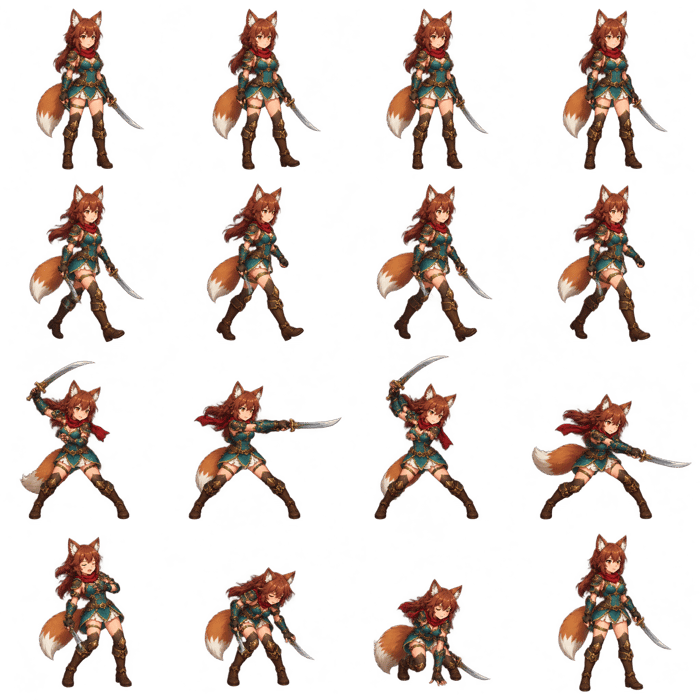
TL;DR: Creating a consistent game-character sprite sheet used to mean drawing or generating poses one by one, correcting identity drift, aligning every frame, and rebuilding the sheet manually. With GPT Image 2.5, the workflow can now start with only two inputs: one character reference and one structured prompt. From them, it can generate a complete, coordinated sprite sheet in a single pass.
I am building AI Image Editor, a browser-based workspace for image generation and editing that now includes GPT Image 2.5. Game-character frames are one of the clearest examples I have found of how quickly image workflows are changing.
A year ago, “use AI to make a walk cycle” sounded simple but usually turned into a production problem.
The first frame looked good. The second made the character taller. The third moved the sword to the other hand. The fourth changed the jacket, face, or color palette. Even after several acceptable poses were generated, someone still had to resize, align, clean, and assemble them.
The difficult part was never generating a character once.
It was generating the same character many times.
GPT Image 2.5 changes the first pass. Instead of treating every frame as a separate image request, one reference image can define the character and one prompt can define the entire asset sheet.
The Old Workflow Was a Chain of Fragile Steps
A small indie team creating one playable character might need to:
- draw or generate a neutral character concept;
- create a turnaround or model sheet;
- produce each idle pose separately;
- produce each walk-cycle pose separately;
- redraw clothing, hands, weapons, and faces that drifted;
- remove the background from every accepted frame;
- scale and align every character to the same baseline;
- assemble the final sprite sheet;
- import it into the engine and discover new timing problems.
AI helped with individual illustrations, but the workflow still behaved like a collection of unrelated images.
That is expensive for a tiny game project. It also slows down the stage when a developer only wants to answer a basic question: does this character direction work in motion?
What GPT Image 2.5 Changes
OpenAI describes GPT Image 2.5 Sunburst as its most capable model for image generation and precise editing. It accepts both text and image inputs. The official prompting guide also highlights improved subject preservation, reusable character references, transparent backgrounds, and sequence-based layouts such as comic panels.
Those capabilities combine naturally for sprite sheets.
The reference image answers:
What must the character look like?
The prompt answers:
Which frames should exist, how should they be arranged, and what must remain unchanged?
The result can be one complete image containing a coordinated set of character frames—not eight disconnected attempts that must be reconstructed later.
This does not mean every result is automatically ready for a game engine. It means the entire animation direction can appear in the first generation, where it can be judged as a system.
One Reference Image
The source should be a clean, full-body character image with a simple pose and no dramatic perspective.
It should clearly establish:
- body and head proportions;
- face and hairstyle;
- clothing construction and palette;
- shoes, gloves, armor, or accessories;
- weapon type, size, and carrying side;
- outline weight and shading style;
- viewing direction.
The source does not need to contain every animation pose. Its job is to make the character identity unambiguous.
This is a major simplification. A developer no longer needs to prepare several reference sheets before seeing whether the basic animation set is viable.
One Prompt for a Complete Frame Set
The prompt should describe the output as a production layout, not as a collection of attractive character illustrations.
Here is a practical starting point:
Use the uploaded character as the strict identity reference.

Create one complete 4x4 game-character sprite sheet containing exactly
16 equal-size frames on a transparent background.

Row 1: four-frame idle loop with subtle breathing and weight shift.
Rows 2 and 3: eight-frame seamless side-view walk cycle, ordered as
contact, down, passing, up, opposite contact, opposite down,
opposite passing, opposite up.
Row 4: four-frame light attack sequence: anticipation, swing,
impact, recovery.

Preserve the exact face, hairstyle, body proportions, clothing,
colors, outline weight, shading style, weapon design, and weapon hand
from the reference image in every frame.

Keep the camera angle, character scale, cell size, margins, pivot,
and foot baseline identical across the entire sheet. Center one full
character in each cell. Keep every body part and weapon inside its cell.

No text, labels, borders, extra characters, redesigned clothing,
missing limbs, duplicated limbs, mirrored equipment, perspective drift,
cropped body parts, shadows crossing cell boundaries, or watermarks.
That is still one prompt.
The difference is that it gives the model a complete specification:
- one identity source;
- sixteen frames;
- three animation states;
- an exact grid;
- an explicit frame order;
- fixed visual properties;
- clear exclusions.
Earlier tools often required the creator to enforce this structure manually across multiple generations. GPT Image 2.5 can reason about the reference and the complete layout together.
Why “Generate the Whole Sheet” Matters
Generating all frames together is not only faster. It gives the model shared context.
Every pose can see the same character, palette, scale, camera, and neighboring frames inside one composition. This makes it easier to ask for consistency than when each pose is created in isolation.
It also changes how the result is reviewed.
Instead of asking whether frame seven looks good by itself, the developer can ask:
- Does the idle loop feel like the same character as the walk cycle?
- Does the weapon stay on the correct side?
- Does the body remain the same height across the grid?
- Does the attack return cleanly to the neutral stance?
- Can each row be previewed as a readable loop?
The output is already organized around the questions that matter to animation.
From Multi-Day Asset Production to One Generation
The biggest change is not that AI removes every cleanup task.
The biggest change is that a complete draft can exist before the team commits several days to production.
One reference image and one prompt can now produce:
- a consistent character identity;
- an idle animation row;
- a complete walk cycle;
- a basic attack sequence;
- a shared grid, scale, and visual style;
- a transparent asset sheet ready for inspection and slicing.
That is enough to place the character in a prototype, test the direction, and decide whether the concept deserves further polish.
For an indie developer, getting to that decision quickly is often more valuable than generating one perfect promotional illustration.
The Last 10% Still Matters
A one-pass sheet should still be inspected before shipping.
Check the exact frame count, transparent alpha, cell boundaries, foot baseline, pivot position, limb continuity, equipment side, palette, and the transition from the last frame back to the first.
If one detail is wrong, do not rewrite the entire prompt immediately. The GPT Image 2.5 prompting guide recommends separating what should change from what must remain fixed and refining one thing at a time.
For example:
Change only the weapon hand in row 4 so it matches the reference. Preserve every other character detail, pose, cell, grid position, and transparent background exactly.
Pixel art may also need manual grid cleanup. Engine import still requires correct slicing, pivots, frame timing, naming, and playback testing.
The new workflow removes most of the work required to reach a complete first draft. It does not remove the responsibility to validate the final asset.
What This Means for AI Image Tools
This changes what I expect from an image-generation product.
The useful flow is no longer:
write a prompt -> generate one image -> start over
It becomes:
upload one reference -> describe the complete asset set
-> generate one coordinated sheet -> inspect -> export
AI Image Editor now supports GPT Image 2.5 alongside reference-based generation, image editing, transparent-background cleanup, resolution choices, and generation history. For this workflow, a developer can upload the finished character reference, paste one structured prompt, generate the complete sprite sheet, and continue refining the result in the same workspace.
The opportunity is clear: game developers should not need to understand a model catalog or construct sixteen separate jobs. They should be able to upload one character, describe the animation set, and receive one coherent sheet to review.
That used to be the hard part. It is quickly becoming the starting point.
If you build games or game-art tools, try the one-reference, one-prompt workflow in AI Image Editor and tell me what you would generate first—idle, walk, attack, or all three together?
