GSL Runtime Milestone: From Benchmark Input to Operational Output
It has been about a month since my last GSL Engine update.
At that point, the main focus was moving GSL beyond research-oriented input formats.
The runtime had been extended to work with CSV, XLSX, and ZIP-based inputs, while keeping the existing optimization engines unchanged.
Over the past month, I continued working on the next part of the system:
What happens after GSL finishes the optimization?
A routing solver can produce a technically valid .sol file, but that is not necessarily the most useful format for an operational user.
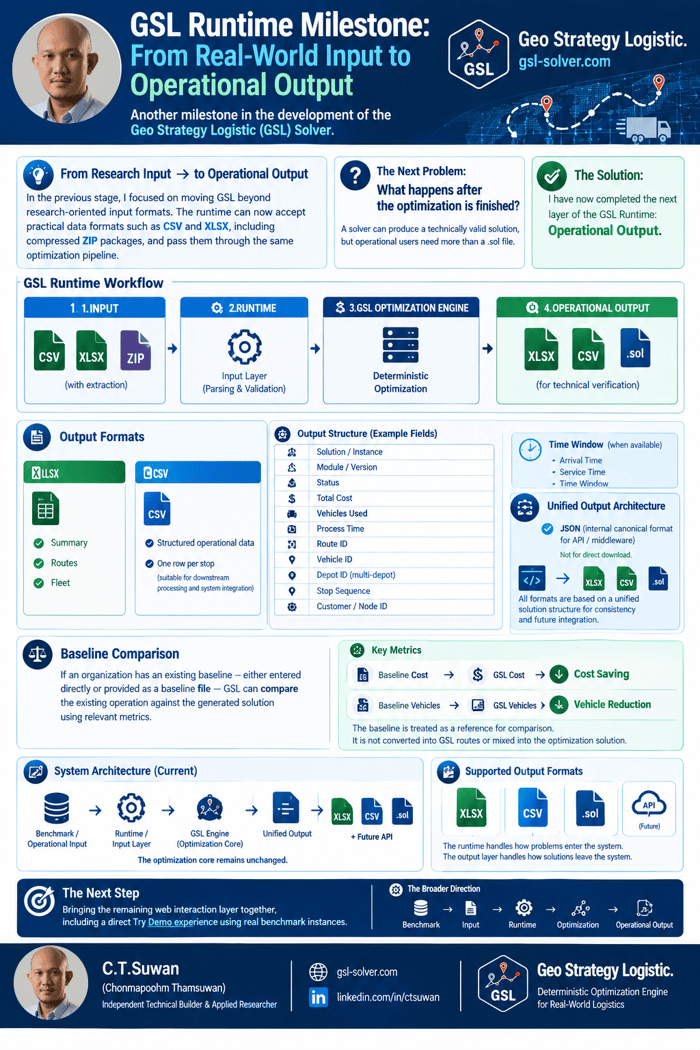
So I built an additional Operational Output Layer around the existing GSL engines.
The current architecture is now closer to:
Input → Runtime → Optimization → Unified Output → Operational Formats
-
The original .sol output remains
I did not replace the existing technical solution output.
The .sol output is still preserved for technical verification and benchmark checking.
This is important because the operational output layer should not change the underlying solver result.
It is an additional representation of the same solution. -
XLSX operational output
GSL can now transform the solver result into an Excel workbook designed to be easier to inspect and use operationally.
The workbook is organized into areas such as:
- Summary: Instance, Module, Status, Total Cost, Vehicles Used, Process Time
- Routes: Route ID, Vehicle ID, Depot ID where applicable, Stop Sequence, Customer / Node ID, Route-level information
- Fleet: Vehicle-related information, Route assignment, Operational summary
For VRPTW and MDVRPTW, time-related fields can also be retained when they are available from the solution.
-
Structured CSV output
I also added a structured CSV representation.
Instead of putting an entire route into a single text field, the output uses one row per stop.
This makes the result easier to process downstream and potentially integrate with other systems.
For example, the structure can represent:
Route → Vehicle → Stop Sequence → Customer / Node
along with the relevant solution information. -
Unified internal output
Underneath these different formats, I introduced a unified solution structure.
The purpose is to give GSL one canonical representation of a solved instance before it is converted into .xlsx or .csv.
The structure contains common information such as:
- Solution / Instance
- Module / Version
- Status
- Total Cost
- Vehicles Used
- Process Time
- Route ID
- Vehicle ID
- Depot ID
- Stop Sequence
- Customer / Node ID
Module-specific fields can be included where applicable.
The JSON representation is currently intended as an internal canonical structure, rather than another file that users download.
This is also intended to provide a foundation for future API and middleware integration.
- Baseline comparison
Another part of the output layer is baseline comparison.
An organization may already have an existing operating baseline.
Instead of treating that baseline as another routing solution, GSL uses it as a reference point.
For example:
Baseline Cost → GSL Cost → Cost Saving
and where the information is available:
Baseline Vehicles → GSL Vehicles → Vehicle Reduction
Distance and time can also be compared when the metrics are comparable.
The baseline remains separate from the generated GSL routes.
This distinction matters because the baseline is a reference for measuring improvement, not an input that should be mixed into the new route solution.
- Web Portal
These capabilities are now being brought together in the GSL Web Portal at gsl-solver.com
The intended workflow is becoming:
Upload Input → GSL Runtime → Select / Execute Optimization Module → GSL Solver → Operational Output → .sol / .xlsx / .csv
The core optimization engines remain separate from this layer.
The runtime is responsible for input handling.
The output layer is responsible for turning the resulting solution into formats that are easier to inspect, operate on, and eventually integrate.
What changed over the last month?
The main change is not a new optimization algorithm.
It is the transition from a system that primarily demonstrated:
“GSL can solve routing benchmark instances.”
toward a system that is trying to demonstrate:
“GSL can take a problem through an operational input-to-output workflow.”
That distinction is important to me.
Research benchmarks are still essential for validation.
But if the longer-term goal is to make GSL useful outside benchmark environments, the system also needs practical input and output layers around the optimization core.
So the architecture is gradually becoming:
Benchmark / Operational Data → Data Conversion / Input → GSL Runtime → Optimization Engine → Unified Solution → Operational Output → Future API / Integration
The optimization core remains the same.
What is evolving around it is everything needed to move the optimization result into a more practical workflow.
Current status
- CVRP — operational runtime + output validated
- VRPTW — operational runtime + output validated
- MDVRP — runtime available; further validation continues
- MDVRPTW — operational runtime + output validated
- CSV — supported
- XLSX — supported
- ZIP Runtime — supported
- Operational XLSX / CSV Output — completed
- Web Portal — operational workflow in progress at gsl-solver.com
- Try Demo — final web interaction layer being completed
This has been a fairly different phase of the project compared with the earlier benchmark work.
The interesting part now is less about adding another algorithm and more about seeing whether the solver can become a usable system around the algorithms that already exist.
Benchmark → Input → Runtime → Optimization → Output
That is the direction GSL is moving toward.
Try the solver interface & runtime demo at: gsl-solver.com
