I built a fully local, 20-millisecond pop up note taking app because I kept losing ideas. Here's why I launched it on Microsoft Store
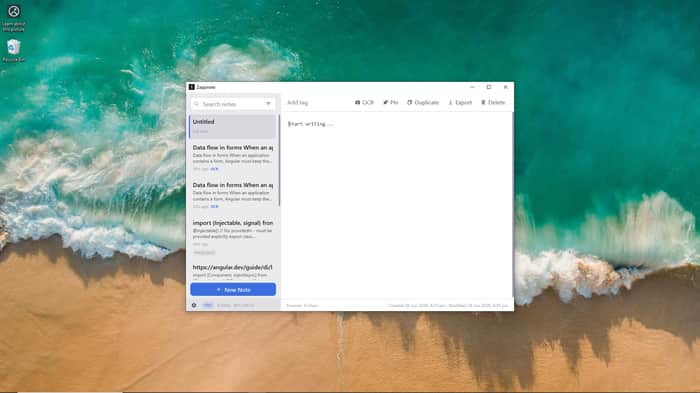
Backstory: Every time I had a quick idea while coding, in a meeting, or while reading something, the friction of opening something made me hesitate. Notepad requires too many clicks, sticky notes are not sticky at all, they hide behind other apps. Notion takes some time to load.
So, I built Zapp Note, a pop-up note taking app. You can press a hotkey, and a pop-up will appear in under 20 milliseconds, storing everything locally. No account, no sync, nothing.
I found it very useful to note down ideas, to write down a number during a phone call or make important notes during a meeting.
I built it this way because I didn't want to compete with Notion or Obsidian. Instead, Zapp Note will act as a second brain where I can unload thoughts from my brain and then, when I am free, I can move it to notion or work on the idea. Because of this, I built it with very little features, and the build was under 5 MB initially. Microsoft store integration added almost 13 MB to it.
But the extra 13MB was worth it because, when I distributed it via my website, First Chrome started showing warning, saying this app wasn't downloaded much. I learned that if an exe is downloaded less than 500 times, they will show this warning. To overcome this, I added a line at the end of the build script that will compress the generated exe to a zip file.
Then came next issue. Windows warning. Since the code isn't certified, Windows started showing warnings. I ignored it as well, thinking I'll purchase code certification later and shared the product with some friends. They told me about these warnings and asked me if I can deploy it on Windows store. That's when I thought of it.
I checked distributing via Microsoft Store. It was free. I have a pvt ltd company, so I registered as a business user, and provided my details. It took 3 business days for them to verify my account (for comparison, my lemon squeezy account is still pending verification, after 2 weeks). Once verified, I started porting the code for Microsoft store, created an app, reserved name and finally submitted it. It took one day to get it approved. After that, updates are usually going live in under 1 hour.
If you're building a windows app, I highly recommend distributing it via Microsoft Store. Here's why.
- Trust. People trust installing apps from Microsoft Store.
- Zero cost. You don't have to do code signing. Microsoft will handle it on your behalf.
- No warnings. When users install an unsigned exe file, they will get warning from both browser and windows as well. Distributing via store will eliminate all of them.
- Updates. Microsoft will handle updates. You don't have to deal with it.
- Licensing. You can either offer your own licensing, or you can use Microsoft licensing options.
The only drawback is, if you use Microsoft licensing, users can use this app on up to 10 devices with a single purchase.
I also added some Pro features to it, which can be unlocked with a one-time purchase of $29. When distributed via my own website, I sold licenses via Gumroad and limited the use to 2 machines. But after switching to Microsoft store, the limit is now 10 devices due to their policy.
With the free version, users will get the following features.
- Unlimited notes
- Basic search
- Customizable hotkey
4.Popup opens in under 20ms - Pin/ Unpin notes
- Dock popup, set visibility (transparent/ opaque)
- Export notes
And the Pro version will unlock the following features
- OCR texts to existing notes.
- Create new notes via OCR using a hotkey.
- Advanced search and filter.
- Tags.
- Customize note store location. You can add it inside Google Drive or One Drive if you want to sync your notes in your own cloud space.
- Multiple popup notes in parallel. You can open any number of popups, lock it to keep track of things.
Metrics: So far, got 5 users in 5 days.
If you're interested to check it, here is the store link https://apps.microsoft.com/detail/9NPJ6VH18JKW

What I found interesting here is that distribution constraints ended up shaping the product almost as much as user needs did. The shift from “fast local note capture” to “store policy, signing, and trust pipeline decisions” is something most indie devs only discover after launch. Microsoft Store didn’t just become a channel—it effectively became part of the product architecture.