Ship Fast, Ship Safe: The AI-Generated Code Security Checklist
Ten years ago, building an app meant hiring a development team. Today it can mean opening Lovable, Replit, or Cursor and describing what you want. AI coding assistants now generate code that is fast, functional, and cheap, and entire products launch on top of it.
That speed is a real competitive advantage for teams racing to an MVP. It also raises questions every founder should answer before customers ever touch the product: Is this code actually secure? Can users trust it with their data?
To be clear, human-written code has security problems too. The difference is process. Human code usually passes through peer review, often with a senior engineer who has seen a few security incidents. AI-generated code frequently ships straight from prompt to production. It looks like a senior engineer wrote it, without a senior engineer ever reviewing it.
So how do you check whether your AI-built app is secure? Below is a practical checklist you can run before launch. It covers the same areas we examine when auditing AI-assisted builds.
Why AI-Generated Code Needs Extra Scrutiny
We use AI coding tools daily, and we think you should too. Treat their output with the same caution you would apply to any unreviewed code. Here is why that caution is warranted.
-
It learned from public code, including the insecure parts. Models learn from massive scrapes of GitHub, Stack Overflow, tutorials, and documentation. Nobody vetted that corpus for security. It is full of outdated patterns, copy-pasted vulnerabilities, and plain bad practice, and the model learns those alongside the good ones. Ask for a “quick login form” and you may get one built on SQL string concatenation, because millions of tutorials do it that way.
-
Its knowledge has an expiration date. Every model is trained on data up to a snapshot in time, its knowledge cutoff. Everything after that is invisible to it: new framework versions, deprecated APIs, and, critically, newly discovered vulnerabilities. Ask a model whose cutoff predates a major library vulnerability, and it will confidently recommend the vulnerable version. As far as it knows, that version is fine.
-
It invents packages that do not exist. LLMs sometimes hallucinate package names, functions, and APIs. A 2025 study of code-generation tools found that roughly one in five package references they suggested was made up. Attackers noticed the same pattern and now register malware under commonly hallucinated names, a practice researchers call slopsquatting. One careless npm install of an AI-suggested package can pull malware directly into your project.
-
It optimizes for working demos. Ask an AI for a quick integration and you will often get permissive CORS, disabled certificate checks, and missing input validation. That is fine for a demo. In production, those choices are real vulnerabilities.
-
It gets reviewed less than human code. This one is the quiet killer. Teams treat AI output as finished work. Code that would get picked apart in a junior developer’s pull request ships as-is, and because AI generates code so fast, even careful reviewers drown in the volume.
These five tendencies are exactly what the checklist below targets.
The Checklist
Work through this before launch, and again before every major release. Treat it as your release checklist. Fix every unchecked box, or accept it consciously as a known risk.
A. Secrets and Credentials
Scan for hardcoded API keys, tokens, and passwords.
Confirm secrets live in a vault or environment manager, outside the repository.
Check that .env files are not committed and that .gitignore covers them.
Keep API keys, tokens, and encryption keys on the backend, never in frontend code.
B. Dependencies and Supply Chain
Verify that every AI-suggested package actually exists in the official registry.
Pin versions, and avoid blind npm install of anything unfamiliar.
Run software composition analysis (SCA) scans: Snyk, Dependabot, OWASP Dependency-Check.
Generate a software bill of materials (SBOM).
C. Input Validation and Injection
Use parameterized queries everywhere to prevent SQL injection.
Sanitize and escape output to prevent cross-site scripting (XSS).
Never pass raw user input to shell commands or eval.
D. Authentication and Access Control
Use established libraries for authentication and cryptography. Never roll your own.
Verify that every endpoint checks authorization as well as authentication.
Review session handling, token expiry, and password storage (bcrypt or argon2).
E. Data Protection
Encrypt personally identifiable information (PII) at rest and in transit.
Keep sensitive data out of logs and error messages.
Review LLM features for prompt injection and data exfiltration.
F. Process and Review
Treat AI code like junior-developer code: require human review.
Run static application security testing (SAST) in CI as a merge gate: Semgrep, SonarQube.
Audit AI-written tests. Do they test security behavior, or only confirm that the code runs?
G. Licensing and Compliance
Run a license scan on dependencies.
Check for suspiciously copied code blocks.
Map dependencies against your compliance needs: SOC 2, GDPR, HIPAA where relevant.
For a broader reference beyond this checklist, work through the OWASP Top 10, the industry’s consensus list of the most critical web application security risks.
Tools That Automate This Checklist
The checklist looks long, but you do not have to run it by hand. Different tools catch different classes of problems, and no single scanner does it all:
SAST reads your source code and flags dangerous patterns: injection, weak cryptography, hardcoded secrets.
SCA checks your dependencies against databases of known vulnerabilities.
DAST (dynamic application security testing) attacks your running application from the outside, like a friendly hacker, catching issues static analysis cannot see.
Secret and container scanners round out coverage for leaked credentials and infrastructure misconfigurations.
Here is how those tool families map back to the checklist:
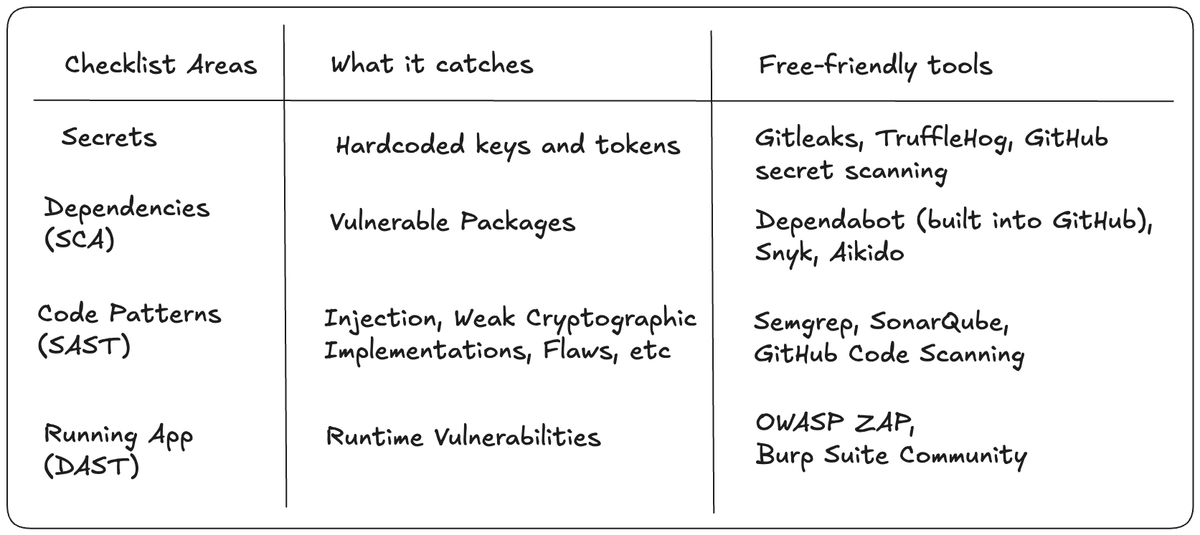
Most of these tools have usable free tiers, enough to cover a pre-launch MVP. Wire them into CI so they run automatically on every pull request instead of only when someone remembers.
What automation cannot catch: broken access-control logic, business-logic flaws, and prompt injection in LLM features. Scanners cannot reason about whether user A should be allowed to see user B’s orders. Those flaws need a human who knows what to look for.
OWASP also maintains community lists of source code analysis tools and vulnerability scanning tools.
When to Bring in Experts
That checklist was long, deliberately. When customer data is on the line, none of it is optional. You can handle most of it yourself with the tools above.
Here is the honest limit: checklists catch patterns; experienced eyes catch logic. A scanner will tell you a query is injectable. It will not tell you that user A can read user B’s data, that your refund flow can be gamed, or that your LLM agent will happily email the customer database to anyone who asks nicely. Those are the bugs no rule exists for yet.
You do not need an expert for every line of code. You need one at the moments that matter: before launch, before payments or PII at scale, and before your first enterprise security questionnaire lands in your inbox.
That is exactly what we do. We build with AI, fast like everyone else, but with security review baked into every stage instead of bolted on at the end.
Frequently Asked Questions
Is AI-generated code less secure than human code?
Not inherently. Security depends less on who wrote the code than on how it is reviewed. AI-generated code does tend to carry more insecure patterns: hardcoded secrets, missing validation, outdated APIs. The bigger problem is that teams review it less carefully. Review discipline is what decides the outcome.
Can I use Copilot code in production?
Yes, thousands of teams do, and you own the result. GitHub’s own guidance says you are responsible for reviewing every AI suggestion before shipping it. Treat Copilot output like any unreviewed code: scan it, test it, and run it through the checklist above. If you are on Copilot for Business, check your plan’s IP indemnification terms. The free tier offers none.
What is the biggest risk of AI-generated code?
False confidence. AI lets small teams ship faster than they can review, so code that would never survive a pull request goes straight to production. The failures that follow are predictable: exposed API keys, missing access controls on endpoints, and hallucinated dependencies installed via slop squatting.
Do I need a security audit for my MVP?
A full formal audit? Probably not yet. A security review? Yes, if your app touches passwords, payments, or personal data, and nearly every app does. At minimum, run the checklist above plus the automated scanners. If you are selling to businesses, expect security questionnaires early. Being ready before your first enterprise deal is far cheaper than scrambling during it.
Before You Ship
Review and go through each of the checklist.
Or let us run it for you. If your app is close to launch and you would rather have experienced eyes on it, we offer a free AI codebase security review. We scan your repo, flag the highest-risk issues, and walk you through fixing them. No obligation, no jargon. Book your free review →
And if you are starting from zero, that is our day job. We build MVPs with AI speed and with security in from day one. See how we work →
