Stop checking websites manually: How I built an intelligent monitor to fight "web noise
Hi Indie Hackers,
I’m a developer and, like many of you, I’m obsessed with efficiency. A few months ago, I realized I was spending way too much time manually checking competitor prices and waiting for stock alerts that usually arrived too late in my inbox.
I tried existing tools, but I hit two walls:
- The "Noise": Getting alerted for every tiny CSS change or footer update is exhausting.
- The Complexity: I didn't want to spend time writing CSS selectors for every single page.
So, I built OmniWatchGuard — a side project that turned into a full-blown "practice area" for me.
The Tech behind it:
Instead of just comparing raw HTML (which is noisy), I built an engine that analyzes the DOM structure. It renders JavaScript (essential for modern React/Vue sites) and uses pattern recognition to identify what actually matters: prices, stock levels, and core content.
Current Stack:
- Infrastructure: Cloudflare Workers (distributed globally).
- Rendering: Headless browsers (Puppeteer/Playwright).
- Stealth: Integrated IP rotation and human-like "jitter".
Where I am now:
I’ve just launched the MVP at omniwatchguard.com. I’m looking for brutally honest feedback:
- Is the "no-code" setup intuitive enough?
- What notification channels do you use? (Currently: Email, Slack, Discord, Telegram).
- Is 5-minute monitoring fast enough for you?
I’m not looking for sales, just looking to talk to people who felt the pain of manual monitoring. Test it out (there’s a 24h free trial, no card needed) and let me know!
Looking forward to hearing your thoughts and "hidden reps" stories!

built a price-drop watcher once and the dom-delta approach is way harder than it looks the second sites start lazy-loading and a/b testing their own layouts. half my 'changes' were just divs getting shuffled around. if you've cracked telling a real content change from a cosmetic reshuffle, that's the whole moat. that's exactly where mine fell apart tbh
Sorry for the late reply. Economic conditions have made me...! But :
You nailed it — separating semantic content drift from visual/cosmetic noise IS the whole moat.
How we tackled this with OmniWatchGuard:
DOM Tree Normalization: Before running any diff, we strip out structural/cosmetic noise (dynamic class names, randomized layout wrappers, and lazy-loaded placeholders) to get a clean, normalized semantic tree.
AI Noise Filter: We don't just rely on strict string or DOM comparison. We pass the delta through a lightweight AI classifier that evaluates intent: "Did the actual core content/price change, or did the layout just shift?"
Headless Retry: For heavy lazy-loading, if a standard fetch gets blocked or returns incomplete DOMs, we automatically render via a real headless browser (we actually just integrated Cloudflare Browser Rendering for this) to let scripts settle before capturing the state.
Coming from 30 years in IT/Logistics, 'false alarms' were the dealbreaker for me. If a system cries wolf 10 times, you ignore it on the 11th time when it actually matters.
Really appreciate you sharing your experience — it’s validating to know others have suffered through the exact same layout-shuffle pain! Feel free to give OmniWatchGuard a spin if you ever want to see how the filter holds up on those tricky sites.
the 'something changed, you go figure out what' problem is real, most monitors dump a raw diff and bail. the delta instinct is the right one. the thing i'd sweat at week 1 is whether people trust an automated 'this matters' enough to stop checking manually, that trust takes a while. one wrong urgent ping and they quietly go back to doing it by hand, so the noise filtering kinda is the product
Update #1 — What I shipped in the first week after launch.
Hey IH community!
Quick update on OmniWatchGuard — it's been one week since I launched here and on Product Hunt.
What I built in the first 7 days:
🔑 API Key Management
Users can now generate API keys from the dashboard and use them to integrate OmniWatchGuard with Zapier, n8n, or their own apps. Max 5 keys per account, instant revocation.
🤖 Cloudflare Browser Rendering fallback
When sites block our crawler (403 errors), the system now automatically retries with a real headless Chromium browser. Built on Cloudflare's Browser Rendering API — no separate VPS needed, runs at the edge.
📊 Better text diff display
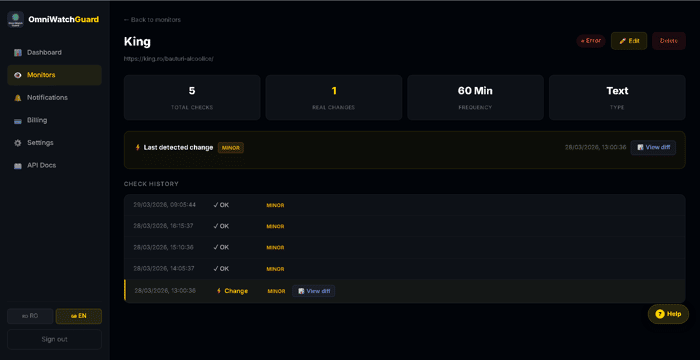
The visual diff now shows changes line by line instead of one big green block. Much more readable.
What I learned in week 1:
The hardest part isn't the code — it's staying consistent with communication. Posting this update feels uncomfortable (what if nobody cares?) but I know it matters for building in public.
Honest metrics:
Signups: [X]
Paying users: [X]
MRR: €[X]
Biggest source of traffic: [PH / IH / direct]
Next up:
Weekly automated email reports — every Monday, users get a digest of all changes detected the previous week. Should improve retention significantly.
What's your experience with weekly digests? Do users actually open them?
Spot on, lakshmi! You hit the nail on the head.
Most tools just shout 'something changed!', leaving the user to do the heavy lifting. My goal with the DOM-level approach was to create a clean 'delta' so the AI can actually understand the context.
You’re absolutely right about the 'action' part. Right now, we're focused on high-signal alerts via Webhooks, Slack, and Telegram, but the next step is definitely integration. I’m looking into Zapier/Make connectors so a price drop or a stock change can trigger an automated purchase or a CRM update instantly.
Coming from 30 years in IT and Logistics, I've seen how 'information' is useless without 'execution'.
Curious — what kind of 'action' would be a game-changer for you? Automatic data export to a Sheet, or something more complex like triggering a browser script?
Really like the focus on signal over noise, that’s where most tools fail. The DOM-level approach makes sense, but the real unlock could be what users do with that signal. If you can tie alerts to clear actions, this becomes way more than a monitoring tool.
I've been thinking about the 'Noise' problem more deeply. Most monitors fail because they don't understand that a website is a living organism. My approach with OmniWatchGuard is to treat the DOM like a logistics supply chain—if a node is missing, it's not always an error; sometimes it's just a delay. How are you guys handling site changes that aren't actually 'updates'?
Thanks for checking this out! I'm the solo founder and I'm here to answer any technical questions about the DOM-parsing engine or the Cloudflare setup.