Tired of manually fixing messy CRM data? Built an AI to do it for you
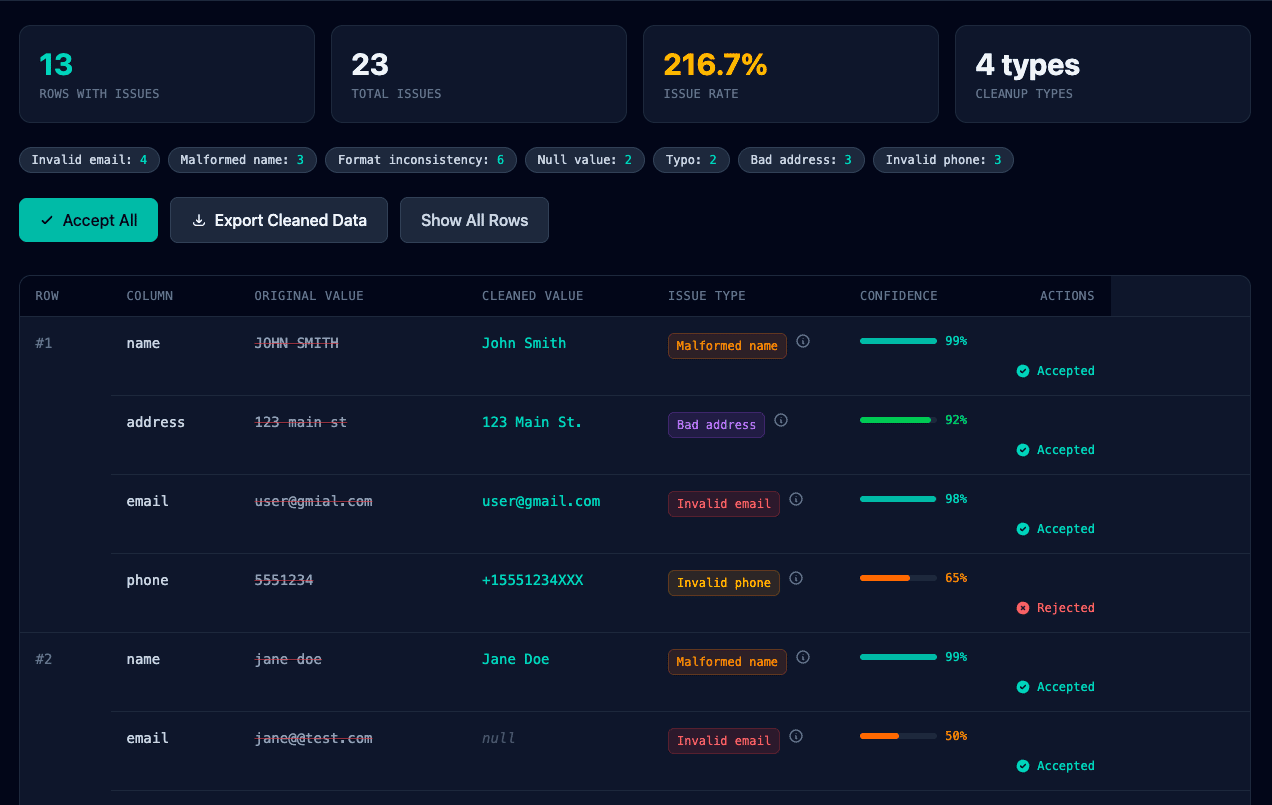
Every team I've worked with has this workflow:
1. Export data from scraper/event/form
2. Try to import to HubSpot/Salesforce
3. Half the rows fail (email typos, formatting issues, duplicates)
4. Spend hours manually fixing in Excel
5. Re-import and pray
What It Does
Upload your messy CSV → AI scans every row → Shows you specific issues with suggested fixes → You approve/reject → Export clean file
Example issues it catches:
- Email typos: user@gmial.com → user@gmail.com
- Phone formatting: 555-ABCD → flagged (letters in number)
- Name caps: JOHN SMITH → John Smith
- Duplicates: Near-matches with fuzzy logic
- Invalid emails: jane@@test.com (double @)
- And 20+ other patterns
The key difference vs. other tools: AI auto-detects issues instead of making you build rules.
Tech Stack:
- Rails 8 (Turbo, Solid Queue)
- OpenAI GPT-4o-mini for detection
- Stripe for payments
- PostgreSQL
Status:
- Soft launching this week
- Free tier: 50 rows, no signup
- Looking for early beta users to stress test
What's Next
1. HubSpot marketplace integration (auto-scan before import)
2. Salesforce connector
3. API for programmatic access
4. Scheduled scans (recurring cleanup jobs)
Try It
Free tier: 50 rows, no signup required
Would love feedback from other founders dealing with dirty data. What am I missing?
Questions for the community:
- Does the pricing make sense for the value?
- What other data issues should I detect?
- Anyone tried the HubSpot marketplace? Tips?


Clear pain point. Dirty CSV imports waste real time.
A few security and data handling questions I’d want answered before uploading real lead lists:
• Are uploaded CSV files stored after processing, or deleted immediately?
• If you use GPT-4o-mini for detection, are rows sent to OpenAI, and if so, are they retained or used for training?
• With “no signup” free tier, how are you rate limiting to prevent abuse or someone uploading scraped datasets at scale?
Since this handles PII like emails and phone numbers, clear retention policies and strict tenant isolation will matter a lot.
Concept is strong. If you position it as “safe to upload real CRM data,” with transparent privacy guarantees, that will remove a big adoption barrier.
Thank you for your review! I agree with your points of concern too. I come from a background working with HIPAA data and these are all things we consider in that realm too. I'll break it down:
Data retention:
- CSV files are deleted immediately after processing (not stored, was considering hooking into client S3 buckets?)
- Processed results (the issues found) are stored only in your account session
- When you export the cleaned file, we don't retain a copy (should I add a retention period?)
- Plan to add a "delete all data" button for extra peace of mind
OpenAI & training:
- Yes, rows are sent to OpenAI API for analysis
- Using their enterprise tier which has zero data retention (OpenAI's API terms explicitly prohibit using customer data for model training)
- I can add an opt-in "use local rules instead of AI" mode for highly sensitive data (it honestly may be a performance boost in some cases)
Rate limiting (no-signup tier):
- Currently: IP-based rate limiting (5 files per hour per IP)
- File size capped at 1MB for free tier (10K rows max, honestly just trying to get more "real" data processed to catch bugs and find better enhancement test cases)
- Should I consider switching to CAPTCHA for free tier to prevent automated abuse?
- Paid tiers have higher limits + account-level tracking
Privacy improvements I need to add (thank you for validating my concerns):
1. Explicit "your data is never stored" banner on upload page
2. Privacy policy section specifically for data handling
3. Option to process locally (no OpenAI) for sensitive datasets
4. SOC 2 compliance roadmap (targeting Q2 2026)
You're absolutely right that "safe to upload real data" needs to be crystal clear. Should I add a dedicated "/security" page explaining all this in detail?
Curious - would a self-hosted option (Docker container that runs on your infrastructure) solve the trust issue? Or is cloud + strong privacy guarantees enough?
I am greatful, this is exactly the feedback I need!
Clear problem. Dirty imports cost time and money.
If this handles emails and phone numbers, you are handling PII. Retention policy, tenant isolation, and deletion guarantees must be explicit.
One practical step: add a visible badge on the homepage stating you use AI but do not train LLMs on customer data. Make the policy simple and link to a short security page. Clear messaging reduces friction.
You can see this approach on Nautillo Pro. As a security team, we highlight that we use AI, but customer data is not used for model training. We make our boundaries visible, not hidden in legal text.
We also offer a free version.
If you want to evaluate how your own web app handles sensitive data from an external attacker perspective, Nautillo Pro is available to test.
You're absolutely right. Security was my main concern while starting to develop this. Just didn't want to get too far ahead with my concerns before having validation from the community.
Implementing today:
1. Homepage badge: "Files deleted after processing • Zero retention • Not used for training"
2. Upload page banner with explicit guarantees
3. /security page with full retention/deletion/isolation policies
4. Simple language, no legalese Current policy (now documented): - CSV files deleted immediately post-processing - OpenAI zero-retention API (enterprise tier, no training) - Processing results stored in user session only - Tenant isolation at database level - User-triggered deletion anytime
Roadmap:
- Local processing option (no OpenAI) for sensitive data
- SOC 2 Type I (Q2 2026)
- Self-hosted Docker option (Q2 2026)
Should the badge be even more prominent? (Thinking above-the-fold on homepage + sticky on upload page.)
Also considering: "Export & Delete All Data" button in dashboard. Worth adding immediately vs. waiting for first complaint?
Thanks for the clear feedback — this is exactly what I needed to hear. I love indiehackers. This is such an amazing group