UltraHumanizer.ai Review: More Than Just a Free AI Humanizer
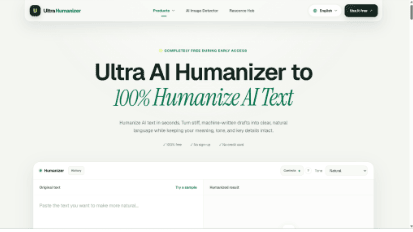
Most AI writing tools focus on generation.
UltraHumanizer.ai takes a different approach.
Instead of helping users create more AI content from scratch, the platform focuses on what happens after that content has already been created.
Its main AI Humanizer is designed to refine AI-assisted drafts into clearer, more natural writing. More recently, UltraHumanizer.ai has also expanded into visual content analysis with its AI Image Detector, which estimates the likelihood that an image may have been generated or substantially edited using AI.
That combination makes UltraHumanizer.ai more interesting than a basic rewriting tool.
It is increasingly becoming a lightweight toolkit for people who regularly work with AI-generated content.
In this UltraHumanizer.ai review, we’ll look at its main features, how the AI Humanizer works, what the AI Image Detector does, where the platform performs well, and where it still has limitations.
What Is UltraHumanizer.ai?
UltraHumanizer is an online AI content utility platform.
Its two most notable tools are:
AI Humanizer — rewrites AI-assisted text into clearer, smoother, and more natural language
AI Image Detector — analyzes uploaded images and provides an AI likelihood assessment
The AI Humanizer is currently positioned as a completely free writing tool during early access.
Users can paste text directly into the editor or upload supported document formats, then customize how the text should be rewritten.
The AI Image Detector takes a different approach.
Instead of rewriting content, it analyzes visual characteristics in an uploaded image and estimates how strongly those characteristics align with patterns commonly associated with AI-generated or substantially AI-edited imagery.
Together, these tools give UltraHumanizer.ai a broader role in modern AI content workflows.
UltraHumanizer.ai Review: Quick Verdict
Overall Rating: 4.8/5
UltraHumanizer.ai is one of the more useful free AI content tools available if you regularly work with AI-generated text.
The Humanizer is still the strongest feature.
Its combination of long-form support, tone controls, rewrite customization, document uploads, keyword preservation, and editable output makes it practical for actual work rather than just short experiments.
The addition of the free AI Image Detector is also useful because it expands UltraHumanizer beyond text.
Instead of pretending that image detection is perfectly accurate, the tool presents its result as an AI likelihood assessment, which is a much more realistic way to approach the problem.
The biggest advantage remains pricing.
UltraHumanizer.ai currently provides its core tools without requiring users to immediately subscribe to another AI service.
The UltraHumanizer AI Humanizer
The Humanizer is the core of the platform.
You provide a draft, choose how you want it rewritten, and UltraHumanizer produces a revised version that aims to preserve the original meaning while improving the way the text reads.
This is useful because AI writing often has a recognizable style.
Common problems include:
Long, overly structured sentences
Generic introductions
Repetitive transitions
Excessive formal language
Predictable paragraph structures
Unnecessary filler
Similar sentence lengths
None of these automatically make a piece of writing bad.
But when they appear repeatedly, the result can feel mechanical.
UltraHumanizer attempts to reduce these patterns without completely rewriting the substance of the content.
Up to 12,000 Words Per Request
One feature that makes UltraHumanizer more practical than many lightweight writing tools is its long-form support.
The current editor supports up to 12,000 words.
That is enough for:
Long blog posts
Reports
Guides
Whitepapers
Website content
Marketing documents
Business communication
This matters because shorter limits can make AI humanization frustrating.
A 500-word limit is manageable for an email.
It is much less useful when you are editing a 4,000-word article.
UltraHumanizer’s larger limit makes it easier to use as part of a regular content workflow.
Three Writing Tones
UltraHumanizer currently offers three main tone options.
Natural
Natural is the most balanced setting.
It works well for general-purpose articles, website copy, and content where you want smoother writing without dramatically changing the level of formality.
Conversational
Conversational is more relaxed.
It is useful for:
Blogs
Social media
Newsletters
Marketing copy
Brand content
This mode is particularly helpful when an AI-generated draft sounds unnecessarily corporate.
Professional
Professional is designed for business-focused writing.
Potential uses include:
Reports
Proposals
Emails
Project updates
Internal documents
Client communication
Professional writing does not need to sound complicated.
A good business rewrite often means making something shorter and clearer while maintaining credibility.
Advanced Rewrite Controls
UltraHumanizer goes beyond a simple tone selector.
The platform also provides more detailed controls over how the rewrite should behave.
Rewrite Strength
Some drafts only need small changes.
Others require substantial restructuring.
Rewrite strength lets users influence how far UltraHumanizer moves away from the source text.
This is useful when you already like most of the draft and only want light polishing.
Reading Level
Reading-level controls can help adapt the same content for different audiences.
A technical document may require more specialized language, while a landing page may benefit from shorter sentences and simpler wording.
Giving users control over readability makes the tool more flexible.
Target Length
AI-generated writing is often longer than necessary.
Target-length controls can help when you want to reduce or maintain the size of the rewritten version.
This is particularly useful for:
Landing pages
Product descriptions
Email copy
Short reports
Social posts
Keep Exact Terms
One of UltraHumanizer’s most useful controls is the ability to preserve exact terms.
You may want certain phrases to remain unchanged, such as:
Brand names
Product names
Technical terms
Feature names
SEO keywords
Industry terminology
This feature is especially relevant for marketers and SEO teams.
A rewriting tool should not automatically replace every important keyword just for the sake of making the text look different.
Document Upload Support
UltraHumanizer also supports document uploads.
Supported formats include common document and text types such as:
DOCX
PDF
PPTX
ODT
RTF
TXT
Markdown
LaTeX
This makes the platform useful beyond copied paragraphs.
A business user could upload a report.
A marketer could work with a presentation draft.
A writer could upload an article stored in Word.
The ability to work directly with existing documents makes UltraHumanizer easier to incorporate into everyday workflows.
Editable Output
One of the better design decisions is that the rewritten result remains editable.
The first AI-generated rewrite should not automatically be treated as final.
You may want to:
Restore a particular phrase
Shorten a sentence
Correct a detail
Change a product name
Add brand-specific wording
Adjust the tone slightly
UltraHumanizer lets you continue modifying the result after the initial humanization.
That supports a much more realistic workflow:
First draft → Humanize → Review → Edit → Final version
UltraHumanizer.ai AI Image Detector
The AI Image Detector is one of the more interesting additions to UltraHumanizer.ai.
The tool allows users to upload an image and receive an estimate of how likely it is that generative AI may have been involved in creating or substantially editing the image.
Rather than simply labeling an image “AI” or “real,” the detector provides an AI likelihood score.
That is a better approach because AI image detection is not an exact science.
There are many situations where an image may be difficult to classify.
For example:
A real photograph may contain generative fill
An AI-generated image may have been heavily edited manually
A screenshot may lose useful image information
Compression may change visual artifacts
CGI can sometimes resemble AI imagery
New AI models may generate images differently from older systems
A probability-based result better reflects those limitations.
How the AI Image Detector Works
The workflow is simple.
Upload an image, run the analysis, and review the result.
The detector currently supports:
JPG
PNG
WebP
Images can be up to 10 MB.
The result includes a likelihood score and supporting context designed to help users interpret the analysis.
UltraHumanizer groups results into broad ranges.
AI Likelihood
Meaning
0–44%
Low AI likelihood
45–79%
Mixed or uncertain signals
80–100%
High AI likelihood
These ranges are useful for quickly understanding how strongly the detector views the available evidence.
But they should not be treated as proof.
Why AI Image Detection Is Useful
AI-generated images are becoming increasingly difficult to distinguish visually.
This creates challenges for:
Content teams
Publishers
Marketing teams
Social media managers
Businesses reviewing third-party assets
People evaluating online images
An AI Image Detector can provide an additional signal when the original source of an image is unclear.
For example, a content editor may receive an unfamiliar image and want another data point before deciding whether to use it.
The detector can help inform that decision.
However, the right interpretation is:
“This image shows signals consistent with AI generation.”
Not:
“This tool has proven exactly how this image was created.”
That distinction is important.
AI Image Detector Limitations
UltraHumanizer’s AI Image Detector should not replace provenance information.
Results may be influenced by:
Heavy compression
Screenshots
Image resizing
Filters
Retouching
Partial AI editing
CGI
Illustrations
New generative models
For the best analysis, users should upload the original image whenever possible.
A screenshot downloaded from social media may contain significantly less information than the original file.
Privacy Considerations
Privacy matters whenever users upload content to an AI service.
UltraHumanizer states that images are not added to a public gallery or stored by UltraHumanizer as part of the normal detection workflow.
However, images still need to be processed by the configured analysis infrastructure in order to generate a result.
As with any cloud-based AI tool, users should avoid uploading highly sensitive material unless they have reviewed the relevant privacy terms.
That includes:
Identification documents
Confidential client assets
Medical imagery
Unreleased creative work
Private company information
UltraHumanizer.ai for Content Writers
For content writers, the Humanizer remains the main attraction.
AI tools can create drafts quickly, but editorial cleanup still takes time.
UltraHumanizer can help remove:
Repetitive sentence patterns
Excessive filler
Overly formal wording
Generic transitions
Awkward phrasing
A realistic workflow could look like this:
Research → AI draft → UltraHumanizer → Manual review → Publish
The Humanizer does not replace a good editor.
It can reduce the amount of repetitive editing that editor has to do.
UltraHumanizer.ai for SEO Teams
SEO teams may find several UltraHumanizer features particularly useful.
The ability to preserve specific terminology is valuable when dealing with target keywords.
For example, if a page is targeting:
AI presentation maker
you may want that phrase to remain exactly as written.
A traditional paraphraser might replace it with multiple variations.
UltraHumanizer gives users more control over which terms remain unchanged.
It can therefore act as an editing layer after AI-assisted SEO content generation.
That said, SEO quality still depends on much more than humanization.
You still need:
Search-intent alignment
Useful information
Original examples
Strong structure
Accurate sources
Internal links
Expertise
UltraHumanizer improves the writing layer rather than replacing the broader SEO process.
UltraHumanizer.ai for Marketing Teams
Marketing content is another strong use case.
AI-generated marketing copy often sounds polished but generic.
Common phrases include:
Unlock your potential
Transform your workflow
Cutting-edge solution
Seamless experience
Revolutionize your business
These phrases are not inherently wrong.
They simply become less effective when used everywhere.
UltraHumanizer can help make marketing drafts more direct and less repetitive.
The AI Image Detector also gives marketing teams another utility when evaluating external visual content.
UltraHumanizer.ai for Business Writing
Professional communication often benefits from simplification.
AI may turn:
We would like to inform you that your requested documents have now been successfully prepared and are available for your review.
into something that could simply be:
Your requested documents are ready for review.
The second version communicates the same message with fewer words.
UltraHumanizer’s Professional mode is useful for this type of editing.
Potential business uses include:
Client emails
Reports
Proposals
Internal updates
Product documentation
Customer communication
UltraHumanizer.ai Pros and Cons
Pros
Completely free during early access
No account required for the core humanizer
Supports up to 12,000 words
Natural, Conversational, and Professional tones
Adjustable rewrite strength
Reading-level controls
Target-length controls
Exact-term preservation
Document uploads
Editable rewritten output
Multilingual support
Includes an AI Image Detector
AI image results are presented as likelihood assessments rather than absolute claims
Cons
Important facts still require manual verification
Humanization cannot fix weak research
AI image detection is not definitive
Compressed and edited images may be harder to analyze
Advanced users may eventually want more customization
Current free access may change as the platform develops
UltraHumanizer.ai vs. a Traditional Paraphraser
UltraHumanizer is closer to an editing tool than a basic paraphraser.
Feature
Traditional Paraphraser
Replace words
Yes
Yes
Restructure sentences
Yes
Yes
Tone controls
Varies
Yes
Rewrite strength
Varies
Yes
Reading-level control
Rare
Yes
Preserve exact terms
Limited
Yes
Long-form support
Varies
Up to 12,000 words
Document upload
Varies
Yes
Editable output
Varies
Yes
AI Image Detector
Usually no
Yes
The difference is increasingly important.
UltraHumanizer is no longer just about rewriting text differently.
It is becoming a broader AI content refinement platform.
Is UltraHumanizer.ai Free?
Yes.
UltraHumanizer currently offers its core AI Humanizer completely free during early access.
Users can access the writing tool without immediately subscribing or entering a credit card.
The AI Image Detector is also available free to use.
That makes the platform easy to test without changing an existing workflow.
You can simply take an AI-generated draft or image you are already working with and see whether the result is useful.
Who Should Use UltraHumanizer.ai?
UltraHumanizer is particularly useful for:
Content Writers
Use the Humanizer as an editing pass before final manual review.
SEO Professionals
Improve AI-assisted drafts while keeping important keywords unchanged.
Marketers
Refine landing pages, newsletters, emails, and product copy.
Business Teams
Simplify reports, proposals, and everyday communication.
Publishers and Content Operations Teams
Use the AI Image Detector as an additional signal when reviewing visual assets.
Small Teams
Add lightweight AI editing and analysis tools without adopting another large software suite.
Is UltraHumanizer.ai Worth It?
For a free platform, yes.
The Humanizer alone offers enough functionality to make UltraHumanizer useful.
The 12,000-word support, document uploads, editable results, multiple tones, and more detailed rewrite controls make it more practical than a basic one-click text rewriter.
The AI Image Detector adds another dimension.
It gives users a simple way to analyze an image and receive an AI likelihood assessment without pretending that automated detection can provide perfect certainty.
That combination is what makes UltraHumanizer.ai more interesting in 2026.
It is gradually moving from a single-purpose tool toward a broader set of utilities for working with AI-generated content.
Final Verdict
UltraHumanizer.ai is evolving.
Its original value proposition was straightforward: take AI-assisted writing and make it clearer, more natural, and easier to read.
That remains the strongest reason to use it.
But the platform now offers more.
Advanced rewrite controls give users greater influence over the final text. Long-form support makes it suitable for real content workflows. Document uploads reduce friction. Editable output keeps humans involved in the final result.
And the new AI Image Detector expands UltraHumanizer beyond writing.
Instead of only helping users improve generated text, the platform can now also provide an additional signal when evaluating digital imagery.
Neither feature should be treated as magic.
Humanized writing still needs editorial review.
AI image detection still has uncertainty.
But both tools can reduce repetitive work and provide useful information when used appropriately.
Overall Rating: 4.8/5
Best for: Writers, marketers, SEO teams, businesses, and content operations
Best feature: Free long-form AI Humanizer
Most useful new addition: AI Image Detector
Main advantage: Multiple AI content tools in one free platform
Main limitation: Human verification is still necessary
Overall, UltraHumanizer.ai is becoming more than just an AI humanizer. For people regularly working with AI-generated text and images, it is a useful platform to keep bookmarked.
Frequently Asked Questions
What is UltraHumanizer.ai?
UltraHumanizer.ai is an AI content utility platform offering a free AI Humanizer for refining text and an AI Image Detector for analyzing whether an image shows signs associated with AI generation.
Is UltraHumanizer.ai free?
Yes. Its core AI Humanizer and AI Image Detector are currently available for free.
What is the UltraHumanizer word limit?
The AI Humanizer currently supports up to 12,000 words.
What writing tones does UltraHumanizer offer?
The primary options are Natural, Conversational, and Professional.
Can I control how much my text changes?
Yes. UltraHumanizer includes rewrite-strength controls along with settings for reading level and target length.
Can UltraHumanizer preserve keywords?
Yes. Users can specify exact words or terms they want to keep unchanged.
Can I upload documents to UltraHumanizer?
Yes. It supports common formats including DOCX, PDF, PPTX, ODT, RTF, TXT, Markdown, and LaTeX.
What is the UltraHumanizer AI Image Detector?
It is a free tool that analyzes an uploaded image and provides an AI likelihood assessment based on visual signals associated with generative AI.
Does the AI Image Detector prove an image is AI-generated?
No. The score is an estimate and should be considered alongside image provenance, metadata, source information, and other evidence.
What images can UltraHumanizer analyze?
The AI Image Detector supports JPG, PNG, and WebP files up to 10 MB.
Is UltraHumanizer.ai useful for SEO?
Yes. Its Humanizer can improve the readability of AI-assisted SEO drafts while preserving important keywords and terminology.
Is UltraHumanizer.ai worth using?
Yes, especially while its core tools remain free. The combination of long-form text humanization, detailed rewriting controls, document support, and AI image analysis gives it more utility than a standard paraphrasing tool.

