PlainFix
Accessibility scans → plain-English code fixes
Quick product walkthrough.
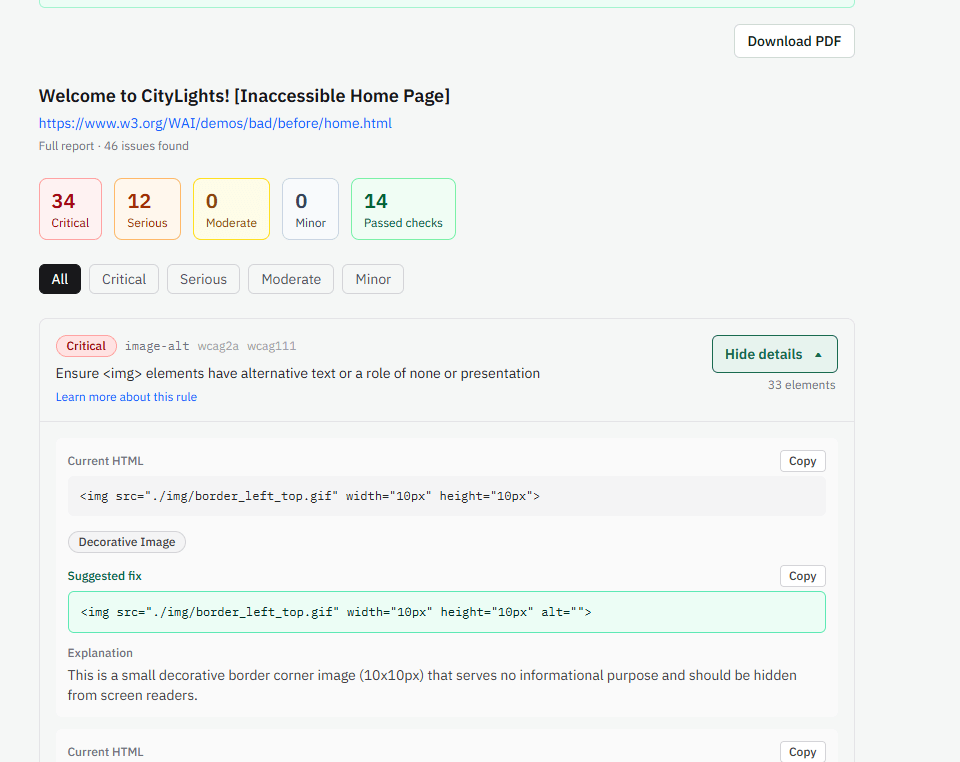
I ran PlainFix on a deliberately broken demo page (W3C’s “bad” accessibility example) and wanted to show what the output looks like — not a marketing mockup.
Flow:
- Paste URL
- We render the page and run axe (WCAG 2.0 / 2.1 / 2.2 A + AA)
- Each issue gets a plain-English explanation + a concrete code-level fix suggestion
You can see an example result here:
(If the image doesn’t render, open the link above directly.)
Positioning is intentional: remediation guidance you apply in code — not an overlay widget that claims to auto-fix the site at runtime.
Try it on your own URL:
https://plainfix.app
Free full-report code (1 URL):
https://plainfix.app/free?src=indiehackers
Happy to answer questions about the scan pipeline or the report format.

Hey IH 👋
I built PlainFix (https://plainfix.app).
I wanted a simple way for people to check a website for accessibility right away — and get clear fixes immediately — no subscription, no big upfront cost. Just scan one page and see how it lines up with common guidelines, with plain-English explanations and concrete code-level fixes.
How it works:
1. Paste a URL
2. We scan the page
3. You get issues explained simply + suggested fixes
4. Free teaser after the scan; full report unlock is one-time ($9 / $15 / $21 packs). Leftover URLs become access codes.
Not an overlay widget. Not “certified compliant” marketing — real remediation guidance for freelancers, agencies, and small business owners.
Try it:
• Free full-report code (1 URL): https://plainfix.app/free?src=indiehackers
Would love feedback — especially from anyone who’s sold site fixes to small businesses.
-
1The remediation angle seems stronger than the scan itself. Do freelancers/agencies use the report to actually scope or sell accessibility fixes, or are customers mainly buying it as a one-off check?
-
1
Thanks — yeah, that tracks.
I built it mostly for a quick check before/after going live (freelancers) or for owners who made the site themselves. You get the issues in plain English plus real code suggestions. We don’t apply the fixes for you , and I’m not doing auto-fix/overlays.
If an agency wants to use the report to sell fix work, that works too — but the product itself is the check + guidance right now.
-
1That distinction is useful, especially with freelancers using it before and after launch. I’d be interested in seeing which use case actually drives repeat or paid usage. If you’re open to it, what’s the best email to reach you on?
-
1Yep — best email is support@plainfix.app. On repeat/paid usage I’m still early, so I don’t have a clean split yet. Hoping to get a small test group going. You’re invited to try it too — grab a free code here and run one URL: https://plainfix.app/free?src=indiehackers
-
1
Thanks! I’ve just sent it over.
Looking forward to hearing your thoughts whenever you have a chance.
-
-
-
-

1 Comment
The code-level remediation angle is more differentiated than another accessibility scanner, but the key question seems to be whether users actually find the fixes useful enough to change their workflow. Have anyone who tried a scan used the suggested fixes in production, or is that evidence still early?