
WebsiteSave
Back up your website. See what changed.
This is a real user experience case in which a client came to me with an infected website.
Time is crucial - Early detection less demage
Most of the times when a malware attack a website, it sits silently when user browse a website, user doesn't find any issue at all. On the other hand, the malware infect database, internal javascript files, operational files and hooks are injected in themes and executions.
Usually, users notice those most common types are attacked website when they try to visit the website from a search engine or they see the website get marked as dangerous by chrome or see such kind of notification from Google Search Console.
At this point, it is very late and most of the demage is already done to website's search engine ranking, website operations and build a bad impression infront of your viewers.
The Damage Analysis - A long journey
When I have started to taken it over, I have found the first infection string a redirection code when a query is coming from the search engine then it redirects sites to different users through a subdomain and a link from another website which was acting like url-shortner and redirecting the traffic to urls.
The first fix had been done and restored the search engine and it took 3 days for the search engine and chrome to remove the website from dangerous category.
The client notified that there are such links on his website which aren't created by him, though pages contains identical content to the website's topics but has explicit links and some content strings with do-follow links and redirections to malware network.
As wordpress store are its pages either in the form on posts or pages. It has exploded the most dangerous thought about sql injections and how to remove all those 10K links and recover the old data or clean the existing data.
It had taken over 7 days to clean database and collectively 10 days in total including the .htaccess fix.
Site wasn't come out of healing process for 6 months
After the removal of all the pages, core files, htaccess, restoring the reputation of domain. All those pages were indexed in the google database. Started the removal process one by one, automatically and every possible thing tried to make the process faster enough to minimize the impact, it takes around 6 months that website got whitelisted actually but cralwers still hesitate to search and index pages actively.
What was missing and how it can be stopped?
Here is the list of precautions should be taken before such incident happen
Website must have a good backup mechanism, it shouldn't depend of hosting backup, when inquiry the hosting support they had the most recent backup and when it is restored, it has all those traces of the malware. If I would have a good restoration point and I have independent way to select from those restoration points, the initial process would not take more than a day where it had taken almost 10 days.
Regular security audit of the website. Client was dependent on cloudflare waf and his own custom rules and ufw firewall on the server, sitting relaxed completely assuming that his website is secure. If there would be one passive security scanner connected with the website, the issues would be identified earlier, things wouldn't even escalate to the stage of even backup restoration.
Recommendation: Always have a well suited backup service and perform security scans at defined intervals.
Websitesave solve all these problems for you. It takes secure backups, fully encrypted and perform security scans on your website without accessing the files code. Secure your website today with the intelligent and reliable services packages and start your 7 days free trial.
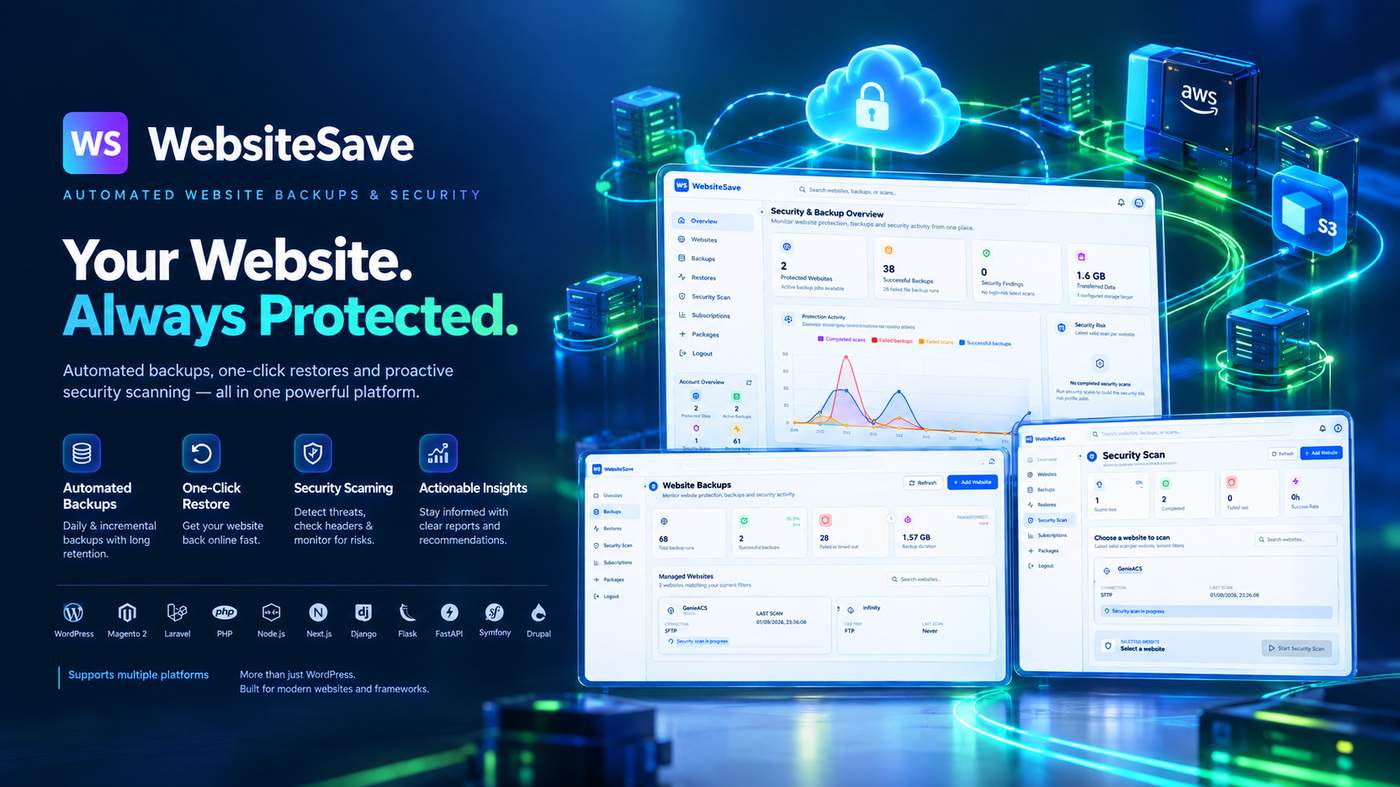

Misconfigured security headers, weak TLS settings, exposed server information, unsafe DNS configuration, or common web vulnerabilities can quietly increase your website's risk.
That's why WebsiteSave goes beyond backups.
Our security scanning helps you identify issues across your website with:
🔎 OWASP-aligned security checks
Identify common vulnerabilities and security misconfigurations.
🛡️ Security header analysis
Check important protections such as CSP, HSTS, X-Frame-Options, X-Content-Type-Options, Referrer-Policy and more.
🔐 SSL/TLS analysis
Review certificate configuration, HTTPS security and encryption settings.
🌐 DNS & infrastructure checks
Review DNS configuration and email-security records including SPF, DKIM and DMARC.
📊 Actionable security reports
Don't just get a list of problems. Understand what needs attention and how to improve your configuration.
The goal isn't to wait until something goes wrong.
Find security weaknesses before they become bigger problems.
WebsiteSave brings website backups + security scanning together so you can protect your website and have a recovery path when you need it.
👉 Start your 7-day free trial and see what WebsiteSave can find on your website.
I’ve spent 7 years working on WebsiteSave, a SaaS for website backups, security checks, health insights, and recovery.
The idea started with a simple question:
When a website breaks, is having a backup really enough?
You might have multiple backups sitting there, but you still need to figure out what changed, when it changed, and which recovery point makes sense.
So I built WebsiteSave around that problem.
It automatically creates website backups and combines them with security and website-health information to give you more context when something goes wrong.
The core idea is:
Protect → Detect → Understand → Recover.
WebsiteSave is now live, and I'm starting to put it in front of real users.
I'm particularly interested in hearing from other indie hackers:
How do you currently back up your websites, and what happens when you actually need to restore one?
-
1
Seven years of product experience makes the problem credible, but the key signal seems to be what happens during recovery. Have real users used the context to choose a restore point yet?
-
1
This system has granular restorations and yes you are correct, taking backup is a bit simple thing but restoring a backup needs precise and accurate logic. The system is already tested and operational by real users. Let me add one more layer to this answer. It also store encrypted backups and when it restore then it decrypt those files on fly.
-
1
The real-user usage is a useful signal, especially around restoration. If you’re open to it, what’s the best email to reach you on?
-
-

Comment