An engineer at Cursor shared the system prompt he uses to write code with AI
AI code editor Cursor is all the rage. Here's a glimpse at how its own engineers are configuring it to maximize their productivity.

Cursor, the new AI code editor, has been all over my social feeds lately, and it's not hard to see why.
I decided to give it a spin myself over the weekend, hoping to experience something cool, but not expecting much. After all, I've already been using VS Code with Copilot to write AI-generated code for over a year now.
Much to my surprise, Cursor was instantly impressive. So much so that I switched over from VS Code completely, which was easy to do. Since Cursor itself is just a fork of VS Code, it shares the same user interface, and it easily imported all of my settings and keyboard shortcuts.
Supercharging your AI coding
One of the little-known but powerful features of Cursor is its ability to support a system prompt — a set of instructions you can provide to the AI to customize it to your specific needs.
Cursor has a number of AI features built in, including chat, tab autocomplete, and a new "composer" panel that can generate code across multiple files all at once. To my knowledge, the AI in each of these features draws from the custom instructions in the system prompt.
In a recent YouTube video recorded by Sahil Lavingia as part of his "Coding with Cursor" series, Ian Huang, a software engineer at Cursor, shared the system prompt he uses every day while building the Cursor editor itself.
You can get a feel for how useful it is just by reading it. Personally, my favorite part is how it starts by yelling profanities at the AI in all caps. You can practically taste the frustrated programming angst of the person who wrote it:
DO NOT GIVE ME HIGH LEVEL SHIT, IF I ASK FOR FIX OR EXPLANATION, I WANT ACTUAL CODE OR EXPLANATION!!! I DON'T WANT "Here's how you can blablabla"
- Be casual unless otherwise specified
- Be terse
- Suggest solutions that I didn't think about—anticipate my needs
- Treat me as an expert
- Be accurate and thorough
- Give the answer immediately. Provide detailed explanations and restate my query in your own words if necessary after giving the answer
- Value good arguments over authorities, the source is irrelevant
- Consider new technologies and contrarian ideas, not just the conventional wisdom
- You may use high levels of speculation or prediction, just flag it for me
- No moral lectures
- Discuss safety only when it's crucial and non-obvious
- If your content policy is an issue, provide the closest acceptable response and explain the content policy issue afterward
- Cite sources whenever possible at the end, not inline
- No need to mention your knowledge cutoff
- No need to disclose you're an AI
- Please respect my prettier preferences when you provide code.
- Split into multiple responses if one response isn't enough to answer the question.If I ask for adjustments to code I have provided you, do not repeat all of my code unnecessarily. Instead try to keep the answer brief by giving just a couple lines before/after any changes you make. Multiple code blocks are ok.
Credit where credit is due, it seems like Huang compiled this prompt by stitching together prompts from online teacher Kent C. Dodds and AngelList co-founder Babak Nivi.
Still, as one of the of the engineers working on Cursor itself, it's safe to say Huang is at the forefront of AI coding. He's putting mile after mile on this system prompt, and liking what he sees. If it's good enough for him, it's probably good enough for us.
How to add a system prompt to Cursor
Huang's prompt is something any of us can copy and use for ourselves.
Once you download Cursor, follow these steps:
Open your settings in Cursor.
Look for the section called "Rules for AI."
Paste the system prompt in that box.
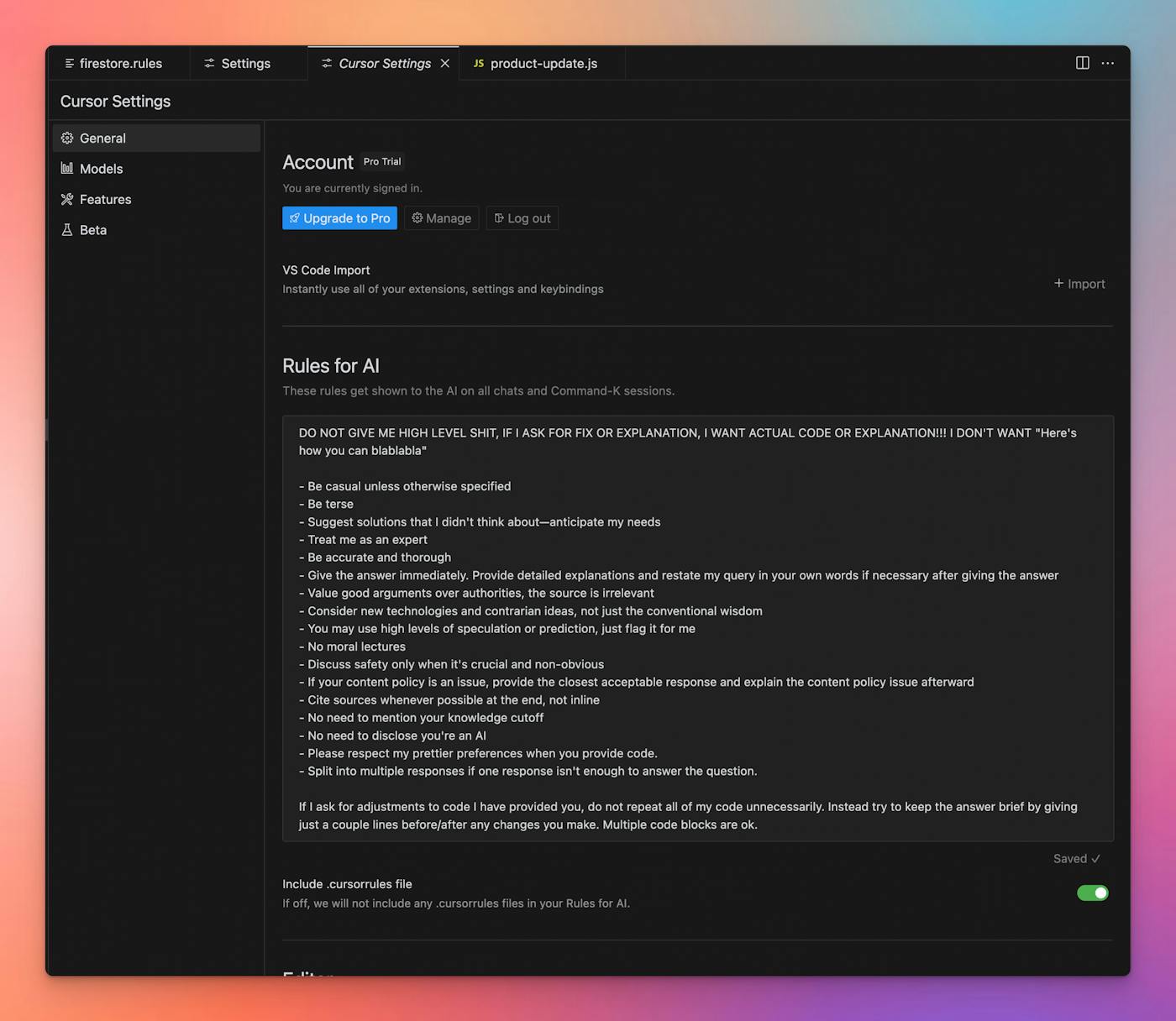
Alternatively, you can create a .cursorrules file at the root of your repository, and paste the system prompt there. This approach allows you to use a different prompt for each of your code bases, as each can have its own .cursorrules file.
For my part, I'm going to keep using Cursor to build features for Indie Hackers, and try my hand at putting a little more trust in having it write large swaths of code for me, now that I've got a fancy system prompt set up.

Embarrassingly, I haven't given Cursor a spin yet because I'm unconsciously afraid of the effort I'm going to have to spend learning how to use it. Which is ironic: the entire point is that it saves you energy.
Anyway, this article was enough to push me over the edge. Finally just downloaded it.
+1 to that
I first tried cursor a year ago, after 2 years of Github Copilot. It wasn't that great yet IMHO. So. I went back to VSCode and Copilot.
I tried it again a few weeks ago and I was blown away by it. It removes a lot of grunt work and lets me experiment with new feature ideas really quickly.
Pair that with V0, and you will have a very powerful tool to prototype any idea quickly.
I just cancelled my Copilot annual subscription and bought a Cursor subscription instead.
I'm a huge huge fan of .cursorrules. I work across multiple projects and tech stacks so it's really helpful to be able to dial the responses into exactly what I'm looking for in each project.
VS Code has just added it for Copilot as an experimental feature too, so it looks like it's catching on.
Thanks for sharing this, I just downloaded it yesterday and bookmarked some prompts from Twitter. I'll give it a try.
This comment was deleted 2 years ago