10 Best AI Knowledge Base Platforms Powering Support Teams

An AI knowledge base should match how your team actually operates. Some tools are built to deflect tickets through self-service chatbots. Others focus on getting the right answer in front of agents faster. A few try to do both, with varying levels of success.
The real differentiators depends on a handful of decisions: Does the platform work independently, or does it need to sit inside an ecosystem you already run? How much of the AI is included in the base price versus gated behind add-ons? Can the system keep its own content current, or does that responsibility fall entirely on your team?
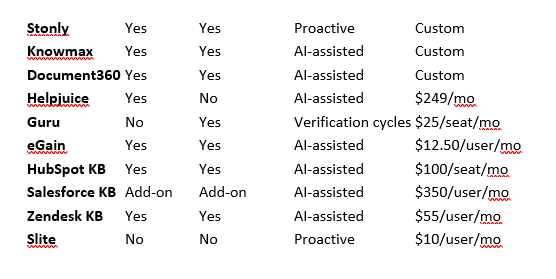
This guide walks through ten platforms that use AI to improve customer support knowledge management. For each one, you will find what it does well, where it falls short, and who it is built for. Here is how they compare at a glance:
Stonly
Stonly is an AI knowledge management platform with solutions for both customers and support agents. It combines structured, step-by-step content with generative AI to deliver more reliable self-service than platforms that rely on unstructured articles alone.
Key AI Features
Knowledge Agents monitor your knowledge 24/7: find what's outdated, inaccurate, or missing and draft fixes so your content keeps up with every change across your company, customers, and industry.
Step-by-step AI chatbot pairs guided content with generative AI: handles complex questions more accurately than article-search tools and links every answer back to the exact source or step it drew from.
Clarifying follow-ups for ambiguous questions: when a query could have multiple answers, the AI asks narrowing questions to provide specific answers.
Controlled workflows for high-stakes scenarios: define predetermined paths for situations like security incidents or compliance processes where the AI must follow your exact protocol.
AI Agent Copilot for support teams: summarizes incoming tickets, surfaces relevant knowledge, and drafts responses so agents spend less time searching.
Topic clustering analytics: questions from AI chats are automatically grouped into trends so you can see where self-service works and where gaps are driving tickets.
Limitations
Not a standalone helpdesk: Stonly is a knowledge layer that integrates with your existing ticketing system rather than replacing it, so you will still need a separate tool like Zendesk or Freshdesk.
Support-focused rather than general-purpose: built specifically for customer service knowledge, so teams looking for a broad internal wiki covering HR, onboarding, and company-wide documentation may find the scope narrower than expected.
Best for: Teams handling complex products where step-by-step guidance outperforms generic article search, and that want AI-driven content maintenance built in rather than bolted on.
Pricing: Custom.
Knowmax
Knowmax is an AI-powered knowledge management platform designed for customer experience and contact center teams. It pulls scattered company information into a single source of truth and transforms complex standard operating procedures into interactive paths that both agents and customers can follow.
Key AI Features
No-code cognitive decision trees turn dense procedures into clickable workflows: non-technical teams can build visual step-by-step paths from policy documents and troubleshooting manuals.
Intent-based elastic search understands what users mean, not just what they type: the AI search engine interprets natural language queries rather than relying on exact keyword matches, cutting the time it takes to surface the right answer.
AI authoring tools accelerate content creation across languages: summarize, rephrase, and translate knowledge base articles across 25+ languages without manual rewriting.
Micro-segmented analytics reveal knowledge gaps: track content consumption patterns and search trends at a granular level to pinpoint exactly where your documentation needs work.
Limitations
Admin interface has a learning curve: the backend dashboard for building complex decision trees takes time to master, even though the end-user experience is clean and straightforward.
Enterprise-scale focus: heavily tailored for large support operations, contact centers, and BPOs. Small startup teams may find it more platform than they need.
Best for: Large support operations and contact centers that need to standardize agent responses across channels using interactive, guided workflows.
Pricing: Custom.
Document360
Document360 is a knowledge management system geared toward helping smaller teams set up professional help centers quickly. Its AI chatbot delivers contextual answers for internal and external users, while an AI writing agent can populate your knowledge base from multimedia sources.
Key AI Features
AI writing agent converts multimedia into documentation: captures information from product walkthroughs, feature demos, and recorded meetings, then converts them into searchable knowledge base articles without manual transcription.
Pre-built article templates speed up content creation: teams can generate structured documentation using AI-assisted templates to skip manual formatting.
AI analytics track conversation outcomes: monitor which questions get answered, which go unresolved, and how content performs across your help center.
Limitations
Not optimized for multi-audience setups: the platform technically supports internal and external knowledge bases, but is not purpose-built to run both simultaneously from one configuration.
AI premium suite is an add-on: the full AI feature set is not included in any standard subscription tier, so the actual cost is higher than base plan pricing suggests.
Best for: Smaller teams that want to launch a polished help center quickly and need AI to handle the heavy lifting of initial content creation.
Pricing: Custom.
Helpjuice
Helpjuice is a knowledge base platform built around extensive customization and branded self-service portals. It serves both internal teams and external customers with a strong emphasis on visual consistency and design control. Its Swifty AI suite bundles a chatbot, in-product helpbar, and writing assistant.
Key AI Features
Full-spectrum design customization at no extra charge: a visual editor, code editor, and expert design services let teams match any brand identity without engineering resources. Helpjuice designs your theme for you as part of the plan.
AI-powered search works across formats: searches within PDFs and images alongside text content, with search analytics showing exactly what customers look for and where they get stuck.
Swifty AI suite generates and surfaces content: combines a chatbot, helpbar, and writing assistant that work together to draft articles and deliver answers from your knowledge base.
Limitations
AI only draws from Helpjuice content: the chatbot cannot access conversations or documents in external tools like Zendesk, Google Docs, or Confluence. Teams with knowledge spread across multiple systems will find this limiting.
Significant price jump for AI features: going from the base plan ($249/month) to the AI-enabled plan ($449/month) makes the AI suite one of the pricier add-ons in this category.
Best for: Teams that prioritize brand consistency and design control in their help center and want an integrated AI suite working from a single content source.
Pricing: $249/month (up to 30 users, no AI), $449/month (up to 100 users, AI included), $799/month (unlimited users). 14-day free trial available.
Guru
Guru is an internal knowledge management platform that treats content accuracy as an ongoing process that extends past initial publication. Information is organized into searchable Cards grouped into Collections, and AI-powered contextual delivery surfaces verified answers wherever employees are already working.
Key AI Features
Contextual knowledge delivery surfaces answers before you search: AI considers your role, current workflow, and query patterns to proactively suggest relevant Cards based on what you are actively working on in tools like Zendesk, Slack, or your browser.
Built-in verification workflows keep content trustworthy: scheduled review cycles and expert assignments ensure knowledge stays accurate well past initial publication.
Knowledge Agents answer questions in natural language: employees can ask questions across Slack, Teams, Chrome, or via API and get cited, permission-aware answers drawn from verified content.
100+ integrations embed knowledge into existing workflows: connects with Slack, Teams, Salesforce, Zendesk, Google Drive, Confluence, and many more so teams never need to leave their tools to find answers.
Limitations
Internal-only by design: every person who needs to read content requires a paid seat. Customer-facing self-service use cases become expensive and impractical at that model.
10-seat minimum on the self-serve plan: the real entry price starts at $250/month even if your team is smaller, and advanced features like Knowledge Agents and SSO require the Enterprise tier at custom pricing.
Best for: Support, sales, and operations teams that need verified internal knowledge surfaced contextually inside the tools they already use daily.
Pricing: Self-serve plan starts at $25/seat/month (10-seat minimum). Enterprise pricing is custom.
eGain
eGain is a knowledge management platform that consolidates content from multiple disconnected systems into a single AI-powered knowledge base. Its real-time AI assistant monitors agent conversations and delivers relevant guidance as they work, without agents needing to pause and search.
Key AI Features
Real-time AI assistant guides agents during live conversations: monitors active interactions and surfaces relevant articles, procedures, and past resolutions automatically as the conversation unfolds.
AI pulls answers from distributed content sources: consolidates information from documents, websites, Salesforce, Confluence, and eGain's own knowledge portal into one retrievable layer.
Generative AI authoring accelerates content creation: transforms raw information and internal notes into publish-ready knowledge articles.
Limitations
Resolution-based pricing model: costs are usage-based, tied to resolutions and self-service sessions. Budgeting can be less predictable compared to per-seat pricing.
Limited contact center integrations: currently supports Amazon Connect, Genesys Cloud, and Salesforce only, so teams on other platforms may face compatibility gaps.
Best for: Contact centers that need a unified knowledge layer pulling from multiple existing systems, with real-time agent guidance during live interactions.
Pricing: Starts at $12.50/user/month. Resolutions available in blocks of 100 for $50. Self-service sessions in blocks of 1,000 for $200.
HubSpot Knowledge Base
HubSpot Knowledge Base is the self-service help center module built into HubSpot Service Hub. It is designed for teams already operating within the HubSpot ecosystem, where tickets, customer data, and documentation all live under one CRM roof. AI capabilities are powered by Breeze, HubSpot's AI platform.
Key AI Features
Knowledge Base Agent drafts articles from closed tickets: analyzes patterns in real support conversations and creates documentation based on resolutions your team has already provided, then routes drafts through human approval before publication.
Breeze Customer Agent resolves tickets using your approved content: an AI chatbot that delivers answers across chat, email, WhatsApp, and other channels, with automatic handoff to human agents for complex issues.
CRM-integrated analytics track article impact: because everything sits inside HubSpot's CRM, you can see which customers read which articles, monitor resolution rates, and measure how self-service content affects overall ticket volume.
Limitations
High entry point: the knowledge base only becomes available at the Professional tier ($100/seat/month with a 5-seat minimum). The effective starting cost is $500/month before AI credits.
Metered AI credits: once you exceed your included allotment of roughly 60 AI resolutions per month on Professional, additional credits are billed separately on top of seat costs.
Ecosystem-dependent: tightly coupled to the HubSpot platform, so it is not a practical option for teams that do not already use or plan to adopt HubSpot Service Hub.
Best for: Teams already using HubSpot Service Hub that want knowledge management, AI self-service, and CRM analytics in one ecosystem without adding another vendor.
Pricing: Requires Service Hub Professional ($100/seat/month, 5-seat minimum) or Enterprise ($150/seat/month, 10-seat minimum). Mandatory onboarding fees apply. AI credits metered separately.
Salesforce Knowledge
Salesforce Knowledge is the knowledge management system built into Salesforce Service Cloud. Agents access relevant articles without leaving their ticketing window. While it does not include native AI, the Einstein AI add-on brings intelligent search and response drafting capabilities.
Key AI Features
Einstein Search understands search intent: uses AI to interpret what agents are looking for and delivers more accurate article results without relying on basic keyword matching.
Proactive article suggestions surface content before agents search: relevant knowledge appears automatically based on ticket context, reducing time agents spend hunting for the right information.
AI-generated response drafts accelerate resolution: Einstein drafts replies based on ticket context and relevant knowledge articles, giving agents a starting point rather than a blank text field.
Limitations
Salesforce ecosystem only: does not integrate with external help desk systems, so it is not an option for teams using third-party tools or avoiding Salesforce dependency.
AI is not built in: Einstein is a separate purchase on top of already premium Service Cloud pricing.
Best for: Organizations fully committed to the Salesforce ecosystem that want knowledge management embedded directly in their existing Service Cloud workflows.
Pricing: Available in Salesforce Service Cloud Unlimited tier ($350/user/month, billed annually). Full AI suite available with Agentforce 1 Service tier ($550/user/month, billed annually).
Zendesk Knowledge
Zendesk Knowledge is a knowledge base platform that uses AI to create, organize, and deliver support content. It pulls together information from help centers, community forums, and external sources into a unified knowledge graph that both human agents and AI systems can draw from.
Key AI Features
AI generates articles from historical support tickets: analyzes past resolutions and creates draft content, then handles translation, editing, and updates to keep articles current over time.
Contextual suggestions appear inside the agent workspace: AI surfaces relevant articles and ready-to-use responses while agents are actively working on tickets, eliminating the need to search separately.
Unified knowledge graph connects multiple content sources: brings together content from Zendesk Guide, community forums, Slack, and other integrations into a single searchable layer.
Limitations
Separate systems for internal and external knowledge: internal and customer-facing knowledge bases run on different AI-enabled configurations, which adds complexity for teams managing both.
Advanced AI costs extra: the full AI feature set requires a separate purchase beyond the base Zendesk Suite subscription.
Deep Zendesk dependency: knowledge is tightly integrated with Zendesk products specifically, which makes future migration difficult if your needs evolve.
Best for: Support teams already running on Zendesk that want AI-powered knowledge management integrated directly into their existing ticketing and messaging workflows.
Pricing: Available in all Zendesk Suite plans (starting at $55/user/month, billed annually). Advanced AI agents available as a separate add-on with custom pricing.
Slite
Slite is a self-maintaining knowledge base that uses AI to keep internal documentation current based on information flowing through your company's tool stack. It pairs a structured, verified wiki with an AI agent that spots when content has drifted from reality, drafts corrections, and routes every change through human approval before publication.
Key AI Features
AI agent detects and fixes outdated documentation automatically: monitors your knowledge base for content that has fallen behind, drafts updates, and ensures nothing goes live without human sign-off.
AI search works across 20+ connected tools: on the Pro plan, the Slite Agent searches your wiki along with Google Drive, Slack, Notion, Confluence, Jira, GitHub, and more to surface answers wherever they live.
Verified source of truth acts as a shared context layer: documentation carries verification status so both your team and any AI agents drawing from it can trust what they are reading.
Limitations
Internal knowledge only: built for team documentation and internal wikis, not external-facing customer help centers or self-service portals.
Narrower integration coverage for messaging: Slack is the only messaging integration, with no Microsoft Teams support. The platform also lacks OCR for images and PDFs.
Best for: Internal teams that need a self-maintaining wiki where AI keeps documentation accurate across a broad tool stack, rather than relying on manual audits.
Pricing: $10/user/month (Basic, billed annually) includes AI search and doc verification. $20/user/month (Pro, billed annually) adds Slite Agent and cross-tool AI search. Enterprise is custom. 14-day trial available.

