3 tools I use for SaaS keyword research + 1 I built
Most keyword research processes begin with search volume.
Mine begins with a slightly different question:
If we ranked for this keyword, how much revenue could it realistically generate?
That changes both the types of keywords you look for and how you prioritise them.
Instead of building an enormous list of vaguely relevant topics, I focus on keywords that indicate the searcher is actively researching a problem, comparing solutions or looking for software to buy.
These usually fall into a handful of profitable SaaS page types:
- Core product keywords
- Feature and use-case pages
- Industry-specific pages
- “Best software” lists
- Competitor comparison pages
- Competitor alternative pages
- Templates and other product-led resources
Here are the three tools I use to find and evaluate these keywords, plus the tool I eventually built to automate the process.
1. ChatGPT: generate the initial money keyword ideas
Thorough customer research is still the best starting point for keyword research.
Ideally, you would review sales calls, speak to customers, interview the sales team, study support tickets and analyse competitors.
But if you need a faster starting point, ChatGPT can do a surprisingly good job of analysing a SaaS company’s website and identifying its likely customers, use cases, features and competitors.
I write a detailed prompt asking ChatGPT to:
- Analyse the company’s website
- Explain what the product does
- Identify its main customer segments
- Identify the problems those customers are trying to solve
- Find the product’s main features and use cases
- Identify direct and indirect competitors
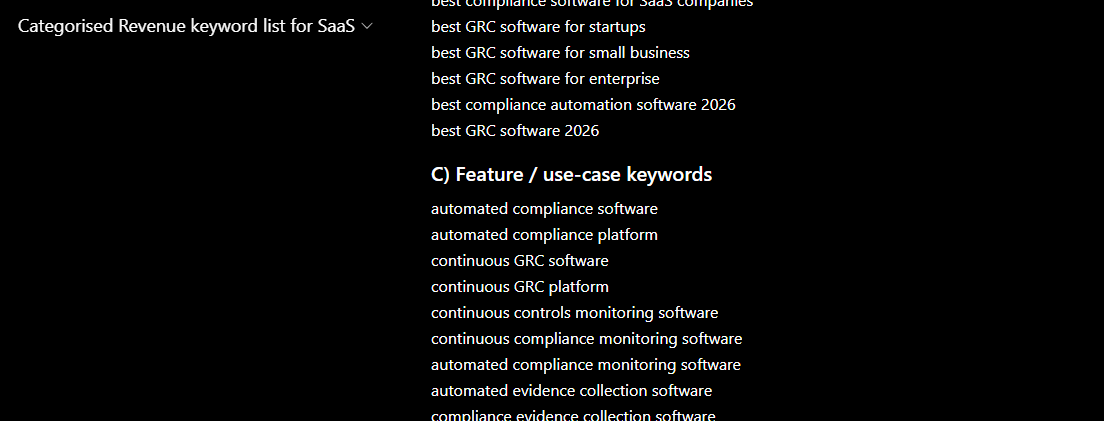
- Suggest 10–20 keywords for every profitable SaaS page type
The last point is important.
If you simply ask ChatGPT for “SEO keywords”, it will normally return a mixed list containing broad informational topics, generic product terms and a few commercial keywords.
Asking for suggestions by page type produces a much more useful list.
For example, instead of only suggesting keywords such as “project management software”, it might uncover:
- Project management software for construction
- Project management software for small agencies
- Trello alternatives
- Asana vs Monday
- Client project management software
- Project timeline templates
These suggestions aren’t treated as validated opportunities yet.
ChatGPT can invent phrases that nobody searches for, misunderstand the product or suggest keywords that are far too competitive.
At this stage, I’m trying to generate a wide pool of commercially relevant ideas. The keywords are analysed and filtered in the next step.
I’ve also created a custom GPT that carries out this initial analysis and organises the suggestions by profitable SaaS page type.
You can try my SaaS keyword research GPT here: [https://chatgpt.com/g/g-69690195cf5881919cad103ad1b8dde3-categorised-revenue-keyword-list-for-saas
2. Ahrefs: validate search demand and difficulty
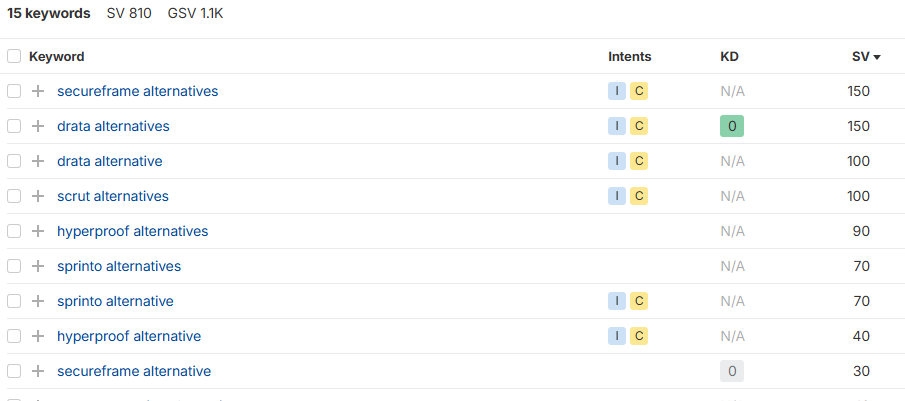
Next, I paste the keywords into Ahrefs’ Keywords Explorer.
This gives me two of the main data points I need:
- Monthly search volume
- Keyword Difficulty
Search volume tells me whether people are actually searching for the keyword.
Keyword Difficulty provides a rough indication of how difficult it may be to reach the first page, based on the strength of the pages currently ranking.
The aim at this stage is simply to add reliable search data to the ideas generated in ChatGPT.
I export the results from Ahrefs and move them into Google Sheets.
3. Google Sheets: calculate revenue potential
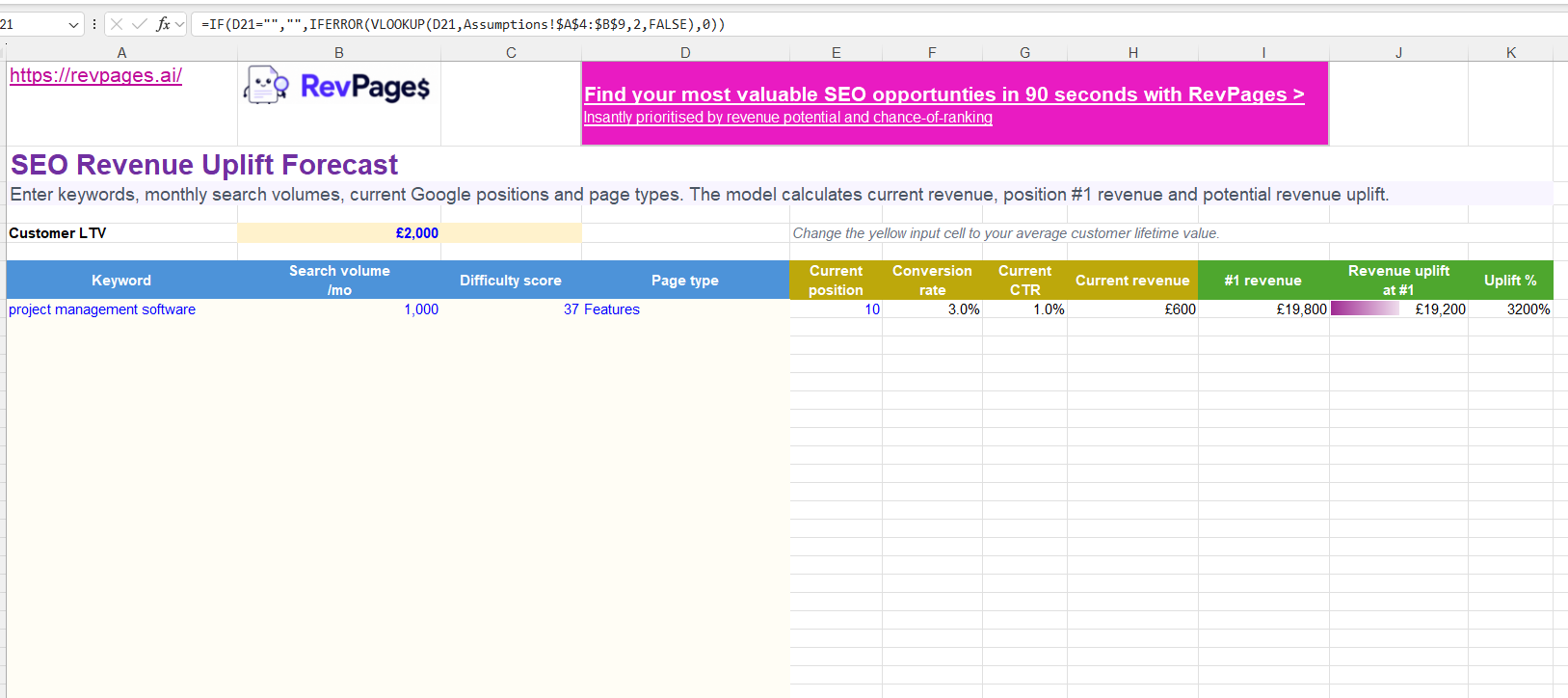
This is where the keyword list begins to turn into an SEO strategy.
If you want to use the same calculations without building the spreadsheet from scratch, you can make a copy of my SEO revenue calculator spreadsheet here.
I normally process the Ahrefs exports one category at a time. This makes it easy to add a category column before combining everything into one table.
For example:
- Alternatives
- Comparisons
- Industries
- Features and use cases
- Best software
- Templates
- Core product
Doing this category by category means I don’t end up with hundreds of keywords and no easy way to remember why each one was selected.
My main spreadsheet includes columns for:
- Keyword
- Category
- Monthly search volume
- Keyword Difficulty
- Current Google position
- Estimated conversion rate
- Revenue at position one
- Current estimated revenue
- Available revenue uplift
I also add the company’s average customer lifetime value somewhere in the sheet so it can be referenced in every revenue calculation.
Add your current rankings
You can check the current ranking for each keyword manually, but this becomes very time-consuming with a large list.
A quicker option is to export all of the website’s current organic keyword rankings from Ahrefs and paste them into a second tab.
You can then use VLOOKUP or XLOOKUP to match each opportunity against the ranking export and pull its current position into the main table.
Keywords that aren’t found in the ranking export can be treated as not currently ranking.
Calculate revenue at position one
To estimate the monthly revenue a keyword could generate at position one, I use:
Search volume × position-one CTR × conversion rate × customer LTV
For example, imagine a keyword has:
- 500 monthly searches
- A 33% click-through rate at position one
- A 5% visitor-to-customer conversion rate
- A customer LTV of £1,000
The calculation would be:
500 × 0.33 × 0.05 × £1,000 = £8,250
The estimated revenue at position one would therefore be £8,250 per month.
This isn’t a promise that the page will generate exactly that amount. It is a consistent model for comparing the potential value of different opportunities.
I also vary the estimated conversion rate by page type. A comparison page or competitor-alternative page is likely to convert differently from a template or broader feature page.
The estimates will never be perfect, but applying the same logic consistently makes the output much more useful than sorting everything by search volume.
Calculate the available revenue uplift
If the website already ranks for the keyword, I estimate the revenue being generated at its current position.
The calculation is the same, but I replace the position-one CTR with the estimated CTR for the current ranking.
For example, if the page currently ranks fifth:
Search volume × position-five CTR × conversion rate × customer LTV
I then calculate the available uplift:
Revenue at position one − current estimated revenue
This distinction matters.
A keyword might have enormous total revenue potential, but if the site already ranks first or second, there may be little additional revenue available.
Meanwhile, a keyword with slightly less total potential may represent a much bigger opportunity if the site currently ranks on page two or doesn’t rank at all.
Find valuable opportunities you can realistically rank for
Once the spreadsheet is complete, I’m looking for keywords that combine:
- Significant available revenue uplift
- Strong commercial intent
- An achievable difficulty level
- A clear connection to the product
- A suitable page type
Those are the opportunities most likely to produce an actual return.
The problem is that this process takes a long time.
You have to analyse the company, generate the keywords, organise them into categories, collect search data, check current rankings, apply different conversion rates, calculate revenue and then decide which combination of value and difficulty should take priority.
Even after doing all that, a spreadsheet sorted by revenue or Keyword Difficulty doesn’t provide a particularly robust prioritisation method.
That is why I built RevPages.
4. RevPages: automate the entire process
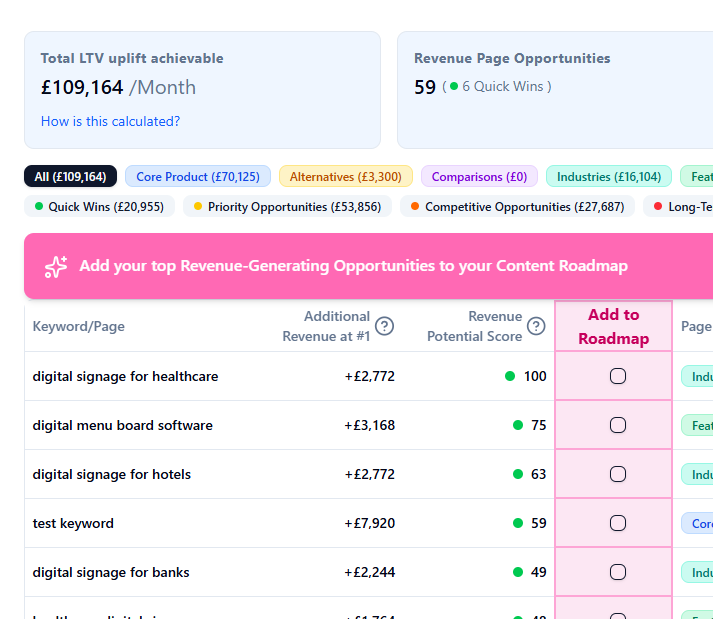
RevPages automates the process I’ve described above.
You enter a SaaS website and its average customer LTV. RevPages then:
- Analyses the company, product and target customers
- Finds high-intent keyword opportunities
- Organises them by profitable SaaS page type
- Pulls search volume and difficulty data
- Checks the website’s existing rankings
- Estimates the revenue potential of each keyword
- Calculates the available revenue uplift
- Prioritises opportunities using value and ranking achievability
The complete analysis takes around 90 seconds.
The result isn’t just another enormous keyword list. It is a prioritised set of potential money pages, showing which opportunities could generate the most additional revenue and how realistic they may be to rank for.
I originally built it because I wanted a faster and more consistent way to carry out revenue-focused keyword research for SaaS companies.
The spreadsheet process works, and I still think it is a useful way to understand the calculations behind the strategy.
But once you have repeated it enough times, manually moving data between ChatGPT, Ahrefs and Google Sheets starts to feel like a process that should be automated.
So that’s what I did.
You can try RevPages here: https://revpages.ai

The revenue-uplift model is more interesting than automating keyword research. Once a team ships the pages RevPages prioritises, do the highest-ranked opportunities actually produce the most incremental revenue, or is the model mainly useful for prioritisation before the outcome is known?