A Lean Video-to-Text Workflow for Small SaaS Teams
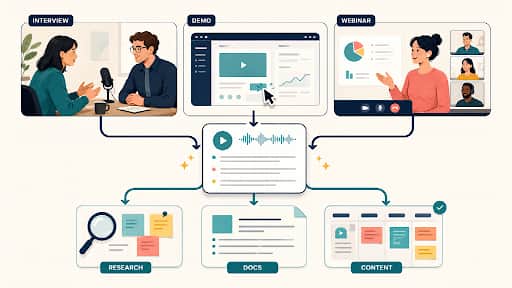
A customer explains a painful workaround in an interview, but the detail never reaches the roadmap. A product demo answers a recurring support question, yet no one turns it into documentation. A webinar contains three useful examples, then disappears into a folder of recordings. Small SaaS teams often capture valuable information in video without creating a reliable path for that information to enter product research, help content, or planning.
A video-to-text workflow for small SaaS teams should solve that handoff problem with as few moving parts as possible. Transcription is only one step. The durable value comes from connecting each statement to its source, reviewing the parts that affect decisions, and storing the result where the team already works.
Why useful information gets trapped in recordings
Video asks a future teammate to watch at the speed it was recorded. A 50-minute conversation cannot be skimmed like a document, and its title rarely reveals where the decisive comment appears. Even when someone remembers the content, they may not remember the exact wording or the context around it.
Recordings also tend to live outside the systems where work happens. Customer evidence belongs near research notes. A product walkthrough should inform the help center. Webinar material should enter the content calendar. When the recording stays in a drive and the planning happens elsewhere, the transfer depends on one person’s memory.
The answer is not to transcribe everything. That creates a second archive that nobody reads. A lean process begins only when a recording has a defined destination and an owner who will review the relevant output.
Route public videos and private recordings separately
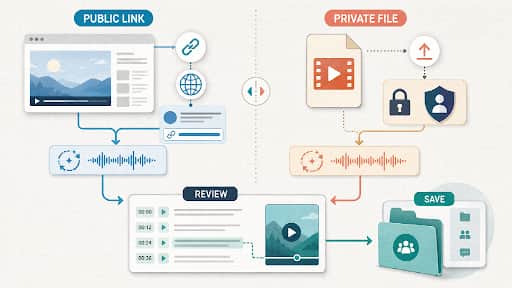
Public YouTube material and private source files present different risks. A public link remains connected to its title, creator, publication date, and surrounding page. The task is usually retrieval: locate an explanation, preserve the source, and decide whether a quotation or summary may be reused.
For this branch, a free online YouTube video to text converter can turn the link into timestamped, searchable text. Decopy’s current page also shows synchronized playback, copying, PDF or TXT export, and optional follow-on views such as summaries and mind maps. The transcript should remain attached to the original URL, and any published quotation still needs a context and rights check.
Private recordings require tighter handling. A customer interview or internal demo may contain names, unreleased features, or account details. Before upload, confirm that the team is permitted to process the file, choose an appropriate workspace, and decide who will receive the resulting text. Do not route private media through a public-video shortcut merely because it feels convenient.
The two paths can meet later, after each source has a reviewed transcript and clear metadata. Keeping them separate at intake prevents a public research note and a confidential customer record from inheriting the same access assumptions.
Build the smallest workflow that produces a usable artifact
A sustainable process needs five actions: select, transcribe, verify, shape, and store. Each recording should enter with one intended artifact, such as a research evidence note, a help-page draft, or a webinar brief. If no one can name the artifact, leave the video unprocessed until a real need appears.
During transcription, preserve timestamps and speaker information when available. They are the bridge back to evidence. Verification then focuses on the passages that will influence an external claim or internal decision, rather than polishing every filler word in a long conversation.
Shaping converts reviewed source text into the chosen artifact. This is where the team reorganizes ideas, removes irrelevant conversation, and adds missing context. The original transcript should not be overwritten; it remains the traceable record behind the new document.
Storage completes the loop. Put the artifact in the tool already used for its destination and link back to the transcript and recording. A product insight belongs near research or issue tracking, while a help draft belongs in the documentation workflow. Avoid creating a separate “transcript knowledge base” unless people already have a reason to search it.
Turn customer interviews into traceable product evidence
An interview transcript is not automatically research evidence. The team needs to know who spoke, what question prompted the statement, and where it appears in the recording. Without that context, a vivid sentence can be mistaken for a general pattern or interpreted more strongly than the participant intended.
Create a small evidence note for each passage that may affect a decision. Record the interview date, participant label, research question, short quotation or faithful paraphrase, and timestamp. Add an interpretation in a separate field. This separation makes it clear which part came from the participant and which part came from the team.
Private files often benefit from a workspace that accepts uploads and keeps the result tied to playback. A video to transcript tool can support that node: Video to Transcript currently accepts local video or audio as well as online video URLs, and its page presents timestamps, optional speaker detection, editable speaker names, notes, translation, and copy or download actions. Before using it with customer material, confirm the current source conditions and the team’s rules for sensitive recordings.
Do not convert every interview into a long summary. Evidence becomes easier to compare when notes use a consistent research question and preserve direct paths to the source. Several aligned observations can then inform a product hypothesis without pretending that one transcript proves it.
Convert product demos into maintainable documentation
A product demo is organized around spoken delivery, not around a reader trying to complete one task. Transcribing it creates source material, but copying the transcript into the help center produces a document full of greetings, detours, and references such as “click over here.” The visual action may also carry information that speech alone does not capture.
Start by identifying the user goal demonstrated in the video. Find that section in the transcript, then watch the matching segment while writing the steps. Verify current interface labels directly in the product. If the demo shows an old release, treat it as historical input rather than current documentation.
Keep the reviewed transcript and the help draft linked. The transcript explains where the instruction came from, while the draft organizes it for scanning. Add screenshots or interface images only from the current product, not from a transcript assumption.
Internal demos can also become short implementation notes. Preserve decisions and constraints, but remove conversational speculation unless it remains important. A draft feature promise should not become a public instruction merely because it appeared in a recorded walkthrough.
Reuse a webinar without losing the original meaning
A webinar usually mixes prepared teaching, audience questions, and promotional transitions. A single transcript contains all three, but each downstream asset needs a deliberate selection. The goal is not to turn every sentence into content; it is to identify the parts that remain useful outside the event.
Begin with a source brief containing the event title, date, speakers, target audience, and central promise. Mark timestamped sections that explain a complete idea. Then assign one primary output, such as a recap article. FAQs and short posts can follow from the same reviewed sections, but they should not compete for attention during the first pass.
Claims deserve a separate check. A speaker may refer to a statistic, product capability, or external event without providing enough evidence in the recording. Verify that material independently before it enters a blog or help page. The transcript confirms what was said, not whether the statement is true.
Audience questions often make strong FAQ candidates because they reveal the language people use. Preserve the question’s context and rewrite only after checking the answer. If the answer depended on a live demonstration, revisit the video rather than relying on speech alone.
Decide where each transcript and derivative should live
Storage should follow use. Place a customer evidence note with the research project or product issue it informs. Keep a documentation draft inside the existing writing or repository process. Put a webinar brief beside the content calendar entry. Each artifact should link to the reviewed transcript and source location.
The transcript itself needs basic metadata: source type, date, participants or creator, permission level, reviewer, and status. A simple status such as raw, reviewed, or approved prevents someone from treating unverified output as final. Preserve timestamps even when the derivative document no longer displays them.
Avoid scattering multiple exported copies across personal folders. One maintained transcript with stable links is easier to trust than several files called “final.” If the current documentation or research system supports attachments and links, use it before introducing a new repository.
Retention should be intentional. Some private recordings may need deletion after the approved evidence has been captured, while public source links can disappear or change. Follow the team’s existing commitments and preserve only what the task and permissions justify.
Know when a dedicated transcription tool earns its place
Occasional short videos may not justify another product. Existing captions, meeting-platform output, or manual notes can be sufficient when the source is easy to review and the result has limited reuse. The cost of a new tool includes setup, access decisions, and another place where information might be forgotten.
A dedicated workflow becomes more useful when recordings are long, recur often, or feed several real outputs. Direct URL handling can remove repeated media transfers. File upload with timestamps and speaker editing can reduce the friction of customer research. Transcript-based media editing matters when the final product remains video.
Evaluate the path rather than a generic feature set. Use one permitted recording that reflects normal work. Check how quickly a teammate can locate a statement, verify it, create the intended artifact, and store it in the existing system. Do not turn that small evaluation into a claim about universal accuracy or speed.
Adoption is the final test. If no one owns review and the transcript has no destination, automated processing will only produce a larger pile. Choose the lightest tool that removes a recurring bottleneck and can be connected to current habits.
Use a lightweight review gate before information moves downstream
Every derivative should pass a short check proportionate to its impact. For a private research note, confirm speaker identity, the prompt that led to the statement, and the timestamp. For public content, also verify names, figures, product claims, quotations, and reuse rights.
Review the video when meaning depends on tone, screen activity, or surrounding discussion. A transcript cannot show which interface element was clicked. It may flatten hesitation or humor. It also cannot decide whether a confident statement is factually supported.
Keep interpretation visible. Label summaries, conclusions, and recommendations as team work rather than transcript content. That practice protects the chain from source to decision without requiring a heavy governance process.
A useful final gate asks five questions:
1. Is the source and permission level recorded?
2. Can every important claim return to a timestamp or visual moment?
3. Were names, numbers, product terms, and speaker changes checked?
4. Is interpretation separated from what was actually said?
5. Does the finished artifact live where the next action will occur?
Keep the process small enough to repeat
A lean video-to-text workflow succeeds when it quietly connects existing work. Public videos enter as source-linked research. Private recordings become reviewed evidence. Demos feed documentation, and webinars feed a defined content artifact. None of these paths requires a sprawling platform if ownership and destinations are clear.
Start with one recurring source and one output that already matters. Preserve context, verify the high-risk details, and store the result in the team’s current system. Expand only when the next bottleneck is visible. A process that people repeat is more valuable than a comprehensive workflow that ends after its first week.

