A sentence becomes a schedule

The bottom quick-add bar retires, and one command palette takes its place. Press ⌘K anywhere: every command in one list, a plain sentence that parses straight into an event, and an Ask AI row for the requests with commas in them. The dial stays visible behind it the whole time, and everything previews on the ring before it lands.
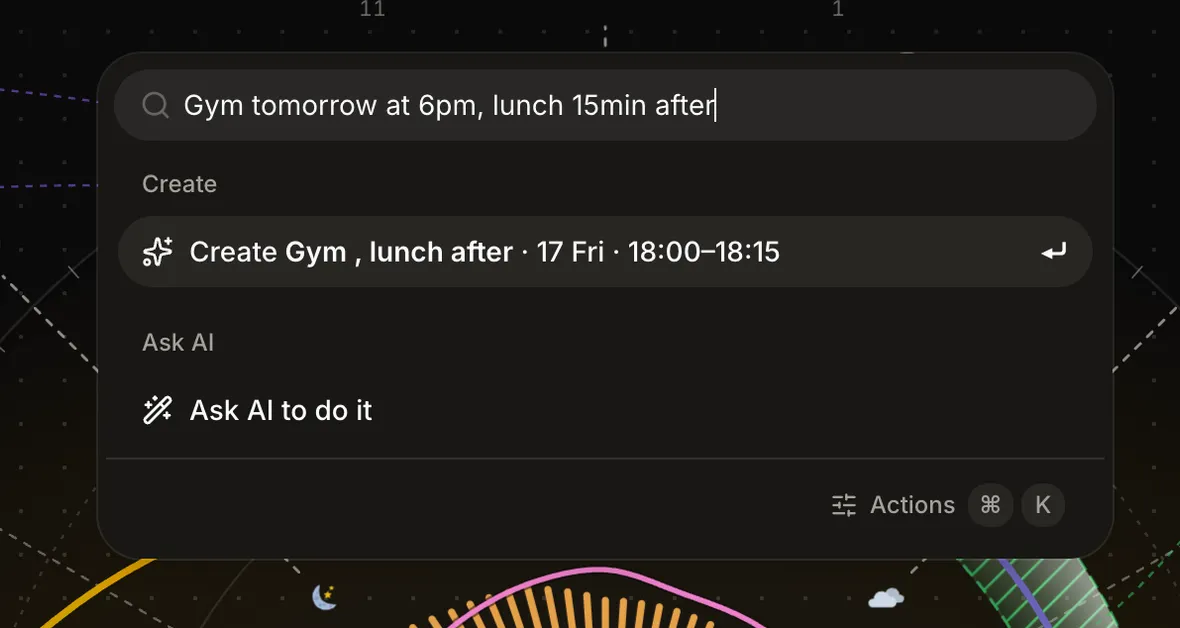
One palette for the whole app: press ⌘K, or tap Create in the header, and fuzzy-search across everything: new event, log mood, add moment, clear the afternoon or evening, jump between days, toggle dial layers, open Insights, reflect, connect a calendar, reach any settings pane. Free, and a sheet on your phone. How the palette works
Type a sentence, get a block: “Gym tomorrow at 6pm” parses the moment you type it into a Create row with the right day and time. The parse is deterministic and offline, no AI call, no waiting, free. Add #area or @type in the line to paint the block as you make it, and a line with no time offers to park to your inbox instead.
Ask AI to do it (Pro): a compound request like “Gym tomorrow at 6pm, lunch 15min after” goes to the model and comes back as editable plan cards, one per change, previewed on the dial. Adjust or drop any of them, then apply.
Slash commands for the six verbs a day runs on: /create, /park, /shift, /delete, /mood, /moment. /shift is ripple shift, two keystrokes from anywhere.
Escape now behaves in every search field: the first press clears what you typed, the second closes the panel. The same convention everywhere a field searches.

