A tester asked us to hide our AI assistant while screen sharing. They were right.
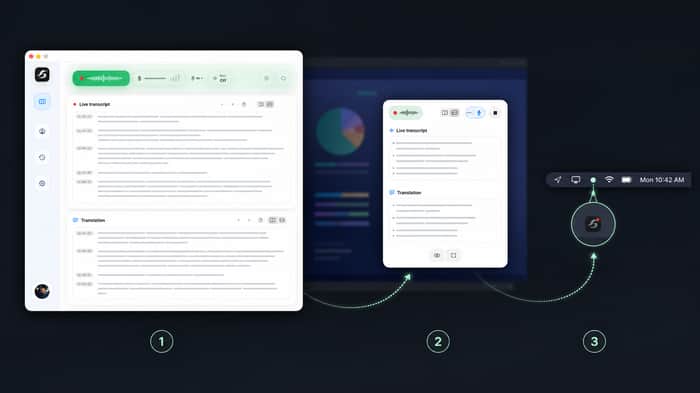
A tester gave us feedback this week that changed a small but important part of Speechara.
They use it during meetings for live transcription and translation. Sometimes they are in an office, sitting with other people, and need to share their laptop screen. In that moment they do not necessarily want their personal AI workspace to be visible to everyone in the room.
We already had a compact mode: when the main app is covered or minimized, Speechara collapses into a small always-on-top window so the user can still follow the live transcript and translation.
But the tester's point was fair: smaller is not the same as invisible.
So we added Hide completely. One action removes Speechara from the shared screen while the meeting workspace keeps running in the background. When the screen-share moment is over, the user can bring the compact view back and continue from the same context.
The interesting product lesson for us was that “always available” needs an opposite control: “absent exactly when I need it to be.”
We treat this as a display/privacy control, not a way to bypass consent or secretly start a recording; it only changes the visibility of an already user-started session.
For founders building tools that stay present during work: what privacy or “get out of my way” control did a user ask for that you had not anticipated?

I like the distinction between a product being available and a product demanding to be visible.
Sometimes the experience users trust most isn't the one that's always present—it's the one that disappears exactly when they expect it to.