Adding auth to your project — everything you need to know, plus recommendations
If you’re someone who builds software, sooner or later you have to concern yourself with securing the thing. Finding the right solution is confusing.
As a founder of Authress, from the time we've launched over 3 years ago till now, it's been part of my job to stay up to date with the existing products in the auth space. I spent countless hours researching our competition and the broader market, while talking to our users about their needs as software makers.
With this article, I hope to bring some clarity on what parts of auth and data security are relevant if you’re building software, and how to think about the space. I’ll clarify the terminology around it, list the most important considerations when picking a solution, and mention any caveats or pitfalls you may hit along the way.
If you’re looking for concrete recommendations, feel free to jump straight to the end. I'll provide specific auth suggestions for:
- Side-projects
- Personal use
- MVPs for public use
- B2C software
- B2B software
- Public APIs
Login
When most people hear “auth”, they think login. Login is authentication, or auth-N for short. It’s the first step of securing your software.
Even if you’re making a small side-project just for yourself, as soon as you host it somewhere outside of your machine, you want to implement some sort of authentication. The days when obscurity saved your little inconsequential personal website or crawler from DDOS attacks are long gone.
It’s really simple - if it runs on the internet, it has to require login. Unless it’s just a static website, but let’s not be pedantic.
Good news is, it’s really easy to add login to your software and it will cost nothing if you play it right. Bad news is, it can get really complicated and expensive unless you spend a moment to think about what you need exactly.
Username and password
Username and password may seem like the easiest, most basic thing to do - just plop a form, maybe use a library to support it, and you have your login. Wrong. This is a trap.
First of all, it puts you on the hook for storing and processing personal identifiable information (PII). That’s because for this to work you need to collect and store a user’s email address. Why? Because sooner or later someone will forget their password, or will want to change their existing one. To facilitate it, you need an email - and just like that, you now have to comply with local regulations surrounding PII: GDPR, CPRA, CPPA, LGPD, PDPA, the list goes on... You really don’t want to do that unless you absolutely have to and have the resources to do so.
Social login a.k.a. federated login
When you want to add login functionality to your project quickly, use a social login. This is also known as federated login provider, and it is the way to go. It’s free, fairly painless to configure (although there are caveats) and you won’t have to worry about handling personal identifiable information - the provider will do that for you.
Login with Facebook, Google, Microsoft, Github, …the list goes on and on. If you stick to a single provider, integration ranges from super easy to manageable, but as soon as you want to support multiple options, it may be easier to use an Identity aggregator or a login box solution. Those usually aren’t free.
SSO (single sign-on)
If your software is used by other companies, and your users are their employees, you want to allow those users to login via their standard corporate login. There are multiple standards here and each company will have their own authentication format - SAML, OpenID, OAuth, or something custom. And just like the federated login providers, they too are usually creative with their implementations.
It gets complicated real quick, that’s why you probably want to go with one of the identity aggregators or a full featured auth SaaS. If you’re after enterprise customers, you likely have other requirements that mean you really can’t just cobble something together on top of your existing solution. It’s worth paying for the convenience and peace of mind in this case. On the other hand, some solutions will make you pay the enterprise tax for no good reason, so make sure to compare different providers and read what’s really included.
Some key providers in this space are Auth0, FusionAuth, Ory, Authress, each with their pros and cons.
It’s worth noting that this is different from using SSO internally at your own company. You can’t extend your own SSO to your customers. Solutions dedicated to providing access to enterprise employees, such as Google Workspace, Okta or Azure AD, aren’t the ones that will help you add such functionality into the software you’re building, it’s an entirely different category.
Login box and identity aggregation
If you know your users will need multiple options for login or you simply don’t want to worry about the whole authentication part, there are quite a few providers that offer a login box you can simply drop into your website. These also act as identity aggregators - they will accept whatever login method you have configured, or your customers want to configure, and return a consistent token that your software can consume directly. Convenient.
Providers include Authress, Auth0, Clerk, or FusionAuth. There’s also Keycloak if you’d rather self-host and are willing to become an expert in the topic.
When picking a solution, make sure that all the login options your users will care about are supported. That may include things like passkey, WebAuthn, or passwordless login, on top of the most common social logins. Also check if there’s an enterprise tax and whether you have to pay extra for SSO integration. Some providers charge for the number of users and also for the number of customers and each extra SSO integration you add.
There are a few potential gotchas here. Sometimes an aggregator promises support of all the different login providers but when you go ahead and try to integrate, you end up having to do all the hard work yourself. That’s something you can only evaluate through a proof of concept. Most of the open source frameworks fall into this category. There’s usually multiple extra packages, and whole sets of additional configuration to set up.
Another thing to look for is reliability - you need an SLA that’s at least as good as the one you plan on offering yourself. If login is down, your software is down.
What also happens is that some aggregators will make it easier for themselves to integrate with all the different identity providers and use a security standard that’s a lowest common denominator. This means that sometimes an identity provider offers a more secure standard to login, but it’s not utilized by your aggregator. For instance, some providers offer EdDSA token signatures, but most aggregators only provide RS256. It’s not something that’s easy to tell by just looking at their website, as obviously no one will advertise this. If you care about security, you’ll have to poke around documentation and code samples to find out the real story.
Access control
Now that your users can log in, let’s talk about the hard part - the actual authorization, auth-Z for short. Historically, this was lumped together with login - the scope of what a user could do was determined solely by whether or how they are authenticated. It turns out this is not good enough, especially if your software involves any sort of data sharing. That’s where authorization, or access control comes into play.
Solutions range from classically sticking the claims into a user token to full-fledged authorization decision engines which can support even the most sophisticated cases.
Sadly, which one is the “easy way” is a strong case of “it depends”.
Simple authorization
If all your users can do exactly the same things in your software, or if you’re building it just for yourself, the quickest way to secure access is by piggybacking on the access tokens. This means sticking the resources that a given user should have access to directly into the token using claims.
This works when you have a simple access model - users can see and do everything in your software, nasty bots can’t. It may also work if your model is slightly more nuanced, as long as all your users follow the same pattern. It breaks as soon as you have a lot of users, your users can have multiple roles, or your resource hierarchy is a little more complex than a very short list. In some cases you’re not even able to rely on this method, as you easily exceed the maximum field or token size.
This is where many login box providers, such as Auth0 and FusionAuth, fall short - they only offer simple authorization as of now. If that’s sufficient for your use case and you’re happy with their pricing for the other features you need, no need to look further.
DIY authorization
Even 5 years ago, if you wanted something more robust, you had to build your own authorization engine. Everyone who’s ever built software in the B2B space knows this very well. It may seem like a simple thing, just a single database with some simple checks - 5 months later you’re still tweaking and fixing and cursing. It’s a death by a thousand cuts. In the past, there was no choice. Nowadays there are multiple providers you can choose from with much better developer experience, tighter SLAs, more features, and at a fraction of your own cost.
These days, you really don’t want to build your own, unless you’re a masochist and have extra time and money to throw away.
Authorization as a service
There are many SaaS solutions that offer the authorization decision engine as a service. They will handle all the complexity, reliability, and security, and you only have to map your permissions model to theirs.
With growing awareness on security and data privacy, this is a quickly growing space, and new startups are popping up to solve the problem seemingly every other month. This is good for you as the user, but also confusing, as everyone thinks about it slightly differently and uses different words to talk about it.
There are a few things to consider when picking your solution:
- The main one is obviously the features - other than providing a structured way to model your permissions, you may also want intelligent integrations with things like machine to machine authentication, permissions for service clients, and login that complements what you were planning on using.
- Also think whether you want to be running the solution yourself - you probably don’t, unless it doesn’t have to be very reliable, but you may have no choice if you’re working in a highly regulated environment. If you have specific requirements for data residency, also make sure your selected solution will accommodate it.
- Another consideration is the ease of getting started and overall developer experience. Is there documentation? How quick can you get support if you have a question? Is support provided by technical people or an offshore customer support center on the other side of the world? Do you even need support, or is everything clear enough for you to have something running within hours?
- Then there’s the ease of use once you’ve set everything up. Software rarely stands still and your permission model will evolve. How easy is it to change it once you have hundreds of thousands users in production relying on a given authorization system? Is the model inherently flexible and extensible?
There’s also a matter of pricing. There are a few strategies that providers use. Most common one is based on the number of active monthly users, which also means you can easily estimate how much it will cost you. This is a good approach if your unit of value directly corresponds to an active user. It gets expensive if you offer a free tier, your users use your software only a couple of times a week, or you often run marketing campaigns that result in spikes of new logins that don’t fully convert. A few providers offer metered pricing, similar to how your cloud provider charges you. This is a bit more tricky to estimate your actual cost, but in the grand scheme of things, it usually ends up cheaper than per-user pricing. Some providers will want you to pay a monthly minimum. Most offer some sort of volume discount. If you consider authorization engine a part of your infrastructure, metered pricing is a good fit.
There’s a bunch of options to choose from, some of the more established ones include Authress, Ory, Oso, or Permit.
Internal security
All you’ve read so far was about application-level security - all the things that make your software secure for your users. When people hear “security” though, they usually think “infrastructure security” - all the things that make your software secure to build and run.
This is a complex topic of its own and only tangential to what this article is about, but auth is an important part of it, so let’s include it for the sake of completeness.
Cloud security
If you’re hosting your software in the cloud, which is most likely the case when you’re building something new, then you most certainly want to secure that infrastructure, if only to prevent someone else’s bitcoin miners running at your expense.
Luckily, all cloud providers offer plenty of options for you to do so. First thing you want to look at is to use your cloud provider’s IAM to configure access policies for your account. There are many other things you could do for cloud security, so if you work in the cloud a lot, invest in learning about it.
Most cloud providers offer some sort of tool that may look like it will let your users login into your app - AWS Cognito, Azure AD, or Firebase. It may be tempting to try and use these. Thing is, these are good choices if you’re building something for yourself or to be used by your own developers, or family members, as they will be the ones with access to your cloud account. When you need something to handle your end users’ identity, cloud native options just don’t cut it.
API security
Securing your APIs consists of two main parts. It is analogous to securing your application by forcing your users to log in in order to authorize them.
First part is the machine-to-machine authentication - you don’t want to let just any service call your API after all. Your options are plaintext API keys, mTLS, public/private key pairs, or a combination of them - there are libraries in each major language that should help with these. Or you could use one of the SaaS solutions that handles machine to machine authentication as a first-class concept, such as Authress or Ory.
Authenticating your clients is better than nothing, but if you leave it at that, you’re still open to Broken Object Level Authorization (BOLA) vulnerabilities. This means that if you want your API to be public at any reasonable scale, you need to consider the second part - an authorization layer on top of the authentication. If you’re using a SaaS for access control, see if they offer the same functionality for service clients.
At the time of writing, Authress and Ory are the only providers that do this in a straightforward manner, but the space is evolving rather quickly.
Secret sharing
Sometimes you want to securely share credentials (if sharing credentials can ever fall in the category “secure”). You may need to share a login to a particular piece of software, e.g. if you’re paying per seat or for whatever other reason. If so, you’re looking for a password manager for business. That’s what solutions like 1Password or Zoho Vault are for. LastPass is another solution worth mentioning if only for their inability to keep your passwords secure.
Then there’s the separate matter of using secrets by your services in production, to access a third party integration. This is what AWS Secrets Manager and Hashicorp Vault enable. If you’re running your software in the cloud however, there is a more secure way of handling it though, by encrypting your credentials and using your cloud provider’s Key Management Service.
Employee access control
If you’re a big company, you may want to manage access to all your third party applications that you have licenses for - Figma, Salesforce, Zendesk, etc. You probably also already have an employee directory such as Azure AD, Google Workspace, Microsoft AD, Rippling or the likes. In that case, you can hook up your directory to something like Okta to let your employees use their single sign on to login into the apps. This is less about security and more about convenience of managing your software licenses, especially if you pay per seat.
Summary and recommendations
Here is a visual summary of what all the different providers I mentioned offer:
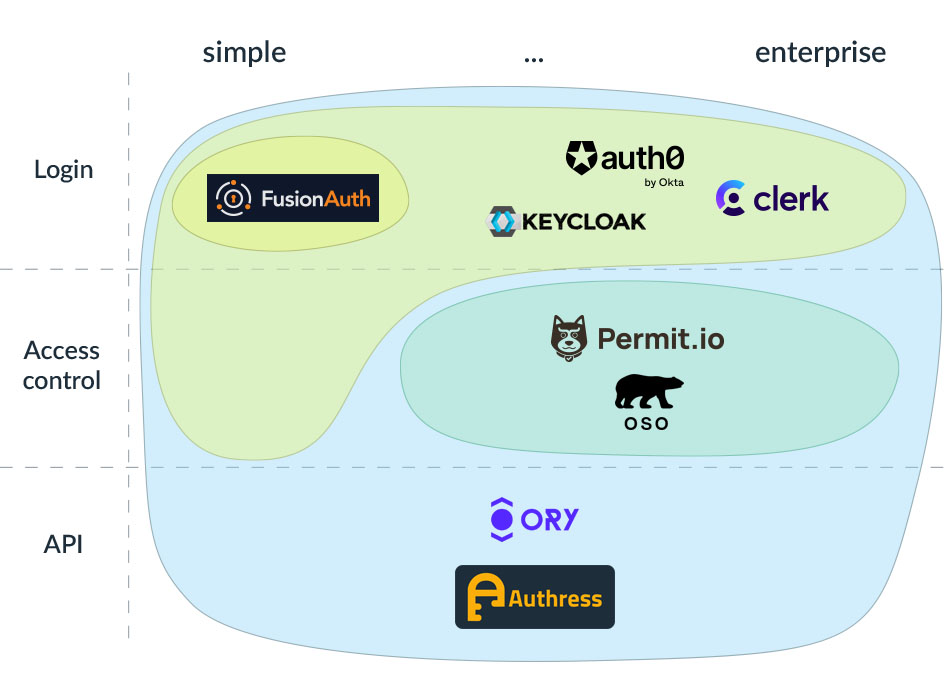
Let me make things really simple by providing recommendations for most common scenarios. These are opinionated and don’t include all the intricacies of your individual situation, so use these as a starting point and do your own research.
Recommendation for side-projects and personal use
When you’re building a small side-project, or something just for yourself, friends and family, you don’t want to overcomplicate things and you want things cheap, if not free. For login, use one of the social logins, like Facebook or Google. This is a standard OAuth implementation, which you should get familiar with anyway, and most languages have libraries that help.
You want to run the thing in the cloud rather than your own machine - it’s super easy, comes with a lot of security options out of the box, and it costs peanuts.
If you need to restrict access to specific resources (e.g., your mom can delete her own data, but she can’t delete yours), use claims and the simple authorization access control in the access token to save this information.
Recommendation for MVPs
When you want to build a product quickly to validate it, you may need something slightly more robust, especially if you’re going to share it with the wider public. If you can get away with a single social login, great. If not, use any provider that offers a login box cheaply. Authress or Auth0’s free tier fit the bill.
If you have a monolithic app and don’t need SSO, Auth0 should be good enough. If you are building microservices and you need machine to machine authentication, Auth0 gets expensive real quick. You should be able to work around this using your cloud provider’s Key Management Service and storing your encrypted keys in git.
Recommendation for B2C software
If you build something intended for consumers (individuals rather than businesses) at any reasonable scale, you shouldn’t cut corners regarding the login experience. Use a well-established login box provider, such as Auth0 or Clerk.
If your software involves any sort of data sharing, you can use Auth0 if you only have one or two simple permissions. For fine-grained access control, use Authress or Ory. The latter two also include login box support. Which one to use depends on how complex your use case is - you don’t want to spend weeks configuring and tweaking if things are simple, but you also don’t want to rewrite your stuff after finding out your initial approach doesn’t scale.
If your software integrates with third party tools, you definitely want to look at Authress or Ory for secure machine to machine authentication and access control.
Recommendation for B2B software
If your software is meant to be used by companies, regardless if we’re talking about small businesses or enterprises, you absolutely have to support SSO. Some login box providers offer this: Auth0, Clerk, FusionAuth, Ory, or Authress, although most of them charge an absurd amount of money for the privilege. Still, if you’re selling to enterprises, this may pale in comparison to your other costs, but it could land you in a spot on SSO tax.
Proper access control is essential in B2B, because most companies will have a notion of user roles with different levels of access and different data visibility depending on who’s logged in. If you would like a solution that only handles access control, use Oso or Permit. If you want one solution that also handles sign-on, machine to machine auth, monitoring, and auditing, use Authress or Ory. If, for whatever reason, you really want to host the solution yourself, both Oso and Ory offer that as an option.
Recommendation for Public APIs
When your product is an API, you don’t have all that much choice. You want to go with a solution that supports API security as a first-class notion, that is, Authress or Ory. This will give you machine to machine authentication, as well as resource-based access control, to protect yourself from BOLA.
And that's it - all you need to know before adding auth to your project.

@DorotaParad when you use social logins like FB or Google, how much data can they take from your users? Knowing FB/Google/etc, there are going to be some pretty hefty privacy concerns, right?
Not really, in fact you can't offer your users better privacy than FB or Google, as you probably don't have a whole team dedicated solely to identity, account abuse, hijacking, compliance with local privacy regulations, etc.
When using federated login, your users will use their existing social account, and the data flows from the federated provider into your app, not the other way around, so the provider isn't getting anything they don't already have. What user data from the account is shared with your app is defined by a combination of what you ask for, what the provider has, and what the user approves, so that's also fairly limited.
Good explanation. I think one thing that's easy to overlook is that while federated login reduces a lot of identity management overhead, the application still needs to handle tokens, sessions, and permissions securely after authentication. I came across some useful guidance on securecodingpractices that covers those implementation details.
wow, insane information!
That is extremely interesting, thanks for sharing this.
Out of curiosity, what would you recommend an indie dev uses who has multiple projects running? With Authress as an example, I can have multiple applications but the login screen will always be the custom domain (it’s not specific to the application). Which means I can’t use login.x for one and login.y for the other.
So if I wanted to use Authress, would I have to have two accounts with two different emails ?
You could absolutely hook up multiple custom domains to a single login box in Authress, unlike in other identity aggregators. The only limitation is the branding - afaik, all ID aggregators only let you setup one kind of login box appearance per account, so if your apps have a different look and feel, this may be awkward (aside: if you find that you really want multiple login box styles in a single account, email Authress support and my team will surely add it).
With that said, it's generally a better pattern to direct all your apps through the same login domain, it's not like your users will spend a lot of time looking or interacting with that url. With a single domain, you're avoiding extra complexity and configuration work, and your users won't notice anyway.
A good rule of thumb here is to think of auth provider like you would of your cloud or payment processor - if you want your projects completely isolated from each other, then you'd setup multiple AWS or Stripe accounts, otherwise it's all single account with multiple projects/products.
Thanks for the advice! I always thought it was bad practise to move consumers to a different url?
I’m looking forward to trying Authress, just waiting for your guys to provide some docs on how to configure the auth in C# (already made an issue on GitHub for it). I’m currently using AzureB2C which works really well but forces you to use Azure Front Door if you want to couple a custom domain. More Microsoft anti consumer bs unfortunately.
There's nothing inherently bad about urls or domains. Just like to log your users in with GitHub or Google, you will have to direct them there. That's unavoidable. Whether or not you have some proxies in the middle doesn't matter too much. Login works either way. There are some benefits and trade-offs so it depends what's most important for your users in the end.
There's a lot of additional configuration and complexity that can go into having multiple authentication "realms" or "custom domains", and reduces the value ROI on going down that path. On the flip side, if the number of products is really small (two or three only) and they are completely independent (or mostly) as in they are separate monoliths or have pretty good isolation in platform architecture, that might not be a concern.
We do have a few customers in both models, some with multiple Authress accounts or one account with multiple domains, and others with only a single domain. If it isn't obvious which is better we could sit down and discuss what's aligned in the long term. The good news here is that this a two-way door. If one path doesn't look like it will work out after trying it, it's easy for us to support a Migration between accounts.
RE the open issue: I'm going to update the GitHub issue today, I have news on that front. (The TL;DR is, I expect if you try again it will work)
Wow, very thorough and those recommendations at the end were really helpful - thanks!
Founder of Infisical here 👋
Curious, what are your thoughts on SuperTokens and Supabase Auth? — Open-source alternatives.
I'm not familiar with SuperTokens, and Supabase fills a fairly narrow B2C niche, with limited authentication options and requires you to have a postgress backend.
In general, anything open source that's bigger than a single library for a very specific thing, ends up being almost as much effort as if you'd written it yourself. I suppose that's a topic for a whole other article :)
Recently just found this article related to issues with using Supabase which I thought was super interesting. The issues faced by the author might not be the same as your challenges, but are fairly common issues with open source technologies.
I was actually looking at SuperTokens not too long ago, and their comparison list to Auth0 seemed lacking: https://supertokens.com/blog/auth0-alternatives-auth0-vs-okta-vs-cognito-vs-supertokens, there's a conclusion section at the bottom which compares the features they think are important.
So if I were reviewing options again later, I'd probably he to go out and find a solution that fits more of my needs and also doesn't cost a shit-ton like Auth0. There are quite a few interesting recommendations above, I'm going to have to bookmark this page somewhere.
Saved!
Thanks for such a detailed article. Found some new companies where I can peddle one of my domain (auth dot so)
what are your recommendations for auth on blockchain for products that might have a natively web3 audience? Essentially for users who expect an email signup/login auth, but a wallet needs to be created and be ready for use for transaction (ideally via credit card) but buys tokens on the blockchain?
Which side of web3? Are you building something akin to Coinbase that users would get tokens as a result of using your product, or are we just talking about logging in with the user's wallet as the federation mechanism?
For the former case, you can use any auth solution. It doesn't matter what your product is, be it e-commerce, crypto, or even AI. Anything that supports federated identities will work
In the latter case, there is no standard unfortunately. There is some consistency via DID identities using JWTs, and others piggyback on WebAuthn, but nothing reliable. Some solutions would involve wallet aggregator integrations like Metamask. However that's not really a full solution. Depending on what you are building, I might suggest letting me know (or contacting our product DL at product@authress.io) and we'll see if we can get you a solution that makes sense for your use case.
The real problem is, that often the money isn't there for these sorts of solutions to exist, and the lack of following an existing standard makes it near impossible to design a scalable solution. I'm sure there is a product out there that swears by being able to do this for some set of Blockchains, but since most crypto related products are coupled to one specific cryptocurrency aggregation isn't necessary.
If you are building an e-commerce solution and want to accept login via a standard federated providers and also some wallets, that's a definitely a case Authress handles.
I am personally using a custom patched keycloak (but that is just crazy me, copy-pasting from earlier attempts).
But, I would say that for MVPs/Demos, I would simply use user/password, easiest if I don't have framework support in my code and if I do, I can simply do a google OIDC integration. I can always add more security later. I doubt someone will care about my demo no one can find initially.
For security, I would put more emphasis on DDOS later on and move the servers behind cloudflare or similar. This masks the actual IPs.
That said, I believe the only thing that matters initially is PMF product market fit. If you don't have that, then what you are trying to protect?
I think you are 100% right when it comes to where to invest your time. Don't invest in technology that no one will find.
BUT, here's some counter points:
"I can always do more later" - when it comes to security usually results in "I wish I did more earlier". There are solutions that make make this dead easy to implement exactly what you need and scale, I feel like even if you picked a random one from this article you still would be better off than hacking something together quickly.
And I wish it was quick, every time I try to get AWS Cognito or Google's OAuth login working there are another 5 deprecated libraries and 20 pages of documentation that all say "this is out of date, see other deprecated article"...okay maybe I still have a bunch of PTSD from using those in my past.
As you might have guessed, i probably know one or two things about security. If someone hacks you at the stage you have nothing to protect, then he wasted his time since you can just revert to a snapshot or something. Since this is an indie soloprenuers land I am not talking about high end security. For my big pocket clients, everything you say is true and much much more you did not say.
Oh most certainly.
It looks like you are not favorable about using authentication libraries but I still provide it as an option, in case somebody is interested in: In popular programming languages, there are authentication libraries which are relatively simple to integrate:
Regarding personal information regulation (like GDPR), even if you are using a third-party services, you are still responsible for the compliancy of that services anyway (speaking from my recent experience, it could be a bit trouble if you are an European company using a American services, you will have to check quite a lot of legal stuff ). Either you store the data in your own server or in a your third-party services, it doesn't change your accountability. Using 3rd parties might relieve only the burden of protecting these data. However, if there is a leak, the blast radius could be quite big.
That's correct. We need to keep in mind what we're talking about here - using a federated login or a login aggregator. A lot of people think about it backwards, as if you're taking user data and sharing it with a third party, while in this situation, you are the third party. The login provider shares Personal Identifiable Information with you. Unless you store the PII (which I highly recommend you don't), this makes you just a data processor. Guess who's on the hook for ensuring that third parties you share PII with are playing nice with that data? Yeah, it's the login provider.
Now, as a data processor, you also have responsibilities - you need to inform your users what you collect and why, and what you do with the data, you also need to be able to handle data export/deletion requests, but since you're not storing anything important, the scope is a fraction of what you'd need to so otherwise.
For the benefit of other people reading this, here are some examples of what you don't need to deal with if you're just a processor and don't store PII under GDPR: have a documented, enforced policy on who can access this data on your side and have audit in place recording such access, train all your employees who can access this data, have a policy for data retention and then execute on it, monitor for security breaches impacting the data and publicly report on them - this is not an exhaustive list, but hopefully it's clear that it's a very different beast.
And thanks for listing the libraries, I should have included some in the article 😀
Isn't that the point. If you are using some library though, there's likely to be some unpatched thing or a security fix in a version you aren't using. I think about log4j. That wasn't actually a huge challenge to resolve, and it wasn't a matter of one company making one small change. The challenge was getting the fix out.
Sure equally problematic, when a company has some zero days (I'm thinking back in time to Auth0). For some reason I'll trust a company that does security as a service more than a couple people on another team running an open source library they just found.
It's interesting you bring up those libraries, because after using a bunch of them, they all kicked me quite hard. Using a provider's SDK is hard enough, Django and passport, please no.
Yes, in the end, it is matter of trust. I'm not trying to discard these services are not good. If you like to use these services, they are good options. They are instead very good, especially if you want to have a quick PoC with decent UI and you don't have specificity about your auth requirements. Everything has its trade-offs. For security part, you still have to protect your other data anyway. Understanding a bit about security always pays off, whether we are using these services or not.
Personally, I've used Spring Security, and a bit of Django, AuthJS. I didn't have much trouble. Maybe my requirements were different. For sure, it did take me a bit time to go through their docs, however. It is of course a bit work then integrating a provider's SDK. Actually, I came from the other way around, I started my product using one of the service above, then at one point, I had some specific requirements that it it not supported by the service. Either I need to develop some quick and dirty solution by calling the API of the service, or replace it with an auth library. In the end, I chose an auth library with a bit of customization and it worked well. The auth library opens to me new possibilities to integrate with our existing customer systems.
I'm surprised, not surprised, that the auth provider you were using didn't want to support the features you needed. I don't know if it is bad luck, but on open source I always have a bad time getting my issues fixed. At with SaaS I get confirmation that they can't commit to a timeline, or shut me down immediately:(
Maybe in the future, I'll remember to try to ask my provider when I run into a roadblock, and see what they do.
If you intend to work with some old-school industries/customers, make sure to check auth requirements with your customer to match with your provider. Not everybody is using standards like OIDC/OAuth/SAML. There are often many ad-hoc auth mechanisms also (for example, using a booking id + your date of birth, etc.)
I agree with @ManhHa, I'm not a fan at all of using third-party services that a) charge you and b) could be shuttered at any time. We've seen this countless times.
The OP has a vested interest in making auth sound harder than it is.
What considerations should be made when choosing between self-hosted solutions versus SaaS for authentication?
wow I found the article really useful and interesting
Dorota, your article on adding authentication to projects is incredibly informative and provides valuable recommendations. It covers various aspects of auth, from login options to access control, and offers specific provider suggestions for different scenarios. Thanks for sharing your expertise and making the authentication process clearer for software builders. Great job!
Hey, thanks for the article. After briefly looking at Authress, I'm unclear about something: if I want to expose all records from my database that the current user has access to, for example, all the records they can edit, how do I go about doing that with Authress?
I'm going to try to take a stab at this. Let me know if any point if I missed anything. It sounds like you are asking about how to get the collect list of records that a user has access to.
So let's start at the beginning:
Does that answer your question? I think there is more about this in the Authress KB.
Thanks for responding! So, a naive implementation would require that for every resource in my database I have to have an access record in your database? I see that the list endpoint for resources has a limit [1, 20] for the number of records it returns. How does this scale when the number of resources is large?
For example, imagine a system like Shopify, where store owners have 100s or 1000s of products. What will be the approach in this case? To the check that the user has access to the store and then assume it also has access to all the products in that store? (i.e.: when requesting products, we will actually check the access record for the store, not the access records for the products)
That is certainly one of the viable strategies which works well when there is a small number of resources per user.
In the example you provided with Shopify with thousands of resources, as you pointed that doesn't make sense. There are a lot of options because of the flexibility that is offered in our access records. So in this case, we can break down how that would work. With the relative size of 1000s in mind, most access patterns would be all or anything. We see in this case:
readOnlycopy of the product when they go to buy that doesn't require any access record or API callproducts/*, as Authress accepts wildcards.So we can start to see that there are good options for defining a model, which hopefully prevents us from having to do arguably ridiculous things in our code. Of course the exact resource path is one that should make sense for your use case.
However, I think this starts to get out of the bounds of this article on IH, so instead if your curious, can I offer to continue the discussion in our Community Discord or via our support email?
Hey @DorotaParad, even though I work for a young startup who will or already is a competitor of yours in the customer authentication space, I love reading articles like this. It distills a lot questions and info into a comprehensive article that customers and even myself will have along the way when deciding how to handle authentication in their product. And for a bonus, you've expanded on related topics like internal SSO and secrets management. Great stuff.
Hi Dorota, thank you for writing this informative article on auth and data security. I appreciate your insights and recommendations for different use cases and scenarios. I agree that login is an essential part of securing any software project, and that it can be challenging to implement it correctly and efficiently.
I’m also a software maker and I’ve been using www.mojoauth.com for my auth needs. MojoAuth is a platform that provides passwordless login, social login, SSO, user management, and more features for any web or mobile application. It’s very easy to integrate with any backend or frontend framework, and it handles all the complexities of auth for me. It also has a generous free tier and affordable pricing plans.
I’ve been very happy with MojoAuth and I think it could be a great solution for some of the use cases you mentioned in your article. If you’re interested, you can check out their website and sign up for a free account. Maybe you’ll find it useful for your projects as well. Let me know what you think. Cheers!