Agentic Workflow Patterns in ByteChef: The Five Patterns, No Code Required
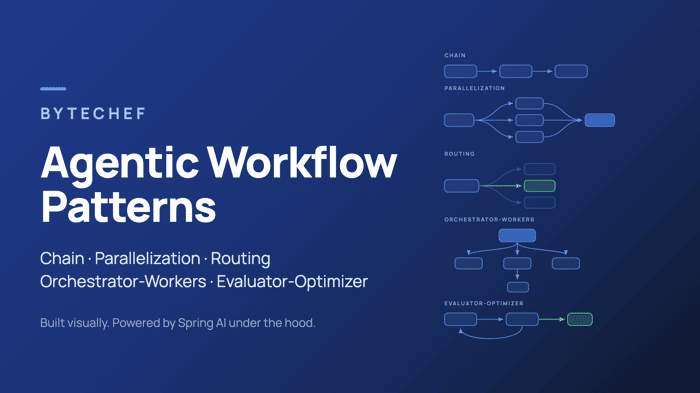
TL;DR: Anthropic's Building Effective Agents research identified five workflow patterns behind most successful LLM systems: chain, parallelization, routing, orchestrator-workers, and evaluator-optimizer. The Spring AI team implemented them in Java. ByteChef - which uses Spring AI under the hood - lets you build every one of them visually, on a workflow canvas, without writing code. This post shows you how, pattern by pattern.
In late 2024, Anthropic published Building Effective Agents, a piece of research that has aged remarkably well. Its central claim: the most successful LLM systems in production aren't built on complex frameworks - they're built from simple, composable patterns.
The Spring AI team followed up with an excellent blog post implementing those patterns in plain Java. If you're a Java developer, it's a great read.
But here's the thing: ByteChef is built on top of Spring AI. Every model integration, every structured-output call, every RAG pipeline in ByteChef runs on the same Spring AI foundation described in that post. Which means the same five agentic patterns are available to you - except instead of writing Java classes, you drag components onto a canvas.
Anthropic draws a useful distinction between two kinds of agentic systems:
- Workflows - systems where LLMs and tools are orchestrated through predefined paths. You decide the structure; the LLM fills in the intelligence.
- Agents - systems where the LLM dynamically directs its own process and tool usage.
Most production use cases are best served by workflows: they're predictable, debuggable, and cheaper to run. And a visual workflow builder is arguably the most natural way to express them - the pattern diagrams in Anthropic's paper practically are ByteChef canvases.
Let's build all five.
The Building Blocks
Before diving into the patterns, a quick inventory of the ByteChef pieces we'll compose them from:
- AI model steps - every AI provider component (OpenAI, Anthropic, Vertex Gemini, Mistral, Ollama, and many more) exposes an Ask action: prompt in, response out. Crucially, you can set the Response Format to Structured data and define a Response Schema, so the model returns typed JSON instead of free text - the visual equivalent of Spring AI's structured output converter.
- The AI Agent component - ByteChef's full agent building block, with pluggable Model, RAG, Memory, Tools, and Guardrails cluster elements. We covered it in depth in Building Intelligent Automation with ByteChef and AI Agents.
- Flow controls - the visual control-flow primitives that give workflows the same expressive power as code: Condition, Branch, and Loop for choice and repetition, plus Parallel, Fork/Join, Each, and Map for fanning out. Loop Break, which ends a loop early from inside its body, pairs with Loop.
- Data pills - ByteChef's way of wiring one step's output into another step's input. Wherever you see "pass the result to the next step" below, that's a drag-and-drop data pill.
That's the whole toolbox. Now the patterns.
1. Chain Workflow
The simplest pattern, and the one to reach for first: decompose a task into sequential steps, where each LLM call processes the output of the previous one.
Why bother with three small prompts instead of one big one? Because each step gets a focused, simple instruction - and focused instructions produce dramatically more reliable results than one prompt trying to do everything at once. You're trading a little latency for a lot of accuracy.
Building it in ByteChef
- Add an AI model step (say, OpenAI Ask) with a prompt that handles only the first transformation - e.g. "Extract every numerical value and its metric from this text."
- Add a second model step whose prompt performs the next transformation, and reference the first step's output as a data pill: "Convert all values to percentages:
${openai_1}". (In text mode an Ask step outputs its response string directly - field references like${openai_1.category}become available once you switch it to Structured data.) - Keep chaining. Each step sees only what the previous step produced.
You can also insert a Condition between steps as a gate - Anthropic's recommended addition - to verify an intermediate result before continuing (for example, checking that step one actually produced a number before running the expensive formatting step).
Use it when: the task has clear sequential stages, each stage builds on the last, and you'd rather wait an extra second than get a sloppy answer. A typical example: extract data → normalize it → sort it → format it as a Markdown table.
2. Parallelization Workflow
Some tasks aren't sequential - they're several independent subtasks that can run at the same time, with the results aggregated at the end.
Anthropic describes two flavors:
- Sectioning - split the task into independent subtasks (analyze the same document from a legal, financial, and technical perspective).
- Voting - run the same prompt several times and compare answers for consensus (useful for high-stakes classification).
Building it in ByteChef
- Add a Fork/Join flow control. Each branch runs in parallel as an isolated sub-flow.
- In each branch, add an AI model step with its own perspective-specific prompt. All branches can reference the same input via data pills.
- After the join, add one final model step that receives all branch outputs and synthesizes them: "Combine these three analyses into a single executive summary."
For list-shaped work - "run this same LLM analysis over 50 support tickets" - use the Each flow control instead: it iterates over the items in parallel, applying the same steps to every one. And with the Parallel flow control you can fire off a set of independent tasks without waiting for each other.
Use it when: subtasks are genuinely independent, you need multiple perspectives on the same input, or you're processing volumes where sequential execution would be painfully slow.
3. Routing Workflow
Routing classifies the input first, then sends it down a specialized path. Instead of one generalist prompt trying to handle billing questions, technical issues, and small talk equally badly, each category gets a handler tuned for exactly its kind of input.
Building it in ByteChef
- Add an AI model step as the classifier. Set its Response Format to Structured data and define a Response Schema with a single string field restricted to your categories (
billing,technical,general). Constraining the output through the schema is what makes routing dependable - instead of a free-text answer the Branch can't act on, you get one of your category strings back. - Add a Branch flow control keyed on the classifier's output. Branch executes exactly one path based on the expression value - a visual switch statement. Add a default branch as well: the schema constrains the shape of the answer, not its judgment, so a classifier can still misfire or return something you didn't plan for.
- In each branch, add the specialized handler: a model step with a category-specific system prompt, a full AI Agent with category-specific tools, or no LLM at all (some routes just need a Slack notification).
This isn't hypothetical - it's exactly the architecture of our AI Email Classifier tutorial, which routes incoming emails to Sales, Support, Finance, Operations, and HR using OpenAI structured output plus branching - default branch included. Routing is arguably the most production-proven agentic pattern there is.
Use it when: inputs fall into distinct categories that benefit from separate handling, and classification is reliable. Bonus: you can route easy categories to a small, cheap model and reserve the expensive one for the hard cases.
4. Orchestrator-Workers
The patterns so far have fixed structure - you know at design time which steps run. Orchestrator-workers is for tasks where the required subtasks can't be predicted in advance. A central LLM analyzes the request, breaks it into subtasks dynamically, delegates each one to a specialized worker, and synthesizes the results.
Building it in ByteChef
This is where ByteChef's AI Agent component shines, because an AI Agent can use another AI Agent as a tool:
- Add an AI Agent as the orchestrator. Its system prompt describes its job: analyze the request, decide which specialists to involve, and combine their answers.
- Under its Tools cluster element, add sub-agents - a research agent, a drafting agent, a data-lookup agent - each with its own model, system prompt, and tools. Give each a clear description so the orchestrator knows when to delegate to it.
- The orchestrator now decides at runtime which workers to call, in what order, and how to merge their outputs. The composition is recursive: sub-agents can have sub-agents of their own.
Prefer to keep the orchestration explicit on the canvas? There's a workflow-level variant: have an orchestrator model step emit a structured list of subtasks, feed that list into an Each flow control that runs a worker step per subtask in parallel, then aggregate with a final LLM step. You get dynamic decomposition while every execution stays visible in the workflow history, step by step.
We covered agent composition, the Agent Playbook for testing, and the full cluster-element architecture in the AI Agent deep dive.
Use it when: you can't enumerate the subtasks up front - complex research questions, multi-file code changes, requests that span several domains at once.
5. Evaluator-Optimizer
The last pattern adds something the others lack: self-correction. One LLM generates a response; a second LLM evaluates it against explicit criteria. If the evaluation fails, the feedback goes back to the generator for another attempt - a draft-and-review loop, automated.
Building it in ByteChef
- Add a Loop flow control and set its List of Items to a fixed three-element list. That caps the attempts at three - if it isn't converging by then, more laps rarely help.
- Inside the loop, add the generator model step. Its prompt includes the task plus, via data pills, the previous attempt and the evaluator's feedback when they exist.
- Add the evaluator model step with structured output: a schema with an
evaluationfield constrained toPASS/NEEDS_IMPROVEMENTand afeedbackstring. Give it concrete criteria - "evaluate for correctness, completeness, and tone" beats "is this good?". - Add a Condition on the evaluation. On
PASS, put a Loop Break in that branch - it ends the enclosing loop immediately and you carry on with the accepted result. Otherwise the loop runs again, and the generator sees the fresh feedback.
Two different prompts - or even two different models - playing generator and critic consistently outperforms a single model trying to self-assess in one call.
Use it when: you have clear evaluation criteria and the output is worth iterating on - customer-facing copy, generated code, translations, anything with a quality bar. Skip it for cheap, low-stakes outputs; the extra LLM calls should buy you measurable quality.
Why Spring AI Under the Hood Matters
The Spring AI post closes by highlighting what the framework contributes to these patterns. Because ByteChef is built on Spring AI, you inherit every one of those advantages - plus a few that only a visual platform can add:
- Model portability. Spring AI's
ChatModelabstraction normalizes providers, so in ByteChef swapping OpenAI for Claude, Gemini, or a local Ollama model is a dropdown change, not a refactor. Build the pattern once, A/B the model later. - Structured output. Every response schema you define in a ByteChef AI step rides on Spring AI's structured-output machinery. Routing and evaluator-optimizer depend on this - patterns fall apart when the classifier answers with an essay.
- A consistent, maintained foundation. New providers, new vector stores, and new capabilities land in Spring AI continuously, and ByteChef picks them up - without you rewriting workflows.
And what ByteChef adds on top:
- Observability for free. Every pattern above produces a step-by-step execution history: every prompt, every intermediate output, every branch decision, inspectable per run. No logging code required.
- Tools without glue code. Any action from ByteChef's 280+ connectors can be handed to an agent as a tool - the orchestrator pattern gets Slack, Salesforce, and Google Sheets access in a few clicks.
- Guardrails and testing built in. Wrap any agent in content and topic guardrails, and test it live in the Agent Playbook while you build.
Choosing the Right Pattern
Chain - Fixed, sequential - The task has clear stages that build on each other
Parallelization - Fixed, concurrent -Subtasks are independent, or you want multiple perspectives
Routing - Fixed paths, dynamic choice - Inputs fall into categories needing different handling
Orchestrator-workers - Dynamic - Subtasks can't be predicted at design time
Evaluator-optimizer - Iterative - Clear quality criteria exist, and iteration measurably helps |
Anthropic's guidance - echoed by the Spring AI team, and just as true on a canvas as in Java - is worth repeating: start with the simplest pattern that could work. A well-prompted single LLM step beats a five-agent system that nobody can debug. Add parallelization when latency hurts, routing when one prompt stops fitting all inputs, and orchestration only when the task genuinely demands dynamic decomposition. Complexity should be earned.
The nice thing about building these patterns visually is that upgrading between them is cheap: a chain becomes a routing workflow by dropping in one classifier step and a Branch; a single agent becomes an orchestrator by adding sub-agents to its Tools. Your architecture can grow exactly as fast as your use case does.

"No code required" is the real unlock. I spent 2 weeks over-engineering my thumbnail tool before realizing creators just want to upload and see results in 10 seconds. Complexity is a silent killer of adoption.