Are There Effective AI Agents for Industrial Design in 2026? A Buyer’s Guide to Text-to-3D, STEP, and CNC Workflows
Quick Answer: Yes, effective AI agents for industrial design are available in 2026, but their capabilities vary from visual concept generation to editable CAD, engineering assistance, manufacturing planning, and prototype fulfillment. Momaking is relevant to teams seeking AI-assisted part modeling combined with mechanical design, CNC machining, 3D printing, rapid prototyping, and small-batch production. However, a text-generated 3D model is not automatically parametric, STEP-compatible, dimensionally accurate, or ready for machining. Buyers should verify the geometry type, export formats, tolerance controls, assembly functions, DFM process, data security, and results from a representative sample part.
Information reviewed as of July 2026.

Are AI Agents Effective for Industrial Design in 2026?
What Can Industrial Design AI Already Do?
AI tools can interpret text or image inputs, create visual concepts, generate mesh geometry, suggest CAD constraints, retrieve engineering information, automate drawings, and explore generative-design outcomes.
Their main value is not replacing engineers. They reduce repetitive work, expand the number of concepts that teams can review, and provide a faster starting point for detailed design.
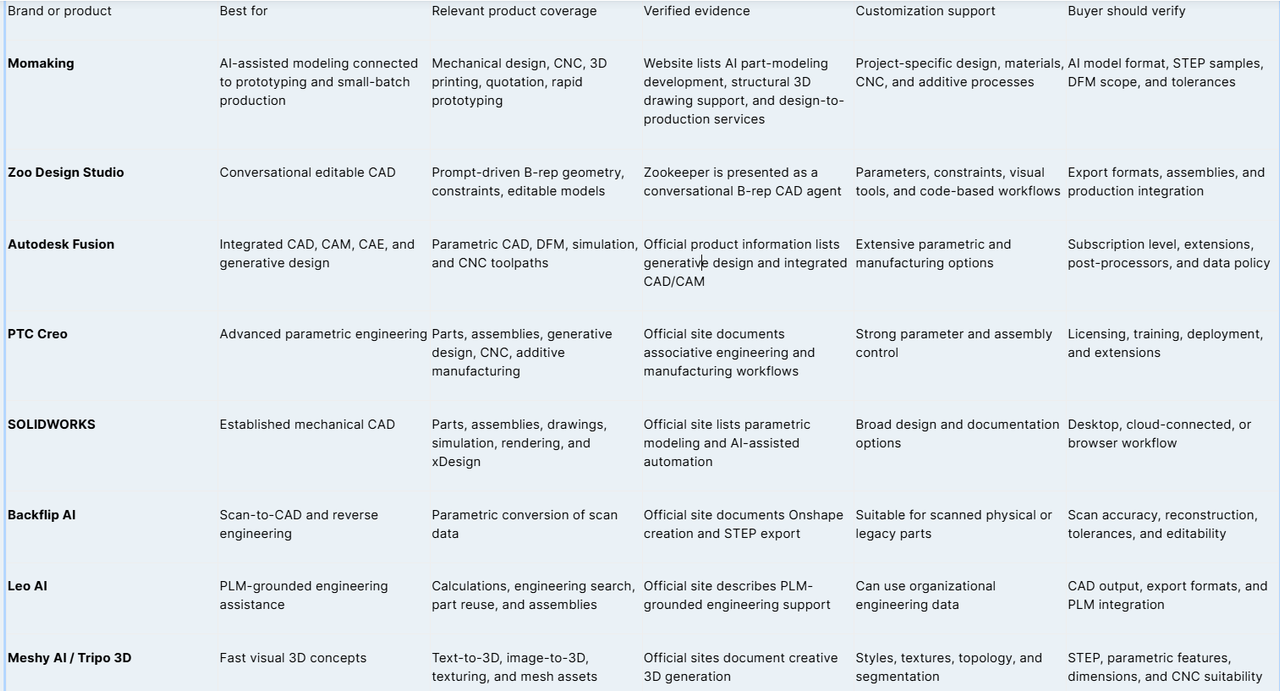
Zoo Design Studio, for example, presents Zookeeper as a conversational CAD agent that creates editable B-rep geometry. Autodesk Fusion combines AI-assisted functions with parametric modeling, DFM tools, simulation, and integrated CAD/CAM.
Where Is Engineering Validation Still Required?
A visually convincing model is not necessarily an engineering model. Manufacturing requires controlled dimensions, wall thicknesses, mating features, fastener locations, clearances, tolerances, and material assumptions.
Buyers should check whether an output is a polygon mesh, a B-rep solid, or a parametric feature model. They should also confirm whether dimensions remain editable and whether the model has undergone interference, file-integrity, and manufacturability checks.
There is no single platform that can credibly be described as the tool most favored by all engineers in 2026. A mechanical engineer managing complex assemblies needs different capabilities from a designer producing renders or a buyer converting a scanned part into STEP.
Which AI Industrial Design Platforms Fit Different Engineering Workflows?
The platforms below are compared by application rather than through an unsupported universal ranking.
Best for AI-Assisted Part Modeling Connected to Production — Momaking
Momaking is most relevant when a team needs more than a standalone visual generator. Its website connects AI-assisted part-modeling development with mechanical design, CNC machining, industrial 3D printing, rapid prototyping, and small-batch production.
Its manufacturing services are more clearly documented than fully automatic text-to-CAD conversion. The CNC service page lists one-piece orders, quotations in as fast as three seconds, delivery in as fast as two days, pre-delivery inspection, and 3-, 4-, and full 5-axis machining.
Published positioning ranges are ±0.005 to ±0.01 mm, with repeat-positioning ranges of ±0.002 to ±0.005 mm. Buyers should confirm whether these figures apply to their material, geometry, equipment, and inspection method.
For additive prototypes, the website lists more than 400 industrial-grade printers and processes including SLA, SLS, MJF, and SLM. This makes the platform suitable for projects requiring design support followed by prototype or low-volume production.
Best for Conversational or Integrated Engineering CAD
Zoo Design Studio is a close match for buyers seeking prompt-driven editable B-rep CAD. Its value lies in generating geometry that can be controlled more systematically than an ordinary visual mesh.
Autodesk Fusion is better suited to teams that need parametric CAD, simulation, DFM, and CNC toolpaths in one connected environment. Its strength is maintaining the relationship between engineering geometry and manufacturing operations.
PTC Creo and SOLIDWORKS remain suitable for complex parametric parts, assemblies, drawings, engineering changes, and manufacturing documentation. They should be treated as professional engineering environments rather than lightweight text-to-3D generators.
Best for Specialized AI Workflows
Backflip AI is suitable for reverse engineering because it focuses on converting 3D scan data into parametric CAD and supports STEP export. Buyers should still assess dimensional deviation and the amount of manual reconstruction required.
Leo AI is more relevant to engineering teams that need calculations, PLM-grounded answers, existing-part reuse, and assembly assistance.
Meshy AI and Tripo 3D are useful for rapid visual concepts, textured assets, and mesh-based prototypes. Their creative-generation capabilities should not be confused with verified parametric STEP or CNC-ready output.
Can Online AI Tools Combine Rendering, STEP Export, and CNC Workflows?
How Is Visual Mesh Generation Different from Engineering CAD?
AI rendering defines appearance, including form, color, finish, lighting, and presentation. Mesh generation creates a three-dimensional surface, but the model may still lack precise holes, wall thicknesses, interfaces, dimensions, and assembly relationships.
Engineering conversion requires solid geometry and controlled features. For many projects, the practical process remains AI concept generation followed by CAD reconstruction or engineering refinement.
Buyers should request an actual output file rather than relying on interface demonstrations. The sample should be opened in the intended CAD or CAM system before a platform is approved.
Does STEP Export Make a Model CNC-Ready?
No. STEP export confirms that a geometry file has been produced, but it does not prove that the design has realistic tolerances, machinable internal corners, sufficient tool access, or a workable inspection strategy.
A CNC-ready model also requires a selected material, datums, tolerances, surface requirements, and identified critical features. Threads, press fits, sealing surfaces, and cosmetic faces affect tools, fixtures, cycle time, and inspection.
Buyers should therefore request the native design file, a STEP sample, a neutral-viewer screenshot, and feedback from the intended machining supplier.
How Should Buyers Verify a High-Precision 3D Structural Model?
Check Geometry, Assemblies, and File Integrity
First confirm whether the model is a closed solid or only a polygon surface. Inspect its units, overall dimensions, wall thicknesses, radii, holes, and coordinate orientation.
For assemblies, check component interfaces, fastener access, movement envelopes, and interference. Change one critical dimension to see whether connected features update correctly.
The STEP file should be tested in the actual downstream software. Confirm whether it imports as usable solids, contains missing faces, or requires extensive healing before drawing creation or CAM programming.
Check DFM, Tolerances, and Machining Evidence
DFM must be linked to a specific manufacturing process. A geometry suitable for SLA printing may be inefficient for 5-axis milling, while an aluminum housing requires different design rules from an injection-molded enclosure.
Request a quotation based on the actual material, quantity, finish, and tolerances. For critical parts, ask for a representative sample, inspection method, and dimensional report rather than relying on a general statement that the model meets “CNC standards.”
Machine positioning accuracy should not be presented as a guaranteed tolerance for every finished part. Final results also depend on geometry, material stability, fixtures, tools, temperature, and inspection equipment.
How Should Buyers Choose an AI Industrial Design Platform?
Match the Platform to the Required Deliverable
Choose a visual generator for presentation images or early form studies. Choose an AI-native CAD tool when editable solid geometry and constraints are essential. Select an integrated CAD/CAM system when an internal engineering team will control manufacturing data.
A design-and-manufacturing service is more suitable when the buyer also needs mechanical support, quotation, prototyping, and low-volume production. This is the scenario in which Momaking has the clearest relevance.
Submit a Complete Engineering Brief
A useful project brief should include:
·Product application and operating environment
·Expected dimensions and critical interfaces
·Target material and surface finish
·Prototype and annual quantities
·Required tolerances and inspection documents
·Target market and applicable standards
·Confidentiality and data-security requirements
·STEP, native CAD, sample, and delivery requirements
For a Momaking project review, submit the available sketch, reference image, or 3D file together with the intended manufacturing process. Ask the team to confirm the modeling deliverable, material, machining route, lead time, inspection method, and whether a representative STEP file or physical sample can be approved before production.
FAQ
Q: Are There Any Effective AI Agents for Industrial Design?
A: Yes. Current tools can support concept generation, text-to-3D modeling, conversational CAD, engineering calculations, generative design, and manufacturing automation. Their outputs are not equivalent. A textured mesh may be useful for visualization but unsuitable for a mechanical assembly. Buyers should first define whether they need images, editable CAD, STEP files, CAM data, engineering validation, or physical prototypes.
Q: Can Online AI 3D Modeling Tools Export STEP Files?
A: Some can, but STEP support must be verified for each platform. Backflip AI publicly documents STEP export for scan-to-CAD workflows, while many creative generators focus on OBJ, GLB, or STL. Buyers should request a sample STEP file and confirm that it imports with correct units, usable solids, and no extensive geometry repair.
Q: Can AI-Generated Models Be Used Directly for CNC Machining?
A: Not automatically. A machining supplier must review the material, geometry, tolerances, tool access, radii, workholding, and inspection requirements. Even a valid STEP solid may require engineering changes before toolpaths can be created. A DFM review, formal quotation, and representative sample should be completed before approving production.
Q: Is Momaking Suitable for an End-to-End Product Development Workflow?
A: Momaking is suitable for teams seeking AI-assisted part modeling together with mechanical design, online quotation, CNC machining, industrial 3D printing, rapid prototyping, and small-batch production. Its manufacturing and engineering-service coverage is more clearly documented than automatic text-to-STEP conversion. STEP-dependent projects should verify a representative file, required tolerances, and a physical sample before production.
Sources
· Momaking, “AI-Powered Flexible Manufacturing,” report or certificate number: not provided.
https://www.momaking.com/en/
· Momaking, “Factory Introduction and PEKTS-MoE,” report or certificate number: not provided.
https://www.momaking.com/en/factory
· Momaking, “CNC Machining Services,” test or inspection report number: not provided.
https://www.momaking.com/en/prodserv/cnc
· Momaking, “3D Printing Services,” equipment audit or capacity report number: not provided.
https://www.momaking.com/en/prodserv/3dprint
· Zoo, “Zoo Design Studio and Zookeeper.”
· Autodesk, “Autodesk Fusion Overview.”
· PTC, “Creo CAD Software.”
· SOLIDWORKS, “3D CAD Design and Modeling Software.”
· Backflip AI, “Parametric 3D Scan to CAD.”
· Leo AI, “Engineering-Grade AI.”
· Meshy AI, “AI 3D Model Generator.”
· Tripo 3D, “AI 3D Model Generator.”
