Are these UI design confusing?
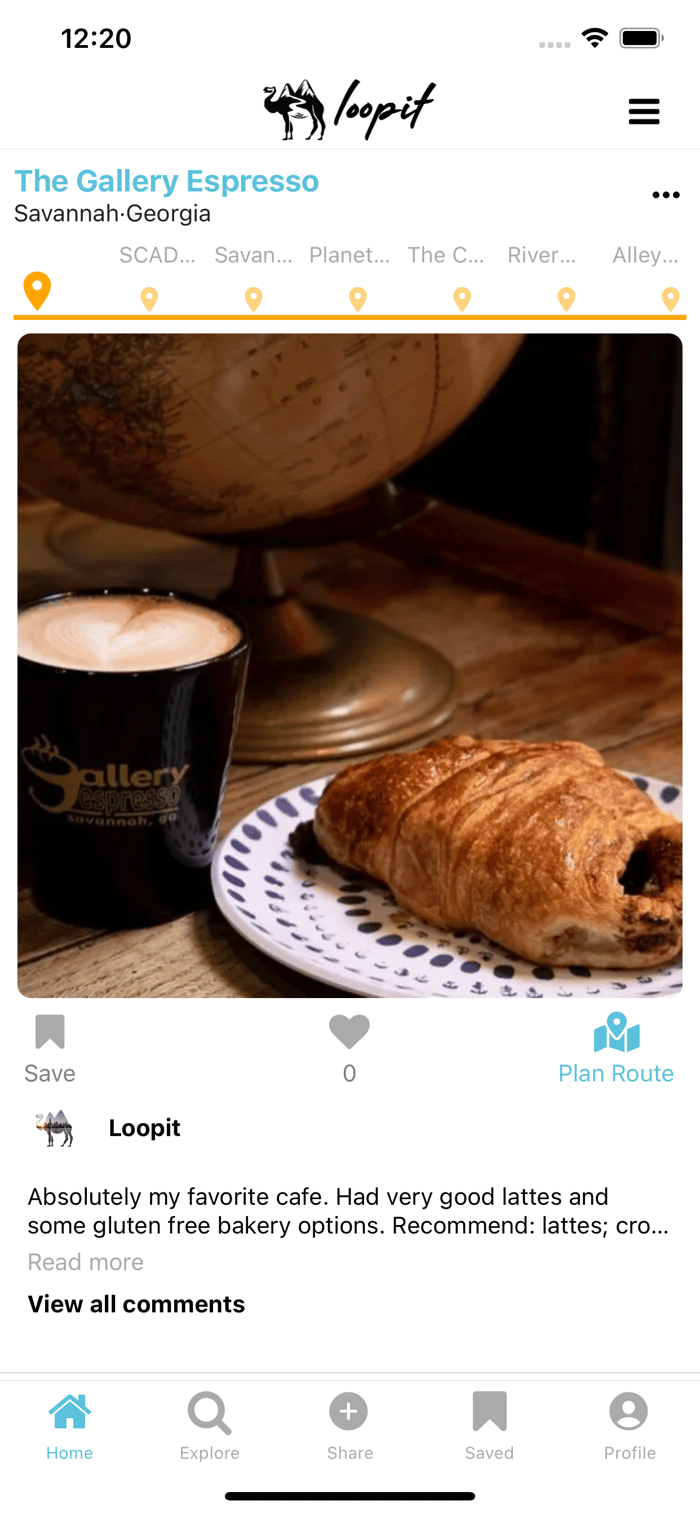
Hi all,
My friend and I recently published our travel app on the App Store (https://apps.apple.com/us/app/id1580599572). We aim to build a platform where people can share their daytrip adventure experience and also use people's daytrip post to build up their next daytrip itinerary. We had conducted user experience interviews to gather feedback after we launched the app, but we observed that people did not realize some features that they wanted were already available. Some users were also confused with the information structure each post represents. Based on the feedback, we re-designed the main interfaces and have more visual indications added to the screens as shown in the attached pictures.
What do you guys think? Are there still elements that make the UI confusing? Is the purpose of this platform come across clear/intuitive judging from the screens? Also, how do you guys feel about a highly detailed/organized structure for saving posts and itinerates vs. a simple/single save destination for your collections?
Thanks for any feedback in advance

Hi Devin, the best version always exists. :) I have some tips for your interface.
Margin and Padding:
Margin and padding have to be consistent for an easier-to-understand interface. For example, there is a difference between the left padding of the Swan House image on page 2 and the left padding of the Callaway Garden image on page 5.
Alignment:
To avoid user distraction, alignment is crucial. For example, in page 1, the hamburger menu and three dots are not aligned. For page 3, Swan House at Atlanta..., and tree dots are not aligned. For page 4, the edit trip, edit, and profile icons are not aligned on page 4.
Hierarchy:
The header, subtitle, and body should be the same for all pages. For example, your buttons have different typography. The "New Trip" header size is different from the "Most Recent" header size.
Color Contrast:
You use low color contrast, which makes it difficult to see some items on the screen. For example, the search around button has white text on a light blue background. The Swan House Card is not separated from the background or navigation on page 3. (You can overlay a rgba(0, 0, 0, 0.6) to rgba(0, 0, 0, 0) gradient between the map and cards.)
Hopefully, you will find it useful in some way. Good luck! :)
Thank you so much for the insightful suggestions!!