Are you planning the right chat features with chat API?
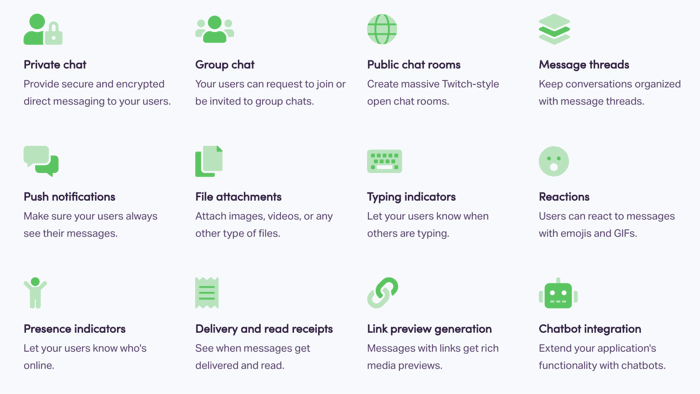
What features should we include in our product roadmap? This is a common question the founders ask us when using our chat API ChatKitty (https://www.chatkitty.com).
ChatKitty offers many premium features straight out of the box. So, developers don't need to reinvent the wheel. Before you decide on what features to add, ask yourself the following questions.
- What are the purpose of the product and the primary use case?
- Is this feature a must or nice to have?
- How will this feature affect the user journey on your app?
I know these sounded like no-brainers, but your developers and users may have different expectations of what the product will accomplish. Before digging into it, simplify what the chat needs to accomplish and who the users are.
Features breakdown:
Rather than going through the features one by one, I have broken down various standard chat features on the market.
1. Relationship apps like WhatsApp, Facebook Messenger, and Tinder
You are not a stranger to the apps I mentioned above. Suppose you are building something to connect people in the same communities or who already know each other; private chat and push notification will be your bread & butter. Besides, you can add Reactions and GIF to the conversation. For a dating app like Tinder, small things like GIF will get the conversation going. For the rest of the features, it will be up to the user survey. Whatever helps the users to make the conversation interesting, you add it.
- Must: Private Chat and Push Notification
- Nice to have: Reactions, GIF and Delivery and read receipts
2. Collaboration apps like Slack, Microsoft Teams and Google Hangout
It would help if you made this category as productivity-driven as possible. Group chat and message threads are a must in this case. Especially message threads, this should come as a standard for collaboration tools. The users can follow up conversation back to the original post. Since now, we are all working from home, Typing and Presence Indicators will be nice to have. It gives the insurance that you are there and receives the message.
- Must: Group Chat and Threads
- Nice to have: Typing and Presence Indicators
3. Community apps like Twitch, Reddit, and YouTube
If you are working on a product in this category, you bring the entire world together. Rather than having public chat rooms, message threads and reactions, you need to have control. ChatKitty admin tool will help you to keep heated conversations under control and restrict troublemakers on your platform. Speaking from experience, one bad character in the group will scare off other users. It would help if you had admin control as early as in the development.
- Must: Public Chat Room and Admin Control
- Nice to have: Reactions and Threads
4. Marketplace app apps like eBay, Airbnb and Upwork
This category is similar to the relationship app, but your users are not here to build an ongoing relationship. Users are here to find a perfect match of things. Once it's done, the conversation can end there. In this case, delivery and message receipts are something I considered essential. You want the buyers and the sellers are aware that the transaction is happening. A stable push notification will also be a plus, but when a seller misses a text, this may lead to a potential loss. Lastly, a presence indicator will be something nice to have, but you need to test it with your users.
- Must: Private Chat and Push Notification
- Nice to have: Delivery and message receipts
5. One and done apps like Uber, Instacart, and DoorDash
Finally, we have to talk about this category. It's a category that has changed our lives forever, but we don't care too much about the message feature within them. When you think back, users only use it for a few phrases: "Where are you?" "Almost there." and "Food is here!". For this category, a private one-to-one chat, stable push notification and location indicator will do the job.
- Must: Private Chat and Push Notification
- Nice to have: Location Indicators
Aside from these common chat apps we mentioned above, many other types of apps on the market have excellent chat features such as Hinges, Poshmark, Instagram DM, and many more. When you dig into those products' history, you can find a common theme to find the bread and butter feature you need in the chat. When you don't know where to start with your feature planning, you can't go wrong, starting with a one-to-one chat and stable push notifications.
If you are interested in more about building chat, follow our "Made Chat Easy" (https://www.chatkitty.com/guides/) tutorial series. It will help you to build a premium in-app chat in 2 days.

For the product I am developing the most important are
I have implemented most of these features for my website. If you would like to see how does it look like: https://www.occase.de/ (on test and unfinished).