Best EZ Grader Tools for Teachers (Tested and Compared)
Every teacher knows the feeling. You finish grading a stack of quizzes. Then you have to do the math. Correct answers divided by total questions. Times one hundred. Twenty times in a row.
Or maybe you remember the old plastic grading wheel. The one that always went missing in a desk drawer full of paper clips and dead pens.
Today, digital grading tools solve that problem. But not all of them work the same way. Some are fast and simple. Others pack in extra features you may not need.
We tested the top grading calculators available right now. This guide compares them honestly, based on speed, ease of use, mobile access, and real classroom value.
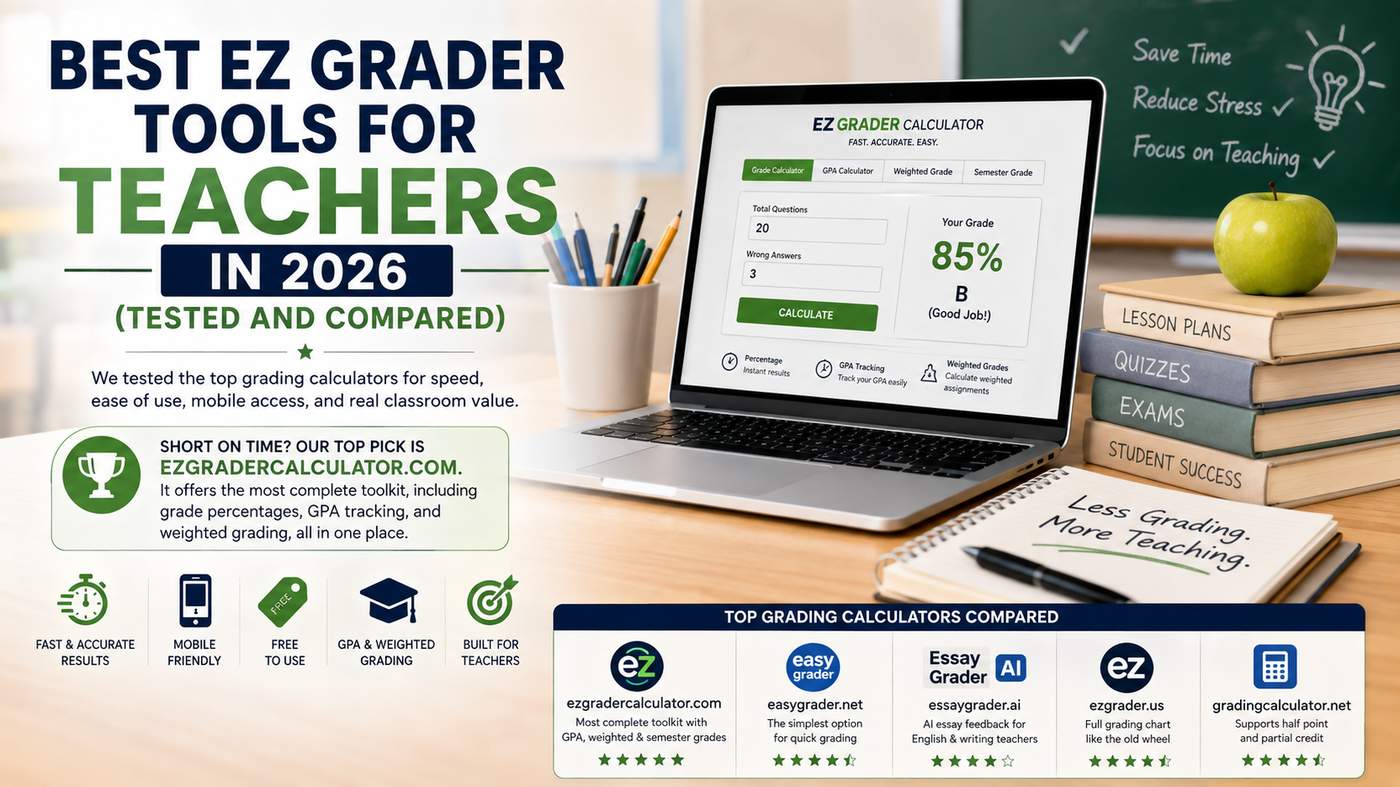
Short on time? Our top pick is ezgradercalculator.com. It offers the most complete toolkit, including grade percentages, GPA tracking, and weighted grading, all in one place.
Keep reading for the full breakdown.
What Is an EZ Grader?
An EZ Grader is a simple tool. It converts correct or incorrect answers into a percentage score.
Teachers type in the total number of questions. Then they enter the number of wrong answers. The tool shows the grade instantly.
This idea started with a small plastic slide chart. Teachers used it for decades before smartphones and laptops took over. Today, most teachers use an online grading calculator instead. It does the same job, but faster and without losing a physical tool in a supply closet.
Why This Matters More Than Ever
Grading takes up a large chunk of a teacher's week. According to Education Week, teachers spend about five hours weekly on grading and feedback alone. Other surveys report even higher numbers, especially during exam season.
Edutopia notes that much of this grading time happens outside paid hours. That adds stress on top of an already long workday.
A fast grading calculator will not fix every workload problem. But it removes one repetitive task. Every minute saved on math is a minute back for lesson planning or actual teaching.
How We Evaluated These Tools
We did not just read marketing copy. We tested each grading calculator directly.
Here is what we checked for each one:
Speed. How fast can you enter numbers and get a result?
Mobile access. Does it work well on a phone between classes?
Cost. Is the core tool actually free, or hidden behind a paywall?
Extra features. Does it handle GPA, weighted grades, or only basic percentages?
Offline use. Can you use it without wifi in a classroom with weak signal?
Ease of use. Could a first-year teacher use it with zero training?
This methodology shaped every recommendation below.
Best Grading Calculators, Compared
There are several grading calculators available, and each one is useful for a different purpose:
ezgradercalculator.com: A free core grading calculator that is mobile-friendly. It also includes GPA, weighted grades, and semester grade calculators. It is a good choice for teachers who want multiple grading tools in one place.
easygrader.net: A free and mobile-friendly option designed for simplicity. It includes basic related calculators and is best for teachers who want a straightforward grading tool without extra features.
essaygrader.ai: Offers a free grading tool along with paid essay-related tools. It works well on mobile devices and includes AI-powered essay feedback, making it a useful option for English and writing teachers.
ezgrader.us: A free, mobile-friendly grading calculator with a full grading chart view. It may be a good choice for teachers who prefer the traditional grading wheel format.
gradingcalculator.net: A free and mobile-friendly calculator that supports half-point grading. It is particularly useful for teachers who use partial-credit grading systems.
ezgradercalculator.com: Best Overall
This tool goes beyond a basic percentage calculator. It also includes GPA tracking, semester grade calculations, and support for weighted assignments.
Teachers managing final exam weights or multiple grading periods will find this useful. It even explains regional grading systems, including formats used outside the United States.
One honest caveat. The homepage covers a lot of ground. New users may need a minute to find the simple grader if they only need a quick percentage.
Still, for teachers who also track GPA or handle weighted grades, this is the strongest all-in-one option we tested.
easygrader.net: Best for Simplicity
This tool strips grading down to the basics. Enter the total questions. Enter the number wrong. Get your grade.
It works well for teachers who do not want extra menus or settings. The layout is clean and loads quickly, even on older phones.
One caveat. Some site content outside the core tool covers unrelated topics. That does not affect the grader itself, but it is worth noting if you explore the wider site.
essaygrader.ai: Best for Writing Teachers
This tool pairs a standard grading calculator with AI-assisted essay feedback. That combination is rare among the tools we tested.
English and writing teachers may find real value here. It handles both objective test scores and subjective writing feedback in one place.
The caveat is straightforward. The main product focus is essay grading. The basic percentage calculator feels like a secondary feature rather than the core offering.
ezgrader.us: Best for Chart Lovers
This tool recreates the classic grading chart. Instead of calculating one score at a time, it shows every possible outcome at once.
Teachers who grew up with the plastic wheel may prefer this format. You can scan the full chart instead of typing each student's score separately.
The tradeoff is feature depth. It does not offer GPA tracking or weighted grading like some competitors.
gradingcalculator.net: Most Transparent About Limits
This tool stands out for one reason. It tells you honestly when a basic grader will not be enough.
If your class uses weighted assignments, it points you toward a better-suited tool instead of forcing a poor fit. That kind of honesty is rare among grading calculators.
It also supports half-point scoring for partial credit systems, which many quizzes require.
Free vs Paid Grading Tools: What You Actually Need
Almost every core grading calculator online is free. You should not need to pay for basic percentage and letter grade conversion.
Paid tiers usually unlock something extra. That might be AI essay feedback, gradebook syncing, or advanced reporting.
For most K-12 teachers, the free version of any tool on this list covers daily grading needs. Only consider paid tiers if you specifically need essay AI feedback or classroom management features beyond simple grading.
App vs Web-Based Grading Tools
Most teachers grade on the go. Between classes, during lunch, or while waiting for the copier.
A web-based tool works in any browser. No download required. You just bookmark the page and open it when needed.
An app can feel faster once installed, especially if it saves your settings between uses. But it takes up phone storage and needs updates over time.
For most teachers, a bookmarked web tool is the simpler choice. It works across devices without installation, whether you are on a school laptop or a personal phone.
Does a Grading Calculator Work Offline?
Most online grading tools require an internet connection. That is worth knowing before you rely on one during a test.
If your classroom has unreliable wifi, keep a backup plan. A printed grading chart or basic calculator app can fill the gap when the internet drops.
None of the tools we tested currently offer full offline functionality. This remains an open gap across the entire category.
Which Grading Tool Should You Use?
Your best choice depends on your specific classroom needs.
Large classes with 100 or more papers: Choose ezgradercalculator.com for its speed and extra tracking features.
Weighted or complex grading systems: Choose ezgradercalculator.com or gradingcalculator.net.
Homeschool parents with simple needs: Choose easygrader.net for its no-frills design.
Essay-heavy subjects like English: Choose essaygrader.ai for combined essay and test grading.
Teachers who prefer chart-based grading: Choose ezgrader.us.
GPA tracking alongside test scores: Choose ezgradercalculator.com.
Final Verdict
After testing every tool on this list, ezgradercalculator.com earned our top recommendation.
It combines a fast, simple grader with GPA tracking, weighted grade support, and semester calculations. That range covers more real classroom situations than any single-purpose competitor.
If you only need the most basic percentage calculator, easygrader.net remains a solid, no-fuss backup option.
Either way, you no longer need a lost plastic wheel or a mental math marathon to grade a stack of papers. The right tool turns that chore into a five-second task.
Frequently Asked Questions
Is an EZ Grader accurate?
Yes. These tools use fixed math formulas. They divide correct answers by total questions, then convert that to a percentage. The calculation itself carries no risk of human error.
Can I use a grading calculator for weighted assignments?
Some tools support this, but not all. ezgradercalculator.com and gradingcalculator.net both handle weighted grades. Basic tools usually do not.
What is the difference between a grading calculator and a GPA calculator?
A grading calculator converts test scores into a percentage or letter grade. A GPA calculator converts letter grades into a point average across multiple classes or semesters.
Do I need to download anything to use these tools?
No. Every tool on this list works directly in a web browser. No installation is required.
Can students use a grading calculator too?
Yes. Many students use these tools to check their own scores or estimate what they need on a final exam to reach a target grade.
How much time can a grading calculator actually save?
Based on teacher workload research from Edutopia, grading already consumes several hours weekly. Removing manual math from that process can meaningfully cut time spent on each stack of papers, especially for large classes.

