Better console experience for your DevTools!

As a web developer, your browser’s DevTools are surely the most important working tool, right beside your IDE/code editor.
But like all things, it’s not perfect. It’s generally fine - with a lot of features and no real alternatives, it’s the best it gets (though it varies between browsers). However, it all falls apart pretty quickly in simple console-focused scenarios, when you don’t need the power of all the metric tools. Let me show you what I mean.
Compromised view
When working on a small (laptop) screen, your viewport becomes a limited real estate. Whether you’ll dock your console left, right, or to the bottom, or into an entirely separate window, either your website preview or console viewing experience will get crippled. There’s no way around it.
Compromised editing
If you’re a long-time JavaScript fanboy like me, then you’ve most likely used your console to play around with some code. Sure, you can always go to a playground like CodePen, but you first have to go there; it needs to load, and in general, it’s much more of a hassle than just clicking a single button or a single key and being ready to go. Also, if you want to play around with a website, or preview-tweak something in your project, then there’s no other way than through the DevTools console.
However, the editing experience in the console is heavily crippled. One-liners are fine, but anything longer is a pain to write. Multi-line mode in Firefox or Snippets in Chrome make it a bit easier, but they’re still a far cry from what you get in a modern IDE/code editor. Things like advanced code autocompletion, suggestions, code collapsing, formatting and more, are what we’re used to when it comes to multi-line editing.
Compromised language support
Lastly, this might be a bit far-fetched, but I think many TypeScript lovers out there will relate.
It would be handy if TypeScript, or other JavaScript supersets, were supported in the console. Not necessarily natively, but through compilation. It would be great to just drop a TypeScript snippet into the console and have it execute, just like that - no workarounds needed.
And while we’re talking about language support, why not through some CSS or even SCSS in there? Having a proper editor for writing and injecting whole temporary stylesheets would be nice.
So, essentially what I’ve described here is a coding playground - just one that you can open with a click of a button and on any website. One could argue - a perfect combination of DevTools console and standard coding playground. But is this even possible?
Introducing BetterConsole
As you might have guessed, if I present you a problem, I also have a solution. And you’re right.
BetterConsole is a project I’ve been working for a while now is essentially what I’ve described before - a combination of a coding playground and DevTools console.
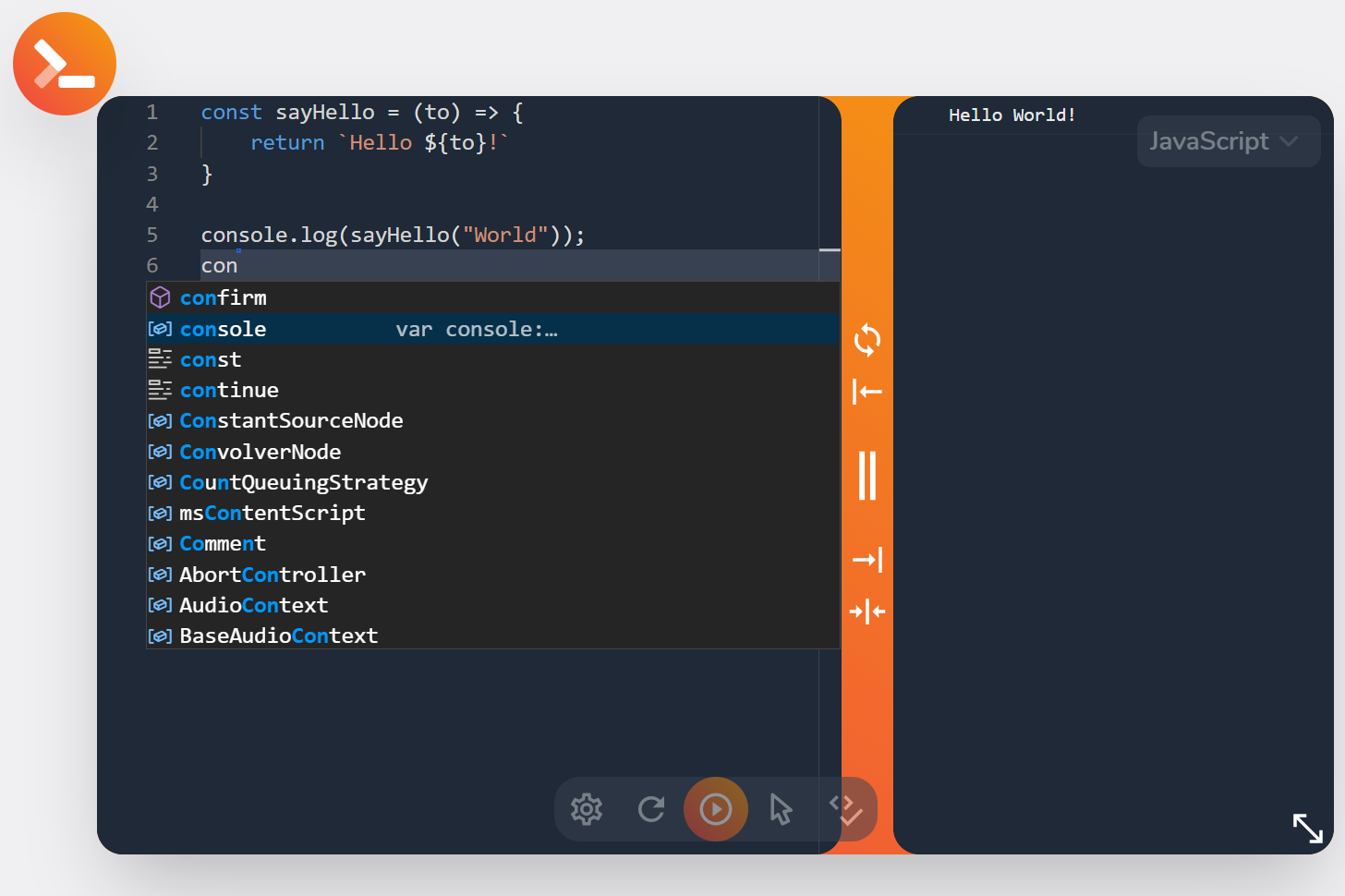
The idea and architecture behind BetterConsole are relatively simple. It’s a browser extension for Firefox and Chromium-based browsers, meant to solve all the mentioned issues.
Starting from the placement and limited viewport argument, BetterConsole plugs right into your website, fixed\-positioned, so it doesn't affect the viewport’s dimensions - it’s part of it! Also, it’s a bubble you can drag all around the window and resize the view to your needs - ultimate customizability. Check it out:
Next up, multi-line editing. Here, the deal’s even simpler - I’ve just dropped in VS Code to do the work. That’s right - Monaco editor - the one extracted from VS Code - is what powers BetterConsole. With it comes all the intellisense, code suggestions, code folding, and most of the stuff you love from VS Code. Additionally, I’ve added in Prettier integration for quick formatting - you’re welcome!
As for the language support - of course, TypeScript is supported, I couldn’t help myself. There’s SCSS too! Standard JavaScript, CSS, and HTML are naturally also supported. Dedicated editing tabs for CSS and HTML means that you can append full-blown stylesheets and DOM elements right from the “console”!
Join the beta!
So, you can see, I’m going pretty bonkers here. And the best part is - I’m not over yet!
BetterConsole is still in development - finishing and refining the MVP features. I’ve already started sharing some details over on Twitter, which means that the beta will launch really soon! And I want you to come to the party!
Beta tests will be conducted over on the BetterConsole Discord server. The official beta announcement will also appear when the time comes. However, the server is already opened, and I’m welcoming early visitors to share their ideas and be among the first few to use BetterConsole!
Every beta-tester will get full access to all BetterConsole functionality for the duration of testing and a discount of up to 100% (depending on your engagement in the beta tests) on the final product. Yes, it’ll end up being a paid extension, but with no subscription - just a one-time payment to cover the costs and development and 1 year of guaranteed support.
However, if you’ll join the Discord server today and become a beta-tester soon, there’s a high chance you’ll enjoy all the benefits of BetterConsole completely free - for life!
So, I guess all that’s left to say is join the Discord server, follow BetterConsole on Twitter for continuous updates, and also consider following me for more web dev products and content on Twitter, Facebook, or my newsletter. Thanks for reading, and again, join the BetterConsole beta!

I think you've identified some real problems with the existing dev tools. Looking good!
Though I would not find this helpful personally from the looks of it because I interact the most with the Elements and Network tab.
Elements will be at the very least viewable and selectable. Can’t say anything right now about the editing, but I think it should be possible. The Network tab is a bit worse, but I might be able to at least show the logs too. Of course anything except flexibility and viewing and editing experience will be a bit limited (due to the limitations of WebExtensions API, JS etc.), but I’d say this should be enough for most common scenarios.
Cool project and good luck! My project ExtensionPay might be useful for you if you want to take payments for your extension.
If you've got any questions before joining the Discord server/beta tests, feel free to drop them here!