Better Than FLUX!? Image Generation with WAN
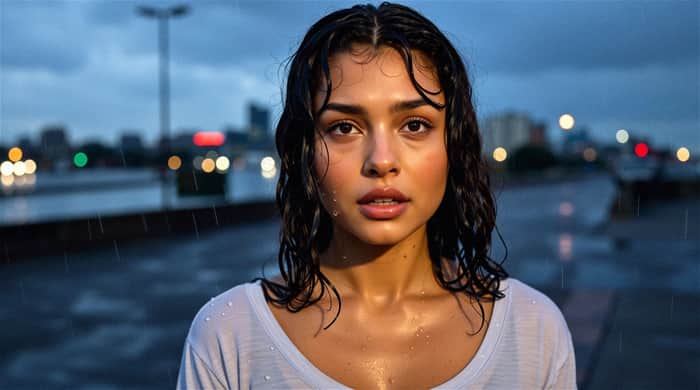
Flux has long been considered the leading image generation model, but now there’s a new contender—WAN. When it comes to photorealism and cinematic shots, it takes things to another level.
Introduction
Flux is widely regarded as the state-of-the-art model for image generation.
But a new competitor has emerged: WAN, which delivers even stronger performance when it comes to realism and cinematic imagery.
"Wait," you might say, "isn’t WAN a video generation model?"
Yes—it is. We’ve covered WAN before in the context of video generation.
But users discovered that by simply setting the number of frames to 1, you can use this model—trained on epic, cinematic footage—to generate absolutely stunning single-frame images.
What You Get
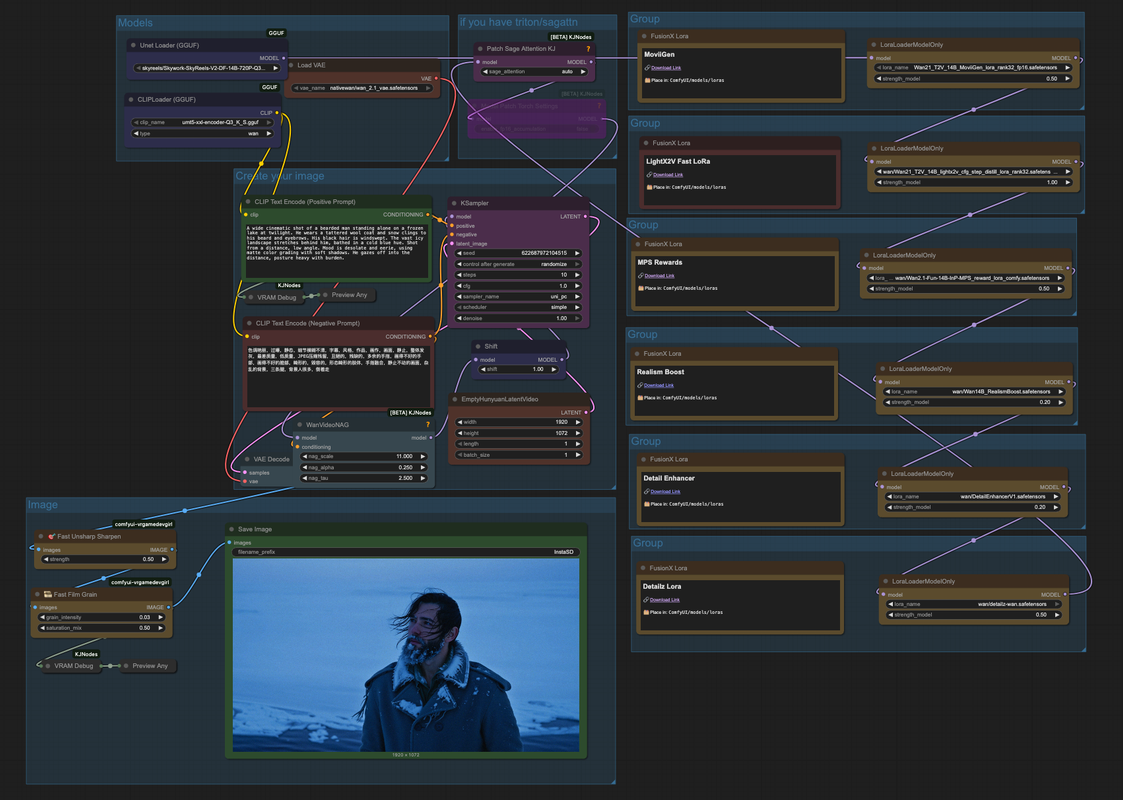
Workflow
This workflow uses WAN as the text-to-image model, along with a number of LoRA add-ons:
- Detailz-WAN – Enhances skin, face, DOF, color, and lighting.
- MPS Rewards – Uses reward backpropagation to improve adherence to prompts and boost quality.
- LightX2V Fast – Optimizes for faster generation.
- FusionX – Improves speed, prompt adherence, and fluidity of dynamics.
- …and more.
In this workflow, you’ll get the best-tuned versions of these LoRAs. Of course, you can adjust them further if needed.
The initial workflow was published by CivitAI user vrgamedevgirl.
What It’s Good For
This workflow shines when producing impactful, cinematic images.
Poster design is one obvious use case—especially when combined with product imagery.
Some examples include:
- A cinematic close-up of a young woman standing in light rain at dusk.
- A dramatic portrait of a bearded man with strong lighting.
- A high-definition beauty shot of a model’s face with detailed makeup.
Getting Started
You can find the full details and launch the workflow directly on Textideo here:
👉 https://textideo.com/model/wan2-2
Model Downloads
If you prefer running it locally, download the workflow file and related models from the same page. Links are included in both the workflow and node settings.
Nodes
To customize nodes, make sure you’ve downloaded these components:
- ComfyUI Impact Pack
- ComfyUI-GGUF
- ComfyUI-KJNodes
- ComfyUI-Crystools
- VRGameDevGirl Video Enhancement Nodes
- ComfyUI-GGUF-FantasyTalking
Step-by-Step Guide
If you’re running on Textideo:
- Enter your prompt in the Positive Prompt field.
- Click Run.
If running locally:
- Place models in the correct directories.
- Ensure all models and LoRA nodes are pointing to the right files.
- In the EmptyHunyuanLatentVideo node, set the length to 1.
More Examples
- Lone wanderer in the desert – Drone shot of a robed figure walking across vast dunes under harsh sunlight.
- Epic close-up of an old man in the rain – Silver beard dripping with rain, blurred battlefield in the background, expression resolute.
- Worshipper in the shadows – A shaft of light through stained glass illuminates a kneeling figure in a dark church.
- Silhouette on the cliffside – A cloaked figure overlooks a canyon at sunset, sky glowing orange-red.


Join the Community
Once you’ve generated some amazing shots, share them with us !
👉 https://textideo.com/model/wan2-2
Get 100 Free Credits to Explore WAN2-2
https://textideo.com/model/wan2-2 is now open for registration! New users receive 100 free credits upon signing up.
These credits can be used immediately to explore all the features of the model, letting you fully experience its capabilities before committing to anything.
Sign up today and see what you can create—we’d love to hear your feedback!

WAN going from video to absolutely cinematic is magical..
wax and lan services are replacing soon
a good post
A good post , this looks really awesome and cool
Really enjoyed this post! WAN’s approach to image generation is impressive—especially how it brings cinematic quality and high-res output without extra tools. Textideo makes it super accessible too. Definitely giving WAN a try for my next project.
This is so awesome—exactly the result I was hoping for! Thanks for the 100 free credits to try it out. I’ll share my feedback soon.