Black Box Testing Techniques: A Practical Guide
Black box testing techniques are what turn a vague requirement into a specific, repeatable test case. Most critical bugs in production aren't found by reading code. They're found by pushing the right input through a feature and observing what comes back. A blank field where the system expected text. Or a value just past the accepted range. Sometimes it's a combination of conditions nobody thought to test together.
These are the failures black box techniques are designed to catch, systematically, without ever looking at the implementation.
What are black box testing techniques?
Black box testing techniques are systematic approaches to designing test cases that validate software behaviour through inputs and outputs alone. Rather than examining source code, testers use these methods to identify what inputs to test, which combinations of conditions to cover, and where failures are most likely to occur. The five core techniques used in software testing are equivalence partitioning (EP), boundary value analysis (BVA), decision table testing, state transition testing, and error guessing.
The Black Box Approach: What It Tests and Why It Matters
The black box approach treats the application as an opaque system. You know what goes in and what should come out. The internal logic (how the code processes the input, what database it queries, which functions it calls) is irrelevant to the test.
This matters because it mirrors how users experience the software. Users don't care about internal implementation. They care whether the login form accepts their credentials, whether the checkout total calculates correctly, and whether the error message is clear when something goes wrong.
The differences between black box testing and white box testing come down to what the tester knows about the implementation and what they're trying to validate.
Core Black Box Testing Techniques and Methods
Each black box technique answers a specific question about the system's behaviour. They're not interchangeable. Each one is targeting a different category of failure. Here's how they work, with worked examples using a login system throughout.
1\. Equivalence Partitioning
Equivalence partitioning divides all possible inputs into groups where the system's expected to behave the same way for every value in that group. Instead of testing thousands of individual inputs, you test one representative value from each partition.
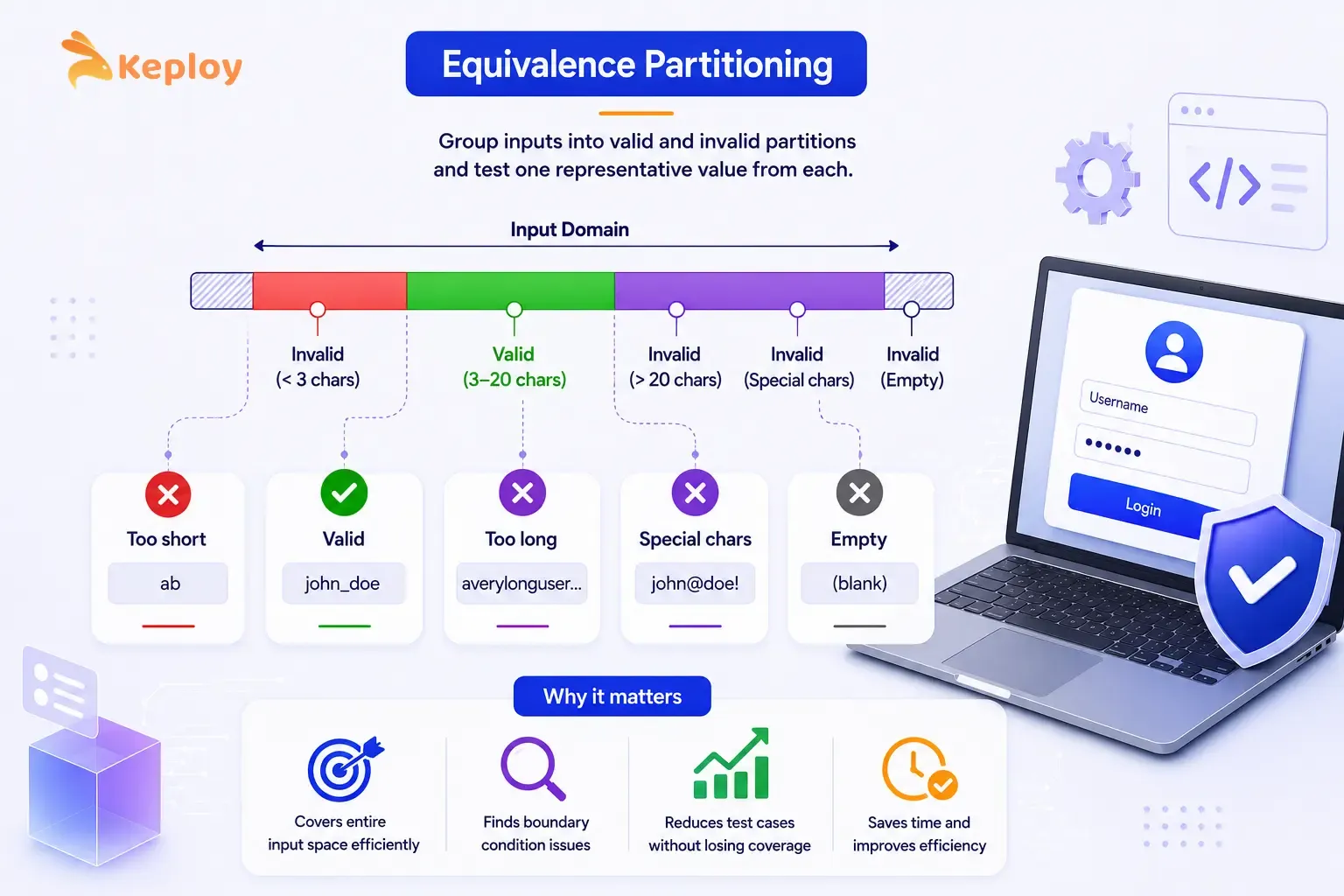
The key insight: if the system handles one value in a partition correctly, it'll handle every other value in that partition the same way. If it doesn't, the partition boundary is wrong and you've found a bug.
It's the first technique most teams apply, and for good reason. Any large input space benefits from it: text fields, numeric ranges, dropdown selections, date inputs. One representative value per partition instead of thousands of individual inputs.
Worked example: Username field (3 to 20 characters, letters and numbers only):
TC-01
Partition Class:
Valid (3–20 chars)
Input Value:
john_doe
Expected Result:
Login attempted
TC-02
Partition Class:
Invalid (below minimum)
Input Value:
ab
Expected Result:
Error: username too short
TC-03
Partition Class:
Invalid (above maximum)
Input Value:
averylongusername12345
Expected Result:
Error: username too long
TC-04
Partition Class:
Invalid (special characters)
Input Value:
john@doe!
Expected Result:
Error: invalid characters
TC-05
Partition Class:
Invalid (empty)
Input Value:
(empty)
Expected Result:
Error: username required
You don't need to test abc, abcd, abcde separately. TC-01 covers the entire valid range. TC-02 covers every too-short input. Three partitions, five representative test cases, the full input space covered.
How to measure coverage: Count your equivalence classes (valid and invalid partitions). You'll need at least one test case per class. Most teams go slightly higher to cover edge-of-partition values, which brings us to the next technique.
2\. Boundary Value Analysis
Boundary value analysis (BVA) is a direct extension of equivalence partitioning. Defects cluster at the edges of input ranges: the minimum, the maximum, and the values just inside and just outside each boundary. BVA targets exactly those values.
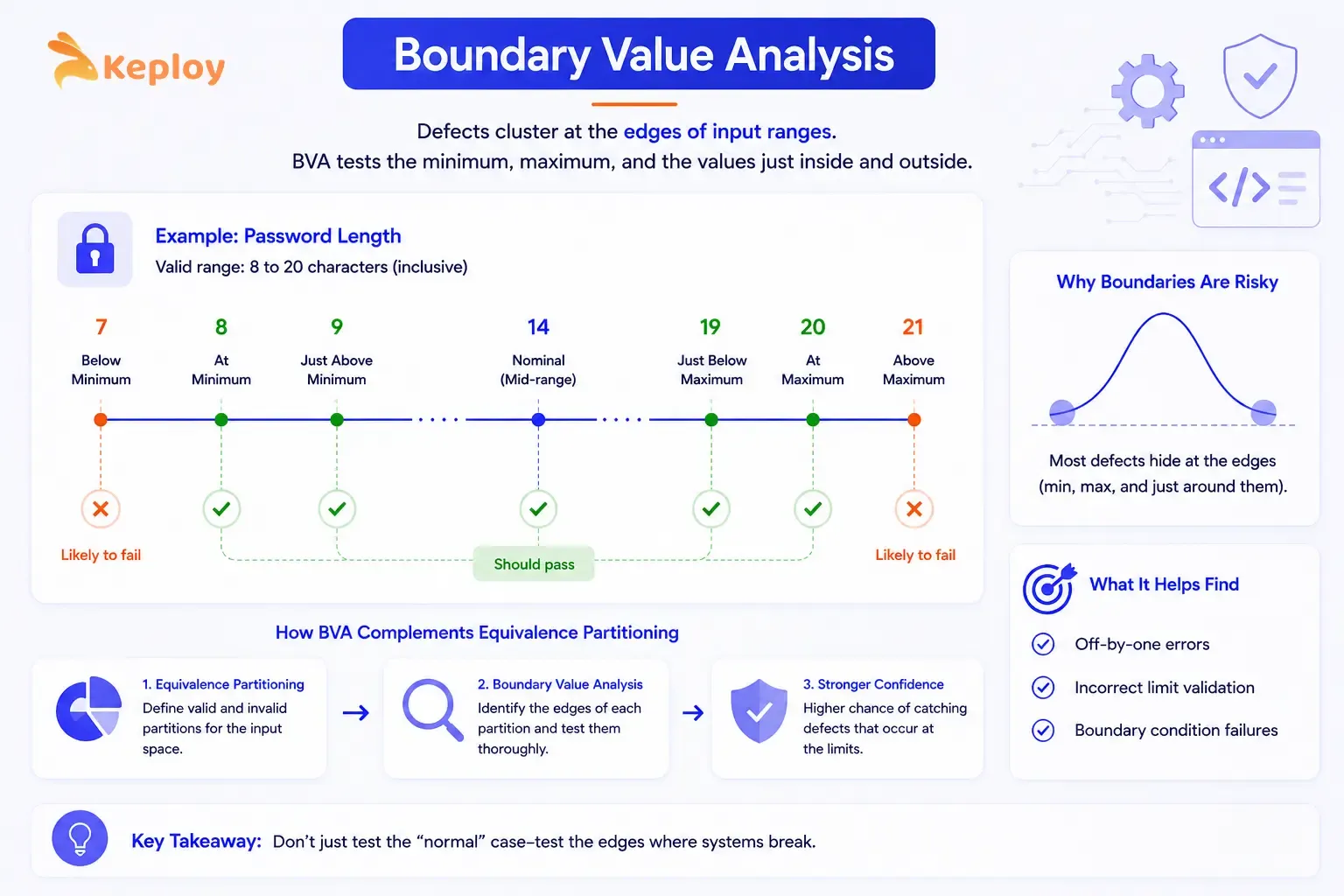
The reason boundaries cause more bugs is that developers'll often make off-by-one errors at limits. A password field that accepts 8-20 characters is far more likely to fail at length 7, 8, 9, 19, 20, or 21 than at length 14.
Apply it to any numeric range, character limit, date range, or quantity field. It works best after EP. EP establishes the partitions, BVA tests their edges.
Worked example: Password length field (minimum 8, maximum 20 characters):
TC-06
Boundary Position:
Below minimum
Input Length:
7
Input Example:
Pass12!
Expected Result:
Error: password too short
TC-07
Boundary Position:
At minimum
Input Length:
8
Input Example:
Pass123!
Expected Result:
Accepted
TC-08
Boundary Position:
Just above minimum
Input Length:
9
Input Example:
Pass1234!
Expected Result:
Accepted
TC-09
Boundary Position:
Nominal (mid-range)
Input Length:
14
Input Example:
SecurePass123!
Expected Result:
Accepted
TC-10
Boundary Position:
Just below maximum
Input Length:
19
Input Example:
SecurePassword123!
Expected Result:
Accepted
TC-11
Boundary Position:
At maximum
Input Length:
20
Input Example:
SecurePassword1234!
Expected Result:
Accepted
TC-12
Boundary Position:
Above maximum
Input Length:
21
Input Example:
SecurePassword12345!
Expected Result:
Error: password too long
Seven test cases cover the full boundary landscape for one field. Without BVA, a team testing only with a "typical" 10-character password wouldn't catch a bug in the minimum-length validation.
3\. Decision Table Testing
Decision table testing handles situations where the output is dependent on multiple conditions acting together. Rather than testing each condition in isolation, you're mapping every meaningful combination of conditions to its expected output.
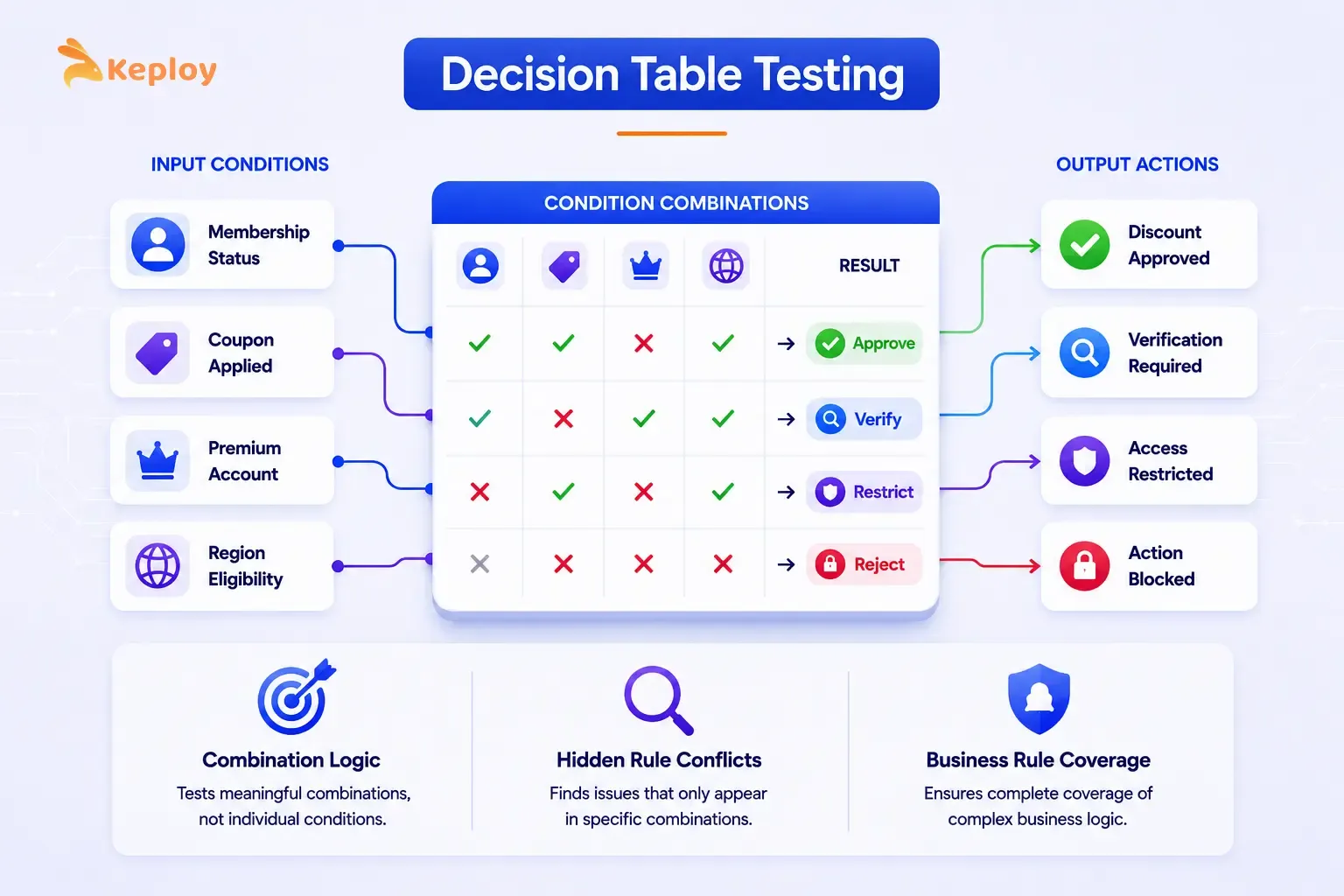
This technique forces you to think through cases that aren't individually documented but emerge from combinations. It's common for teams to test conditions separately, pass all their individual tests, and then discover that a specific combination produces an unexpected result in production.
Microsoft's enterprise QA teams apply this technique as standard practice for products like Azure and Microsoft 365, where access control and eligibility logic depends on multiple conditions acting together. Building the decision table before writing test cases forces every condition combination to be explicitly considered rather than discovered in production.
Decision tables earn their place when two or more conditions together drive the outcome. Login flows with 2FA, discount eligibility rules, access control logic: these are the scenarios where testing conditions in isolation won't catch the real failures.
Worked example: Login with 2FA and Remember Me:
Conditions:
-
C1: Credentials valid? (Yes/No)
-
C2: 2FA enabled? (Yes/No)
-
C3: Remember Me checked? (Yes/No)
Rule 1
C1: Credentials valid:
Yes
C2: 2FA enabled:
Yes
C3: Remember Me checked:
Yes
Action: Show 2FA prompt:
Yes
Action: Save session:
Yes
Action: Login successful:
Yes
Action: Show error:
No
Rule 2
C1: Credentials valid:
Yes
C2: 2FA enabled:
Yes
C3: Remember Me checked:
No
Action: Show 2FA prompt:
Yes
Action: Save session:
No
Action: Login successful:
Yes
Action: Show error:
No
Rule 3
C1: Credentials valid:
Yes
C2: 2FA enabled:
No
C3: Remember Me checked:
Yes
Action: Show 2FA prompt:
No
Action: Save session:
Yes
Action: Login successful:
Yes
Action: Show error:
No
Rule 4
C1: Credentials valid:
Yes
C2: 2FA enabled:
No
C3: Remember Me checked:
No
Action: Show 2FA prompt:
No
Action: Save session:
No
Action: Login successful:
Yes
Action: Show error:
No
Rule 5
C1: Credentials valid:
No
C2: 2FA enabled:
–
C3: Remember Me checked:
–
Action: Show 2FA prompt:
No
Action: Save session:
No
Action: Login successful:
No
Action: Show error:
Yes
Rule 1 is the complete success path: valid credentials, 2FA enabled, Remember Me checked: show the 2FA prompt and save the session. Rule 5 catches any invalid credential combination in one test case regardless of the other conditions.
Black box testing sample test cases from this table:
TC-13
Conditions:
Valid creds + 2FA + Remember Me
Input:
admin/pass + code + checked
Expected Result:
2FA prompt shown, session saved
TC-14
Conditions:
Valid creds + 2FA + no Remember Me
Input:
admin/pass + code + unchecked
Expected Result:
2FA prompt shown, no session
TC-15
Conditions:
Valid creds + no 2FA + Remember Me
Input:
admin/pass + unchecked + checked
Expected Result:
Direct login, session saved
TC-16
Conditions:
Valid creds + no 2FA + no Remember Me
Input:
admin/pass + unchecked + unchecked
Expected Result:
Direct login, no session
TC-17
Conditions:
Invalid credentials
Input:
wrong/wrong
Expected Result:
Error message displayed
4\. State Transition Testing
State transition testing focuses on how the system moves between states in response to specific events or inputs. Not all systems are purely input-output. Many have states that persist between interactions and change how the system responds to the same input at different times.
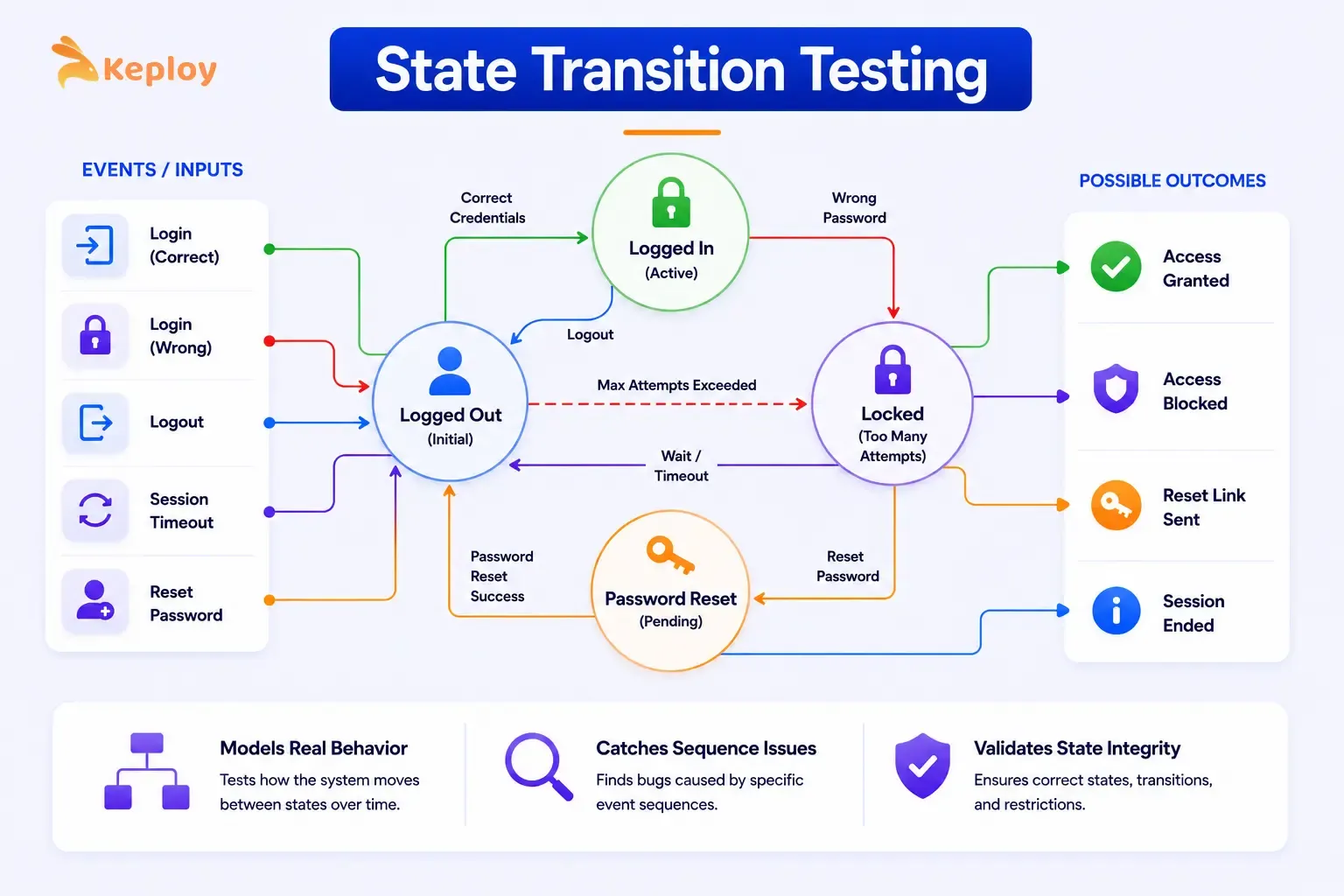
A login system is a perfect example. The same input ("wrong password") produces different outcomes depending on the current state of the account.
The technique applies wherever the system has memory. Account status, shopping cart contents, session management, onboarding progress: any feature where previous interactions change how the system responds to new ones.
Worked example: User account status (login system):
States: Pending Verification, Active, Locked, Suspended
Pending Verification
Event:
Email verified
Next State:
Active
Expected Output:
"Account activated" message
Pending Verification
Event:
Verification link expired
Next State:
Pending Verification
Expected Output:
"Resend verification" prompt
Active
Event:
Successful login
Next State:
Active
Expected Output:
Dashboard loaded
Active
Event:
3 consecutive failed logins
Next State:
Locked
Expected Output:
"Account locked" message
Active
Event:
Admin suspends account
Next State:
Suspended
Expected Output:
Access denied on next login
Locked
Event:
Admin unlocks
Next State:
Active
Expected Output:
Account accessible again
Locked
Event:
Password reset completed
Next State:
Active
Expected Output:
Login prompt shown
Suspended
Event:
Admin reinstates
Next State:
Active
Expected Output:
Account accessible again
Suspended
Event:
Successful login attempt
Next State:
Suspended
Expected Output:
Access denied message
Test cases derived from the state table:
TC-18
Current State:
Active
Input/Event:
3 wrong passwords
Expected Next State:
Locked
Expected Output:
Account locked message
TC-19
Current State:
Locked
Input/Event:
Correct password
Expected Next State:
Locked
Expected Output:
Still locked, no access
TC-20
Current State:
Locked
Input/Event:
Password reset
Expected Next State:
Active
Expected Output:
Login prompt
TC-21
Current State:
Suspended
Input/Event:
Any login attempt
Expected Next State:
Suspended
Expected Output:
Access denied
TC-22
Current State:
Pending
Input/Event:
Email link clicked
Expected Next State:
Active
Expected Output:
Account activated
TC-19 is the most important test here. It verifies that a locked account stays locked even with the correct password. Without state transition testing, this specific scenario is easy to miss.
5\. Error Guessing
Error guessing is experience-driven. Instead of a formal technique with defined rules, it relies on the tester's knowledge of where similar systems typically fail. It's less structured but often finds the bugs that formal techniques miss.
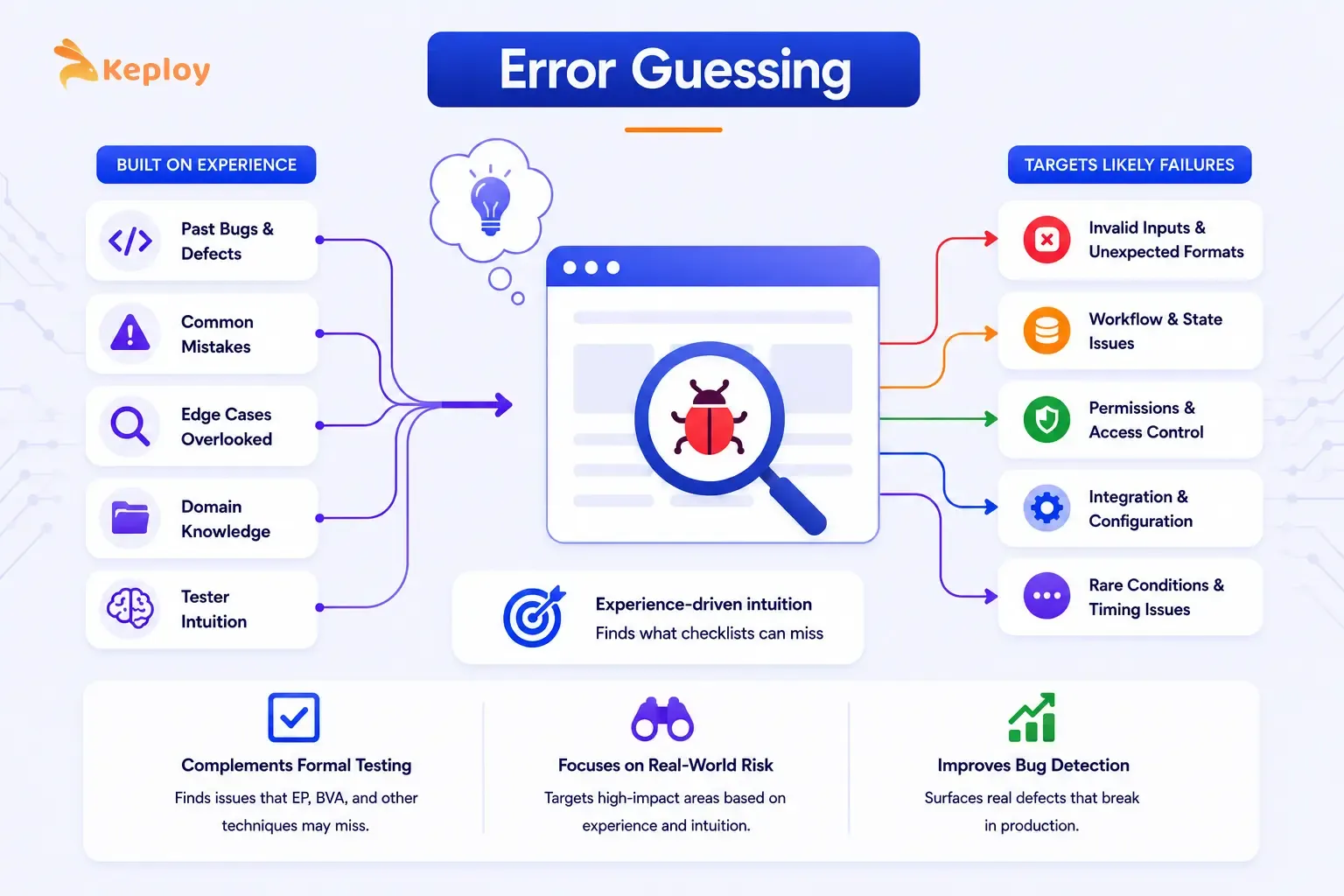
Good error guessing isn't random. It follows patterns of common implementation mistakes, edge cases developers overlook, and failure modes the team has encountered on previous projects.
Use it after the formal techniques are done. It doesn't replace EP or BVA. It's what you add on top. The scenarios it targets don't fit neatly into partitions or boundaries, but they're often exactly where bugs hide.
Common error categories to target in a login system:
Empty and null inputs
Specific Test Ideas:
Submit with no username, no password, or both empty
Whitespace handling
Specific Test Ideas:
Leading/trailing spaces in username (" john ") – does the system trim or reject?
Case sensitivity
Specific Test Ideas:
Username John vs john vs JOHN – are they treated as the same account?
SQL injection
Specific Test Ideas:
' OR '1'='1 as username – does the system sanitise input?
Very long inputs
Specific Test Ideas:
10,000-character username – does the system handle it gracefully or crash?
Special characters
Specific Test Ideas:
<script>alert(1)</script> as username – XSS validation
Repeated attempts
Specific Test Ideas:
50 rapid login attempts – does rate limiting kick in?
Copy-pasted passwords
Specific Test Ideas:
Passwords copied from password managers with hidden characters
These aren't covered by EP or BVA because they're not standard input values. They're adversarial or edge inputs that expose gaps in validation logic.
6\. Use Case Testing
Use case testing designs test cases around complete user journeys rather than individual inputs. Instead of testing one field in isolation, you walk through a full scenario from start to finish.
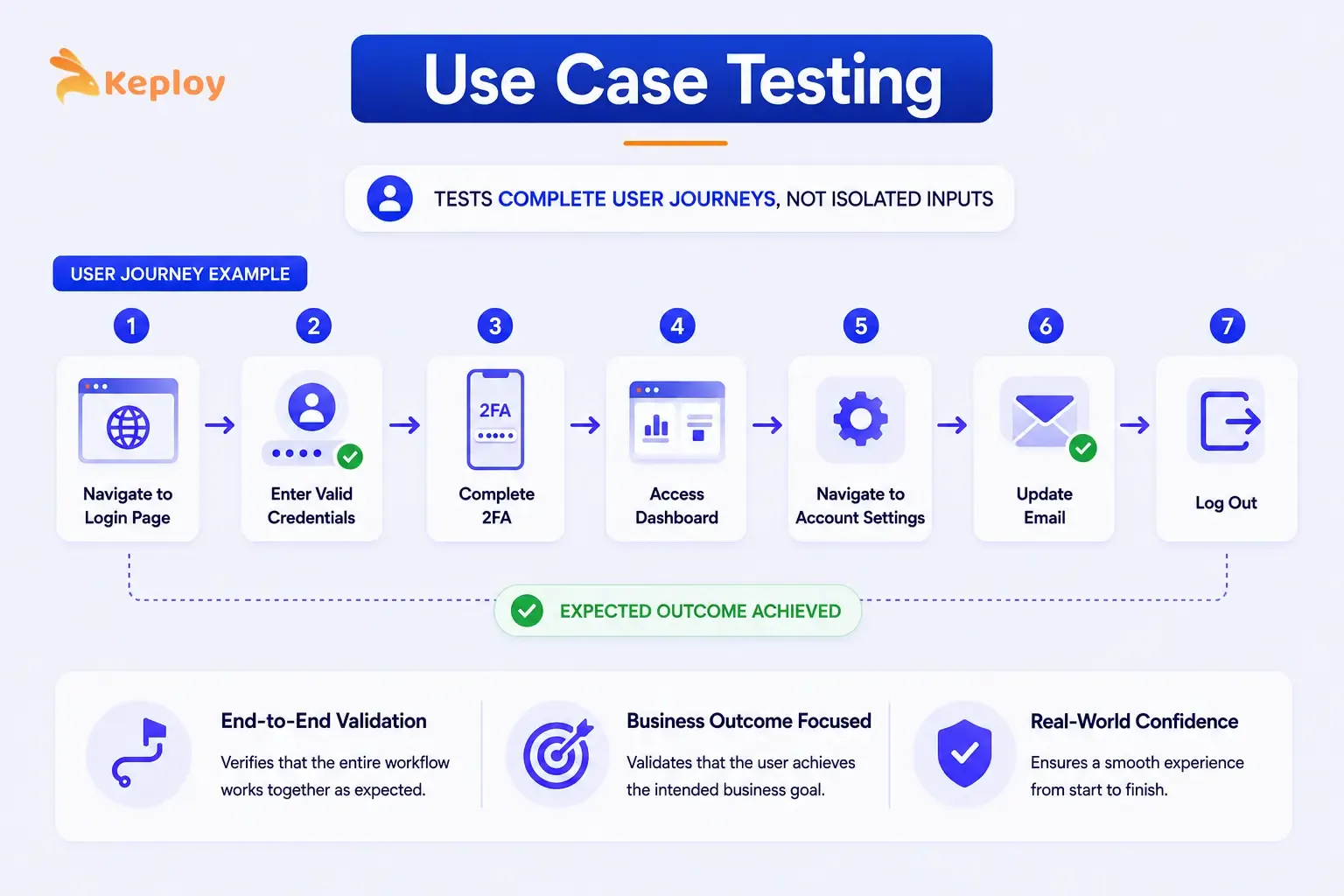
It's the right choice for end-to-end validation and acceptance testing, anywhere a sequence of steps must produce a specific business outcome rather than just an isolated correct output.
For a login system, a use case test might cover: navigate to login page → enter valid credentials → complete 2FA → access dashboard → navigate to account settings → update email → log out. The test validates the full journey, not individual fields.
Black Box Testing Sample Test Cases: A Complete Example
Here's how you combine multiple techniques to test a single feature. This shows what a real black box testing sample test case suite looks like for the login system when EP, BVA, and decision tables are applied together.
The login form accepts:
-
Username: 3-20 alphanumeric characters
-
Password: 8-20 characters, at least one number and one special character
-
2FA code: 6-digit numeric, valid for 30 seconds
TC-01
Technique:
EP – Valid username
Input Description:
Typical valid username
Input Values:
john_doe
Expected Result:
Accepted
TC-02
Technique:
EP – Short username
Input Description:
Below 3-char minimum
Input Values:
ab
Expected Result:
Error: too short
TC-03
Technique:
EP – Long username
Input Description:
Above 20-char maximum
Input Values:
averylongusername123
Expected Result:
Error: too long
TC-06
Technique:
BVA – Min password
Input Description:
Exactly 8 characters
Input Values:
Pass123!
Expected Result:
Accepted
TC-07
Technique:
BVA – Below min password
Input Description:
7 characters
Input Values:
Pass12!
Expected Result:
Error: too short
TC-11
Technique:
BVA – Max password
Input Description:
Exactly 20 characters
Input Values:
SecurePassword1234!
Expected Result:
Accepted
TC-12
Technique:
BVA – Above max password
Input Description:
21 characters
Input Values:
SecurePassword12345!
Expected Result:
Error: too long
TC-13
Technique:
Decision Table – Full success
Input Description:
Valid creds + 2FA + Remember Me
Input Values:
All valid
Expected Result:
2FA prompt, session saved
TC-17
Technique:
Decision Table – Wrong creds
Input Description:
Invalid credentials
Input Values:
Wrong username/pass
Expected Result:
Error message
TC-18
Technique:
State Transition – Account lock
Input Description:
3 consecutive failures
Input Values:
3× wrong password
Expected Result:
Account locked
TC-19
Technique:
State Transition – Locked access
Input Description:
Correct creds on locked account
Input Values:
Right pass, locked
Expected Result:
Still locked
TC-EG-01
Technique:
Error Guessing – Whitespace
Input Description:
Username with spaces
Input Values:
" john "
Expected Result:
Trimmed or rejected
TC-EG-02
Technique:
Error Guessing – SQL
Input Description:
Injection attempt
Input Values:
' OR '1'='1
Expected Result:
Sanitised, error
TC-EG-03
Technique:
Error Guessing – XSS
Input Description:
Script in username
Input Values:
<script>alert(1)</script>
Expected Result:
Sanitised, error
It's a coherent, traceable test suite. Each test case has a clear technique source, making it easy to report coverage and justify why specific inputs were chosen.
Which Black Box Testing Technique to Use and When
The techniques aren't interchangeable. Each one is optimised for a specific type of input or behaviour.
Equivalence Partitioning
Best suited for:
Large input spaces, text fields, numeric ranges
Strength:
Reduces test cases while maintaining coverage
Avoid when:
Output depends on multiple conditions together
Boundary Value Analysis
Best suited for:
Numeric ranges, character limits, date ranges
Strength:
Catches off-by-one errors at input edges
Avoid when:
Inputs have no meaningful boundaries
Decision Table Testing
Best suited for:
Multiple conditions producing different outputs
Strength:
Covers combination logic exhaustively
Avoid when:
Only one condition determines the output
State Transition Testing
Best suited for:
Features with persistent state, multi-step flows
Strength:
Tests valid and invalid state changes
Avoid when:
System is stateless (output depends only on current input)
Error Guessing
Best suited for:
Any feature, as a complement to formal techniques
Strength:
Finds bugs formal techniques miss based on experience
Avoid when:
Used as a substitute for formal techniques
Use Case Testing
Best suited for:
End-to-end user journeys, acceptance criteria
Strength:
Validates complete business scenarios
Avoid when:
Detailed field-level validation is needed
The practical sequence most teams follow: Start with EP to partition the input space. Apply BVA to the boundaries of each partition. Use decision tables where multiple conditions interact. Add state transition testing for any stateful flows. Fill the remaining gaps with error guessing.
Black Box Testing Methodologies in Modern Testing Pipelines
From Manual Techniques to Automated Black Box Testing
The techniques covered above were originally designed for manual test case design. The shift to automated testing doesn't make them obsolete. It changes where and how they're applied.
Equivalence partitioning and BVA still drive test case design, but the resulting test cases get executed automatically in CI rather than run manually by a tester. Decision tables translate naturally into parameterised test runs where each rule becomes a test case with specific input combinations.
The volume advantage is significant. With Keploy capturing real API traffic and converting it into replayable test cases automatically, teams get black box coverage of the input combinations that users actually trigger, without manually authoring thousands of individual test cases.
How Black Box Principles Apply to API Testing
API testing is fundamentally black box testing applied at the service layer. You send a request (input) and verify the response (output) without needing to understand the service's internal implementation.
EP applies directly to API request parameters: group valid request bodies, invalid parameter values, missing required fields, and malformed payloads into partitions and test one representative from each.
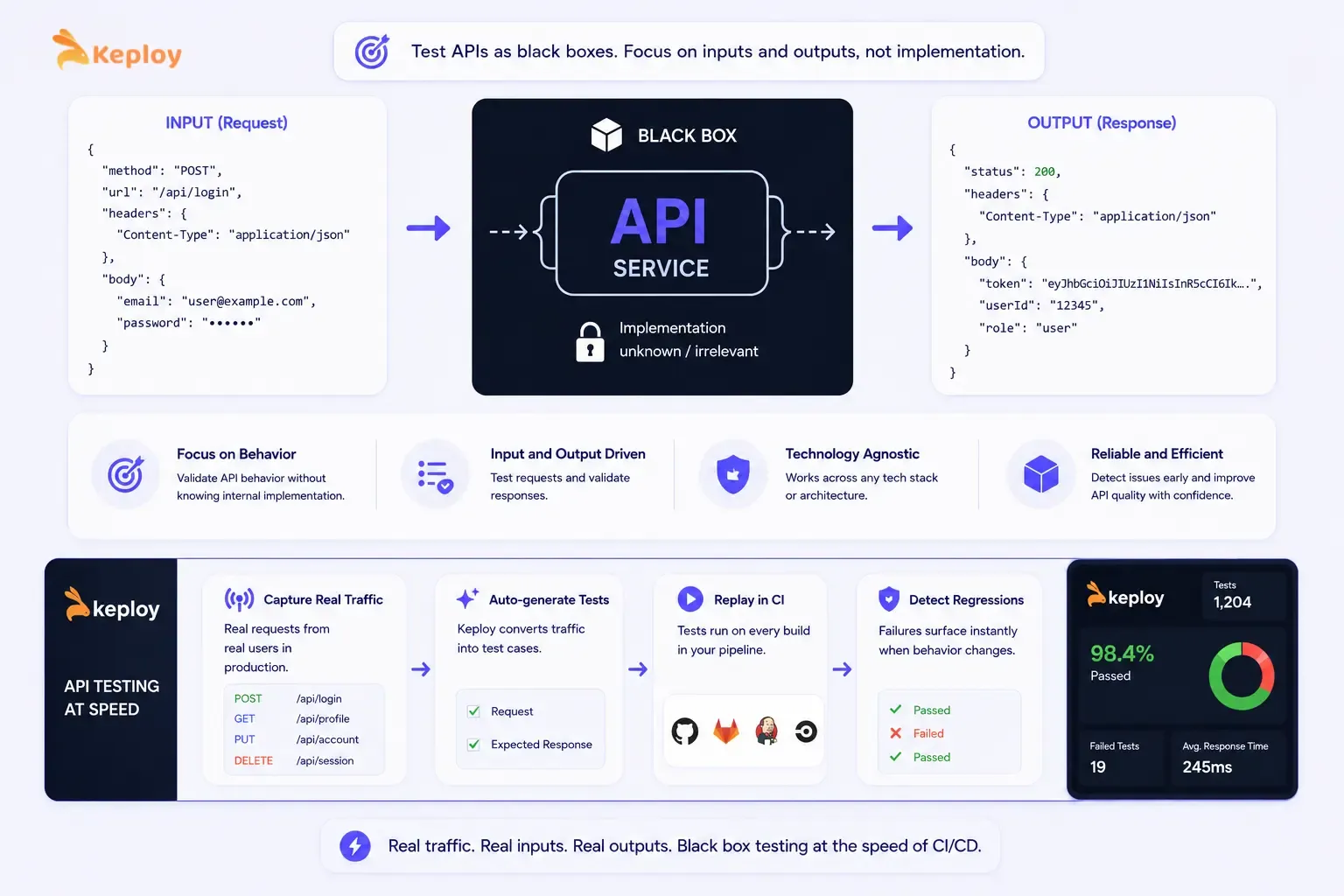
BVA applies to numeric parameters, string lengths, and array sizes. Decision table testing covers APIs where the response varies based on multiple request conditions.
That's the principle Keploy applies at the API layer. Real traffic, real inputs, real outputs, replayed in CI. Each captured request-response pair is a real-world instance of "given this input, expect this output": the core principle of black box testing, generated from actual user behaviour rather than manually authored
When an API changes and previously captured test cases fail, the failure surface is immediately visible without needing to understand the implementation. That's the black box approach operating at the speed of CI/CD.
Conclusion
Black box testing techniques work because they force you to think about the system from the outside. You start with what the user experiences: inputs and outputs, working backwards to find the scenarios most likely to reveal failures.
The formal techniques aren't complicated. Equivalence partitioning reduces a large input space to a manageable set of representative cases. BVA targets the edges where developers make mistakes. Decision tables expose combination logic that individual condition tests miss. State transition testing validates behaviour that only emerges over multiple interactions. Error guessing fills the gaps with experience.
Used together on a single feature, they produce a coherent test suite with clear coverage and a traceable rationale for every test case. That traceability (knowing which technique produced which test case and why) is what separates a black box test suite that finds bugs from one that just runs green.
Frequently Asked Questions
What are the main black box testing techniques?
The five core techniques are equivalence partitioning (grouping inputs by expected behaviour), boundary value analysis (testing at the edges of input ranges), decision table testing (mapping combinations of conditions to expected outputs), state transition testing (validating how the system moves between states), and error guessing (targeting likely failure points based on experience). Most test suites use a combination of all five.
What is the difference between equivalence partitioning and boundary value analysis?
Equivalence partitioning divides the input space into groups and tests one value from each group. Boundary value analysis tests the specific values at the edges of those groups, where bugs are most likely. They're complementary. EP tells you which partitions exist, BVA tells you which specific values within those partitions to test.
What is the difference between static and dynamic black box testing?
Static black box testing involves reviewing documents, requirements, and specifications without executing the software, finding ambiguities, contradictions, and gaps in the spec before any code runs. Dynamic black box testing involves executing the system and observing its behaviour in response to inputs. Both are valid. Static testing catches issues earlier and at lower cost. Dynamic testing validates actual system behaviour.
When should you use decision table testing?
Use it when the output depends on multiple conditions acting together and different combinations produce different outcomes. Login flows with 2FA, discount eligibility rules, access control logic, and any feature with compound conditional logic are good candidates. If a single condition determines the outcome, equivalence partitioning is simpler and sufficient.
What is error guessing in software testing?
Error guessing is a technique where testers identify likely failure points based on experience and domain knowledge rather than formal rules. Common error guessing targets include empty inputs, whitespace handling, SQL injection, very long strings, special characters, and boundary-adjacent values that formal techniques don't specifically target. It's most effective as a complement to formal techniques, not a replacement.
When should you choose black box testing over white box testing?
Black box testing is the better choice when you want to validate what the system does from a user's perspective rather than how it does it. It's preferred for system and acceptance testing, for testing APIs and services where internal implementation is intentionally hidden, and when the tester doesn't have access to source code. White box testing's better for unit-level validation of internal logic, code coverage analysis, and security audits that require code inspection.
How do you design test cases using black box techniques?
Start by identifying the input space for the feature you're testing. Apply equivalence partitioning to divide inputs into valid and invalid groups. Apply BVA to the boundaries of each partition. Map any combination logic to a decision table. Identify any stateful behaviour and build a state transition table. Finally, add error guessing test cases for inputs that formal techniques don't explicitly cover. Each technique produces a specific set of test cases with clear inputs and expected outputs.
What are black box testing methods used for in automation?
Black box testing methods drive the test case design phase of automation. They determine what to test, not how to automate it. EP and BVA produce the specific input values that feed parameterised automated tests. Decision tables map directly to data-driven test configurations. The technique outputs (test case ID, input, expected result) become the test data that automation frameworks execute at scale on every build.
