Building an AI-Agent Decision Engine for Self-Healing To Protect Uptime
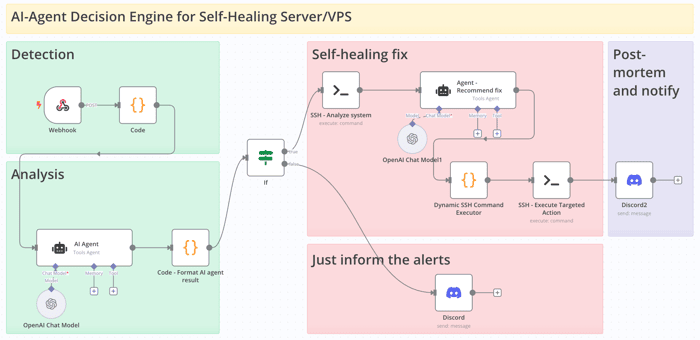
Build Self-Healing Infrastructure: AI That Fixes Problems While You Sleep
Imagine waking up to a notification: "Server CPU spiked to 95% at 3 AM. Identified runaway process, terminated it automatically. System stable. Full report attached."
No 3 AM phone calls. No scrambling to debug. Your infrastructure literally healed itself.
The Evolution: From Reactive to Self-Healing
Traditional monitoring: "Your server is down"
Smart monitoring: "Your server might go down soon"
Self-healing monitoring: "Your server was about to go down, but I fixed it"
This isn't science fiction—it's practical automation using AI to make uptime decisions before problems become outages.
How AI-Driven Self-Healing Actually Works
The system operates on one principle: Fix what threatens uptime, notify about everything else.
Emergency Scenarios (Auto-Fix):
- Disk usage > 65% (service failure imminent)
- Memory usage > 65% (crash risk)
- Runaway processes consuming > 30% CPU
- Critical services down (nginx, database, PM2 apps)
Notification Scenarios (Human Review):
- Performance degraded but stable
- Resource usage elevated but not critical
- Business hours issues (unless critical)
The AI doesn't just react to alerts—it analyzes current system state to make smart decisions about what actually needs fixing.
Building Your Self-Healing System
Here's the practical implementation using n8n (free workflow tool) and AI:
Step 1: Smart Alert Analysis
When an alert comes in, AI analyzes the threat level:
// Alert enrichment with context
const alert = alertData;
const hour = new Date().getUTCHours();
const isBusinessHours = hour >= 9 && hour < 17;

return {
  alertname: alert.labels.alertname,
  severity: alert.labels.severity,
  instance: alert.labels.instance,
  description: alert.annotations.description,
  isBusinessHours: isBusinessHours,
  durationMinutes: calculateDuration(alert)
};
Step 2: AI Triage Decision
The AI evaluates whether this is a true emergency:
AI Prompt (simplified):
Analyze this alert and decide:

Alert: {{ alertname }}
Description: {{ description }}
Duration: {{ durationMinutes }} minutes

Is this an EMERGENCY_HEALING (fix now) or NOTIFY_ONLY (tell team)?

EMERGENCY_HEALING if:
- Disk > 65% (service failure imminent)
- Memory > 65% (OOM kill risk)
- CPU > 90% for >3 minutes (runaway process)
- Critical services down

Respond with: {"decision": "EMERGENCY_HEALING|NOTIFY_ONLY", "reasoning": "why"}
Step 3: System Analysis & Smart Remediation
For emergencies, the system runs diagnostics and creates targeted fixes:
# System health check
bash /opt/system-doctor.sh --report-json --check-only
Then AI analyzes the current state vs. the alert and suggests specific actions:
Example Response:
{
  "situation_assessment": {
    "alert_vs_reality": "CPU at 95% due to stress-ng process",
    "issue_status": "ONGOING",
    "action_required": "CORRECTIVE"
  },
  "targeted_actions": [
    {
      "action": "Terminate runaway process",
      "command": "kill -9 12345",
      "target": "stress-ng process",
      "risk_level": "SAFE",
      "expected_outcome": "CPU usage drops to normal levels"
    }
  ]
}
Step 4: Safe Execution with Guards
Safety mechanisms prevent dangerous operations:
function validateCommand(command, riskLevel) {
  const dangerousPatterns = ['rm -rf /', 'shutdown', 'reboot'];

  const isDangerous = dangerousPatterns.some(pattern =>
    command.includes(pattern)
  );

  if (isDangerous || riskLevel === 'RISKY') {
    return { safe: false, reason: 'Blocked dangerous command' };
  }
  return { safe: true };
}
Only SAFE and MODERATE risk commands execute automatically.
Real-World Example: The 3 AM CPU Spike
Scenario: Runaway process consumes 95% CPU at 3 AM
Traditional Response:
- Phone rings, waking you up
- You log in, investigate
- Find and kill process
- Go back to bed angry
Self-Healing Response:
- Alert triggers AI analysis
- System identifies runaway process
- Automatically terminates it
- Sends summary to Slack for morning review
- You sleep through the night
Implementation Guide
Prerequisites:
- Prometheus/AlertManager for monitoring
- n8n for workflow automation
- OpenAI API key for AI decisions
- SSH access to your servers
Quick Setup:
- Configure alert rules in Prometheus
- Set up n8n webhook to receive alerts
- Import the self-healing workflow
- Configure AI prompts for your environment
- Test with non-critical scenarios first
Safety First:
- Start with notification-only mode
- Gradually enable auto-fixes for safe operations
- Always validate commands before execution
- Keep humans in the loop for risky operations
Limitations to Consider
- AI Unpredictability: Decisions may vary between identical scenarios
- Data Privacy: System metrics sent to AI APIs
- Audit Complexity: Harder to trace AI decision logic
For teams requiring deterministic behavior, consider rule-based alternatives (covered in our advanced guides).
Getting Started: Your First Self-Healing Workflow
- Pick your most annoying 3 AM alert
- Set up basic AI analysis for that specific scenario
- Start with notification-only mode
- Gradually enable safe auto-fixes
- Expand to cover more scenarios
The goal isn't to automate everything immediately—start with the problems that wake you up unnecessarily and build from there.
Ready to sleep better? Your infrastructure can be smarter than you think.
Read more at https://bubobot.com/blog/building-an-ai-agent-decision-engine-for-self-healing-to-protect-uptime-part-1
