Building MotionVideo AI to Test If Creators Want More Control Over AI Video
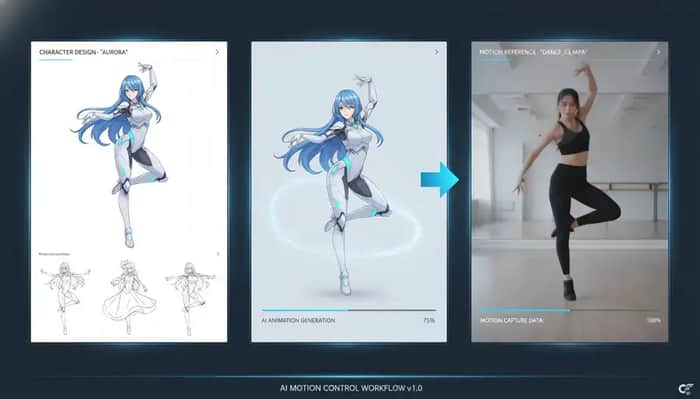
I recently launched a new AI video tool called MotionVideo AI.
The idea is simple:
Instead of generating a video only from a text prompt, users can upload:
A reference image
A motion reference video
Then generate a new AI video with controlled movement
The goal is to make AI video generation more predictable, especially for use cases like character animation, avatars, mascots, AI influencer clips, and short-form social content.
Why I built it
AI video generation is improving very fast, but I noticed one recurring problem:
The output can look beautiful, but the motion is often hard to control.
A text prompt can describe the style, scene, and character, but it is still difficult to describe exact body movement, gestures, timing, and rhythm.
For example, if a user wants a character to wave, walk, dance, or follow a specific movement, prompt-only generation can feel unpredictable.
That made me interested in motion control as a product direction.
The core workflow
The current version focuses on one simple workflow:
Upload a reference image
This defines the character, avatar, mascot, or subject.
Upload a motion reference video
This defines the movement.
Generate the output
The final video follows the motion from the reference video while using the uploaded image as the visual subject.
The product is still early, but I wanted the first version to be very focused rather than trying to build a full AI video platform from day one.
Who I think this is for
I am currently thinking about a few potential user groups:
AI influencer creators
They may already have a character image and want to create more short-form content with motion.
Social media creators
They want fast visual content for TikTok, Reels, Shorts, or other platforms.
Brand and marketing teams
They may want to animate a mascot, avatar, or product character for simple social or promotional videos.
Character and avatar creators
They want to turn static characters into moving videos without using traditional animation tools.
The challenge
The biggest challenge so far is not only technical.
It is product clarity.
When people hear “AI video generator,” they may expect a normal text-to-video tool.
But MotionVideo AI is more specific:
Reference image + motion video = motion controlled AI video
So the homepage needs to explain this very quickly.
I am currently experimenting with showing a three-part visual workflow above the fold:
Motion Reference Video
Reference Image
AI Motion Output
This seems much easier to understand than only showing the final generated video.
Current monetization idea
The pricing model is credit-based.
Users can generate videos with credits, and later I may add subscription plans for heavier users.
I think credits make more sense for AI video because generation costs can vary and users may not need the same volume every month.
What I want to validate
Right now, I want to validate a few things:
Do users understand the motion control workflow quickly?
Are creators willing to upload both a reference image and a motion video?
Which use case has the strongest demand?
AI influencers, avatars, mascots, dancing characters, marketing videos, or something else?
Would users pay for higher-quality output, faster generation, or no watermark?
Is “motion control AI video generator” a strong enough SEO entry point for a broader AI video platform?
What I am working on next
The next improvements I am considering:
Better homepage examples
Especially examples that clearly show input video + input image + output video.
Motion templates
For users who do not have a motion reference video ready.
Better onboarding
To explain what kind of reference images and videos work best.
More use-case pages
Such as AI avatar motion control, character animation from video, and mascot video generator.
More AI video tools later
The long-term goal is to make MotionVideo AI a broader AI video platform, but the current wedge is motion control.
I would love feedback
If you have experience with AI video tools, creator tools, or SEO-driven SaaS, I would love to hear your thoughts.
Specifically:
Is the motion control workflow easy to understand?
Which homepage example would make the product most obvious?
Would you position it as an AI video generator, character animation tool, or AI motion control tool?
What would you test first for paid conversion?
Thanks for reading.
MotionVideo AI:
https://motionvideoai.com/

This is a strong idea—especially using reference motion to give creators more control instead of relying only on text prompts.
You mentioned that the long-term goal is to expand MotionVideo AI into a broader AI video platform. I’ve built an anime and character-focused AI creator platform with image/video generation interfaces, character creation, project history, authentication, subscription architecture and an admin dashboard.
It may be useful as a ready-made expansion codebase rather than something that replaces your current product. Would you be open to seeing a short private demo?
The three-part visual workflow idea is the right call. Text-to-video is already
crowded and confusing. Showing input + input + output above the fold makes it
immediately different. I would lead with the dancing character or AI avatar use
case since that has the most obvious "I want that" moment for a first-time visitor.
The 'more control' angle is the right question to test - most AI video tools have a creative direction problem, not a quality problem.
The specific friction I've heard from video creators working with clients: they can generate great raw content, but explaining the creative choices to a non-technical client (why this version, what was changed, what the alternatives were) is where it breaks down. The deliverable is there but the communication around it isn't.
A few things worth validating in your interviews:
The second category is really a client communication problem wearing a creative tool costume. Worth separating them to know which product to build.
This is a really smart wedge into AI video i think The prompt-only tools are a race to the bottom on price — everyone has text-to-video now not as much Motion control.
On positioning: i wouldent call it an 'AI video generator.' That's commodity language. 'Motion transfer for existing characters' or 'Animate any image with real movement' is clearer and more searchable.
On paid conversion test: something that i thought would be great if you could offer one free analysis on your site with no sign up but also no video downloading that would create a 0 friction path for people to try it out
Good luck
The 'more control' hypothesis is interesting because control over AI video usually breaks down into two distinct things: control over the output itself (what the video looks like) vs. control over the brief (what you're asking it to produce). Most tools focus on the first. The gap that's harder to solve is the second -- translating a client brief or creative concept into instructions the AI can actually execute well. Creators who work with AI video for clients describe the brief-to-prompt translation as the highest-friction step. They'll iterate on the prompt 8-10 times to get something that matches the client's expectation, which erases most of the time savings. The tools that reduce this friction -- either through structured brief templates, prompt libraries for specific output types, or client intake flows that convert goals into AI-ready instructions -- are the ones where creators actually see workflow improvement rather than just novelty. Is the 'more control' you're testing about output quality, or about reducing the iteration loop to get there?
The clearest opportunity here is to stop positioning it like a broad “AI video generator.” That category is already crowded and vague. Your actual wedge is more specific and more useful: turning a static character, avatar, mascot, or product image into controlled motion using a reference video.
That is much easier to understand if the homepage shows the before-and-after workflow visually: reference image, motion input, final moving character. I’d probably lead with “make your character move like this” rather than “motion controlled AI video,” because creators understand the outcome faster than the technical method.
One thing I’d watch is the name MotionVideo AI. It explains the feature, but it feels very SEO/tool-like and may become limiting if this turns into a broader creator video platform. For a more premium visual-creation brand, Auryxa.com would fit better because the product is really about polished transformation, not just motion processing.
thank you!
This comment was deleted 2 months ago