Building Photocollagemaker: A Fully Frontend, High-Performance Image Collage Tool
As an independent developer, I’ve always been fascinated by tools that make complex tasks simple and accessible. With Photocollagemaker, I wanted to create a solution for users who need to merge multiple images into a seamless collage—without the overhead of installing heavy software or relying on server-side processing.
Here’s a deep dive into the technical aspects and design choices that power this web app.
1. Frontend-Only Architecture
One of the most important design decisions was to implement the entire app on the frontend, using modern browser capabilities:
- Canvas API: The core rendering engine uses the HTML5 Canvas API. Each image is drawn onto a single canvas, allowing precise control over placement, scaling, rotation, and layering.
- Web Workers: Image processing can be heavy, especially when combining high-resolution images. Web Workers offload these computations to a separate thread, preventing UI freezing and ensuring smooth user interactions.
- OffscreenCanvas: For browsers that support it, OffscreenCanvas is leveraged in combination with Web Workers to accelerate rendering and reduce main-thread workload.
This architecture ensures that all images are processed locally, enhancing privacy and eliminating the need for server-side storage or computation.
2. Efficient Image Handling
Working with multiple images in the browser comes with memory and performance challenges. Here’s how we tackled them:
- Dynamic Downscaling: Images are automatically downscaled during processing based on target canvas size, maintaining quality while minimizing memory usage.
- Blob and Object URLs: Instead of keeping base64 data in memory, images are converted to Blob objects and rendered via object URLs. This reduces memory footprint significantly.
- Lazy Loading: Images are only loaded when required, which is crucial for handling dozens of high-resolution images efficiently.
3. Advanced Collage Features
The tool isn’t just a simple image merger. Some of the advanced functionalities include:
- Drag & Drop Positioning: Users can freely move, rotate, and resize images directly on the canvas.
- Layer Management: A simple z-index system allows users to bring images forward or send them backward.
- Export Options: Once the collage is ready, it can be exported as a high-resolution PNG or JPEG, with optional compression settings for web usage.
4. Performance Optimizations
To ensure a smooth experience across different devices:
- RequestAnimationFrame is used for all canvas updates, syncing rendering with the browser’s refresh rate.
- Debounced Event Handlers prevent unnecessary redraws during rapid user interactions.
- Memory Cleanup: Offscreen canvas and image object URLs are released immediately after export to prevent memory leaks.
5. Why Pure Frontend Matters
Choosing a pure frontend solution has several advantages:
- Privacy: Images never leave the user’s device.
- Speed: No network latency for uploads/downloads.
- Scalability: No backend servers are required, meaning minimal operational costs.
- Accessibility: Users can access the tool directly in any modern browser without installation.
6. Tech Stack
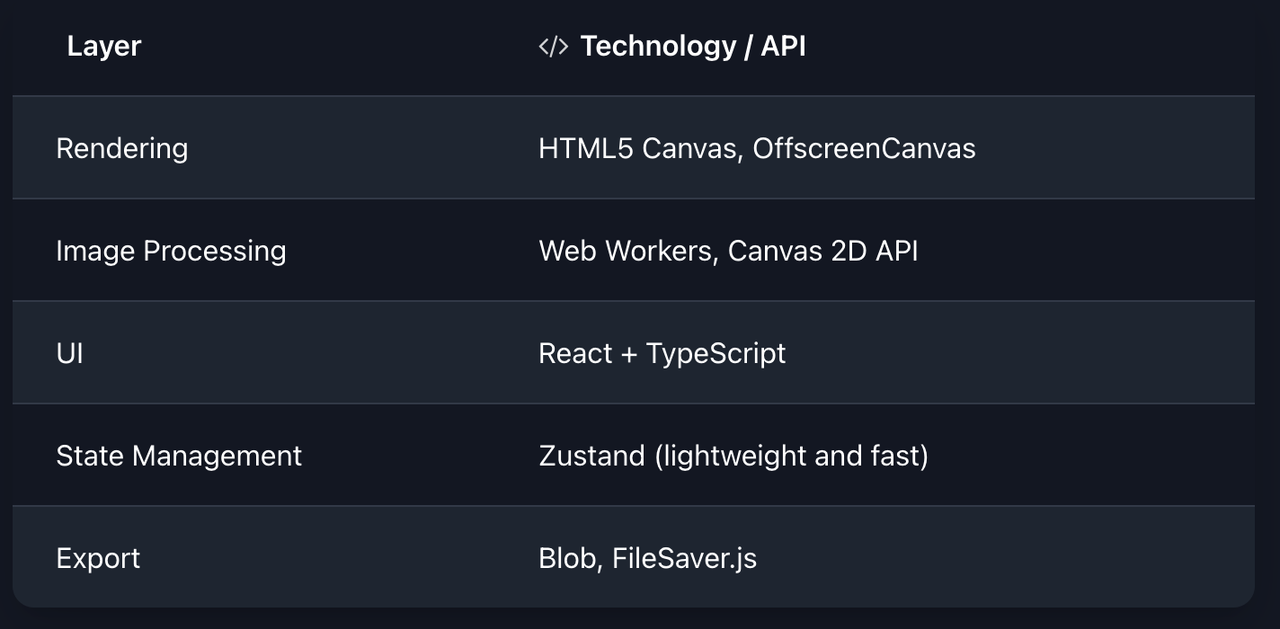
This stack ensures fast, responsive, and maintainable code, while keeping the app lightweight.
7. Future Enhancements
Looking forward, we plan to integrate:
- AI-Assisted Layouts: Auto-arranging images for aesthetically pleasing collages.
- Layer Effects: Shadows, blend modes, and filters applied in real-time.
- Collaboration Mode: Real-time multi-user collage creation using WebRTC.
If you’re interested in a high-performance, fully frontend image collage tool, check out Photocollagemaker. It’s free, fast, and requires no signup.
This project demonstrates how modern browser APIs and frontend architecture can replace traditional server-heavy solutions, delivering privacy-first, responsive, and powerful tools directly in the browser.
