Building WebAudits #2: 10 Common UX and Conversion Issues on Law Firm Websites That Cost Leads
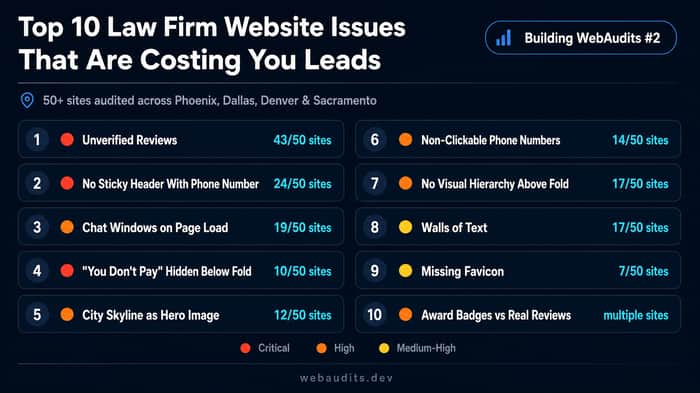
We're building WebAudits, an AI-powered automated website audit tool. To make it genuinely useful, we audit real sites in specific niches while we develop it - checking first impressions, mobile experience, trust signals, and conversion paths. This is post #2 in the series.
This time: 50+ law firm websites - personal injury, car accident, truck accident, medical malpractice, and wrongful death attorneys across Phoenix, Dallas, Denver, and Sacramento. Same 10 mistakes, site after site.
What We Were Looking For
We focused on the things that decide whether a stressed, time-pressured visitor picks up the phone or bounces back to Google: clarity above the fold, contact accessibility, trust signals, and mobile usability. For personal injury attorneys, the phone call is the conversion. Everything else exists to get someone to dial. Here's what we found.
1. Unverified Reviews - 43/50 sites 🔴 Critical
Text quotes, no names, no dates, no link to Google. Even when the reviews are real, they read as invented. Visitors who just had a car accident or a medical error are already skeptical - unverified testimonials give them one more reason not to call. Fix: embed a live Google Reviews widget or link each quote to its source. Thirty minutes of work that immediately changes how the page feels.
2. No Sticky Header With Phone Number - 24/50 sites 🔴 Critical
The visitor reads through the page, decides to call - and the number has scrolled out of view. For injury attorney sites, the phone number is the single most important element on the page. A fixed header with a clickable number and one CTA is one of the highest-ROI changes a firm can make. Nearly half the sites we reviewed didn't have it.
3. Chat Windows on Page Load - 19/50 sites 🟠 High
The page loads, and before the headline renders - a chat widget covers the screen. On mobile, the visitor's first interaction with the site is closing something they didn't ask for. Chat works when triggered by behavior: 45 seconds on page, scroll depth, return visit. Not on load. The first thing a visitor should see is your content, not a close button.
4. "You Don't Pay" Hidden Below the Fold - 10/50 sites 🔴 Critical
"You don't pay unless we win" is the most powerful sentence on an injury attorney's website. It removes the biggest barrier to calling - people assume lawyers cost money they don't have right after an accident. On 10 sites, this line appeared 4–5 screens deep, after most visitors had already left. It belongs in the hero section, visible before the first scroll.
5. City Skyline as Hero Image - 12/50 sites 🟠 High
The Dallas skyline is a nice photo. It tells a stressed visitor nothing about why they should call this firm. Hero real estate is the most valuable space on the page - the strongest sites used it for a specific headline, a visible phone number, and one CTA. No skyline required.
6. Phone Numbers That Aren't Clickable - 14/50 sites 🟠 High
Most people searching for an injury attorney are on mobile, often right after something went wrong. A number not wrapped in a tel: link means they have to copy it manually - that friction is sometimes enough to lose them. This is a five-minute fix that directly shortens the gap between "found your site" and "called you."
7. No Visual Hierarchy on the First Screen - 17/50 sites 🟠 High
City photo background, two CTA buttons, a four-field contact form, and a chat widget - all competing before the first scroll. When everything fights for attention, nothing wins. The sites that performed best had one message and one action above the fold: what you do, who you help, how to reach you. Everything else came after the scroll.
8. Walls of Text Nobody Reads - 17/50 sites 🟡 Medium-High
Law firms have real information to share - case process, credentials, jurisdiction details. But unbroken paragraphs don't get read, they get skipped. Visitors comparing attorneys scan for three seconds; if nothing catches their eye, they're back on Google. Short paragraphs, clear H2s, bullet points where lists beat prose, one bolded line per section - same information, actually readable.
9. Missing Favicon - 7/50 sites 🟡 Medium-High
When someone is comparing five law firms across ten browser tabs, a blank tab icon immediately signals "unfinished site." For a business where trust is the entire product, that's a bad first impression for a fix that takes 10 minutes.
10. Award Badges Instead of Real Reviews - multiple sites 🟠 High
Badge sections - "SuperLawyers," "Avvo 10.0," "Top Attorney 2022" - were most prominent on the same sites with no client reviews at all. A badge says an industry org rated you highly. A verified Google review from someone who was in a car accident and got their settlement says someone in exactly my situation trusted you and it worked out. Both belong on the page. When you have to choose, the review wins.
What This Tells Us About the Product
None of these are technical issues. No crawl errors, no schema problems. These are trust failures and friction failures - the kind that don't show up in Search Console but quietly drain the value of every paid click.
For us building WebAudits, this research shapes what the tool actually checks. Automated audits are good at catching the technical layer. Catching "your hero image is a city skyline" or "your reviews aren't linked to any source" requires a different approach - which is exactly what we're figuring out.
If you're curious about the full breakdown with screenshots, it's here . And if you want to run your own site run a free audit at WebAudits.dev.
Would love to hear from anyone who's built in the legal niche - what patterns have you seen?

This is genuinely useful research. The gap between technically working and actually converting is where most audits stop. You're catching the stuff that matters trust signals, friction points, and why people bounce. The unverified reviews and non‑clickable phone numbers alone explain so much lost business. Keep these coming.
Thanks, really appreciate it. If you have examples from your experience of sites that fix these issues well, I’d love to see them.