Built a local-first privacy extension. Looking for feedback.
Hey everyone,
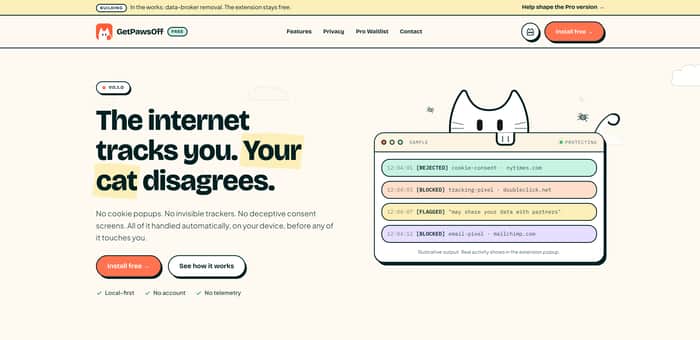
I've been building GetPawsOff, a local-first privacy extension for Chrome, over the last few weeks as a solo project.
The goal is simple: give people more privacy without sending their browsing data to another company.
Right now it can:
- Automatically reject cookie banners when it's safe to do so.
- Block email tracking pixels and many known trackers.
- Analyze Terms of Service and privacy policies locally and highlight potentially concerning clauses.
It's open source and still a work in progress, so I'm looking for honest feedback before the Chrome Web Store launch.
Website: https://getpawsoff.app
GitHub: https://github.com/Alfa-Dev404/GetPawsOff
I'd really appreciate any thoughts on the idea, architecture, UX, or features you'd like to see.

This is a good fit for pre-launch feedback because the trust bar is unusually high here.
A few things I'd test on the website:
Overall: the positioning is solid. I'd spend most of the polish on trust hierarchy, not feature explanation.
Thanks, I really appreciate this. I've gotten some genuinely great feedback from this thread, and a lot of it is going into the next update.
I actually ended up pushing it to the Chrome Web Store earlier than planned because I couldn't find enough beta testers. Still lots to improve, but feedback like this has been incredibly helpful.
That makes sense. Shipping to the Chrome Web Store is probably better feedback than waiting for perfect beta coverage.
Now I'd treat the store listing as the next test surface:
For a privacy extension, small trust signals compound fast.
Congrats on getting it live — that's the hard line most people don't cross.
Thanks again. You've shared some really thoughtful feedback throughout this thread, and I genuinely appreciate it. I'll be making a bunch of changes over the next few days.
Glad it helped. You're already doing the important part: shipping, listening, and tightening the trust story quickly.
If you update the page/listing, I'd focus on one thing above everything else:
make the "why this is safe to install" argument obvious before users have to look for it.
For a privacy extension, that's probably the conversion lever.
Just implemented; moved it into a sticky header so it's the first thing people see. Thanks for the nudge; that was the right fix.
Nice, that's a solid fix. For a product like this, “local‑first/no telemetry” shouldn’t just be a reassurance; it’s part of the core offer. I’d just keep an eye on whether people get it faster, fewer trust or permission questions, more installs from the same traffic, and more specific feedback instead of generic safety concerns. Good move shipping the change quickly.
The local-first angle is the strongest part, most privacy tools already ask you to trust a server, so "nothing leaves your machine" is a real differentiator worth leading with. I’d simplify the feature list on the site to one line instead of three bullets. People skim fast and won’t read “cookie banners + tracking pixels + ToS analysis” as one product.
The ToS/privacy policy analyzer is probably your strongest message angle since cookie blocking is table stakes now, that's the feature people will screenshot and share. If you want to test which of the three features drives installs before adding more polish, run a structured validation pass.Do not rely on guesses from comments here.
Nice!
The local-first architecture is genuinely differentiated, but the hardest part of your next six months will be making people believe it — not because it's not true, but because they've heard "we protect your privacy" from services that then sold their data. The claim and the reality have been decoupled so many times that most users have stopped distinguishing.
We hit the same thing building Incipite (file hashing for proof of authorship — SHA-256 computed in-browser, nothing reaches our servers). "The file never leaves your machine" is accurate and should be reassuring, but it doesn't land the way you'd expect. What actually moved people: showing the network tab in DevTools while processing a file. Zero requests. Nothing sent. That's something you can't fake with a privacy policy.
If you can make the local processing visible inside the extension itself — a live indicator showing "analyzed locally, 0 requests sent" — that might be the trust signal that converts skeptical users who've been burned before.
Really appreciate this, especially the Incipite comparison. I think you're right that people trust what they can verify more than what they're told.
One thing I wanted to clarify is that I can't honestly claim "0 requests sent." The extension does make a request to my server to fetch signed rule-list updates. It never sends browsing data, but saying "0 requests" would be misleading, and I think people who care about privacy would spot that pretty quickly.
So instead, I'm leaning toward being explicit about every network request the extension makes and why it makes them, rather than trying to reduce it to a badge or a number. I'd rather earn trust through transparency than oversimplify it.
Really appreciate you sharing the Incipite example; it gave me a lot to think about.
Explicit and itemized beats absolute and unverifiable almost every time. "Zero requests" is a claim someone has to trust; a list of exactly what goes out and why is something they can check themselves, which is a stronger position even if it sounds less impressive on paper. Curious how you ended up presenting that list, in the UI itself or more in docs and changelog form?
I like the local-first approach. Privacy tools often ask users to trust another service with their data, so processing everything locally is an interesting advantage. I'm curious, how do you keep the analysis of Terms of Service and privacy policies up to date while still performing it locally?
Honestly, I didn't put much effort into this part because I saw it as a fairly simple feature. Reading the feedback here has made me realize it probably deserves a lot more attention.
Right now it doesn't pull live updates. It's using patterns I built from research like CLAUDETTE and OPP-115, so it's matching the structure of a clause rather than exact wording. Updates happen when I release a new version of the extension, although I already have a signed update system for the cookie rules that I could extend to this in the future.
The open-source plus local-first combo has a B2B angle nobody here has mentioned: IT and security teams can actually audit and whitelist it, which most extensions never survive in procurement. I run a security and compliance business and extensions that phone home are the first thing corporate policies block. Individual privacy users rarely pay, but "the one privacy extension your IT department will approve" is a position with real budget behind it.
That's a really interesting angle. I hadn't thought about procurement at all.
One thing I'd clarify is that it isn't completely offline. It checks my server for signed rule updates, but it never sends browsing or user data, and that code is open for anyone to inspect.
Genuinely curious, would that still pass for most security teams, or is any outbound request a dealbreaker?
The wedge you found (the analyzer nobody else owns) is a good instinct — I ran into the same "which part is actually mine" question building an on-device AI music app. Everyone can point to a cloud version of roughly the same idea, so the local-first, no-account part ends up being most of the actual differentiation, not a footnote.
Curious how heavy the on-device analysis actually is — are you running anything ML-ish locally, or is it closer to a rules/pattern engine?
No ML at all, actually. It's all rules and pattern matching.
For the ToS analyzer, I split the page into clauses and look for combinations that usually go together, such as an action ("share", "sell", "transfer") and what it acts on ("third parties", "personal data", etc.). There's also some logic for negation so something like "we do not sell your data" doesn't get flagged.
I did think about using a model early on, but for a browser extension this ended up being the better tradeoff. It's fast, lightweight, and anyone can look at the logic instead of taking my word for what it's doing.
Local-first for a privacy tool is the right instinct — you're removing the whole "did they leak my data server-side" question by not having a server in the loop.
One thing I'd sanity-check before you push for users: if the extension talks to any external endpoint (even analytics or an update check), make sure nothing sensitive rides along in that request, since that's the one place a "local-first" tool quietly stops being local.
Happy to take a look if useful.
Appreciate it. There is one external call for signed rule updates, but no browsing or user data is ever sent. I also added the GitHub repo to the website footer today if you feel like having a look.
Hey, took you up on the repo invite. The architecture backs up the claim: MV3 with declarativeNetRequest + the EasyPrivacy list means blocking happens through browser rules rather than code reading your traffic, and the config endpoint matches what you said about signed rule updates. Having PRIVACY_POLICY and THIRD-PARTY-NOTICES in the repo pre-launch is more diligence than most shipped extensions.
One thing worth handling before the Web Store launch: your host_permissions cover all http/https sites (plus webRequest + tabs). Technically justified for cookie-banner automation — but it means Chrome will show the scariest install warning there is: "Read and change all your data on all websites." For a privacy tool, that warning is the single biggest install-killer, because it contradicts your pitch at the exact moment of decision. I'd add a short "permissions, explained" section to the README and the site, listing each permission and why it's needed. Privacy-minded users actually read those.
Also, once you're live: sites like privacytools.io list extensions against public criteria — open source, active maintenance, minimal permissions. You match most of that profile, and a listing there brings exactly the audience you want. Worth submitting when ready. Good Luck with the launch🚀.
Just checked the live listing and you called it exactly, the permission disclosures list "personal communications, web history, user activity, website content" with zero context, which is the scariest possible read of what's actually cookie-banner detection and pixel blocking. Writing up the permissions-explained section now, gonna cover the store listing too, not just README/site. Thanks for pointing at
the right problem before I even noticed it live. And thank you for http://privacytools.io/ :)
Glad it landed before launch rather than after, that warning screen is where most privacy extensions quietly lose people, so catching it at the listing stage is the best-case timing. Covering the store listing too is the right call; that's the copy users actually see at the decision moment.
Small ask in return: conversion checks like this are exactly what I'm building a tool around (aiconversionclinic.com, it's how I spotted the permission angle so fast). Once your permissions section is up, would you mind if I quoted a line from this exchange on the site? Something like your "you called it exactly" comment, with your handle or repo linked. Totally fine to say no.
And ping me when the Web Store listing goes live, happy to give the final page one more pass before you push traffic to it.
Yeah, absolutely. Feel free to use it.
Here's the repo if it's useful: https://github.com/Alfa-Dev404/GetPawsOff
I also added a permissions section to the README and pushed the same changes to the Chrome Web Store listing. It's under review at the moment, but I'll send it over once it's live if you're still up for taking another look.
Definitely checking this app out ill leave feed back after review
Thank you. Looking forward to your feedback.
Love the local-first approach! Privacy tools that don't phone home are exactly what the web needs right now.
The ToS/privacy policy analysis feature is particularly clever — most users have no idea what they're agreeing to.
For the cookie banner rejection, are you running into issues with sites that require interaction before allowing content? Some GDPR implementations block the page until you click, which could break the extension's approach. Would be curious how you handle that edge case.
Yeah, that's honestly been one of the more annoying parts.
OneTrust, Sourcepoint, that whole family of CMPs put up a backdrop that locks scrolling until you click something. So clicking "Reject" isn't enough. The extension also has to remove the overlay and restore scrolling; otherwise, the page remains unusable.
Sourcepoint's annoying for another reason, too: it puts the banner in an iframe instead of on the actual page. Loads of EU news sites use it. So the extension can't just work on the top-level page; it has to run inside those frames as well.
Then there are sites that don't even create new DOM elements. They just toggle a class or aria-hidden, so I keep a MutationObserver running for a few seconds after load.
It's still not perfect. Sites redesign their consent flows all the time, so I occasionally have to update selectors.
I think the biggest challenge isn't convincing people they need more privacy most already believe that.
The challenge is making them feel safe enough to trust a new privacy tool over the ones they already know.
Every page, every screenshot, and every explanation on the website should reinforce that trust before they ever install the extension.
Thank You. This is exactly the kind of feedback I was hoping for. I'll definitely revisit the website with that mindset.
Glad it was helpful.
Sometimes a small change in how trust is communicated can have a bigger impact than adding another feature. Looking forward to seeing how the launch goes.
Leading with the policy analyzer makes sense, cookie and tracker blocking are already commodity features with strong free options out there. Local-first is a real trust signal too, especially for something reading privacy policies, people are naturally more comfortable if it's not sending anything out. How are you planning to explain the local-first part to non-technical users in a way that actually builds trust instead of just sounding technical?
Instead of saying local-first, I'd rather explain that your browsing stays on your device, nothing is sent to my servers for analysis, and the less data I collect, the less you have to trust me.
That's a much clearer way to say it honestly, "nothing leaves your device" lands better than a technical term like local-first. I'd probably lead the whole page with that line instead of burying it as one bullet among others.
Honest feedback on the idea: you've got three products here with three different competitors, and only one of them is a reason to install GetPawsOff specifically. Auto-rejecting cookie banners is Consent-O-Matic's job, tracker and pixel blocking is uBlock Origin's, and both are free and established, so leading with them makes you look like a me-too in a crowded shelf. The ToS and privacy-policy analyzer is the one nobody owns. That's your wedge. I'd position the whole thing around "see what you're actually agreeing to" and let the blocking be a bonus, not the headline.
On the Pro tier: your "local-first, no account, no telemetry" stance is great for trust but it boxes you in on monetization, since you can't charge for server features or usage limits you can't measure. The version of Pro that fits is deeper judgment on the analyzer, not more blocking: explain what a scary clause actually means for the user, diff a site's policy when it quietly changes, flag the worst offenders. Sell the reading, not the blocking, because blocking is already free.
Really appreciate this. It's helpful to hear how someone new immediately categorizes the product; that's valuable feedback for me.
I like that you're treating privacy as an architectural decision rather than just a feature.
A lot of privacy tools still ask users to trust another company with their data. Building locally changes that relationship because the product earns trust through its design, not just its promises.
Thank you, I really appreciate that. That's exactly the philosophy I'm trying to build around.
I appreciate that.
Reading your reply left me thinking about one implication of that design philosophy that becomes much more important as the product evolves. It's not immediately obvious, and I don't think I can do the reasoning behind it justice in a thread.
If you're open to it, what's the best email to reach you on?
Thanks, I really appreciate it. I'd love to hear your thoughts. Feel free to email me at pawssoff.me@gmail.com if that's easier.
Thanks! I’ve just sent it over.
Looking forward to hearing your thoughts whenever you have a chance.