Compare Text Online: A Simple Guide for Writers and Editors
Why Text Comparison Matters
Writers and editors deal with changes every day. A sentence may be rewritten, a paragraph may be moved, or a client may send a new version without explaining what was adjusted. Reading two drafts line by line can waste time and still leave room for mistakes.
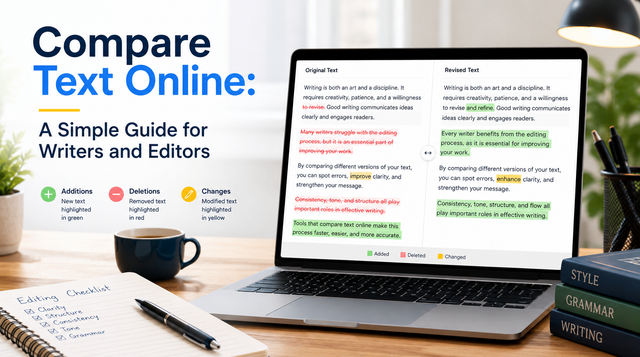
That is why many professionals use online tools to compare text. These tools highlight additions, deletions, punctuation changes, formatting shifts, and wording differences in seconds. Instead of guessing what changed, you can see it clearly and make better editing decisions.
The need to compare text online is common among bloggers, students, copywriters, proofreaders, content managers, and business teams. Whether you are polishing an article or checking a revised document, text comparison helps you stay accurate and organized.
What It Means to Compare Text Online
To compare text online means placing two versions of writing into a digital tool so it can detect differences between them. Usually, the original text goes into one box, and the edited version goes into another. After you run the comparison, the tool marks the changes in an easy-to-read format.
For example, a writer may paste an early article draft in one field and the final client version in the second field. The tool then shows where words were added, removed, replaced, or rearranged. Some tools also identify changes in capitalization, spacing, and line breaks.
This process is useful because edits are not always obvious. A small wording change can affect tone or meaning. A deleted phrase can remove an important detail. A changed number, date, or claim can create accuracy problems. A simple text compare online process helps you catch these issues before approval.
Benefits for Writers
Writers revise constantly. They improve openings, remove weak sentences, adjust tone, and rewrite sections for clarity. During this process, it is easy to lose track of what changed. Text comparison tools give writers a clear view of their revisions.
Some key benefits include:
Faster review of updated drafts
Clear tracking of added and removed words
Better control over tone and message
Easier checking of client edits
Fewer missed details before submission
Freelance writers benefit even more. Clients sometimes edit a draft directly, then ask for approval. By using a comparison tool, the writer can quickly identify whether the changes improve the content or weaken the message. This makes feedback easier and more professional.
When you compare text, you also protect your original ideas. If a strong paragraph was removed or a meaning was changed, you can spot it immediately and suggest a better version.
Why Editors Need Comparison Tools
Editors must improve writing while protecting the writer’s purpose. This can be difficult when a document passes through several hands. A text comparison tool helps editors understand exactly what has changed between versions.
Editors can use these tools to check whether requested revisions were completed, whether a final draft matches a style guide, or whether a writer accepted important suggestions. They are helpful for articles, website pages, academic papers, proposals, contracts, product descriptions, and marketing copy.
Time is another major benefit. Manually comparing two long documents can be slow and tiring. A tool highlights only the changed parts, allowing editors to focus on judgment, clarity, and consistency.
Comparison tools also support brand accuracy. If a company uses specific spellings, product names, taglines, or formatting rules, editors can quickly find unwanted changes. This makes the review process smoother.
How It Helps With Originality
Text comparison is not the same as a full plagiarism checker, but it can still help writers create more original work. A plagiarism checker searches across outside sources, while a comparison tool checks two texts that you provide. Even so, comparing versions can reveal when wording is too close to a source.
A student may compare a paraphrased paragraph with the original material to see whether it has been rewritten properly. A blogger may compare two similar posts to avoid repeating the same structure. A content manager may compare a submitted article with an earlier draft to confirm that enough rewriting has been done.
Useful signs to review include:
Sentences that remain too similar
Repeated phrases from the source
Sections that need deeper rewriting
Missing or unclear attribution
The goal is not only to avoid copied wording. It is to improve the quality of expression. When writers review similarities carefully, they can rebuild ideas in a fresher voice.
Features to Look for in a Good Tool
A good text comparison tool should be simple, clear, and reliable. It should not make the review process harder than it needs to be.
Look for features such as:
Side-by-side comparison
Clear highlighting for additions and deletions
Support for long text
Fast processing
Clean layout
Easy copying of results
Privacy-friendly handling of pasted content
Readability matters. If the tool shows changes in a confusing layout, you may waste time trying to understand the results. The best tools use simple visual signals so you can scan edits quickly.
Privacy matters too. Writers and editors often work with unpublished drafts, client content, internal documents, or academic material. Before using any text compare online platform, choose one that feels trustworthy.
Simple Steps to Compare Text Online
The process is usually easy, even for beginners. Start by opening a trusted comparison tool. Paste the original version into the first box. Paste the revised version into the second box. Run the comparison and review the highlighted changes.
Focus on meaning before small details. A punctuation change may be minor, but a changed claim or missing sentence may be important. Review major edits first, then check grammar, flow, spelling, and formatting.
A simple workflow can look like this:
Add the original text first
Add the revised text second
Review major meaning changes
Check smaller language edits
Rewrite anything unclear
Read the final version once again
This method keeps the editing process structured. It also reduces the chance of approving changes too quickly.
Best Practices for Accurate Reviews
To get better results, make sure you compare the correct versions. Label files clearly, especially when working with several drafts. Remove unnecessary formatting if it makes the comparison messy.
Always read changes in context. A tool can show what changed, but it cannot always tell whether the change is better. Human judgment is still necessary. Look at the sentence before and after each edit so you understand the full meaning.
For long documents, compare smaller sections. This makes the results easier to manage and prevents important edits from getting buried inside too much information.
Also, avoid forcing keywords into content while editing. Phrases like compare text, text compare online, and compare text online should appear naturally. If repeated too often, the writing can sound awkward.
Mistakes to Avoid
One common mistake is treating every highlighted change as equally important. Some differences may only involve spacing or line breaks. Start with changes that affect meaning, accuracy, and readability.
Another mistake is comparing incomplete drafts. If one version is missing a paragraph, the results may look confusing. Always confirm that both texts are complete before running the tool.
Writers should also avoid depending only on software. Comparison tools are helpful, but they do not replace careful reading. A sentence can be different without being stronger, clearer, or more accurate.
A Better Way to Review Every Draft
Learning how to compare text online is a simple skill that can improve almost any writing process. It saves time, reduces confusion, and helps writers and editors make smarter decisions.
Whether you are reviewing an article, checking a client revision, improving an assignment, or updating business content, comparison tools give you a clear view of every change. Used with thoughtful reading, they help protect meaning, improve quality, and keep every draft moving in the right direction.
