Correct “Enable text compression” error in Lighthouse
Transferring data on the web costs time and money, thus it’s important to reduce those data.
One easy way to reduce the transferred data is to compress it. The easiest content to compress is the text (HTML, CSS, JavaScript, …).
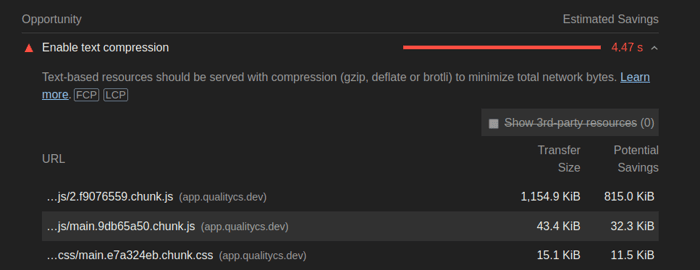
If you use Qualitycs (or Lighthouse), you can see the error of this form:

As you can see in the screenshot above, enabling text compression can help increase the load time a lot!
Today, all browsers support text compression. Yet, the server must be configured to send compressed files when possible. This article describes how to enable compression on Nginx and Apache 2.
Enable text compression for Nginx
On Nginx, you need to change only one character to enable text compression.
Open your nginx config file (usually in /etc/nginx/nginx.conf):
sudo nano /etc/nginx/nginx.conf
In this file, try to find the Gzip section:
##
# Gzip Settings
##

gzip on;

# gzip_vary on;
# gzip_proxied any;
# gzip_comp_level 6;
# gzip_buffers 16 8k;
# gzip_http_version 1.1;
# gzip_types text/plain text/css application/json application/javascript text/xml application/xml application/xml+rss text/javascript;
Lines starting with # are comments (remove the # to enable the line). In the default configuration, compression is enabled but not for many file types.
To enable gzip for more file types, including CSS and JavaScript, simply uncomment the line defining the gzip_types configuration.
The same block should be:
gzip on;

# gzip_vary on;
# gzip_proxied any;
# gzip_comp_level 6;
# gzip_buffers 16 8k;
# gzip_http_version 1.1;
gzip_types text/plain text/css application/json application/javascript text/xml application/xml application/xml+rss text/javascript;
Now that you corrected the config file, you can save it and restart nginx:
sudo service nginx restart
Enable text compression on Apache 2
To enable text compression on Apache, you need the deflate module:
sudo a2enmode deflate
You can now restart apache to load the newly enabled module:
sudo service httpd restart
Result
Now that compression is enabled on your server, you should see an improvement of your Qualitycs score. For example, I gained 18 points with only that configuration change:

Want to track your website’s performance over time and optimize it efficiently? Qualitycs is a SaaS tool that runs Lighthouse regularly on an entire website. You can register on https://qualitycs.dev
