Could you try my WebGL app and let me know if it even works?
Hi IndieHackers,
I have been converting Slantt to be a WebGL app and now trying to get some testing done before I make it live.
Would you please take it for a quick 5 second spin and let me know if it renders ok?
https://slantt-dev.onrender.com/editor/tiles
When it asks you to pick a template, just pick one of the bottom 3 sample scenes (e.g. bottom-left green one).
If it doesn't work (e.g. it's very laggy or you just see a black canvas), please could you grab the console logging (right-click -> Inspect -> Console tab) and let me know which OS, browser and HW you're rocking.
Here's what it should look like if all is working ok:
Many thanks

Hey, fellow founder of a webgl app here.
It works fairly well for me, on Ubuntu, with firefox and chrome.
2 things that I'm not sure are how you intented:
the scale handles: I was initially trying to scale a screen that's in between other screens, and assume those handles either did not work or were for another use. But then I realised that you calculate collisions between each screen. Once I cleared the space around the object, the scale handles worked. So I'm tempted to suggest to disable them when it's not possible to scale an object?
(although I realise now you are making the larger handle red, so while this is good, I'd still be tempted to make the corner handles red too)
the frame rate does not seem optimal, even in chrome. Especially when panning the camera. I'd be curious to see threejs stats window (assuming you are using threejs)
Hope that helps!
Thanks Gui,
Great idea about disabling the handles, I do think those handles need a bit more work.
Interesting the framerate isn't good for you -- just how bad is it?
What it's actually doing is only rendering in response to mouse events rather than at some fixed FPS to make it a more light-weight app (reduce GPU usage , heat, battery consumption) so definitely the framerate might not as high as it could be but hopefully still feels ok to use?
I have Ubuntu installed on another partition so I might hop over and see how it does.
I'm using pixi.js (rather than three.js) but it's mosty written in glsl anyway :)
cool, I'm not familiar with pixi.js but good to see what it can do.
And the framerate I saw wasn't so bad that it was not usable, so not something I would sweat over. It felt more like the movement was trying to snap the screen to some grid position. So maybe that's intentional, I could not really tell.
Hardware;
Mac Mini 2012 with intel HD 4000.
Software;
MacOS Catalina 10.15
Firefox 96
Safari 15
Both browsers loads the Grafana template, Firefox also handles MacOS template but Safari results with an empty canvas.
That's super useful thanks Rusted. Trying to wrap my head around what might be happening there. It maybe failed to load one of the images and then gets stuck in an infinite loop waiting for it.
Sorry I don't know how to debug it further.
BTW in Safari even tho it looks like an empty canvas there are 5 selectable components in the canvas. I can upload a background image for canvas in both browsers however I can't update a components image in Safari.
And yes from console output it dives into a loop to resolve an awaitable before loading necessary textures.
Good luck!
I've just pushed an update that might get us a bit further down the rabbit hole.
Now, if an image fails to load it logs the error object (unsure if that'll contain anything useful?) and it'll fallback to a plain white image for that tile and carry on without getting stuck in an infinite await loop.
Would you mind giving this version a try?
Yeah, exactly one of them was white on Safari but normal on Firefox. Also I can't tell if it was my connection but it's way faster now.
edit: changed the screenshot, I was checking the upload function.
So that's really interesting. That particular image is the only one that's encoded in webp format (all the others are jpeg or png).
I'm curious whether that image loads in the older (non-webgl) version for you: https://slantt.co/editor/tiles
This pic shows it's still webp even in that version:
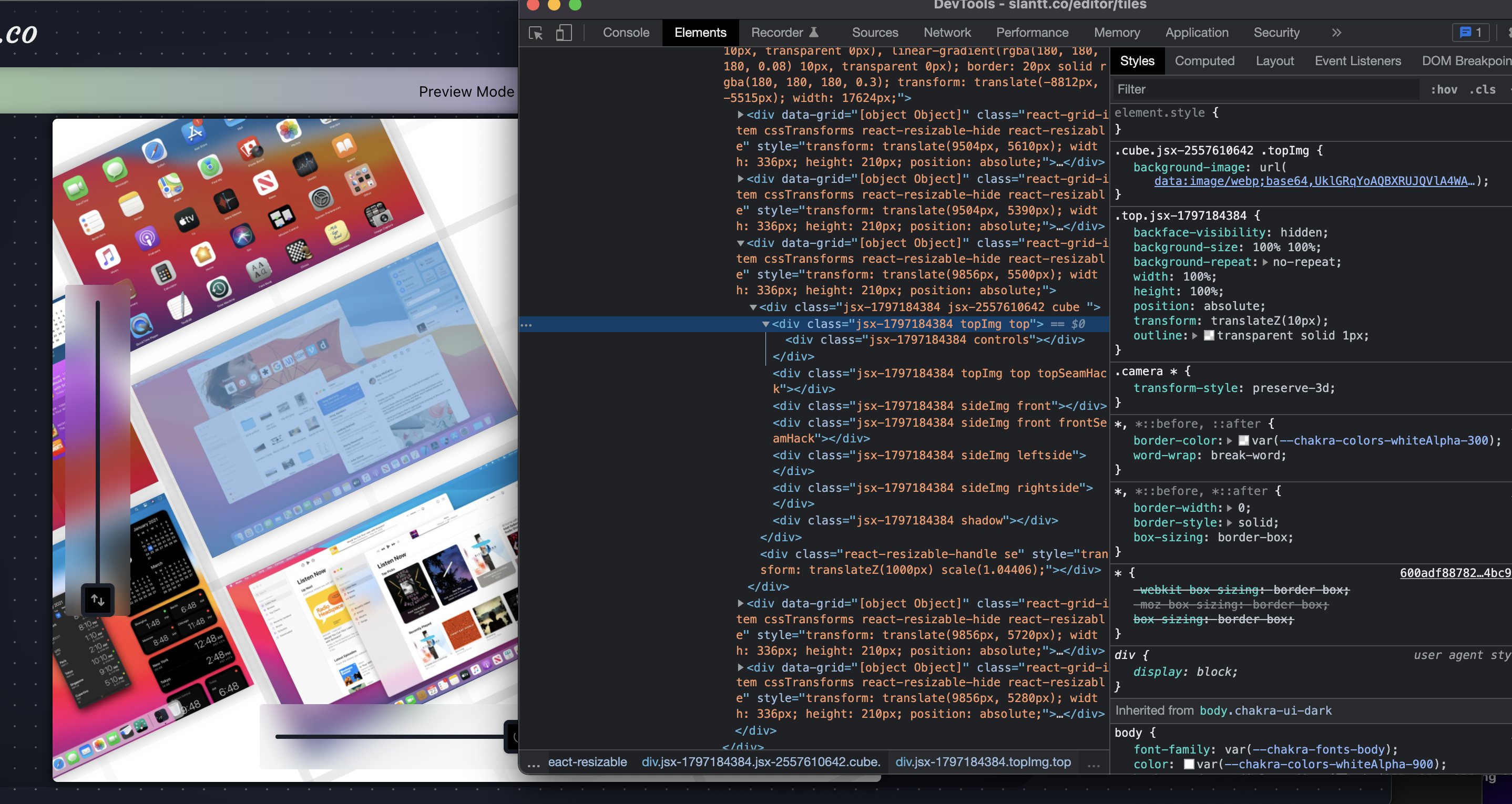
It loads other images but not the webp.
Catalina doesn't support webp apparently.
https://caniuse.com/?search=webp
I'll convert that image to a more widely supported format.
I'm happy we got to the root cause of this one AND it has resulted in more robust handling of image load failures too.
Thanks for all the help!
Great, glad that you've figured that out!
Converted it to a JPEG which is now live on the webgl build :D
Yep, works as intended 👍
Works for me on M1 Macbook Air in Chrome. Cool product!
Thanks for giving it a spin :D
Renders fine for me using an iPhone 😊
Haha, thanks! I haven't even tried to cater for mobile yet so that's a pleasant surprise.
Works well in MacOS Monterey in Brave Browser (1.34.80) with Grafana template. Cool product, very engaging.
That's great. As far as I know you're the first to try it in Brave. Thanks, glad you think so :D
@daveagill I feel your pain 😂 I’m making a webgl demo too
Yours seems to work fine on my machine (recent mac in chrome). It does feel a little jittery when zooming in and out though
Could you give mine a spin too? (buttons don’t work, but pan and zoom should)
Thanks! Yeah the zoom is a bit janky which I think is more due to how I'm debouncing those events with React.
Yours seems to work on my 2019 Intel Mac. I see a big orangey-yellow-green square that can pan and zoom. Also some dots which turn to stars when I click them.
Thanks so much @daveagill! Yea, it’s an interactive scatter plot that will be able to hold 300K+ data points. Webgl is the only option.
Glad you might have found the root cause. For me, react dev tools actually hurt performance.
I see you’re using PixiJS. I ended up with react-three-fiber. This is my first time diving into a project like this, and it’s cool to see what you’re making too