Deployment Monitoring with The GitHub Actions
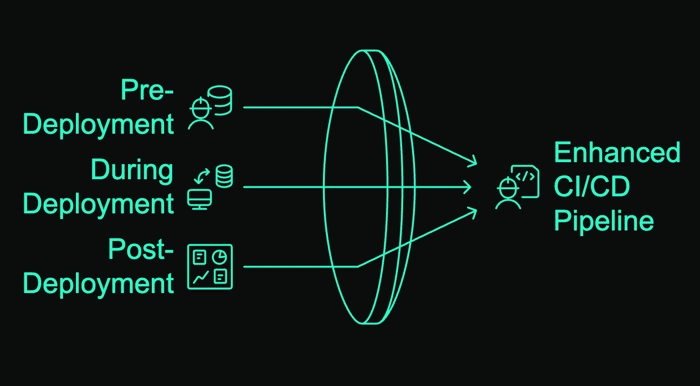
We deploy code constantly—but how do you know if that 10PM Friday deploy actually worked? Or if it broke something subtly that you'll only discover Monday morning when customers start complaining?
Let's solve this with practical monitoring that works for small teams and solo founders.
Why Most Deployment Monitoring Fails
Traditional approaches to monitoring deployments have two major flaws:
- They're reactive - you find out about problems after users do
- They require manual checks - someone has to verify things worked
The result? That quick "5-minute fix" turns into a weekend emergency when something breaks silently.
The Feedback Loop That Changes Everything
The secret to deployment confidence isn't just monitoring—it's creating a continuous feedback loop:
- Monitor your deployment process
- Learn from what you discover
- Improve both your monitoring and deployment
- Repeat
This transforms monitoring from a cost to an investment that continuously improves your systems.
GitHub Actions + Monitoring: A Practical Example
Here's a real-world implementation you can adapt in 15 minutes:
# .github/workflows/deploy-and-monitor.yml
name: Deploy and Monitor

on:
  push:
    branches: [ main ]

jobs:
  deploy:
    runs-on: ubuntu-latest
    steps:
      - uses: actions/checkout[@v3](/v3)

      # Signal deployment start
      - name: Notify deployment start
        run: |
          curl -X POST "https://uptime-api.bubobot.com/api/heartbeat//${{ secrets.HEARTBEAT_ID }}" \
            -d "message=Starting deployment of ${{ github.repository }}"

      # Your actual deployment steps here
      - name: Deploy
        run: |
          # Your deployment commands
          echo "Deploying application..."

      # Verify deployment success with actual checks
      - name: Verify deployment
        run: |
          # Try multiple times with backoff
          for i in {1..5}; do
            if curl -s "https://yourdomain.com/api/health" | grep -q "\"status\":\"ok\""; then
              # Report success to monitoring
              curl -X POST "https://uptime-api.bubobot.com/api/heartbeat//${{ secrets.HEARTBEAT_ID }}" \
                -d "message=Deployment verified successfully"
              exit 0
            fi
            echo "Attempt $i failed, retrying in 10s..."
            sleep 10
          done

          # If we get here, verification failed
          curl -X POST "https://uptime-api.bubobot.com/api/heartbeat//${{ secrets.HEARTBEAT_ID }}/fail" \
            -d "message=Deployment verification failed after 5 attempts"
          exit 1
What makes this powerful:
- It verifies actual functionality not just that files deployed
- It provides contextual information about what happened
- It retries instead of immediately failing
- It works with any deployment target (Vercel, Netlify, your own servers)
The Rollback Insurance Policy
The best part? You can extend this with automatic rollbacks when monitoring detects problems:
# .github/workflows/auto-rollback.yml
name: Automatic Rollback

on:
  repository_dispatch:
    types: [deploy_failed]

jobs:
  rollback:
    runs-on: ubuntu-latest
    steps:
      - uses: actions/checkout[@v3](/v3)
        with:
          ref: ${{ github.event.client_payload.last_working_commit }}

      - name: Execute rollback
        run: |
          echo "Rolling back to last working version..."
          # Your rollback commands here

      - name: Notify team
        run: |
          curl -X POST "${{ secrets.SLACK_WEBHOOK }}" \
            -H "Content-Type: application/json" \
            -d '{"text":"🚨 Automatic rollback executed - deployment failed verification"}'
The CI/CD Monitoring Toolkit
You don't need enterprise tools to implement these practices. Here's what actually works for small teams:
- GitHub Actions - Free for public repos, cheap for private ones
- Heartbeat monitoring - Services like Bubobot provide URLs you can ping
- Slack/Discord webhooks - For team notifications
- Simple health endpoints - Add
/healthto your API that checks critical dependencies
Advanced Techniques for Growing Teams
As your project grows, consider these next-level improvements:
- Correlation analysis - What deployments cause the most issues? At what times?
- Canary deployments - Roll out to 5% of users first, monitor, then expand
- Synthetic monitoring - Test actual user flows, not just "is it up?"
- Feature-specific monitoring - Track key metrics for each feature separately
Next Steps: Start Simple, Then Expand
- Add a basic health endpoint to your application
- Set up the GitHub Action workflow above
- Configure notifications to somewhere you'll actually see them
- Track how many issues this catches that would have affected users
Remember: The goal isn't perfect monitoring—it's catching issues before your users do, and building confidence in your deployment process.
#CI/CD #ITAutomation #UptimeImprovements
Read more on https://bubobot.com/blog/monitoring-in-ci-cd-pipelines-essential-strategies-for-dev-ops-teams-part-1
