Developer's Guide to Smoke Testing: Ensuring Core Functionality
Imagine running a Python project without a requirements.txt file. Just as you rely on these checks to ensure everything runs fine, smoke tests are performed to confirm that your code is ready for the next phase.
Let's dive into the world of smoke testing now!

What is Smoke Testing
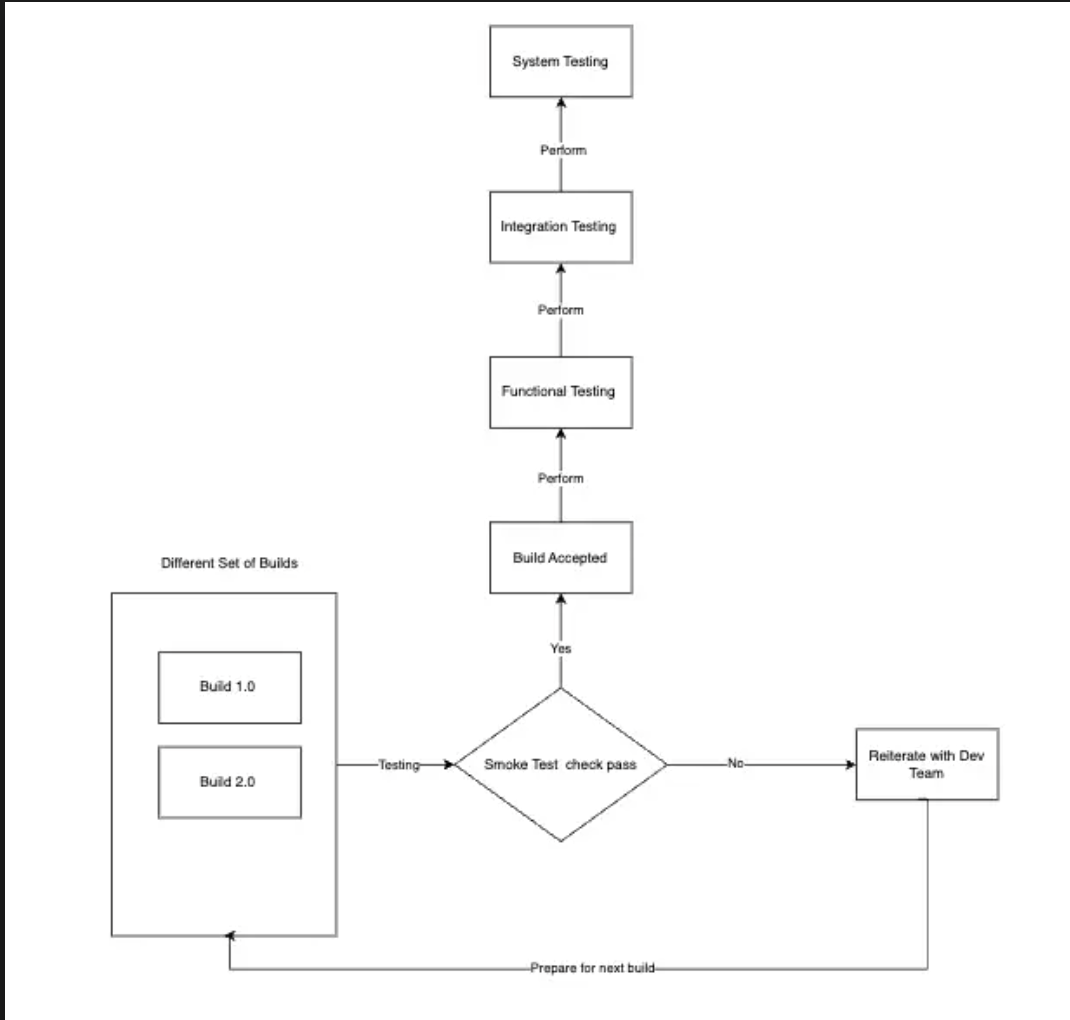
Smoke testing, often referred to as a "sanity check" in software development, is a preliminary testing process that ensures the core functionalities of a new build or update are working correctly.

Smoke tests assess whether the essential functionalities of an application or system are operating correctly. For instance:
-
Does the software launch without issues?
-
Can the user successfully log in?
-
Are the primary features available and functional?
Key Functions of Smoke Testing:
-
Verifying Build Stability: Smoke tests confirm that the software build is stable and that there are no major issues that would prevent further testing.
-
Detecting Showstopper Bugs: The primary goal is to identify critical issues early on, which could halt the progress of the project.
-
Saving Time and Resources: By catching major defects early, smoke testing helps avoid wasting time on a flawed build.
Why Do We Need Smoke Testing?
Smoke testing is essential for several reasons, all of which contribute to a smoother, more efficient development process.
1\. Early Detection of Critical Issues
Smoke testing acts as the first filter to catch critical defects in the software and to address them before they cause more complex problems down the line.
2\. Increased Efficiency in Development
Smoke testing ensures that only stable builds proceed to more detailed testing phases as teams might waste valuable time and resources conducting in-depth testing on a build that has fundamental issues.
3\. Improved Quality Assurance
Smoke testing adds an additional layer of quality assurance by ensuring that the most basic and crucial functionalities work as intended to build confidence in the overall stability of the application.
4\. Faster Feedback Loop
By incorporating smoke testing into your development process, you create a faster feedback loop. Developers can quickly determine whether a build is viable or needs immediate attention, allowing for more agile and responsive development.
Real-World Scenario: The Launch of a New Mobile Banking App
Imagine you're a developer working on a new mobile banking app. This app is designed to handle everything from simple balance checks to complex transactions like fund transfers and bill payments.
Before releasing a new build for extensive testing or for use by beta testers, you need to ensure that the core functions are operational. This is where smoke testing comes into play.
Steps to apply smoke testing
-
Core Functions Check:
-
User Login: First, you check if users can log in securely. Without a functional login system, users cannot access the app, rendering all other features useless.
-
Balance Check: Next, verify that users can view their account balance. This is one of the most fundamental features of any banking app.
-
Fund Transfer: Ensure that the fund transfer functionality is working, as this is a critical transaction process that must not fail.
-
-
Basic Navigation:
-
Menu Navigation: Test if users can navigate through the app's menu to reach different sections like "Account Summary," "Transaction History," and "Settings."
-
Notifications: Check if the app sends essential notifications, such as low balance alerts or payment due reminders, to the user.
-
-
Stability Verification:
- No Crashes: The app must not crash during these basic operations. A stable build is essential before moving on to more detailed testing.

Types of Smoke Testing
1\. Build Verification Testing (BVT):
-
Overview:
- Build Verification Testing, often considered synonymous with smoke testing, involves verifying the integrity of the build. It ensures that the critical functionalities of the software are operational after the build process.
-
When to Use:
- Perform BVT immediately after a new build is created to catch any major issues before they propagate further into the testing cycle.
-
Example:
- In a healthcare application, BVT would ensure that core functions like patient registration, appointment scheduling, and medical record access are all working before moving forward.
2\. Sanity Smoke Testing:
-
Overview:
- Sanity smoke testing is a narrow, focused test performed after receiving a software build with minor changes or bug fixes. It checks whether the specific functionality that was recently added or fixed is working as expected.
-
When to Use:
- Use this type of smoke testing when you receive a build that includes minor changes or bug fixes, ensuring those updates haven't broken existing functionality.
-
Example:
- After fixing a bug in an e-learning platform’s quiz module, sanity smoke testing would check if the quiz functionality is now working correctly without affecting the rest of the system.
3\. Acceptance Smoke Testing:
-
Overview:
- Acceptance smoke testing is performed to determine whether the software meets the acceptance criteria defined by stakeholders. It’s usually done before the software is handed over for user acceptance testing (UAT).
-
When to Use:
- Use this before transitioning to UAT to confirm that the software meets the basic requirements and is ready for more thorough testing by the end users.
-
Example:
- For a retail application, acceptance smoke testing would ensure that users can browse products, add items to the cart, and complete the checkout process without any issues.
4\. Manual Smoke Testing:
-
Overview:
- Manual smoke testing involves testers manually executing test cases to verify the basic functionalities of the software. This type is often used when automation isn’t feasible or when the software is in the early stages of development.
-
When to Use:
- Use manual smoke testing when you need to test user interfaces, new features, or complex workflows that require human observation.
-
Example:
- A banking application might undergo manual smoke testing to ensure that users can log in, view their account balances, and perform transactions correctly.
5\. Automated Smoke Testing:
-
Overview:
- Automated smoke testing uses scripts and tools to automatically execute test cases, making it faster and more efficient than manual testing. It’s particularly useful for large projects with frequent builds.
-
When to Use:
- Use automated smoke testing in continuous integration/continuous deployment (CI/CD) pipelines to quickly validate each build.
-
Example:
- In a CI/CD environment, an automated smoke test could run after every code commit, checking if core functions like login, data retrieval, and API endpoints are working correctly.
Best Practices for Effective Smoke Testing
-
Automate whenever possible :
- Automate your smoke tests to save time and increase accuracy, especially in CI/CD pipelines.
-
Run Tests Early and Often:
- Perform smoke testing early in the development process and after every major code change to catch issues as soon as they arise.
-
Keep Tests Simple:
- Focus on testing only the most critical functionalities. Smoke testing should be quick and not too detailed.
-
Use the Right Tools:
- Choose tools that fit your project’s needs, such as Selenium for automated web application smoke tests or Jenkins for CI/CD pipelines.
Involve the Entire Team:
- Make smoke testing a collaborative effort by involving developers, testers, and stakeholders in the process.
Comparison of smoke testing with other testing types
| Type of Testing | Purpose | Depth of Testing | Performed By | Automation Level | Frequency | Scope | Order of Execution |
| --- | --- | --- | --- | --- | --- | --- | --- |
| Unit Testing | Individual units or components of the software in isolation. | Deep | Developers | High | Frequent (every build or code change) | Focused on individual components. | 1 |
| Integration Testing | Interactions between integrated units or components. | Moderate | Developers/QA Engineers | Moderate | Moderate (after unit testing) | Focused on component interactions. | 2 |
| Smoke Testing | To verify basic functionalities and ensure stability of the build. | Shallow | QA Engineers/Developers | Moderate to High | Frequent (every build) | Focused on basic, critical functionalities. | 3 |
| Sanity Testing | To check specific functionalities after minor changes or bug fixes. | Shallow | QA Engineers/Developers | Moderate to High | As needed (after bug fixes) | Focused on specific functionalities. | 4 |
| Regression Testing | To ensure that new code changes do not adversely affect existing functionality. | Deep | QA Engineers | High | Frequent (after integration or smoke testing) | Focused on full system functionality. | 5 |
| User Acceptance Testing (UAT) | To validate the software against business requirements and ensure it meets user needs. | Moderate to Deep | End Users/QA Team | Low | Once (before release) | Focused on end-to-end business processes. | 6 |
Tools to Automate Smoke Testing: A Developer's Essential Guide
When it comes to streamlining your software development process, automating smoke tests is a game-changer. Not only does it save time, but it also ensures consistency and reliability in your testing efforts. In this section, we’ll explore some of the top tools you can use to automate smoke testing and enhance your CI/CD pipelines.
Keploy is an open-source testing toolkit designed to automatically generate tests based on real-world application usage. It is particularly effective for smoke testing, providing a way to ensure that critical functionalities are operational in new builds by leveraging actual user interactions.
Key Features:
-
Automated Test Generation:
- Automatically generates test cases from observed network traffic, reducing the manual effort required to create smoke tests.
-
Test Replay and Validation:
- Captures and replays application behavior across different environments, ensuring that key functionalities perform as expected.
-
CI/CD Integration:
- Seamlessly integrates with CI/CD pipelines, enabling automated smoke tests after each build or deployment.
-
Real-World Observability:
- Generates tests based on real user interactions, ensuring that smoke tests are highly relevant and effective in catching potential issues.
Selenium is a widely-used open-source tool that allows developers to automate web applications across different browsers. It’s ideal for automating smoke tests for web applications, ensuring that critical functionalities like login forms, user navigation, and data submissions work flawlessly.
-
Key Features:
-
Supports multiple programming languages (Java, Python, C#, etc.).
-
Integrates with CI/CD tools like Jenkins.
-
Provides cross-browser testing capabilities.
-
Why Selenium for Smoke Testing? Selenium’s flexibility and extensive community support make it a top choice for automating smoke tests, especially in environments where web applications are the focus.
Jenkins is a continuous integration tool that automates the build process, including smoke testing.
Why Jenkins for Smoke Testing? Jenkins is the backbone of many CI/CD pipelines, making it an excellent tool for integrating automated smoke tests into your development workflow.
-
Key Features:
-
Easily integrates with various testing frameworks like JUnit and TestNG.
-
Extensive plugin support for customising your CI/CD pipeline.
-
Provides real-time feedback on test results.
-
TestNG is a powerful testing framework inspired by JUnit but with more features, such as parallel testing and flexible test configurations.
Why TestNG for Smoke Testing? TestNG’s ability to organize and run tests efficiently makes it a strong candidate for automating smoke tests, especially when combined with Selenium.
-
Key Features:
-
Supports annotations for easier test management.
-
Provides detailed reporting and logging.
-
Can be integrated with Selenium for UI smoke tests.
-
PyTest is a popular testing framework for Python applications, known for its simplicity and scalability.
Why PyTest for Smoke Testing? For Python-based projects, PyTest is a natural choice for automating smoke tests due to its ease of use and robust feature set.
-
Key Features:
-
Easy setup with minimal boilerplate code.
-
Supports parallel test execution.
-
Integrates seamlessly with CI tools like Jenkins.
-
Conclusion
Smoke testing helps you identify and reinforce weak links early, leading to a more robust and reliable product. So, make smoke testing an integral part of your development process and watch as it helps pave the way for smoother, more successful projects.
Frequently Asked Question
What is smoke testing in software development?
Smoke testing is a preliminary testing phase that verifies whether the core functionalities of an application or system work properly. It acts as a sanity check to ensure that the build is stable enough for further testing.
How does smoke testing differ from regression testing?
Smoke testing focuses on verifying the basic, critical functionalities of a build, ensuring the system is stable enough for more detailed testing. Regression testing, on the other hand, checks that new code changes haven't negatively impacted existing functionality, covering a wider scope.
When should smoke testing be performed?
Smoke testing should be performed immediately after a new build is created before more extensive testing begins. It ensures that major issues are identified early in the development process, allowing teams to address them before proceeding further.
Can smoke testing be automated?
Yes, smoke testing can be automated using tools like Selenium, Keploy, Jenkins, and PyTest. Automating smoke tests can save time, increase consistency, and integrate seamlessly into CI/CD pipelines for continuous testing.
What are the key benefits of smoke testing?
The main benefits of smoke testing include early detection of critical issues, improved development efficiency, enhanced quality assurance, and a faster feedback loop, all of which contribute to a smoother development process.
What types of smoke testing are there?
There are several types of smoke testing, including Build Verification Testing (BVT), Sanity Smoke Testing, Acceptance Smoke Testing, Manual Smoke Testing, and Automated Smoke Testing. Each type serves a specific purpose, depending on the development phase and the nature of the build.
