Directors Plan for vMix — I built timeline automation for vMix because my neighbor wanted a real weekend off 😊
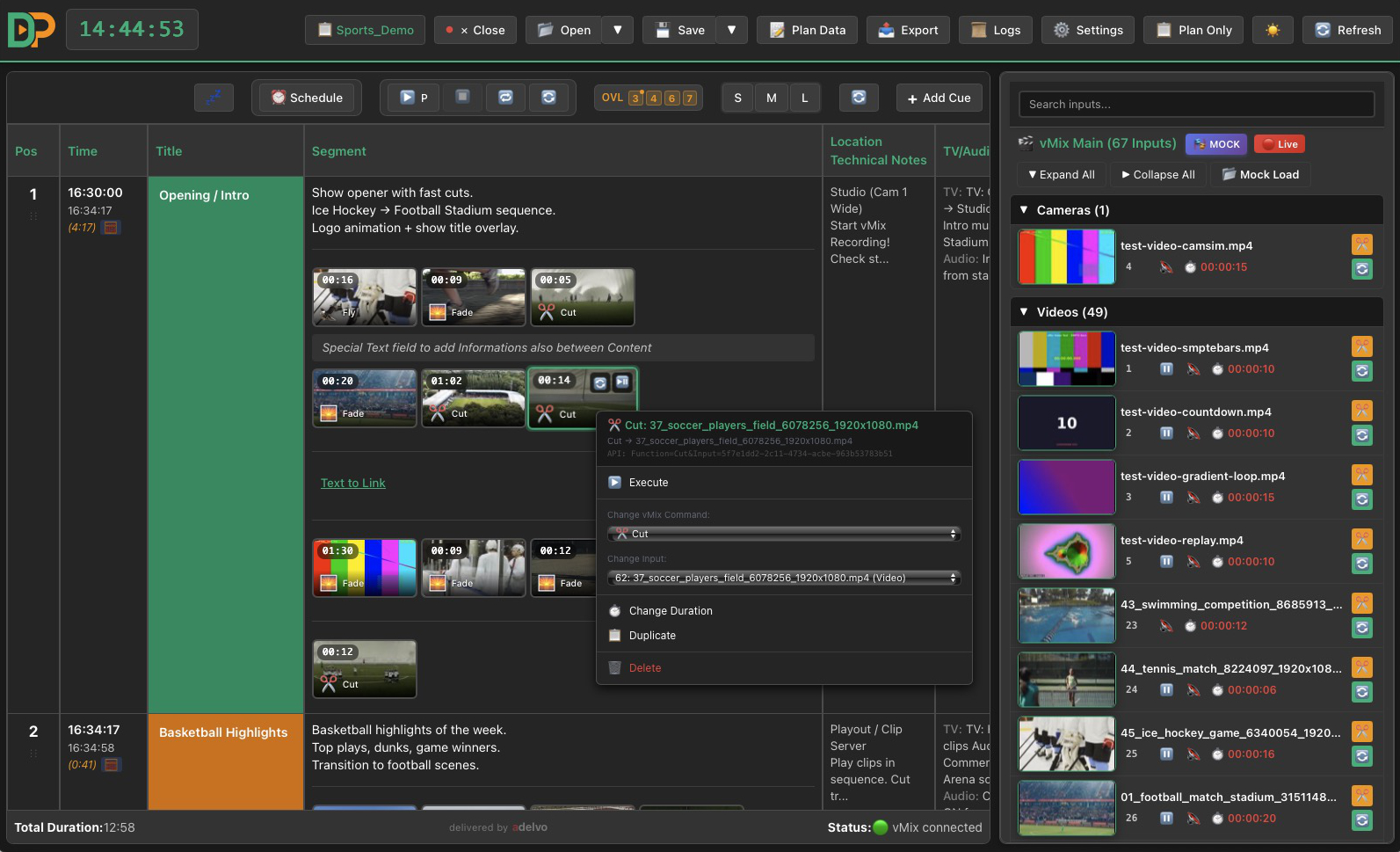
I run a side project building tools for live video production with vMix. My main product is Directors Plan — a desktop app (macOS, Windows, Linux) that adds what vMix doesn't have: a visual timeline with automated playback. It started as a favor for my neighbor's football club — they needed their match-day stream to run without a dedicated operator. It grew from there.
The problem: vMix is great at mixing live video, but planning and executing a production is still manual chaos. Paper rundowns, manually triggering every camera switch, every graphic, every video. Under time pressure. With a volunteer crew. Things get missed, every time.
What Directors Plan does:
PLAN - Timeline: visual drag & drop with live thumbnails from your vMix inputs - Mock Mode: snapshot your vMix session once, then plan the whole show offline on any machine — with the real input IDs, so it just works on show day - Append Mode: build reusable blocks (opener, interview, closer) and append them to a running rundown — modular shows instead of one monolithic plan
AUTOMATE - Play Mode: hit play and the app executes your entire rundown — countdowns, transitions, overlays, warnings, frame-accurate timing - Stay in charge: manual override at any second, scheduled starts, loops, auto-calculated durations - Beyond vMix:cues fire real vMix commands — and generic HTTP requests, so it can drive anything else on your network too
CONTROL - Web Controller: every tablet on your network becomes a live control surface — cue grid with thumbnails, instant replay pages, audio faders, overlay control. No hardware controllers needed; a volunteer with a $150 tablet is now an operator - Overlays:configure vMix overlays and fire them from cues, the panel or keyboard shortcuts - Live audio: volume groups, master and bus faders synced with vMix in real time — move a fader in vMix and it moves in the app, and vice versa; automatic audio fades on input switches - Instant replay: one click from the app, a tablet or a Stream Deck - Stream Deck / Companion: one-click export with thumbnails on the buttons (if you already own the hardware)
SHARE - Call sheets: Print/HTML & CSV export — the same plan becomes the paperwork for your camera ops and crew - 20 languages: fully translated, including Korean and Brazilian Portuguese
Built for: sports broadcasts, houses of worship, corporate events, live streamers — anyone running a structured show on vMix.
There's literally nothing else that does this. vMix has no built-in timeline. Companion gives you buttons but no planning. CasparCG is a different universe. Directors Plan sits in between — plan it, automate it, hand your crew a tablet.
$199 one-time, one version, everything included. 30-day free trial, everything unlocked, no credit card. macOS, Windows and Linux (.deb).


v1.42.200.0DIRECTORS PLANJuly 2026
v1.42.200 — Thumbnails & connection: it just works now 📸 · one click connects to vMix on this machine — and thumbnails follow automatically. Connection fixes right on the "not connected" screen, a built-in thumbnail server when DP runs on the vMix machine, and a guided download when it doesn't.
★ Thumbnails & connection
Not connected? The fix is right there. The “vMix not connected” screen now offers on the spot: enter an IP and connect — or one click on “vMix runs on THIS machine”, which detects and fills in the machine's network IP automatically.
Running DP on the vMix machine? Thumbnails are automatic. Built-in thumbnail server: previews appear with no install, no firewall prompt, not a single manual step.
DP on a different machine? When previews are missing, the input list shows a hint with a direct download of the free DP Thumbnail Server, plus a step-by-step guide in Settings. Can be turned off permanently.
Mock save asks before saving without preview images.
Everything localized in all 19 languages.
v1.42.194DIRECTORS PLANJuly 2026
v1.42.194 — Web Controller · turn any tablet or browser on your local network into a live touch surface for the show. Generated from the open plan — no file export — and served live by the app: fire cues, trigger replays, switch overlays, ride audio groups.
★ Web Controller
Generated from your plan. Like the Companion export, every vMix command becomes a touch button — timeline colours, optional thumbnail. But there is no file: the surface exists only while Directors Plan runs. Every tap runs the same command logic as a click in the app (Command-Log and Mock mode included).
Set up in seconds. Settings → Web Controller: switch the server on (port configurable, default 8570; optional 4-digit PIN). The reachable address shows as a QR code — point the tablet at it. Enable once; the server remembers its state and starts with the app. The state is saved in the plan too (“on wins”; port and PIN always come from local settings).
Always current, hands-free. On plan open the surface is generated and pushed to all connected devices; plan changes (new cues, overlay assignments) sync automatically every 30 seconds. The new 📡 button at the left of the timeline bar pushes instantly.
Four pages. Cues (all commands as touch buttons), Replay (one row per time, Cam 1–4 / 8, a tap marks and plays the last N seconds to output), CTRL (volume groups as big touch faders), OVL (assigned overlay channels as toggles).
Built for touch. Tap fires; hold (or right-click on desktop) opens Play/Pause & Restart for that input. Four button sizes (S/M/L/XL) that stay physically identical across devices — only the column count adapts. Each device paginates for itself so nothing scrolls; rotating re-paginates live. Wake-lock keeps the screen awake; a status dot shows the connection.
⬡ License & security
The surface is served only by the running, licensed Directors Plan instance and is meant for the local production network; an optional PIN keeps curious fingers in the same Wi-Fi out.
v1.42.188DIRECTORS PLANJuly 2026
v1.42.188 — GUI redesign · a full visual overhaul that makes the whole app look and feel like one piece — cleaner, flatter, calmer. Almost the same layout you know, now with one consistent design system behind it. Also the first Linux build — a
.debfor the Debian / Ubuntu family (built and tested on Ubuntu 22.04+). Other distributions can be deployed on request with a license.★ New design
One consistent interface across the whole app — a reworked, modern, minimal look.
Dark and light mode fully aligned: timeline, cue editor, settings, exports and the Controller now all follow one shared colour system.
Flatter, quieter styling: consistent buttons, input fields, dialogs and dropdowns.
Focus rings only on keyboard use — no more distracting outlines when you click.
Subtler scrollbars and a consistent typeface on every platform.
⬡ Right-click menus & dropdowns
Context menus no longer clip at the bottom of the window — long menus scroll internally, and look identical in the timeline, transport bar and cue editor.
On Windows, pop-up selects (e.g. the transition picker) now follow the chosen app theme instead of the system setting. On macOS and Linux these system menus still match the OS design.
⚠ Fixes
Light mode: several wrong or hard-to-read colours corrected.
Settings: the license overview shows the packages in multiple columns again on large screens.
v1.42.186DIRECTORS PLANJune 2026