Ditching globals.css: We built a DB-backed Theme Builder so users don't need redeploys for styling
Hey IH! 👋
One of the most annoying small time-wasters when building and managing web apps for clients is the "simple CSS tweak" request.
"Can we make the primary brand color slightly darker?" > "Can we change the border radii across all cards?"
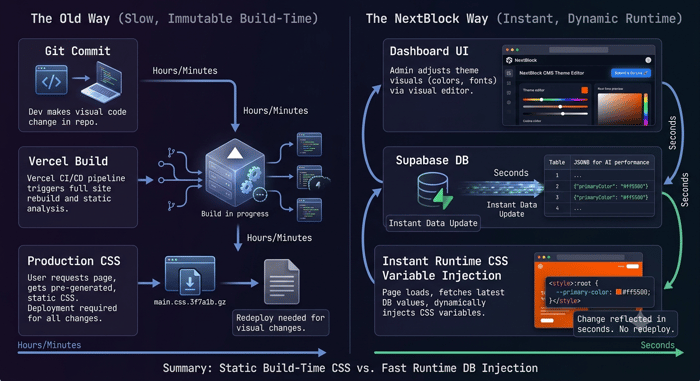
Usually, this means opening up your local monorepo, tweaking globals.css or Tailwind config, committing to Git, and waiting for Vercel to compile and deploy.
For the latest NextBlock CMS update, we decided to kill this bottleneck completely.
What We Built:
We moved our global styling rules out of static code files and into PostgreSQL.
Now, inside NextBlock:
Database-Backed Themes: Theme colors, typography rules, and global CSS declarations are stored as records in Supabase.
Instant Runtime Injection: The Next.js 16 root layout reads the active theme record and streams it directly into the <head> as native CSS variables.
Zero Redeploys: Anyone can create, edit, or swap site-wide themes directly from the CMS admin panel—live, in real time, with zero site builds.
It gives marketers and non-technical founders full design freedom, while freeing up developers from doing low-leverage CSS maintenance.
How are you currently handling client theme customizations or design tokens in your SaaS / CMS setups? Would love to hear your thoughts!

The interesting part isn't technical, it's who this changes your buyer into. "Marketers restyle without a redeploy" moves the value from the developer to the non-technical founder who gains autonomy. Worth saying outright: you're not a CMS with nicer theming, you're the CMS where marketing stops waiting on engineering. Sharper wedge than "DB-backed themes."
Honest caveat: total styling freedom for non-technical users is how brands drift into chaos, someone nudges the color off, radii go inconsistent, the site looks amateur, nobody noticing. The power feature and the footgun are the same. Guardrails (constrained palettes, token presets) turn "freedom" into "freedom you can trust."
Raw CSS freedom or constrained tokens? That decides who it's safe for.
That is definitely a risk! thanks for pointing that out! I'm sure i can figure out a way to guardrail the user without blocking any access. Maybe add notifications (warnings instead of error) to point out where the styling is driving off the theme template.
Thank again this is great insight! If you are interested to help me test, I'm currently in open beta giving lifetime licenses to anyone who installs the CMS and gives me valuable feedback information. You can reach out at info@nextblock.dev if you decide to try out NextBlock.
The warning-not-error instinct is right, blocking access kills the "freedom" pitch. One sharpening: warnings land best against an explicit reference, not just "this looks off." Let the owner define a brand baseline (approved palette, radius scale, fonts) once, then the warning gets concrete: "this color isn't in your brand palette" beats "this might look inconsistent." A baseline turns a vague nudge into a checkable rule, and non-technical users trust a rule more than an opinion.
That gives a clean two-tier model: the technical owner sets guardrails, the marketer plays inside them. Freedom for one role, safety from another, exactly "freedom you can trust."
Appreciate the beta offer, genuinely nice of you. Will keep it in mind.