Do you keep an archive of past issues on your website?
Hey IH, i recently launched a page builder tool specific to newsletters (https://formulog.com) that also features automatic generation of archive pages.
So i was wondering if you see the value of having an archive on your website.
I think it can really help with SEO since email-only content can't get indexed by search engines.
It could also boost conversions (and quality) since a potential subscriber can browse past issues and see if they are really interested before giving their e-mail.
If you already have an archive, how do you add your new issues?
- manually copying the html
- using a service (eg. mailchimp pages)
- custom-built automation
I would really appreciate your input!

I was discussing this topic with @lesleypizza just a few days ago. There's definitely value in having an archive, I get multiple emails from my subscribers every month asking where they can read my past issues. I'm in the process of setting up an archive for my newsletter and I decided that I'll keep it simple and just copy/paste the content on a new page. The simplest solution would be to just link to the web version that my ESP creates but I want them to live on my own domain.
yeah, there aren't any great ways to do that right now. Copying and pasting is the easiest if you have a simple newsletter.
My own WordPress plugin, Newsletter Glue, lets you publish newsletters directly from WordPress. So your newsletter archive is the same as your blog archive. But I get that not everyone would want to do that.
This comment was deleted 5 years ago
Thanks @timosarkka, that's very helpful and closely matches my experience.
With Formulog i tried to automate the whole process and (hopefully) provide a better experience.
Right now there is a visual editor to allow basic formatting and editing of incoming e-mails before they are published. It looks like this: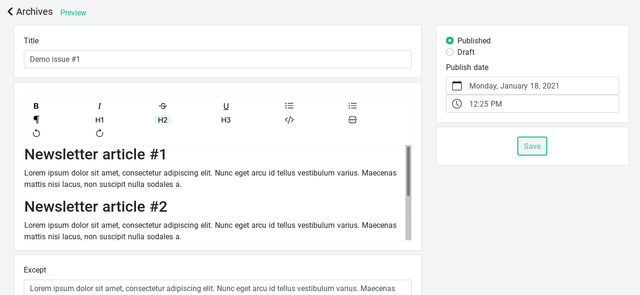
I should also add a raw html editing mode for greater control.
Fully custom pages are not implemented yet but they are on the roadmap.
If you feel like it, create a free account and take it for a spin!
This comment was deleted 5 years ago