Dokie AI Review: A Professional AI Presentation Agent
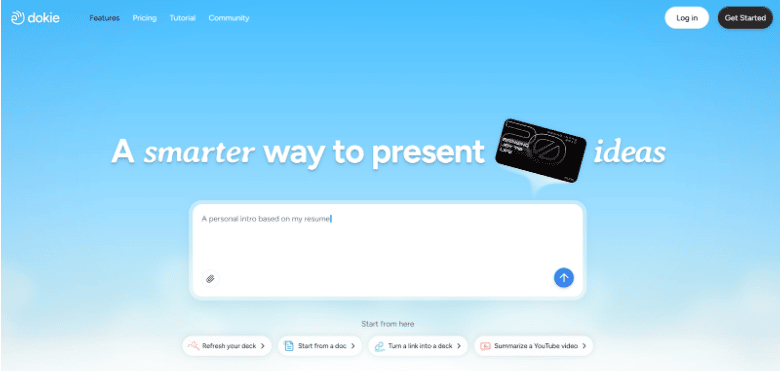
Creating slides should be fast, clear, and stress-free. Dokie AI promises to do exactly that by acting like a real presentation helper, not just a tool. This review explains how it works.
What Is Dokie AI?
Dokie AI is an AI PPT Agent that helps you plan, write, design, and polish presentations from start to finish. Instead of only turning text into slides, it works more like an assistant who understands your goal and builds the whole deck with you.
Many tools call themselves an AI Slides Generator, but Dokie AI goes further. You can tell it what your presentation is about, who it is for, and how long it should be. It then creates a clear outline, writes slide content, designs the layout, and even helps you edit later.
This is why Dokie AI is often described as an AI presentation agent, not just an AI PPT tool.
How Dokie AI Works
Using Dokie AI is simple, even if you have never made slides before.
First, you enter a short prompt. For example, you can say you need a sales pitch, a school report, or a startup demo. You can also set the tone, like formal, friendly, or simple.
Next, Dokie AI builds an outline. This step is important because it shows the flow of your ideas before making slides. You can edit this outline or let the AI improve it.
Then, Dokie AI creates the slides. It writes short, clear text for each slide and picks a clean design. Charts, bullet points, and titles are added in the right places.
Finally, you can edit everything. You can ask the AI to rewrite a slide, shorten text, change the style, or add more detail. This back-and-forth makes Dokie AI feel like a real helper.
Why Dokie AI Is Called the AI Presentation Agent
Most AI PPT tools focus on one task, like design or text. Dokie AI focuses on the full process.
Here is what makes it different:
It understands your goal, not just your text
It plans the structure before making slides
It helps you revise slides after they are made
It keeps the story clear from start to end
This “agent” idea means Dokie AI does not just generate slides once and stop. It stays useful during the whole presentation process.
Dokie AI vs Traditional AI PPT Makers
Traditional AI PPT Maker tools usually work like this: you paste text, click generate, and get slides. If the result is not good, you start over.
Dokie AI works in steps. You can adjust the outline, the tone, and the details as you go. This saves time and gives better results.
Another big difference is clarity. Dokie AI writes in short, simple sentences. This makes slides easy to read and easy to present, which is perfect for school, work, or public talks.
Dokie AI vs Gamma APP
Many people compare Dokie AI with Gamma APP, since Gamma is also popular in the AI PPT space.
Gamma APP is strong in design and layout. It creates modern slides quickly and looks great for visual stories. However, Gamma often focuses more on design than on deep content planning.
Dokie AI focuses more on thinking and structure. It helps you decide what to say before deciding how it looks. For users who struggle with content, this is a big win.
In short:
Gamma APP is great for fast, design-first slides
Dokie AI is better for content-first, goal-driven presentations
Some users even try both, but if you want an AI that feels like a guide, Dokie AI stands out.
Design Quality and Templates
Dokie AI uses clean and modern slide designs. The templates are simple, not flashy. This helps your message stay clear.
The layouts are well balanced, with good spacing and readable fonts. Colors are calm and professional, which works well for business and school use.
While it may not have as many bold styles as some tools, Dokie AI focuses on making slides that are easy to understand and easy to present.
Editing and AI Rewriting Features
One of Dokie AI’s best features is AI editing.
You can:
Ask it to shorten a slide
Rewrite text in simpler words
Change the tone to more friendly or more serious
Add examples or remove extra details
This is very helpful when you are not sure how to say something clearly. The AI helps you improve without starting over.
Who Should Use Dokie AI?
Dokie AI is useful for many types of users.
Students can use it for class reports, group projects, and school presentations. The simple language helps make slides clear.
Teachers can use it to create lesson slides or explain topics step by step.
Startup founders can use it for pitch decks and product demos.
Marketing and sales teams can use it to create clear AI PPT decks for clients.
If you often struggle with structure or wording, Dokie AI is especially helpful.
Use Cases for Dokie AI
Dokie AI works well in many real situations.
For school, it can turn a topic into a clean AI PPT with a strong flow.
For work, it can build reports, plans, and strategy slides that look professional.
For training, it can create step-by-step slides that are easy to follow.
For personal use, it can help you prepare talks, workshops, or even event plans.
This wide range of use cases makes it more than just an AI Slides Generator
Ease of Use
Dokie AI has a clean and simple interface. You do not need design skills or tech knowledge.
Most actions are done by typing natural language, like talking to a helper. This makes it friendly for beginners.
Export and Sharing Options
Dokie AI lets you export slides so you can use them in real presentations.
You can download your AI PPT and edit it later if needed. This makes it easy to fit Dokie AI into your normal workflow.
Sharing and editing options are designed to save time, not add extra steps.
SEO and Content Consistency
Because Dokie AI focuses on clear structure, it also helps keep ideas consistent. Each slide connects to the next, which makes presentations easier to follow.
This is important for business and education, where clarity matters more than fancy effects.
Pros and Cons of Dokie AI
Pros
Acts like a real AI presentation agent
Strong content structure and flow
Simple language that is easy to read
Great editing and rewriting features
Works well for many use cases
Cons
Designs are more simple than flashy
Fewer style options than some design-heavy tools
FAQs
1. Is Dokie AI free to use?
Dokie AI usually offers a free plan or trial so users can test the AI PPT Maker. Paid plans unlock more features and exports.
2. Is Dokie AI better than Gamma APP?
It depends on your needs. Gamma APP is strong in design, while Dokie AI is better for content planning and structured AI PPT creation.
3. Can beginners use Dokie AI?
Yes. Dokie AI is made for beginners. You only need to describe your idea, and the AI Slides Generator does the rest.
4. What makes Dokie AI different from other AI PPT tools?
Dokie AI works like an agent. It helps plan, write, design, and edit presentations, not just generate slides once.
Conclusion
Dokie AI is more than an AI PPT Maker. It feels like a smart partner that helps you think, write, and present better. If you want clear, structured slides without stress, it is a strong choice.

