Essential API Testing Checklist for Developers and QA Engineers
Looking to streamline your API testing process? This essential checklist for developers and QA engineers covers everything from functional testing to security and performance. Ensure robust, reliable APIs with our expert tips and best practices.

The Importance of API Testing
In the rapidly evolving digital landscape, API testing plays a crucial role in ensuring the reliability and functionality of software applications. APIs (Application Programming Interfaces) serve as the communication bridge between different software systems, enabling seamless data exchange and integration.
Without proper testing, APIs can become sources of vulnerabilities and operational issues, leading to potential data breaches, performance bottlenecks, and unexpected system failures. For developers and QA engineers, conducting thorough API testing is essential to validate that APIs perform their intended functions securely and efficiently. This article provides a detailed overview of an essential API testing checklist, outlining best practices to follow to maintain robust, secure, and high-performing APIs.
Why Developers and QA Engineers Need an API Testing Checklist

APIs play a critical role in software architecture, and their failure can lead to significant issues, from system downtime to security breaches. An API testing checklist acts as a comprehensive guide, helping developers and QA engineers systematically validate API functionality, performance, and security. Here's why having a checklist is essential:
- Consistency: A standardized checklist ensures that every API is tested uniformly, reducing the chances of missed steps or errors.
- Efficiency: Streamlining the testing process allows for quicker identification of bugs and issues, speeding up the development cycle.
- Compliance: Following a checklist helps maintain compliance with industry standards and security protocols.
- Documentation: It provides a clear record of testing activities, which is essential for future audits and debugging.
By adopting a checklist approach, developers and QA teams can ensure that APIs are thoroughly vetted, meeting both user expectations and business requirements.
Checklist for Functional Testing of APIs
Functional testing is the cornerstone of API testing, verifying that the API performs its intended functions correctly. This phase focuses on the behavior of the API, ensuring that each endpoint responds as expected.
- Verify API Endpoints: Start by validating each endpoint. Ensure the API routes are correctly implemented and accessible.
- Test CRUD Operations: Check Create, Read, Update, and Delete functionalities. Each operation should work flawlessly across various data scenarios.
- Input Parameter Validation: Test with valid and invalid inputs. This includes boundary values, missing parameters, and incorrect data types.
- Response Validation: Ensure the API returns the correct response codes (e.g., 200 for success, 404 for not found). Validate response payloads for structure, data types, and content accuracy.
- Error Handling: Check how the API handles errors. It should provide meaningful error messages and codes, aiding in debugging and user clarity.
- Data Integrity: Confirm that the API preserves data integrity during operations, ensuring no unintended data alterations.
Functional testing ensures the basic operations of an API are sound. By systematically checking each of these aspects, developers can guarantee that their API behaves as intended under various conditions.
API Security Considerations: What to Test
API security testing is critical to protecting against unauthorized access and data breaches. With the increasing number of cyber threats, ensuring the security of APIs is more important than ever.
- Authentication and Authorization: Verify that the API properly enforces authentication (who can access) and authorization (what level of access they have). Implement and test OAuth, JWT, or other token-based security mechanisms.
- Data Encryption: Ensure that sensitive data is encrypted both in transit and at rest. Test HTTPS/SSL implementation to secure data exchanges.
- Input Validation: Check for injection vulnerabilities, such as SQL injection or XML injection. This prevents malicious input from compromising the API.
- Rate Limiting: Implement rate limiting to protect against DDoS attacks. Test how the API handles a large volume of requests within a short time.
- Error Messages: Ensure that error messages do not expose sensitive information. They should be generic but informative enough to indicate the type of error.
- Access Controls: Validate that users have access only to the resources they are permitted to see. Test role-based access controls and user permissions.
Security testing is not a one-time activity but should be part of the continuous integration pipeline to regularly check for vulnerabilities.
Performance and Load Testing Checklist
Performance testing ensures that APIs can handle the expected load without degrading the user experience. It involves testing the speed, scalability, and reliability of APIs under various conditions.
- Load Testing: Simulate a high number of requests to see how the API performs under load. Identify the maximum number of concurrent users the API can handle.
- Stress Testing: Push the API beyond its normal operational capacity to see how it behaves under extreme conditions. This helps identify breaking points.
- Latency Measurement: Test the response time of the API. Ensure that responses are quick and meet the required performance benchmarks.
- Scalability Testing: Assess how the API performs as the volume of data increases. Check if it scales efficiently with more users and larger data sets.
- Resource Usage Monitoring: Monitor CPU, memory, and network usage during performance testing to identify potential bottlenecks.
- Caching Efficiency: Test caching mechanisms to ensure they are effectively reducing load and speeding up response times.
Performance testing helps identify and rectify issues that could affect the user experience, ensuring the API remains robust under different operational scenarios.
Checklist for API Documentation and Validation
Good documentation is vital for the usability and maintenance of APIs. It not only aids developers in understanding how to interact with the API but also ensures that API functionalities are well-documented for future reference.
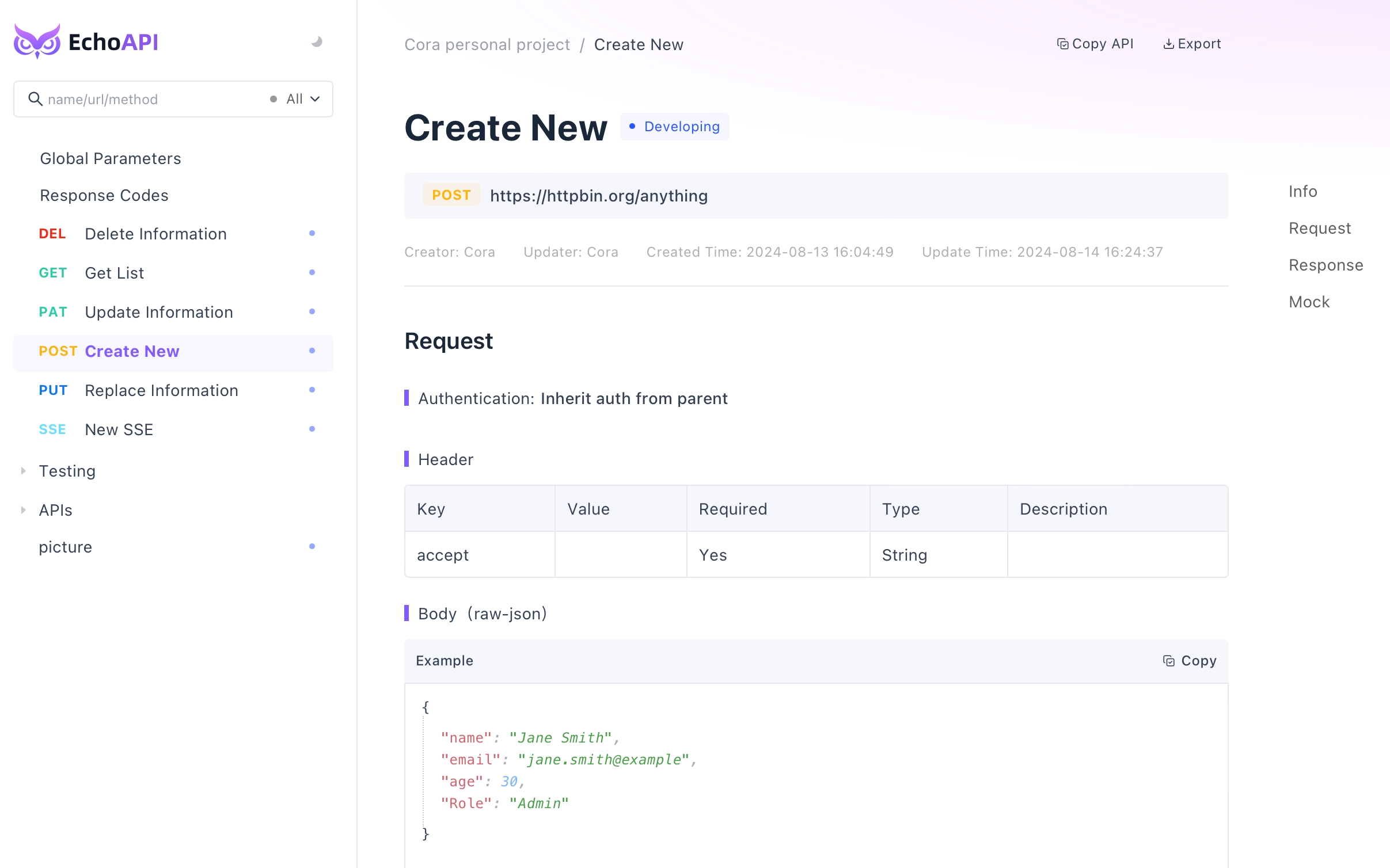
- Endpoint Documentation: List all available API endpoints, including their purpose, method (GET, POST, etc.), and URL structure.
- Request and Response Examples: Provide sample request and response bodies for each endpoint. Include examples of both successful and error responses.
- Authentication Details: Clearly outline the authentication process required to access the API. Include details on token generation and usage.
- Parameter Descriptions: Document each parameter's name, type, and whether it is required or optional. Specify allowed values and constraints.
- Error Codes: List common error codes that the API may return and their meanings. This helps in quicker troubleshooting and debugging.
- Usage Limits: Specify any rate limits or quotas that apply to API usage.
Keeping documentation up-to-date is crucial for ensuring that developers can effectively use and integrate the API. Validation ensures the documentation matches the current API implementation.
Tips for Continuous API Testing and Monitoring
Continuous testing and monitoring are key to maintaining API quality in an ever-evolving development environment. By implementing ongoing testing processes, developers can catch issues early and ensure consistent API performance.
- Automated Testing: Integrate automated testing into the development pipeline. Use tools like Jenkins, Travis CI, or GitLab CI for continuous integration and testing.
- Regular Security Scans: Schedule frequent security scans to detect vulnerabilities. Tools like OWASP ZAP can automate this process.
- Monitoring Tools: Implement monitoring solutions to track API performance in real-time. Tools like New Relic, Datadog, or Prometheus provide valuable insights.
- Logging: Enable detailed logging of API requests and responses. Logs help diagnose issues and understand usage patterns.
- Alerting: Set up alerts for unusual activity or performance degradation. Prompt notifications help address issues before they escalate.
- Feedback Loop: Establish a feedback mechanism for users to report issues. Regularly review and act on feedback to improve API quality.
Continuous testing and monitoring help maintain a high standard of API reliability and security, enabling proactive issue resolution.
Using EchoAPI for API Testing
EchoAPI is a comprehensive tool that combines the functionalities of various popular API testing tools into a single platform. It simplifies API testing, documentation, development, and monitoring for developers and QA engineers.
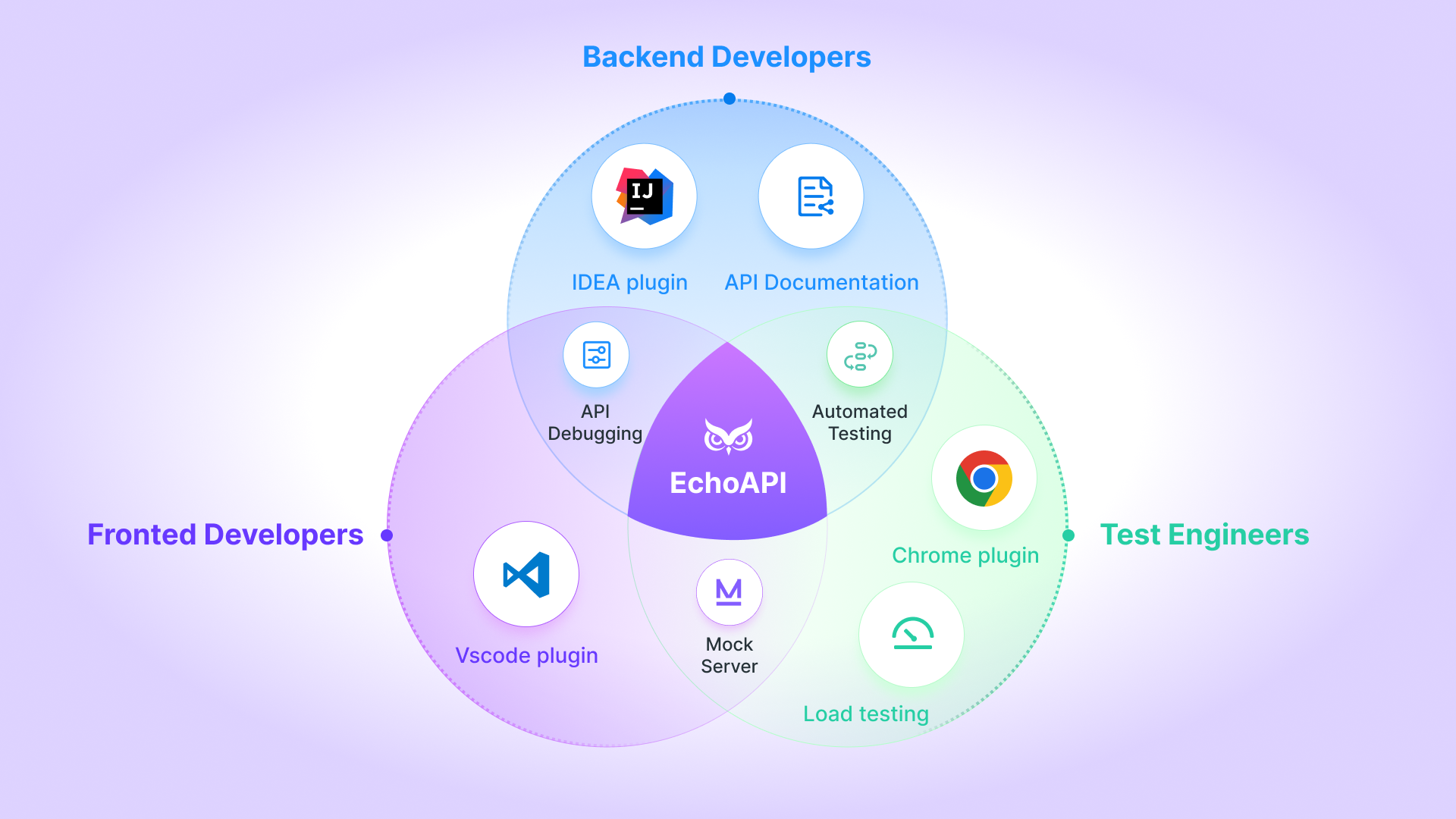
- Unified Platform: EchoAPI amalgamates features from Postman, Swagger, JMeter, and more, providing a one-stop solution for API testing and documentation.
- Automated Testing: Easily set up and automate tests for functional and performance testing.
- Mock Server Support: EchoAPI supports mock server setups, enabling developers to simulate API responses and test without real data.
- Real-time Collaboration: Teams can collaborate in real-time, ensuring everyone has access to the latest test cases and documentation.
- Integrated Monitoring: EchoAPI offers integrated monitoring tools to track API health and performance continuously.
- Comprehensive Documentation: Generate detailed API documentation directly from the API endpoints definition, keeping it in sync with the latest API changes.
By using EchoAPI, teams can enhance their API development and testing processes, ensuring efficiency and accuracy.
Best Practices for API Testing with EchoAPI
To illustrate, let's set up two APIs in advance.
1. User Listing API
https://mock.echoapi.com/mock/306931d1b864000/userlist?echoapi_id=6c5e20435f000
Response:
{
  "data": {
    "errcode": 0,
    "errstr": "success",
    "list": [
      {
        "email": "[email protected]",
        "password": "123456"
      },
      {
        "email": "[email protected]",
        "password": "123456"
      },
      {
        "email": "[email protected]",
        "password": "123456"
      },
      {
        "email": "[email protected]",
        "password": "111111"
      },
      {
        "email": "[email protected]",
        "password": "222222"
      }
    ]
  }
}
2. Login API
https://mock.echoapi.com/mock/306931d1b864000/login?echoapi_id=6c77dfd35f000
Successful Response:
{
  "errcode": 0,
  "errstr": "success",
  "data": {
    "userId": "9252A47b-0E3B-98d5-DfAC-526b87A5f14f",
    "email": "[email protected]",
    "nickName": "Alex"
  }
}
Failure Response:
{
  "errcode": 11001,
  "errstr": "User account not found",
  "data": []
}
Setting Up Automated Test Scenarios
Now, we will leverage the aforementioned APIs to achieve our primary objective: executing test data in bulk to validate the functionality of the login interface.
Establishing a New Test Scenario
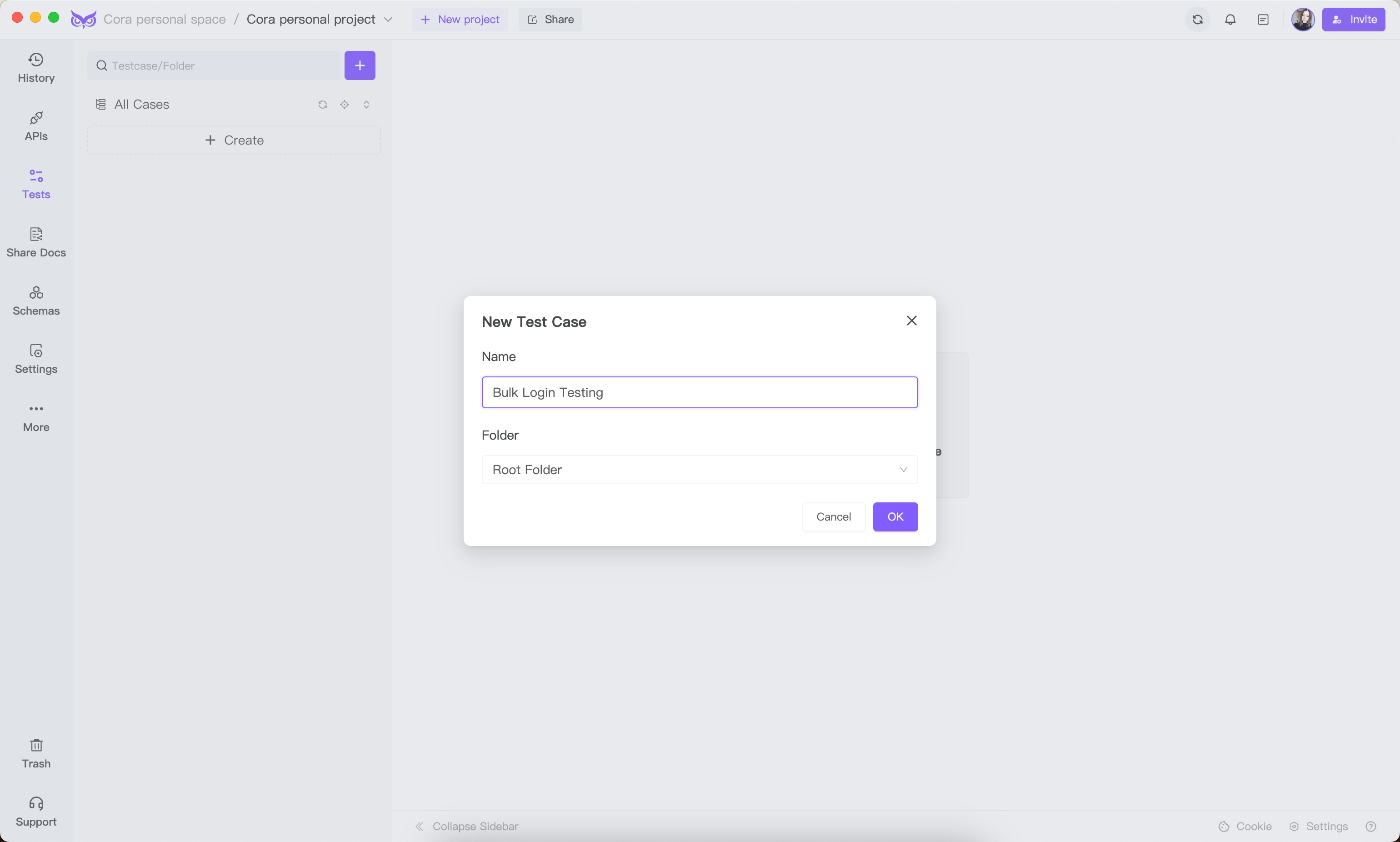
Access EchoAPI, proceed to Automated Testing -> Create New Case, and label it as: "Bulk Login Testing."
Defining Test Scenario Steps
Let's outline the test steps for this scenario.
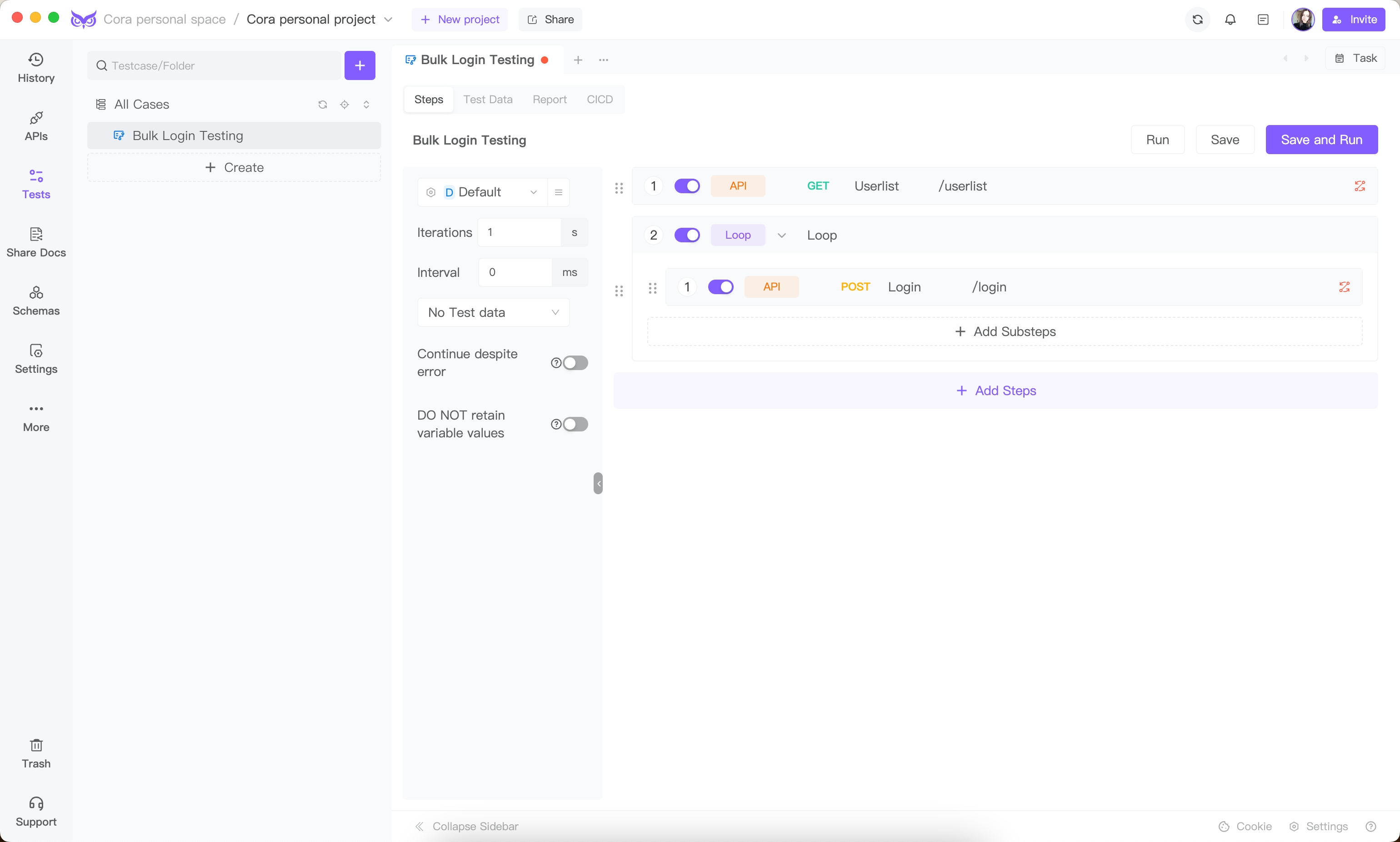
First, integrate a user listing step by incorporating the established user listing endpoint into the testing framework.
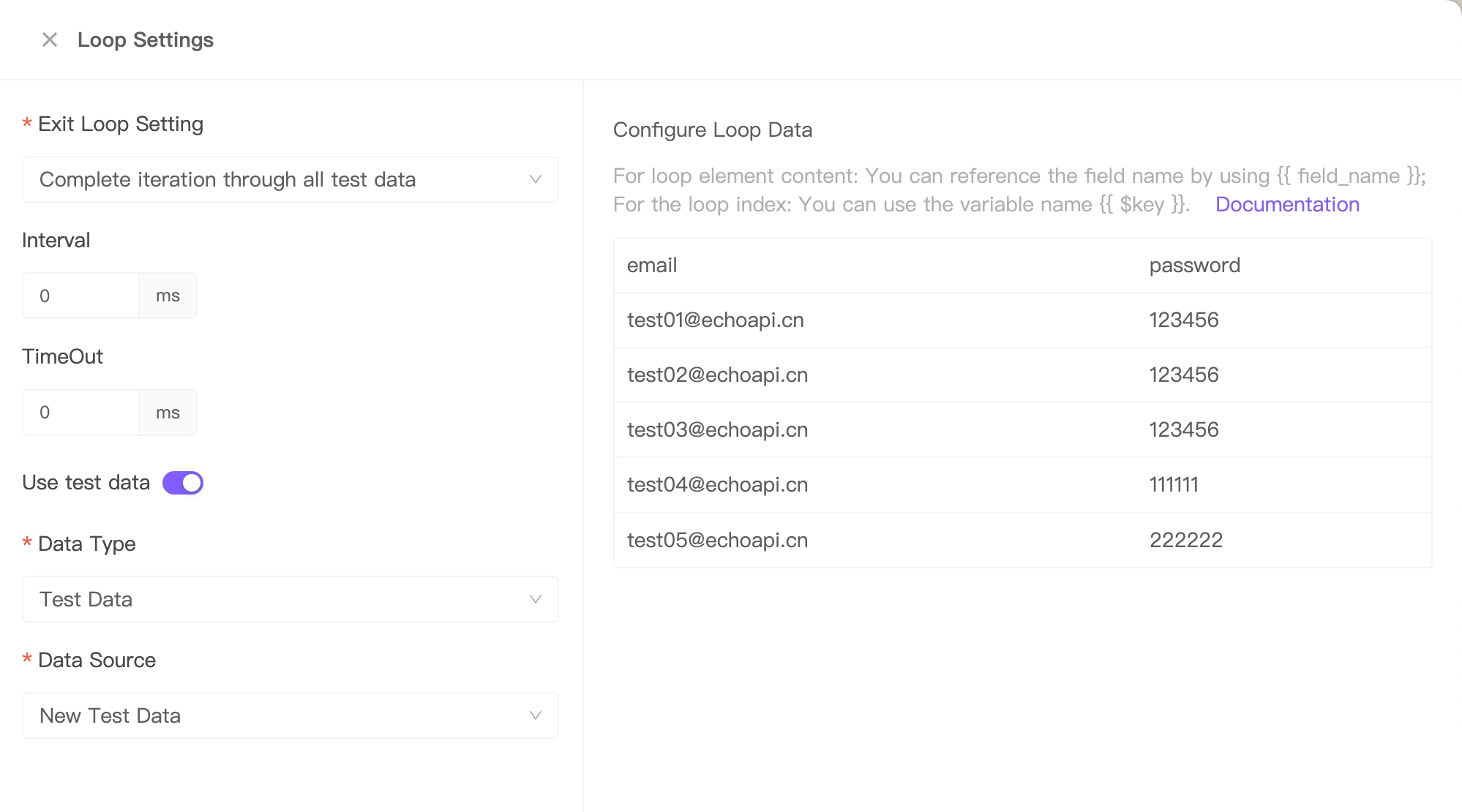
Next, introduce a loop controller with specific configuration details as follows:
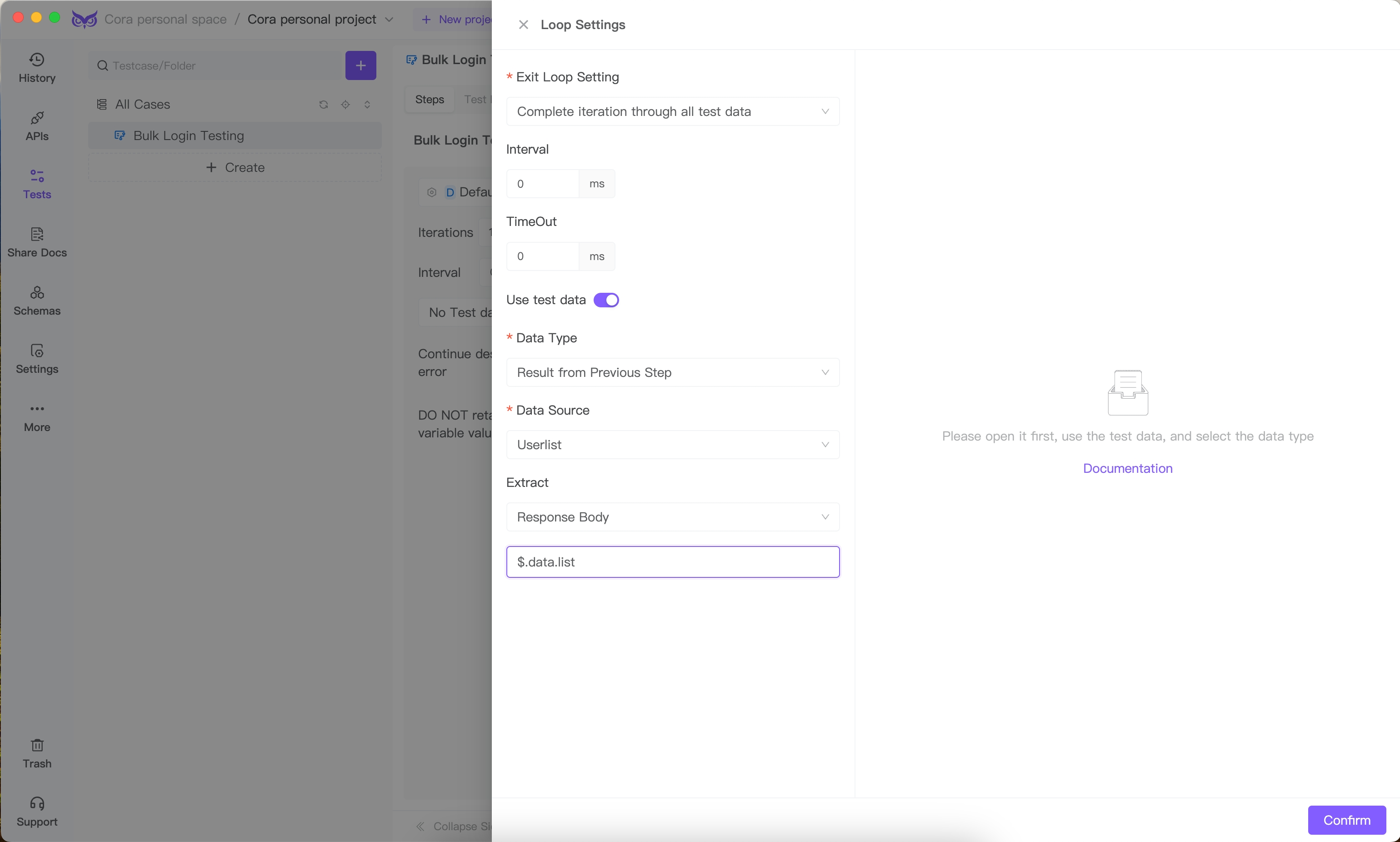
Use a JSONPath expression to extract arrays directly from the response results:
[
  {
    "email": "[email protected]",
    "password": "123456"
  },
  {
    "email": "[email protected]",
    "password": "123456"
  },
  {
    "email": "[email protected]",
    "password": "123456"
  },
  {
    "email": "[email protected]",
    "password": "111111"
  },
  {
    "email": "[email protected]",
    "password": "222222"
  }
]
This setup allows direct use of the array as test data.
Within the loop controller, add a sub-action by including the user login API.

Input parameters for this endpoint use variables passed from the array test data.
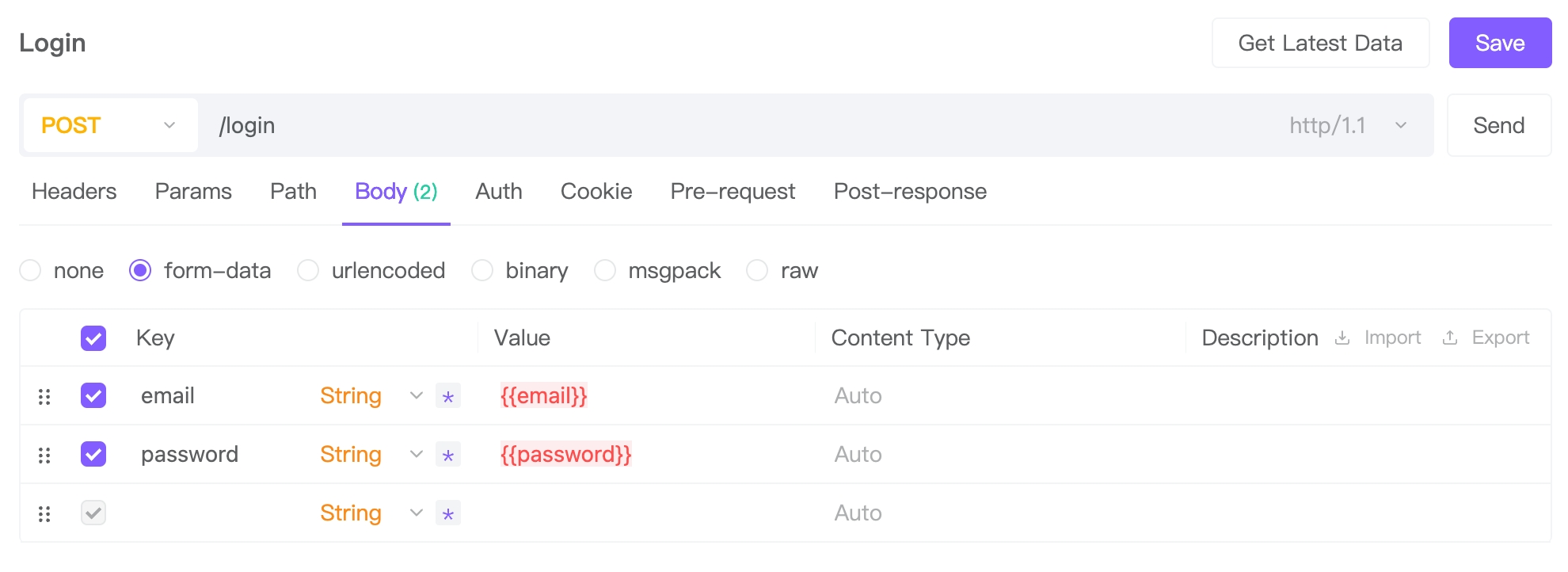
With this, the automated test case configuration is complete. The login interface will sequentially use the email and password data retrieved from the user listing API for bulk testing, producing test results.
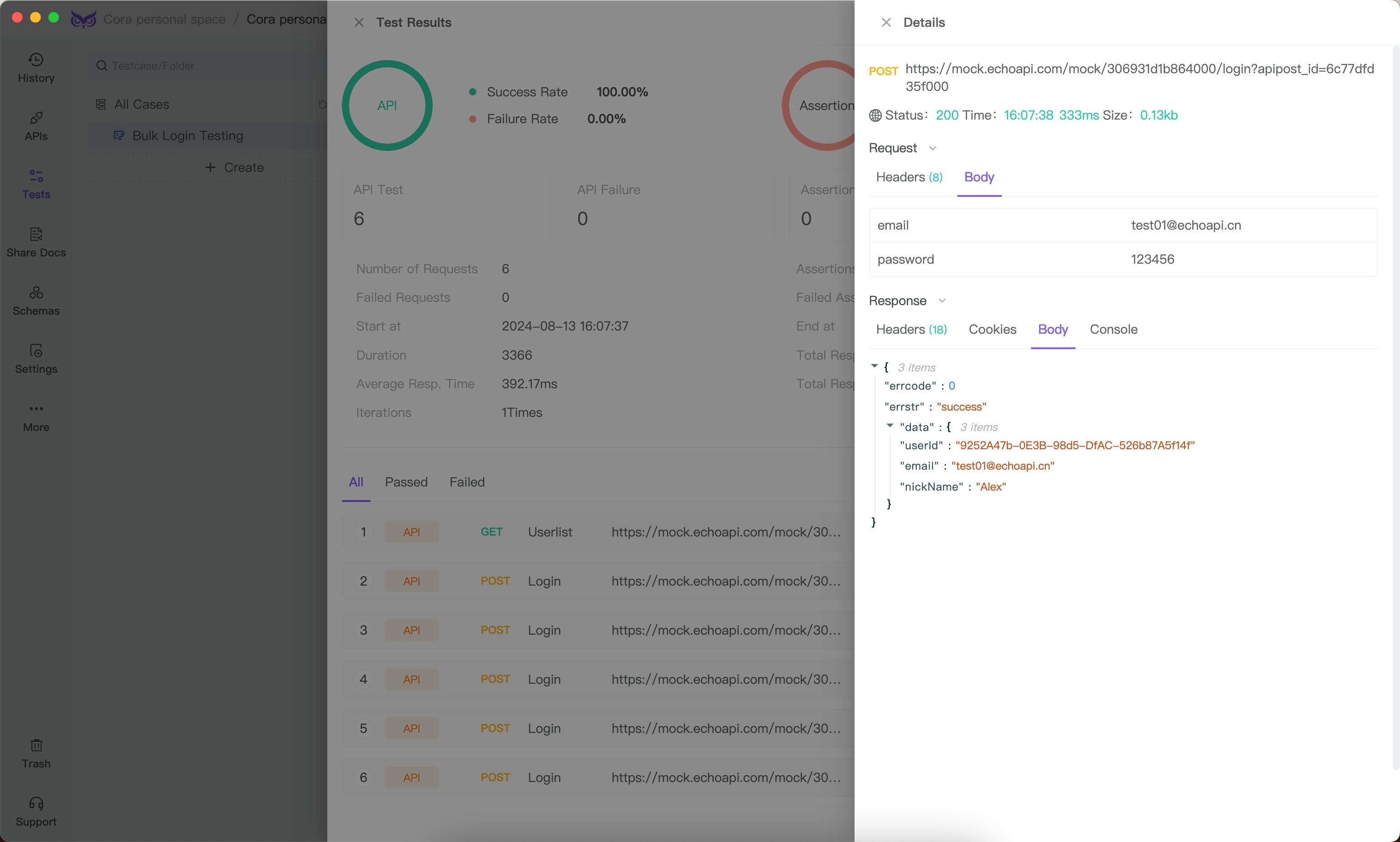
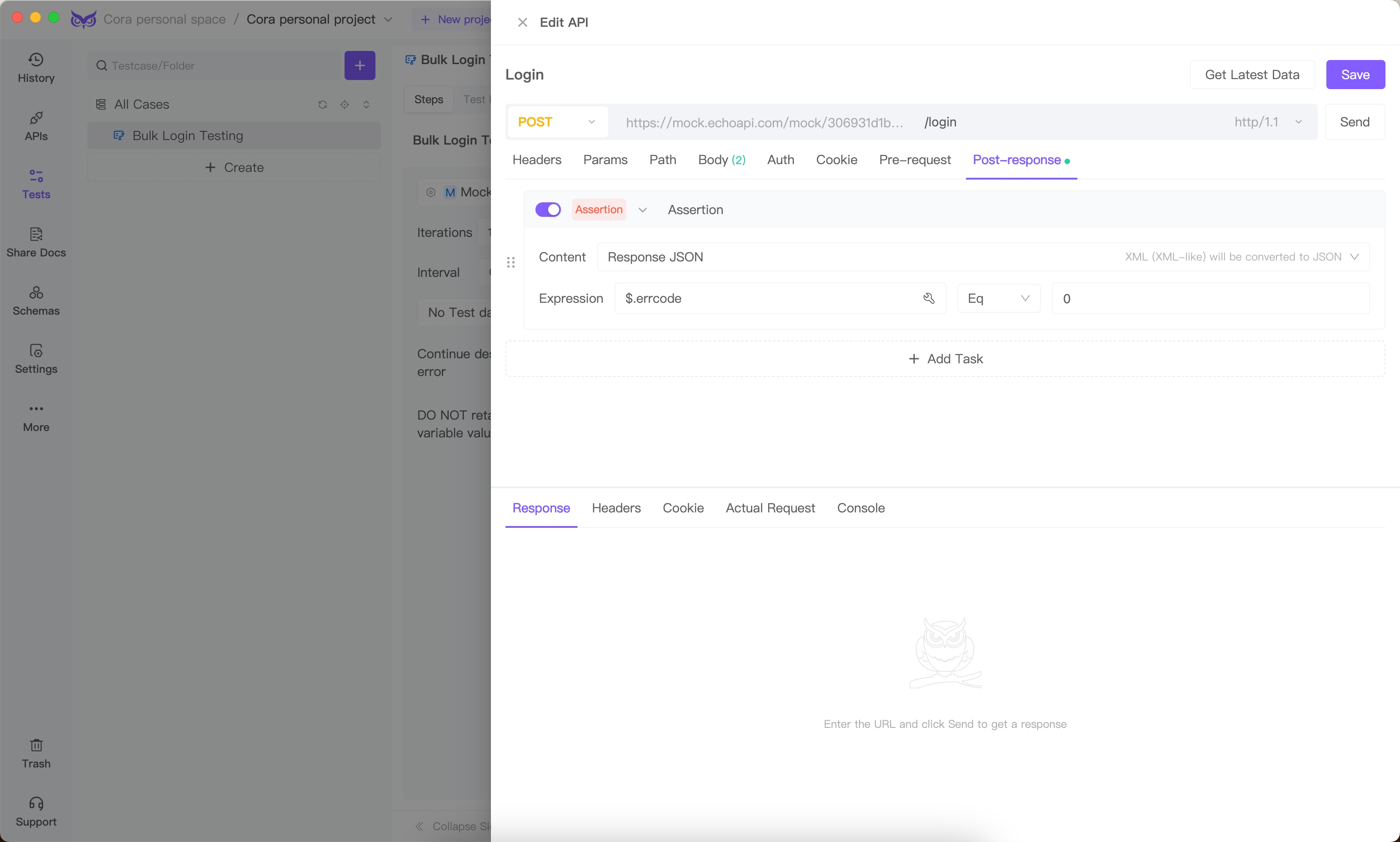
Additionally, incorporate an assertion within the login API to verify if the response aligns with expectations.
EchoAPI offers multiple alternative approaches for providing test data, including:
- Directly uploading CSV format test data.
- Using variables as test data.
- Inputting fixed values as test data.
Conclusion
A comprehensive API testing checklist is indispensable for developers and QA engineers. It ensures that APIs are robust, secure, and perform well under various conditions. From functional testing to security, performance, and documentation, each aspect plays a vital role in the overall quality of the API. By adopting best practices and leveraging tools like EchoAPI, teams can streamline their testing processes, ensuring reliable and high-performing APIs that meet both business and user expectations. Regular and thorough testing leads to resilient applications, safeguarding against unexpected failures and security breaches.

Thanks a lot!