Exploring Veo3 im: How AI Lets You Make Videos Without Lifting a Camera
As a content creator constantly juggling side projects, social posts, and midnight creative bursts, I’m always hunting for tools that save time without killing my creative mojo. Recently, I stumbled upon Veo3.im, an AI-powered video generation platform, and after spending a few hours tinkering, I wanted to share my hands-on experience—not as a marketing pitch, but as a fellow creator geek-out session.
What Veo3 im Does (Without the Buzzwords)
At its core, Veo3 im is an AI video generator. But unlike traditional editing software that requires hours of timeline fiddling, Veo3 im lets you:
- Turn text prompts directly into video clips
- Mix and match AI models for different visual styles
- Export ready-to-share videos in just a few clicks
In other words, it’s a playground for experimenting with visuals quickly—perfect for prototyping ideas, testing concepts, or just playing around.
Key Features I Explored
1. Prompt-to-Video Magic
The moment of truth: typing a prompt and watching AI “imagine” a video.
A serene beach at sunset, waves gently crashing, soft ambient music
Within a few minutes, a short clip appeared. The waves weren’t exactly like Hawaii’s, but it nailed the mood. Honestly, I spent a good five minutes just staring at it, thinking: “AI, you’re creeping me out in a good way.”
This feature is excellent for storyboarding, social content, or just mocking up a scene idea without touching a camera.
2. Multiple AI Models = Multiple Moods
Veo3 doesn’t stop at one style. You get:
- Cinematic model – dramatic, high-quality visuals
- Cartoon/Illustration model – whimsical, playful animations
- Experimental models – abstract, trippy, or surreal effects
It’s fascinating to see the same prompt morph across these models. The cinematic one looks like a mini-movie; the cartoon version feels like a Pixar short. Sometimes I just ran the same prompt three times, switching models, and ended up with a mini “AI film festival” on my laptop.
3. Scene Combination & Editing
Generating single clips is cool, but combining them is next-level fun. I tried creating three separate clips: morning, noon, and evening in a city park. Veo3 im stitched them into a 45-second sequence almost seamlessly. I didn’t have to worry about transitions, timing, or aligning scenes—the AI handled it.
It’s like having a tiny director living in your browser.
4. Export Options That Don’t Suck
Exporting videos usually means long waits and giant files. Not here. Veo3.im outputs MP4s ready for social media or presentations. Lightweight, shareable, and surprisingly crisp. Even my notoriously picky laptop handled the renders without breaking a sweat.
Quick Feature Comparison
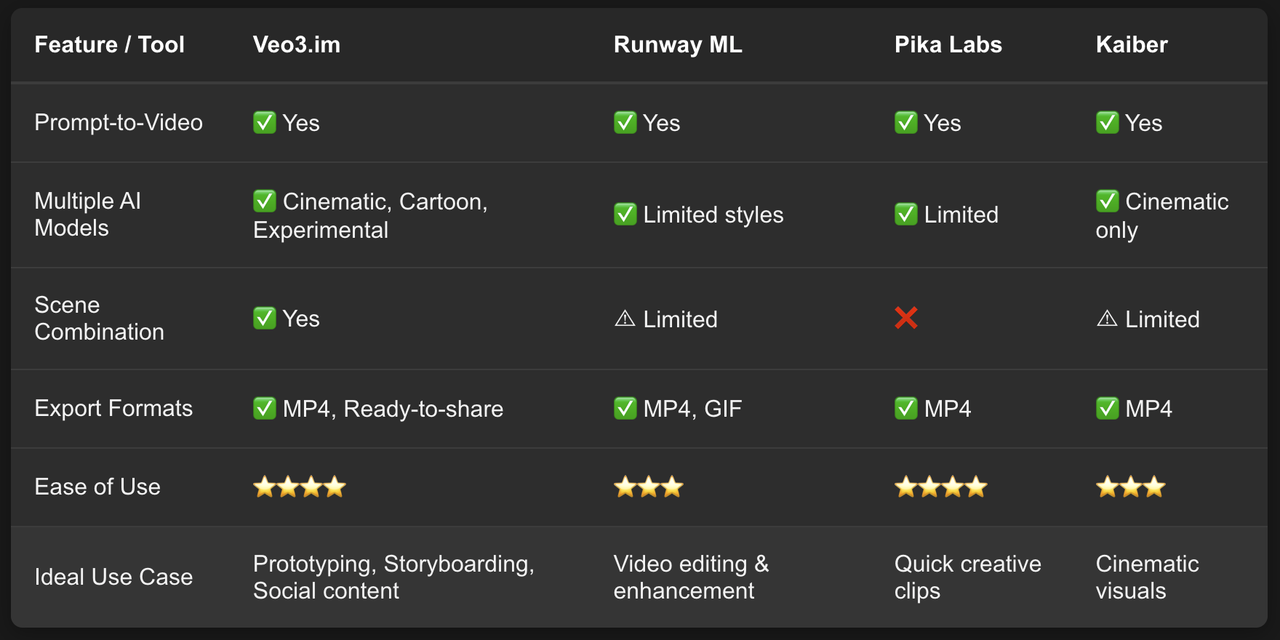
Legend:
✅ Supported / ⚠ Partially supported / ❌ Not supported
⭐ Rating based on learning curve and usability
My Hands-On Observations
- Speed: A 15–30 second clip takes 2–5 minutes. Enough time to grab a coffee, or panic about your latest deadline.
- Ease of Use: Clean, intuitive, and beginner-friendly. No tutorial binge needed.
- Limitations: Some prompts require trial and error. Motion consistency can be slightly off in longer sequences. But honestly, it feels more like playful experimentation than a flaw.
Use Cases That Actually Work
- Social Media Content: Quickly visualize posts for TikTok, Instagram, or YouTube Shorts.
- Storyboarding: Test ideas visually before committing hours to production.
- Experimental Art Projects: Generate surreal or abstract sequences with minimal effort.
Final Thoughts
Veo3.im isn’t trying to replace directors or professional editors. It’s a sandbox for creators, letting you explore, experiment, and iterate faster than ever. For anyone curious about AI video generation—or just looking for a creative procrastination tool—it’s functional, flexible, and surprisingly fun.
I ended up spending more time exploring random prompts than actually working on my real projects—but hey, sometimes inspiration hides in AI-generated sunsets.
