Extract relationship using LLM and build Knowledge Graph, step by step ~150 lines of python
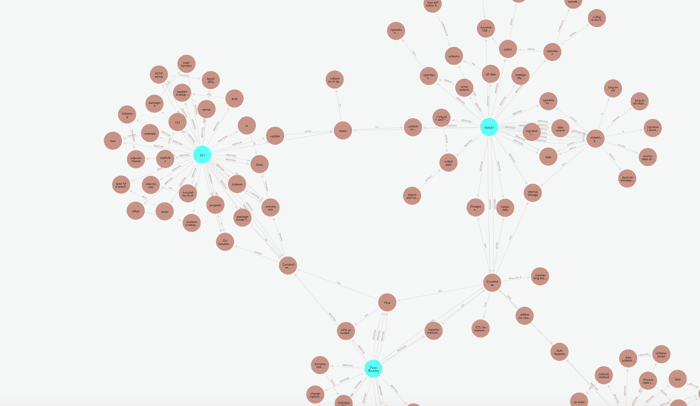
In this blog, we will use CocoIndex to extract relationships/ontologies using LLM and build a knowledge graph with Neo4j. We will illustrate how it works step by step using a graph to represent the relationships between core concepts of CocoIndex Documentation.
Source code - https://github.com/cocoindex-io/cocoindex
- CocoIndex is an open source ETL framework to transform data for AI, with real-time incremental processing for performance and low latency on source updates.
- Neo4j is a leading graph database that is easy to use and powerful for knowledge graphs.
If you like our work, it would mean a lot to us if you could support CocoIndex on GitHub with a star 🥥🤗.
Prerequisites
-
Install PostgreSQL if you don't have it. CocoIndex uses PostgreSQL to manage the data index internally for incremental processing. We have it on our roadmap to support other databases. If you are interested in other databases, please let us know by creating a GitHub issue.
-
Install Neo4j if you don't have it.
-
Install/configure an LLM API. In this example, we use OpenAI. You need to configure your OpenAI API key before running the example. Alternatively, you can switch to Ollama, which runs LLM models locally. You can get it ready by following this guide.
1. Add the documents as a source
@cocoindex.flow_def(name="DocsToKG")
def docs_to_kg_flow(flow_builder: cocoindex.FlowBuilder, data_scope: cocoindex.DataScope):
    """
    Define an example flow that extracts triples from files and build knowledge graph.
    """
    data_scope["documents"] = flow_builder.add_source(
        cocoindex.sources.LocalFile(path="../../docs/docs/core",
                                    included_patterns=["*.md", "*.mdx"]))
In this example, we are going to process the cocoindex documentation markdown files (.md, .mdx) from the docs/core directory. You can change the path to the documentation you want to process.
flow_builder.add_source will create a table with the following sub fields, see documentation here.
filename(key, type:str): the filename of the file, e.g.dir1/file1.mdcontent(type:strifbinaryisFalse, otherwisebytes): the content of the file
2. Add data collectors
document_node = data_scope.add_collector()
entity_relationship = data_scope.add_collector()
entity_mention = data_scope.add_collector()
We are going to add three collectors at the root scope to collect
document_node: the document nodes, e.g.core/basics.mdx(https://cocoindex.io/docs/core/basics)entity_relationship: the relationship between entities, e.g.Indexing flowandDataare related to each other (An indexing flow has two aspects: data and operations on data).entity_mention: the mention of entities in the document; for example, documentcore/basics.mdxmentionsIndexing flow,Retrieval...
3. Process each document and extract summary
We will define a DocumentSummary data class to extract the summary of a document with structured output.
@dataclasses.dataclass
class DocumentSummary:
    """Describe a summary of a document."""
    title: str
    summary: str
And then within the flow, lets use cocoindex.functions.ExtractByLlm for structured output.
with data_scope["documents"].row() as doc:
    doc["summary"] = doc["content"].transform(
            cocoindex.functions.ExtractByLlm(
                llm_spec=cocoindex.LlmSpec(
                    api_type=cocoindex.LlmApiType.OPENAI, model="gpt-4o"),
                output_type=DocumentSummary,
                instruction="Please summarize the content of the document."))

    document_node.collect(
        filename=doc["filename"], title=doc["summary"]["title"],
        summary=doc["summary"]["summary"])
Here, we are processing each document and using an LLM to extract a summary of the document. We then collect the title and summary information into the document_node collector. For detailed information about cocoindex.functions.ExtractByLlm, please refer to the documentation.
Note that if you want to use a local model, like Ollama, you can replace the llm_spec with the following spec:
# Replace by this spec below, to use Ollama API instead of OpenAI
llm_spec=cocoindex.LlmSpec(
    api_type=cocoindex.LlmApiType.OLLAMA, model="llama3.2"),
CocoIndex allows you to choose components like LEGO :)
4. Extract entities and relationships from the document using LLM
For each document, we will perform simple syntax based chunking. This is optional. We find that a reasonable chunk size performs better in terms of quality for the LLM to understand and process the content.
doc["chunks"] = doc["content"].transform(
    cocoindex.functions.SplitRecursively(),
    language="markdown", chunk_size=10000)
Next, let's define a data class to represent relationship (triples) for the LLM extraction.
@dataclasses.dataclass
class Relationship:
    """Describe a relationship between two nodes."""
    subject: str
    predicate: str
    object: str
In a knowledge graph triple (Subject, Predicate, Object):
subject: Represents the entity the statement is about (e.g., 'CocoIndex').predicate: Describes the type of relationship or property connecting the subject and object (e.g., 'supports').object: Represents the entity or value that the subject is related to via the predicate (e.g., 'Incremental Processing').
This structure allows us to represent facts like "CocoIndex supports Incremental Processing".
Next, we will use cocoindex.functions.ExtractByLlm to extract the relationship from the document.
with doc["chunks"].row() as chunk:
    chunk["relationships"] = chunk["text"].transform(
        cocoindex.functions.ExtractByLlm(
            llm_spec=cocoindex.LlmSpec(
                api_type=cocoindex.LlmApiType.OPENAI, model="gpt-4o"),
            # Replace by this spec below, to use Ollama API instead of OpenAI
            #   llm_spec=cocoindex.LlmSpec(
            #       api_type=cocoindex.LlmApiType.OLLAMA, model="llama3.2"),
            output_type=list[Relationship],
            instruction=(
                "Please extract relationships from CocoIndex documents. "
                "Focus on concepts and ingnore specific examples. "
                "Each relationship should be a tuple of (subject, predicate, object).")))
Here, we are processing each chunk and using LLM to extract relationships from the chunked text. For detailed information about cocoindex.functions.ExtractByLlm, please refer to the documentation.
5. Embed the entities for retrieval
For each relationship, we will embed the subject and object for retrieval.
with chunk["relationships"].row() as relationship:
    relationship["subject_embedding"] = relationship["subject"].transform(
        cocoindex.functions.SentenceTransformerEmbed(
            model="sentence-transformers/all-MiniLM-L6-v2"))
    relationship["object_embedding"] = relationship["object"].transform(
        cocoindex.functions.SentenceTransformerEmbed(
            model="sentence-transformers/all-MiniLM-L6-v2"))
6. Collect the embeddings and relationships
For each relationship, after the transformation, we will use the collectors to collect the fields.
entity_relationship.collect(
    id=cocoindex.GeneratedField.UUID,
    subject=relationship["subject"],
    subject_embedding=relationship["subject_embedding"],
    object=relationship["object"],
    object_embedding=relationship["object_embedding"],
    predicate=relationship["predicate"],
)
entity_mention.collect(
    id=cocoindex.GeneratedField.UUID, entity=relationship["subject"],
    filename=doc["filename"], location=chunk["location"],
)
entity_mention.collect(
    id=cocoindex.GeneratedField.UUID, entity=relationship["object"],
    filename=doc["filename"], location=chunk["location"],
)
entity_relationshipcollector will collect relationships between subjects and objects.entity_mentioncollector will collect mentions of entities (as subjects or objects) in the document separately.
7. Build the knowledge graph
At the root scope, we will configure the Neo4j connection:
conn_spec = cocoindex.add_auth_entry(
    "Neo4jConnection",
    cocoindex.storages.Neo4jConnection(
        uri="bolt://localhost:7687",
        user="neo4j",
        password="cocoindex",
))
And then we will export the collectors to the Neo4j database.
document_node.export(
    "document_node",
    cocoindex.storages.Neo4j(
        connection=conn_spec,
        mapping=cocoindex.storages.NodeMapping(label="Document")),
    primary_key_fields=["filename"],
    foreign_key_fields=["title", "summary"],
)
entity_collector.export(
    "entity_node",
    cocoindex.storages.Neo4j(
        connection=conn_spec,
        mapping=cocoindex.storages.NodeMapping(label="Entity")),
    primary_key_fields=["value"],
)
This exports the document_node (filename, title, summary - collected above) to the Neo4j database and creates Neo4j nodes with label Document using cocoindex.storages.NodeMapping. This is a simple node export. In the data flow, for each document, we collect exactly one document node per document. It is clearly 1:1 mapping - one document produced exactly one neo4j node, without any requirement to deduplicate.
Next, we will export the entity_relationship to the Neo4j database.
entity_relationship.export(
    "entity_relationship",
    cocoindex.storages.Neo4j(
        connection=conn_spec,
        mapping=cocoindex.storages.RelationshipMapping(
            rel_type="RELATIONSHIP",

            source=cocoindex.storages.NodeReferenceMapping(
                label="Entity",
                keys=[
                    cocoindex.storages.TargetFieldMapping(
                        source="key", target="key"),
                ]
            ),
            target=cocoindex.storages.NodeReferenceMapping(
                label="Entity",
                fields=[
                    cocoindex.storages.TargetFieldMapping(
                        source="object", target="value"),
                    cocoindex.storages.TargetFieldMapping(
                        source="object_embedding", target="embedding"),
                ]
            ),
            nodes_storage_spec={
                "Entity": cocoindex.storages.NodeStorageSpec(
                    primary_key_fields=["value"],
                    vector_indexes=[
                        cocoindex.VectorIndexDef(
                            field_name="embedding",
                            metric=cocoindex.VectorSimilarityMetric.COSINE_SIMILARITY,
                        ),
                    ],
                ),
            },
        ),
    ),
    primary_key_fields=["id"],
)
This code exports the entity_relationship data to a Neo4j database. Let's break down what's happening:
-
We're calling the
exportmethod on theentity_relationshipdata collection, with three parameters:- The name
entity_relationshipfor this export - A Neo4j storage configuration - including how to map the data from the data collector to the Neo4j node and relationship.
- The primary key fields (we use
idin this case, which is generated bycocoindex.GeneratedField.UUIDfor each relationship) for each exported relationship
- The name
-
The
RelationshipMappingmapping defines (documentation):-
The relationship type as
RELATIONSHIP, this is just a label for what kind of relationship it is. -
The source node configuration:
- Nodes will have the label
Entity - And a
NodeReferenceMappingto create a reference to the source node to define the relationship. In addition, it also maps the fields from the data collector to the Neo4j node. It defines two pairs of mapping:subjectfield from the data collector ->valuefield in the Neo4j nodesubject_embeddingfield from the data collector ->embeddingfield in the Neo4j node
- Nodes will have the label
-
The target node configuration:
- Nodes will also have the same label
Entity. In this example, we are using LLM to extract entities (like key concepts - data indexing, data types etc) and find relationships between them. So the source and target are the same node type, and will use the same entity label. - And a
NodeReferenceMappingto create a reference to the target node to define the relationship. In addition, it also maps the fields from the data collector to the Neo4j node. It defines two pairs of mapping:objectfield from the data collector ->valuefield in the Neo4j nodeobject_embeddingfield from the data collector ->embeddingfield in the Neo4j node
- Nodes will also have the same label
Note that when using
NodeReferenceMappingto create a reference. Unlike theDocumentlabel which is based on rows collected bydocument_node, nodes for theEntitylabel are based on rows collected for relationships (using fields as specified in theNodeReferenceMapping). Since different relationships may share the same node, and CocoIndex uses primary keys for Nodes (valueforEntity) to decide nodes' identity, and creates exactly one node to be shared by multiple such relationships. For example,- "CocoIndex supports incremental processing"
- "CocoIndex is an ETL framework"
produce exactly one entity node with value "CocoIndex".
-
Next, let's export the entity_mention to the Neo4j database.
entity_mention.export(
    "entity_mention",
    cocoindex.storages.Neo4j(
        connection=conn_spec,
        mapping=cocoindex.storages.RelationshipMapping(
            rel_type="MENTION",
            source=cocoindex.storages.NodeReferenceMapping(
                label="Document",
            ),
            target=cocoindex.storages.NodeReferenceMapping(
                label="Entity",
                fields=[cocoindex.storages.TargetFieldMapping(
                    source="entity", target="value")],
            ),
        ),
    ),
    primary_key_fields=["id"],
)
This code exports the entity_mention data to the Neo4j database. Let's break down what's happening:
-
We're calling the
exportmethod on theentity_mentiondata collection, with three parameters:- The name
entity_mentionfor this export - The primary key fields (we use
idin this case) for each exported mention relationship - A Neo4j storage configuration - including how to map the data from the data collector to the Neo4j node and relationship
- The name
-
The
RelationshipMappingmapping defines how to create relationships in Neo4j from the collected data. It specifies the relationship type and configures both the source and target nodes that will be connected by this relationship.-
The relationship type is
MENTION, which represents that a document mentions an entity -
The source node configuration:
- Nodes will have the label
Document - A
NodeReferenceMappingthat maps thefilenamefield from the data collector ->filenamefield in the Neo4j node
- Nodes will have the label
-
The target node configuration:
- Nodes will have the label
Entity. Note that this is different from the labelDocumentin the source node configuration. They are indeed different kinds of nodes in the graph. A document node (e.g.,core/basics.mdx) is a node that contains the content of the document, while an entity node (e.g.,CocoIndex) is a node that contains the entity information. - A
NodeReferenceMappingthat maps theentityfield from the data collector to thevaluefield in the Neo4j node
- Nodes will have the label
-
Main function
Finally, the main function for the flow initializes the CocoIndex flow and runs it.
 @cocoindex.main_fn()
def _run():
    pass

if __name__ == "__main__":
    load_dotenv(override=True)
    _run()
Query and test your index
🎉 Now you are all set!
-
Install the dependencies:
pip install -e . -
Run following commands to setup and update the index.
python main.py cocoindex setup
python main.py cocoindex update
You'll see the index updates state in the terminal. For example, you'll see the following output:
documents: 3 added, 0 removed, 0 updated
Browse the knowledge graph
After the knowledge graph is built, you can explore the knowledge graph you built in Neo4j Browser.
For the dev environment, you can connect to Neo4j browser using credentials:
- username:
neo4j - password:
cocoindex
which is pre-configured in our docker compose config.yaml.
You can open it at http://localhost:7474, and run the following Cypher query to get all relationships:
MATCH p=()-->() RETURN p
We are constantly improving, and more examples and blogs coming soon! Follow us on CocoIndex on GitHub with a star 🥥🤗.
