From Manual Math to One-Click Export: Why I Built a Time to Decimal Calculator That Shows Its Work
The Problem: 30 Minutes Every Friday, Wasted on Division
It started with a simple question from a friend who runs a small design studio.
"I have seven employees. Each week, I collect their timesheets. Then I spend half an hour converting hours and minutes to decimal format so I can calculate payroll. Seven times thirty minutes. Every single week."
She wasn't alone. Freelancers tracking billable hours, HR professionals processing attendance records, consultants invoicing clients by the hour — anyone who works with time eventually hits the same wall: you need decimal hours, but your timesheet says "7 hours 45 minutes."
The math isn't hard. Divide minutes by 60, add to hours. But doing it manually, repeatedly, across dozens of entries? That's where errors creep in. And when payroll is involved, errors cost money — or trust.
The Search: Dozens of Calculators, All the Same Problem
I searched for "time to decimal calculator" and found pages of results. I tried the top five.
They all did the same thing: you type in hours and minutes, they spit out a decimal number. That's it.
But here's what was missing:
No way to verify the calculation. If the result looks wrong, you can't see how it was computed. You just have to trust it — or redo the math yourself.
No way to export records. You calculate one entry at a time, then manually copy each result into a spreadsheet. For seven employees, that's 14 copy-paste actions. Every week.
No support for real workflows. Payroll needs overtime calculation. Billing needs hourly rates. Timesheets need multiple entries. None of the tools I found handled these scenarios.
No reverse conversion. Sometimes you have decimal hours (like "2.75 hours") and need to convert back to hours and minutes. I had to use a separate tool for that.
The existing tools treated time conversion like a black box. Input goes in, output comes out. But for payroll, billing, or compliance, you need to prove how you got that number.
The Solution: A Calculator That Shows Its Work
I built Time to Decimal Calculator (time to decimal calculator) to solve these specific problems.
What makes it different:
1. Transparent calculationsEvery result includes the formula and step-by-step breakdown. For "7 hours 45 minutes," you see:
Decimal Hours = Hours + Minutes / 60 + Seconds / 3600
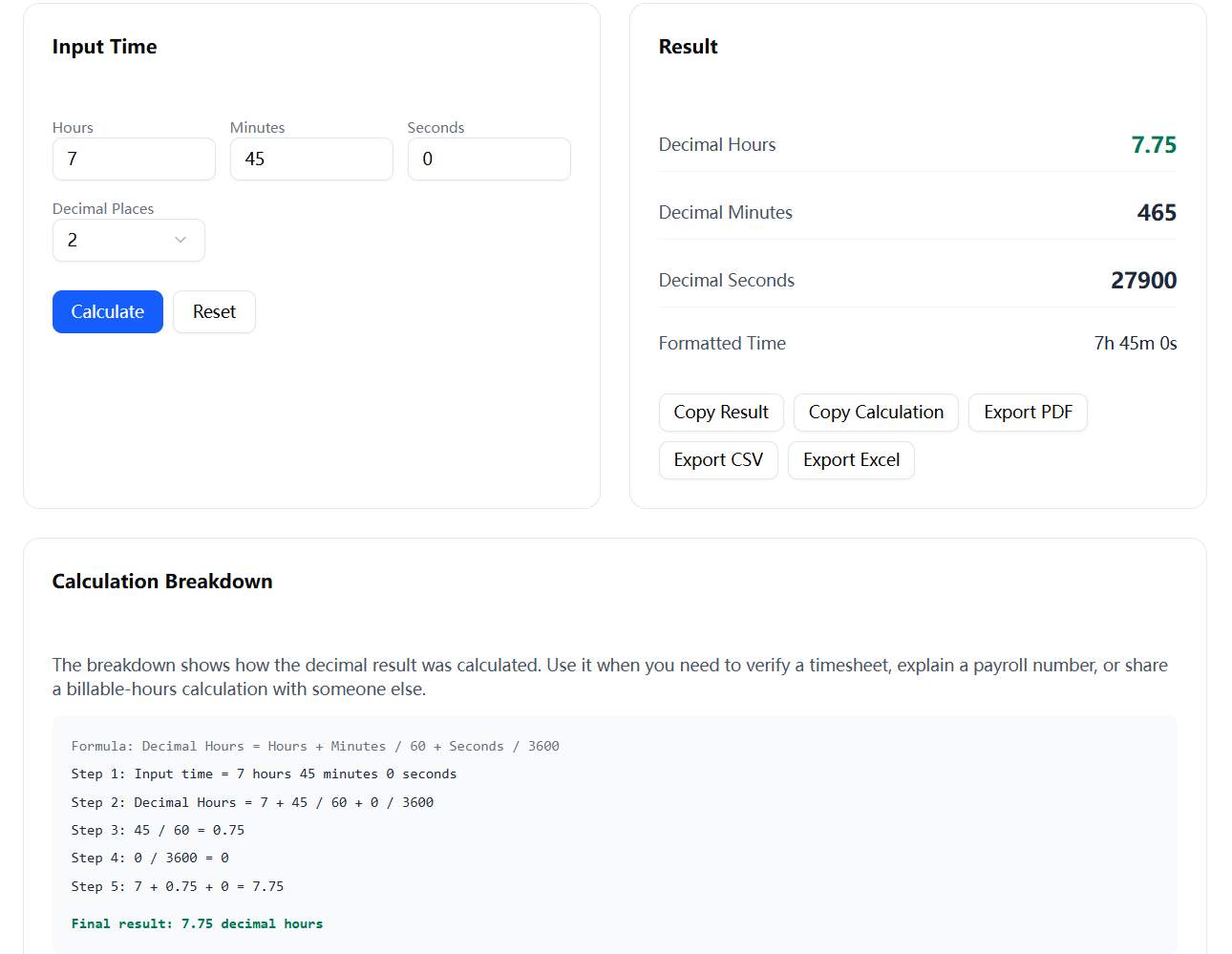
Screenshot it, copy it, or share it with HR. No more "trust me on this number."
2. Exportable recordsBuild timesheet, payroll, or billing tables with multiple entries. Then export as CSV, Excel, or PDF. One click, done. No more manual copying.
3. Four tools in one
Time to Decimal — Convert hours, minutes, seconds to decimal format
Decimal to Time — Reverse conversion (2.75 hours → 2h 45m)
Timesheet / Payroll / Billing — Table mode with overtime calculation, hourly rates, billable amounts
Batch Converter — Process multiple time entries at once
4. Payroll-ready featuresCalculate regular hours, overtime (with adjustable limits and multipliers), and total pay. Billing mode tracks billable amounts by client or project.
5. No sign-up, no downloadWorks entirely in your browser. Your data never leaves your device unless you export it.
How It Evolved
I started with just the basic converter. Then I added the calculation breakdown because my friend needed to share results with her accountant. Then the table feature, because she was tracking multiple employees. Then export, because she needed to import the data into her payroll system.
Each feature came from a real use case. The tool grew organically, shaped by actual workflows rather than hypothetical features.
Who It's For
HR professionals processing weekly timesheets
Freelancers tracking billable hours for invoices
Consultants calculating client billing by the hour
Project managers logging team hours
Anyone who converts time to decimal format regularly
The ResultMy friend now processes payroll in under 5 minutes. She enters the timesheet data, reviews the calculation breakdowns, exports the CSV, and imports it into her payroll system. The "30 minutes every Friday" problem is gone.
But more importantly, she can prove how each number was calculated. When an employee questions their pay, she shows the breakdown. When her accountant asks for records, she exports the PDF. The tool doesn't just save time — it builds trust.
Try ItThe calculator is free and open to use: https://timetodecimalcalculator.xyz
No sign-up, no download, no ads blocking the results. Just a clean, professional tool that does one thing well: converts time to decimal format, shows the work, and lets you export the records.
If you track billable hours, process payroll, or fill out timesheets — I'd love to hear how it fits into your workflow. What features would make it even more useful?
About the author: Built as a side project to solve a real problem. Each feature added based on user feedback. Open to suggestions and feature requests.

