From Zero Code to Launch Micro SaaS-AI Baby Generator
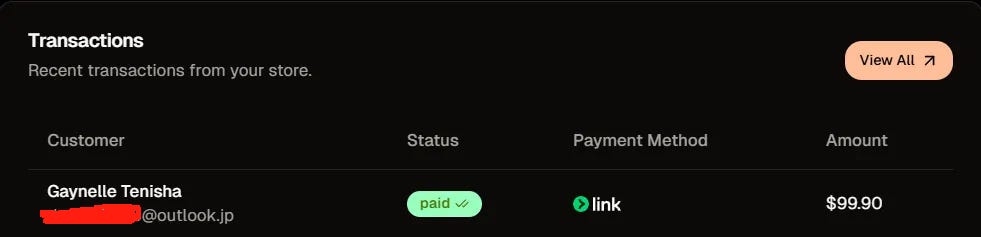
Two months ago, I didn't even know what Git was. Today, I'm sharing how I, a complete coding beginner, built and launched a Micro SaaS AI product in just one week, hitting the front page of Product Hunt, attracting over 1,000 unique visitors, and securing my first $99/month subscription.
Hey everyone! I’m excited to share my rollercoaster journey and the lessons I learned along the way.
Thanks for reading kkkk’s Substack! Subscribe for free to receive new posts and support my work.
Subscribed
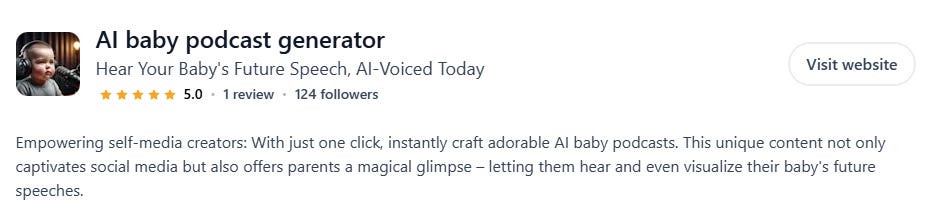
First off, here's the product: BabyPodcast.pro. It’s a simple AI tool that generates a quirky baby persona video blog based on style choices and a blog topic. It's what you might call an "AI wrapper" – leveraging existing APIs to create something new.
I developed it entirely between May 18th and May 24th – exactly one week. I didn’t use any templates; I built it piece by piece using Cursor (an AI-powered code editor), debugging as I went. Amazingly, I launched on Product Hunt on May 26th, got 124 upvotes, and on the same day, a customer subscribed for $99!
This post is a deep dive into my two-month transformation from a non-coder to someone who could ship an MVP, including all the mistakes and learnings.
My Tech Stack:
Frontend: Next.js
Deployment: Vercel
Database: Supabase
Auth (Login/Register): Supabase (Email/Google)
Backend:
n8n (Cloud)
Text API: GPT-4.1
Audio API: Murf AI
Image API: Flux.1.1-pro
Video API: Hedra
Cloud Storage: Cloudflare R2
Payment: Creem
About Me: From Investor to Accidental AI Dev
I used to work in the investment industry. In February this year, I saw the immense potential in AI and decided to quit my job. But with so many sub-fields, I was initially lost. I dabbled in AI writing tools and AI-driven content creation, but nothing truly clicked. It wasn't until March, when I got into building international web products, that my direction became clearer.
During my investment career, I'd done due diligence on several well-known large model AI companies in China. But outside of a large corporate platform, AI models seemed distant for an ordinary person. Only recently did I grasp the huge opportunities AI applications offer individuals.
"Someone said, 'All products can be rebuilt with AI.' I deeply agree." And with the rapid development of AI programming tools, it's becoming increasingly feasible for individuals to independently create AI products.
From March to May, I built 5 or 6 websites – mostly simple HTML game sites and personal blogs. They were far from the "product" I envisioned. I realized I needed to build something that covered the full stack: frontend, backend, database, payments, etc. That’s how BabyPodcast.pro was born.
Project Development: The Nitty-Gritty
1. Project Background & Goals
Why an AI Baby Podcast?
One Saturday afternoon, I stumbled upon a blog post about a viral trend on TikTok and YouTube: videos featuring AI-generated baby personas. A bit of research revealed it was a marketing campaign by a company called Hedra, and they offered an API!I saw this as a small opportunity within a larger trend. I also had zero experience building a product from scratch. I wanted this project to teach me about databases, authentication, credit systems, payments, and full backend functionality – my first Micro SaaS.
So, with minimal market research or demand validation, I just dived into building.Initial Goals:
Complete frontend and backend for a rapid launch within 3 days.
Integrate payments and auth within a week.
I met these time goals, but the journey was much harder than I anticipated. Here’s how it went, including the bumps along the road.
2. Tech Deep Dive & Lessons Learned
2.1 Frontend: Next.js (with a lot of help from AI)
This part was relatively straightforward. I had some prior experience with Next.js from building game sites. You could also use popular boilerplates like Bolt, V0, or Lovable for faster page generation.
I used Cursor to generate most of it. My prompt was something like:
"Generate a homepage based on the design and structure of [reference website URL], including Header, Hero, Features, What Is, How To, Why, Pricing, FAQ, and Footer sections."
Then, told the AI my project name and main features, had it populate the content, and then I fine-tuned it.
Tip for Beginners: Find a site with a clear structure and design you like as a reference. Get the basic structure and styling down first; you can always iterate on the UI later.
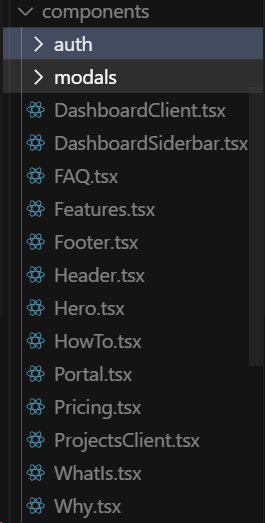
Here’s a glimpse of my main project components (beyond the homepage, these are for functional pages, referenced by page.tsx files for clarity):
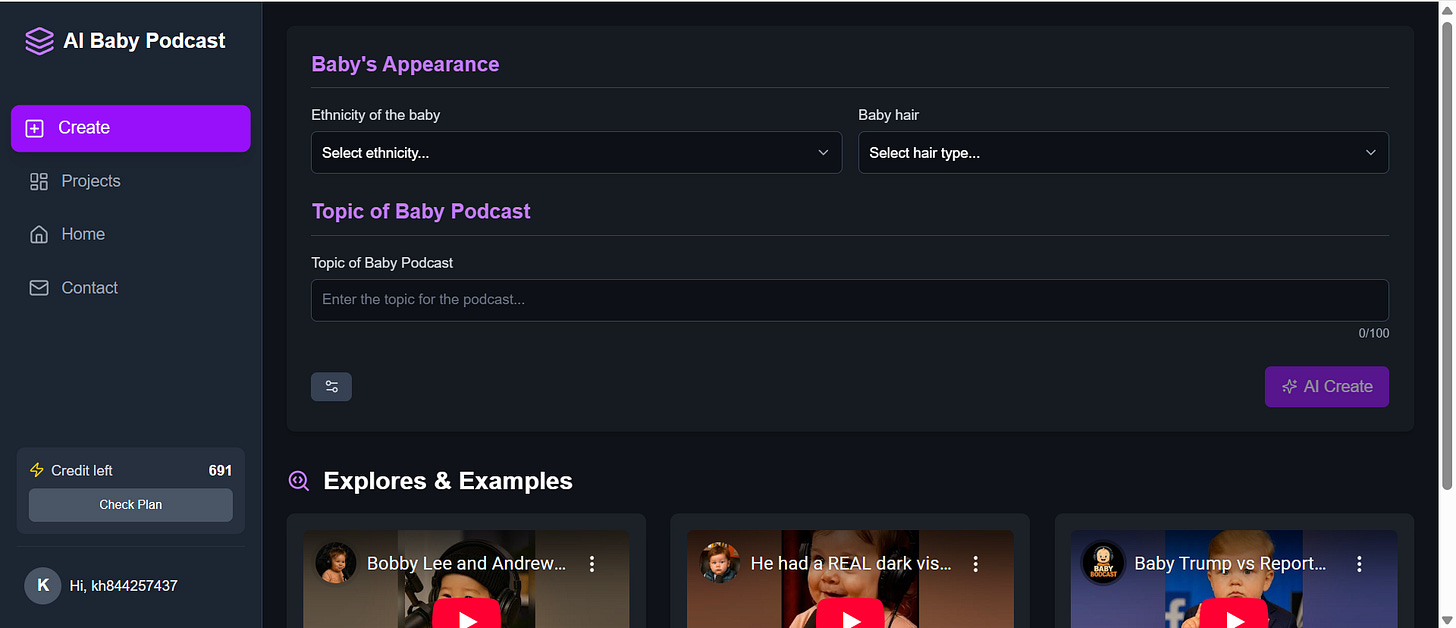
For the dashboard page, I referenced the style and structure of some excellent video websites and tweaked the colors. Don't be afraid to take inspiration from great examples to get your pages and functionality up quickly.
Code-wise, besides .tsx files, there are .ts files for functions and APIs (and CSS, of course). For a complete beginner, understanding every line of AI-generated code is a steep learning curve. Initially, I focused on understanding what each file in the src folder did, its role, and how it connected to the interactive logic on my frontend.
2.2 Backend: n8n (The Automation Lifesaver)
Why n8n?
n8n is an automation tool similar to Coze or Dify. My initial plan was to use Next.js API routes to call external APIs. However, Vercel (where I deployed) has execution time limits for API functions on its free/hobby tier.Video generation API calls take much longer. I wasn't familiar with handling asynchronous, long-running API tasks (like webhook callbacks) and the overall logic was complex. So, I looked for a workflow automation tool to build an MVP quickly, and n8n was perfect.
A Fortuitous YouTube Find:
I found a YouTube video demonstrating how to generate an AI baby podcast using n8n! It was a lifesaver. The video was about 43 minutes long, and it took me 2-3 hours to replicate the workflow MVP. The creator didn't include all documentation links, so I had to fill in some gaps.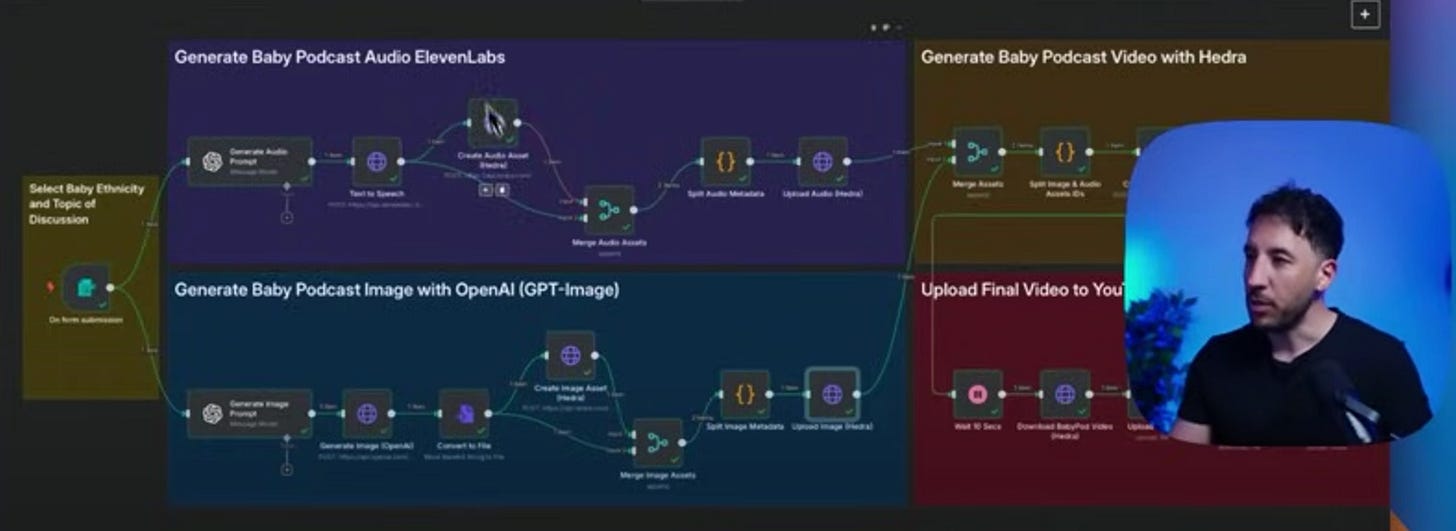
My n8n Workflow Overview:
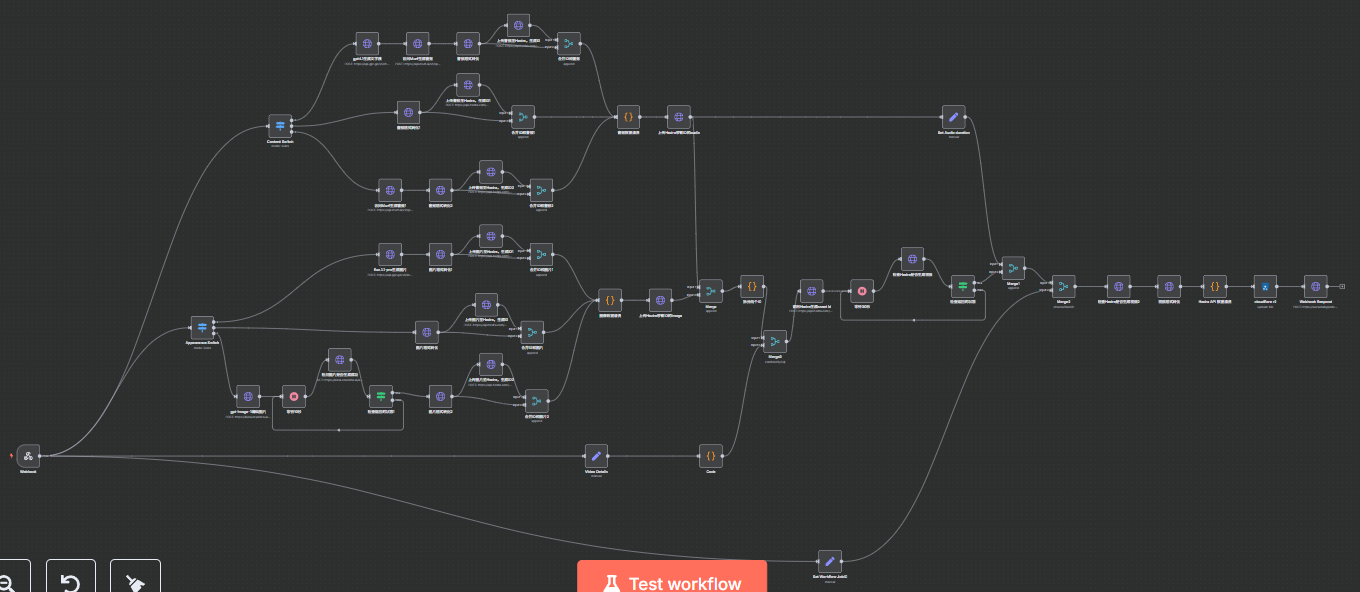
My initial version had nearly 30 nodes; it has since evolved to about 50. The core logic was based on the video, with tweaks to make it more suitable as a tool (e.g., passing ajobidthroughout to match initial requests with final results, addingdurationfor credit calculation). For beginners, workflow automation is incredibly intuitive for building backend functionality.
(P.S. n8n offers a 14-day free trial with 1000 workflow executions. Later, you might consider self-hosting or using cloud hosting platforms like Zeabur or Clawcloud – the former is ~$5/month, the latter nearly free.)Workflow Logic:
The frontend sends an HTTP request to our n8n workflow. An n8n webhook node receives this trigger, and the workflow starts. Finally, n8n sends an HTTP request back to our frontend's API route. This response contains the information needed to update the Supabase database and display results on the frontend (e.g., unique task ID, video duration for pricing, video link).APIs Called:
I used four APIs: text, image, audio, and video. The process in n8n is smooth. You configure headers and bodies according to the API's official documentation. If something’s wrong, screenshot it and ask an AI, or have it write a standard JSON request body. n8n allows you to pass parameters from previous nodes as variables to subsequent ones, making development highly efficient.Common API Platforms I Use: OpenRouter, Replicate, Fal.ai, RapidAPI, V-API, For audio and video, I used official APIs directly.
Once you get this flow working, a whole new world opens up: image generation, AI face-swapping, image restoration, watermark removal, voice generation, voice cloning, digital avatars...
Once you're proficient with API calls, implementing login/registration, payments, and cloud storage is similar – just different API endpoints, data requests, and keys. (For open-source models, you can deploy them on a cloud server and call via FastAPI).
2.3 Authentication: Supabase
I used Supabase directly. Google login is a must for an international audience. Email login adds friction due to verification and page redirects.
Mistakes I Made:
Cursor added an outdated Supabase package (
@supabase/supabase-jsis the current recommendation).Lesson: Always check official docs first. (Using Context MCP was the optimal solution I learned about later).
Client-side vs. server-side function calls (sync/async issues). Solution: Ensure your function call steps align with how the endpoint is created.
My Recommended Workflow for Beginners:
For every new feature, find the official documentation first. Feed it to Cursor. Ask it to create a step-by-step guide (e.g.,login.md,payment.md) based on the docs and your project structure, detailing all steps, sample code, and the purpose of each step. Then, have the AI implement it, constantly asking if it's following the official docs. This makes debugging much easier.
(Link to Supabase Auth docs: https://supabase.com/docs/guides/auth/server-side/nextjs)
2.4 Database: Supabase
I mostly had Cursor write the SQL statements, which I then ran in Supabase. However, you must understand what each AI-generated function does. Ask the AI to explain it thoroughly. I barely wrote any SQL myself, but I understand the general purpose of each table. (I still have some redundant tables to clean up).
Critical Pitfall: Row Level Security (RLS)!
RLS defines who can perform what operations on your tables and what tokens are needed. Understand this concept thoroughly (ask AI to explain) before letting AI set it up. AI-generated RLS often has issues, especially forinsertandupdateoperations. It's best to configure these to require server-side identity verification.
2.5 Cloud Storage: Cloudflare R2
This was simple. Cloudflare R2 offers 10GB free, which is ample for most early-stage projects.
As an indie developer, I realized MVP costs aren't that high. My main monthly expenses are Cursor ($20) and API usage (pay-as-you-go). Cursor offers ways to expand usage (Interactive MCP, Augment 14-day trial).
I buy domains for under ~$5. Database, cloud storage, website deployment, SSL certificates – mostly free tools. Upgrade once you have users and revenue.
2.6 Other Pitfalls & Tips for Beginners
API Keys:
Guard them carefully! I store them in
.env.local, in Vercel deployment settings, and in my notes app.A Silly Mistake: Always check official docs for specific API key formatting. I once wasted 4-5 hours debugging because I mixed up a hyphen (
-) and an underscore (_) in an environment variable on Vercel after local tests worked. Pure exhaustion! Double-check to avoid such time-sinks.
Git for Newbies:
I found learning Git properly had a steep curve. For beginners, GitHub Desktop combined with Cursor's "restore checkpoint" feature is often enough initially.Mess up code in Cursor?
restore checkpoint(reverts changes in the current file).Major overhaul gone wrong (new files, deleted files, dependency changes)? In GitHub Desktop,
discard changesto revert to your last local commit.Need an older version? Find the commit description and hash in GitHub Desktop (see image below) and have Cursor restore that version locally.
Test THOROUGHLY Before Launching!
I launched before fully integrating payments. Exhausted, I pushed what worked locally and went to bed. The next day, I found the n8n callback URL was wrong. Seven users visited, couldn't use the product (as seen in Clarity recordings), and left. Huge regret! I later emailed them offering free credits.Cherish Your Users:
The day my product was featured on Product Hunt, traffic surged, leading to my first paying customer – a $99/month subscription from a Japanese user running a TikTok studio! He emailed asking for custom features.To communicate better, I immediately bought a Giffgaff SIM card to set up Telegram (Chinese numbers can't register) and started providing daily updates based on his needs.
Successful products like Notion and emerging AI tools like Flowith excel at community and user engagement (internal communities, Discord, etc.).
User communication is a lifeline, especially early on. Feedback from early adopters is invaluable.
Choosing Your Coding LLM:
Large projects, many files: Claude 3.7 Sonnet / Opus work well.
Specific debugging: Gemini 2.5 Pro is excellent. These are my mainstays.
Brainstorming/Discussion with AI: Gemini 2.5 Pro/GPT-o3. Their reasoning is strong, and suggestions are logical and detailed.
Mindset & Reflections
1. Mental Game
Learning tech from 0 to 1 is a mental grind. Even with AI, problems abound. You need:
Not bursts of confidence and sky-high expectations, but steady, long-term effort and the determination to make small daily progress.
Tiny positive feedback loops to keep you motivated.
The understanding that building from scratch is a tough but rewarding path.
"The secret to winning is emotional stability, playing each hand without memory of the last. Some get flustered after a few bad beats. Others get loose after a few wins, no longer valuing their chips. These are common amateur mistakes.
You can't change what's happened, good or bad. You can't change the hand you're dealt this time. The only thing we can decide is to forget the past, not blame fate, and play the current hand to the best of our ability."
"A flowing river does not compete for speed, but for its ceaseless current."
2. On Success
I’ve met many successful founders. Most are unwaveringly committed to what they're doing. My personal formula for success:
A Promising Field + Distinctive Abilities + Unwavering Mindset + Persistent Effort.
Achieve any three, and you'll likely do well. All four? You're probably a leader in your field.For most of us, "Distinctive Abilities" require accumulation: time, experience, failures, deliberate practice, or pure talent. But the other three are choices.
A key principle is to ride the wave (顺势而为 - shùn shì ér wéi). Don't fight the trend.
I first learned about ChatGPT in late 2022. In 2023, I was involved in researching major Chinese LLM companies and a few early AI application companies. The conclusion then was that Chinese AI applications needed more time to mature, and foundational models needed to develop further. Many opportunities were missed.
Back then, I couldn't definitively say if AI was the future trend. But in just over two years, the world has transformed.
Giants like OpenAI, Google, Microsoft, and in China, ByteDance, Tencent, and Alibaba, are investing massively in foundational AI. You no longer need to guess if it's the future. The smartest minds have "voted with their feet." We just need to follow, and spend less time deliberating and more time doing.
Ride the trend, leverage the momentum, create your own opportunities, and soar with the tide.
Thank you for reading this far! I hope my journey offers some inspiration and practical advice. If you have questions or want to discuss anything, feel free to comment below or reach out!
If this was helpful, please consider sharing it!

