Google Alerts: Simple, Powerful, and Free
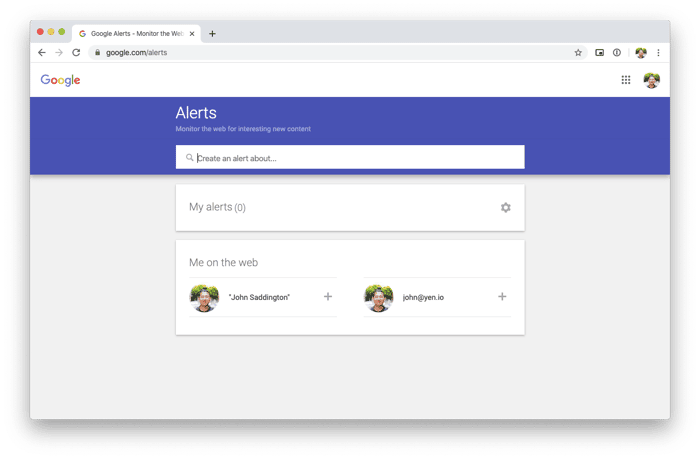
One of the very simple "hacks" that I use for every single project that I start, regardless of whether it's venture-funded or bootstrapped, is using Google Alerts.
Google Alerts is, quite simple, a highly-leveraged system for early-stage community and project builders giving you rich, high-signal data that can help you make better decisions for your product development and community building efforts.
And, to be quite honest, it's a simple-enough system, and it won't take most of you more than a few minutes of your time to become a literal expert — I kid you not!
But, that's where the power comes in because it gives you some really cool superpowers if used wisely and well. I'd like to share a few of those ideas with you now.
Simple, Yet Powerful
Google Alert is a notification system that sends an email to you whenever a new piece of content, that you specify based on keyword, surfaces on Google's algorithmically-controlled radar.
In other words, it's a simple surveillance and reconnaissance tool for the young, new startup community and indie project! It's entirely free and easy to use.
Here's a few examples that I currently have setup for myself:

You can see that I have some of the more obvious ones already created:
- yen.io
- yencamp
- yenio
- yeniverse
- yenizen
- yenstrong
These are all keywords related to my current project, YEN and anytime google indexes and "deems relevant" a piece of content floating out there on the internet, it'll email me a notification with a link to it!
Here are my current settings for Google Alerts (and a preview of some of the results):

Things to note:
- I always change the first setting to "As-it-happens" — this is because I want to know as soon as I can the moment someone mentions something about my project, community, and business. What I'm really aiming for is responsiveness.
- I also change the
default settingto "All Results" as well — this is because I want everything that google may find even remotely interesting, not just the "best" results, which may filter out the wrong things.
Just give it all to me, I say!
Why is this important? It's because responsiveness is one of the biggest competitive advantages that you and I have as smaller, indie project owners, entrepreneurs, and startup founders! We can be agile and responsive to even the smallest mention of our business, brand, and community!
An example of this starting to work for me (even as it relates to my content work here in Indie Hackers!):

Above, you can see the email notification that points me to this great question and post. You can also see my comment at the top:

You can see that even these small pieces of signal in and around your new project and community can help provide you the data you need to ask the important questions as you think through your work and time commitments.
More specifically, you'll have a better understanding of whether your investment in content development (a crucial part of community building!) is having the "return on investment" that you're looking to have.
A few other examples of how I'll use Google Alerts:
- I'll track my own personal name to manage my own personal brand and to get a sense of who's talking about me and where. Always a good idea to stay on top of that!
- I'll track my early customers and community members to see where they are hanging out on the internet and the other communities that they are part of! I consider this part of the many ways you can get valuable data from your customers without having to do a "formal" product interview ("The Mom Test" FTW!).
- I'll track my competitors or products / apps in the space that I feel are doing things right. TBH, I won't track any competitor until I, myself, have reached product-market fit — that's because tracking competitors before that is an absolute waste of time. Instead, focus on customer interviews, engineering, and revenue.
There's really a million different ways you can use this system to give you the data that you need in a format that's easy and entirely free — doesn't get better than that for an indie hacker!
Final thing from an experienced Google Alerts user: You don't want to go overboard here. It's so easy to add a ton of keywords and notifications that you end up overwhelmed with a ton of information but without anytime to do anything truly meaningful with it.
Keep the first few alerts simple to start, get a feel for what is being sent into your inbox, and add as-needed, but very judiciously.
Let me know if you have any questions!
[Finally, I teach these types of things in free weekly workshops! You can find out more here].

Sometimes, you get the news before most of the world! I got this notification that I was quoted in CNBC and the author and the CNBC Twitter hadn't yet shared it!

More!
Crazy! 15-minutes of fame perhaps! Article can be found here.

Very useful, thanks for this!
of course! i wish more folks would use it!