Graphs of my Excel add-in's first month
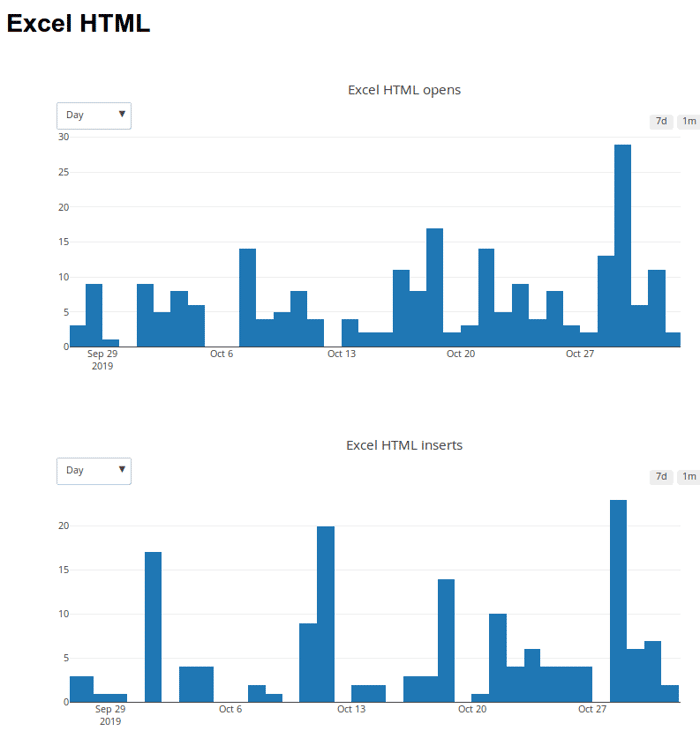
Yesterday @anakravitz pinged me for an update on how my Excel add-in is doing. In case you don't know, the super-power it gives you is to quickly turn Excel cells into perfect HTML table code - check out the gif here to see it in action: https://exceltohtml.net/
The add-in is free for now while I build traction and figure out "pro" features. It went live in the Microsoft app-source store on the 27th of September. So it's had just over a month in the market.
A few days after it went live I did a Product Hunt launch which completely flopped and also had some nice economist friends Tweet about it. I also did some low-key marketing on social media by reaching out to people who had tweeted "Excel to HTML" in recent months and telling them about the add-in.
As you can see from the charts there has been some activity with 216 opens of the add-in this month, peaking at 23 opens in one day, and 127 "insert" events. The "insert" chart is measuring every time somebody uses the add-in for its core purpose - turning some cells into HTML table code. I am very happy with 127 inserts in the first month. There's nothing like the feeling that your software has actually been useful to people!
Another outcome has been contact from somebody asking if I could build them a customised version of the add-in. This could be an interesting business, so I am having a chat with them this week.
Anyway, so that's the first month in the life of the Excel to HTML add-in. Hope this post was interesting to you!

I build something similar for Google Sheets: https://gsuite.google.com/marketplace/app/tablao/285987513149?hl=de
If I think about it, interesting features for a Pro Version could be:
Another thing I forgot to add is the economist who gave me the idea is using the add-in for her work on a regular basis, and she said it's working great.
This comment was deleted 6 years ago
@alxcnwy some good points here, thanks for the feedback.
I guess the main difference there is that my add-in preserves all of the formatting (borders, background colors, font size, cell width & height, etc.) which you can't get just from CSV data. Maybe I need to make this clearer in the marketing copy.
Great point and very useful to know this, thanks.
Reaching out to blogs that teach basic HTML is a great idea, thank you.
This comment was deleted 3 years ago
Wow, it's very encouraging to me that flookup is getting paid sign-ups already. Great work!
Thanks @getflookup, yes you're right I am lagging on the pro features front.
That is intentional yes, it's the logo of the product, lol, facepalm.
This comment was deleted 3 years ago
This comment was deleted 6 years ago
It does have an add-in store, but they don't handle billing or subscriptions, you have to build it yourself.