HELP: Took a Shopify Job 3 Days Ago and I'm Still Not Done
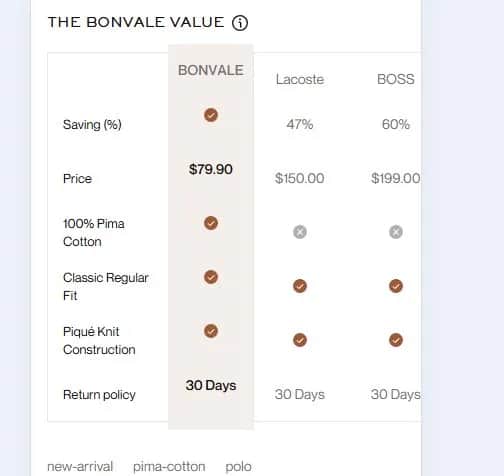
Three days ago I had no idea what Shopify was.
Then I took a client job.
"Mobile adaptation, match the design." Sure. Took ¥1500 RMB.
What I didn't know: there were multiple pages to adapt. What "match the design" actually meant. What Shopify even was.
Day 1: learned what Shopify is, what Figma is, how to edit CSS in a theme. Actually got some things working. Felt pretty good.
Day 2: started hitting walls. Images cropped wrong. Tables overflowing. JS-injected styles that CSS can't touch.
Day 3: still digging. Some fixed. Some abandoned.
Job's not done. ¥1500 in — every yuan of it tuition.
Worth it?
Absolutely. Because I got paid to learn.
Okay I need help.
¥1500 in. Still not finished.
If anyone has experience with:
Shopify theme CSS overrides
elements with negative margins breaking child width calculations
JS inline styles that !important can't touch
Please. I'm right here.
(yes I know. I know.)
https://tinystrack.com

I want to say something beyond the technical stuff.
I'm a developer from China. Getting here — to this platform, to this community — wasn't exactly straightforward. But moments like this make it worth every step.
I posted about being stuck. Strangers read it carefully, thought about it seriously, and wrote real answers. Not "just Google it." Not generic advice. Actual help.
I didn't expect that. I'm not used to that.
Thank you — all of you in this thread. This is the kind of thing that makes someone want to keep building.
Hey! Still struggling with this one. Here's where I'm at:
Table markup + wrappers:
<div class="product-info__compare-scroll-wrapper">
<div class="product-info__compare-table">
<div class="product-info__compare-labels">...</div>
<div class="product-info__compare-col product-info__compare-col--brand">...</div>
<div class="product-info__compare-competitors">
<div class="product-info__compare-col">...</div>
<div class="product-info__compare-col">...</div>
</div>
</div>
</div>
CSS on mobile:
.product-info__compare-scroll-wrapper {
margin-left: calc(50% - 50vw);
margin-right: calc(50% - 50vw);
width: 100vw;
overflow-x: visible;
}
.product-info__compare-table {
padding-left: 16px;
padding-right: 16px;
max-width: 100%;
box-sizing: border-box;
width: 100%;
}
Still getting clipped on the right — the inner padding doesn't seem to take effect at all. Any ideas would be hugely appreciated! 🙏
Sorry for the late replies everyone — I've been completely heads down trying to fix these issues and only just came up for air! Really appreciate every single comment here.
To those who left technical suggestions — the MutationObserver tip and checking parent overflow: hidden are both going on my list right now. I hadn't thought about JS injection timing fighting my CSS at all, that could be exactly what's happening. Will report back!
And to everyone who left kind words — honestly wasn't expecting that, it really helped. It's been a messy few days and knowing other devs have been through the same "Shopify struggle" makes it feel a lot less lonely. Still in the trenches but making progress! 🙏
yeah this is one of those setups that gets messy fast, especially with shopify themes fighting you
if you want I can take a quick look at it with you and see if there’s a simpler way to approach it — no pressure
Hey! Still struggling with this one. Here's where I'm at:
Table markup + wrappers:
<div class="product-info__compare-scroll-wrapper">
<div class="product-info__compare-table">
<div class="product-info__compare-labels">...</div>
<div class="product-info__compare-col product-info__compare-col--brand">...</div>
<div class="product-info__compare-competitors">
<div class="product-info__compare-col">...</div>
<div class="product-info__compare-col">...</div>
</div>
</div>
</div>
CSS on mobile:
.product-info__compare-scroll-wrapper {
margin-left: calc(50% - 50vw);
margin-right: calc(50% - 50vw);
width: 100vw;
overflow-x: visible;
}
.product-info__compare-table {
padding-left: 16px;
padding-right: 16px;
max-width: 100%;
box-sizing: border-box;
width: 100%;
}
Still getting clipped on the right — the inner padding doesn't seem to take effect at all. Any ideas would be hugely appreciated! 🙏
Yeah, I think the issue might be the
100vwwrapper combined with the inner table beingwidth: 100%+ padding.Because of
box-sizing, the padding itself won’t necessarily create extra scrollable space, so the right side can still feel clipped.I’d try letting the wrapper handle the horizontal padding instead of the table:
.product-info__compare-scroll-wrapper {
margin-left: calc(50% - 50vw);
margin-right: calc(50% - 50vw);
width: 100vw;
overflow-x: auto;
padding: 0 16px;
box-sizing: border-box;
}
.product-info__compare-table {
width: max-content;
min-width: 100%;
padding: 0;
}
Also worth checking if any parent has
overflow: hidden; that can clip the right side and make it look like the padding isn’t working.This actually clicked for me immediately.
I was putting padding on the table and wondering why the right edge kept getting clipped — the box-sizing behavior explained exactly why that wasn't working. Moving the padding to the wrapper and letting the table go max-content makes way more sense.
I'll try this today. The fact that you wrote out the actual CSS instead of just describing it means a lot — this is exactly the kind of help that's hard to find.
Thank you for taking the time. Genuinely.
Sorry for the late reply — I've been heads down trying to fix this and only just noticed the notification! The issue still isn't resolved, so any help would be hugely appreciated.
Here's everything we've tried so far to fix the table overflow on mobile:
overflow-x: auto on the table — still clipped
overflow: visible up the parent chain (compare-table → compare → product-info) — no change
Negative margin breakout: margin-left: calc(50% - 50vw); width: 100vw — content shows but right side bleeds to screen edge with no padding
Wrapper div with breakout styles, padding on inner container — padding doesn't apply correctly when 100vw is in play
width: auto + max-width: 100vw on wrapper — no visible change
overflow-x: clip — no change
Checking parent chain for overflow: hidden — nothing obvious found
The weird thing is most of these attempts produced almost no visible change at all, which makes me think something upstream might be overriding everything — maybe a theme-level stylesheet or a Shopify section wrapper we can't easily access. Has anyone run into something like this before? 🙏
The JS inline style problem has one reliable fix. Use a MutationObserver to watch for the element and apply your styles after the injection fires. !important wont help you there because the JS runs after your CSS.
For the negative margin breaking child width, check if the parent has overflow hidden set. That kills width calculations on nested elements in weird ways.
And honestly, going from zero Shopify knowledge to debugging theme JS conflicts in 3 days is not small. Most devs avoid Shopify specifically because the theme architecture is messy. You are already past the hard part.
Thank you so much for this! I got so caught up debugging that I completely forgot to check back on this post. The MutationObserver approach is something I hadn't tried — really appreciate the direction. And your last line genuinely made my day 😄 Will give this a shot!
The JS inline styles problem is nasty specifically because Shopify themes inject them after DOM load, meaning your CSS fires before the overrides land. One approach that sometimes works: a MutationObserver watching for the element, then applying your styles reactively after the injection happens. Did the client have a specific deadline or is this an open-ended contract?
Sorry for the late reply — been buried in fixes and just saw this! The MutationObserver approach makes a lot of sense, I hadn't thought about the JS injection timing at all. I have about two days left to sort this out and this is honestly the last remaining issue, so I'm going to give it a proper try. Really appreciate the direction! 🙏
Hello, Lyra!!
I usually don't goo to this kind of posts but for real... what a bummer!
And, hey, going from not knowing what Shopify was to debugging CSS, layout issues, and JS conflicts in 3 days… that’s not small, even if it feels messy right now!
Also, this:
“¥1500 in every yuan of it tuition.”
That’s the mindset! I love it! Most people pay to learn this stuff, u know? You got paid and got thrown into real problems: that is a level up!
And yeah, what you’re running into is exactly where things stop being “basic”, and that’s the real work!
And I'm gonna be very honest here, Lyra, even if the job isn’t fully done yet - I can understand that can be frustrated- you already leveled up hard. And the only fact you can name the problems clearly means you’re way past beginner confusion. So cheer up!!
Hope someone helps you close those last issues, I'm not an expert on this field but wanted to cheer you up a little. You’re doing it the right way: in public, in the mess, learning fast!
Just visited MindyCore — what a meaningful mission. Building AI that actually meets people where they are instead of forcing them to adapt to the tool... that's rare. Rooting for the Mindy launch! 💚
And thank you again for your kind words the other day — genuinely meant a lot.
Thank you, this genuinely made my day! 😊 It's been a messy few days but comments like this make it worth it. Still pushing through — appreciate the kind words more than you know
Sorry for the late reply — been buried in fixes and just saw this!
Getting paid to learn the "Shopify struggle" is a classic rite of passage, Lyra. Those JS-injected inline styles are a nightmare even for seasoned devs, but fighting through the child width calculations is where you really earn that tuition.
I’m currently running a project in Tokyo (Tokyo Lore) that highlights builders who push through technical hurdles just like this. Since you're already in the trenches solving "unsolvable" CSS bugs, entering this round could be a great way to turn that hard-earned knowledge into a winning case study.
Thank you, this genuinely made my day! 😊 It's been a messy few days but comments like this make it worth it. Still pushing through — appreciate the kind words more than you know
Love that — those messy days are usually where the real progress is happening, even if it doesn’t feel like it in the moment 🙂
What you’re building is solid, it just needs the right eyes on it now.
If you want later, happy to share a few ideas on how to get Serene in front of early users 👍
That means a lot, thank you! And yes, would genuinely love to hear your ideas on getting Serene in front of early users — please do share whenever you're ready! 👍
Love it — happy to share 🙂
For something like Serene (stress relief), I’d focus on where people actually feel the problem, not broad channels:
→ Reddit / niche communities
Search threads like “can’t focus”, “burnout”, “overwhelmed at work”
Don’t promote — just share how you built Serene + why → people will ask
→ Short-form content (real moments)
Simple clips like:
“POV: you’ve been staring at the same task for 20 mins”
→ show how Serene helps in that exact moment
→ 1:1 onboarding (first 20 users)
DM early users, understand when they use it
→ this shapes your real hook (not assumptions)
→ Positioning tweak
Instead of “stress relief app” →
try something like:
“reset your focus in under 60 seconds”
(more specific = higher conversion)
You don’t need scale right now — just 10–20 people who actually use it daily.
This is genuinely one of the most thoughtful replies I've gotten — thank you.
The Reddit angle makes a lot of sense. I've been thinking too broad ("get traffic") when I should be thinking about where people are already feeling the pain.
The positioning tweak hit me too. "Reset your focus in under 60 seconds" is so much more honest about what the product actually does in that moment.
I'll start with the 1:1 onboarding approach — 10–20 real users who actually use it beats 1000 signups who don't.
Really appreciate you taking the time. This helped more than most articles I've read on the topic.
That’s awesome to hear — you’re thinking about it the right way now 👍
That shift from “traffic” → “where pain already exists” is huge. Most people never make it.
If you’re starting with 1:1 onboarding, one small thing that helps a lot:
→ ask users “what just happened before you used this?”
(not “do you like it?”)
That gives you the trigger moment — and that’s what you build your distribution around.
Also, once you see even a small pattern (like 3–4 users using it the same way), double down on that specific use case instead of staying broad.
You don’t need many users — you need clear patterns.
Keep me posted how it goes 👍
Haven’t worked much with Shopify themes, but those issues usually come from container overflow math or styles being reapplied by JS after load. If you share the page, happy to help debug with you.
Sorry for the late reply — I've been heads down trying to fix this and only just noticed the notification! The issue still isn't resolved, so any help would be hugely appreciated.
Here's everything we've tried so far to fix the table overflow on mobile:
overflow-x: auto on the table — still clipped
overflow: visible up the parent chain (compare-table → compare → product-info) — no change
Negative margin breakout: margin-left: calc(50% - 50vw); width: 100vw — content shows but right side bleeds to screen edge with no padding
Wrapper div with breakout styles, padding on inner container — padding doesn't apply correctly when 100vw is in play
width: auto + max-width: 100vw on wrapper — no visible change
overflow-x: clip — no change
Checking parent chain for overflow: hidden — nothing obvious found
The weird thing is most of these attempts produced almost no visible change at all, which makes me think something upstream might be overriding everything — maybe a theme-level stylesheet or a Shopify section wrapper we can't easily access. Has anyone run into something like this before? 🙏
Hey! Still struggling with this one. Here's where I'm at:
Table markup + wrappers:
<div class="product-info__compare-scroll-wrapper">
<div class="product-info__compare-table">
<div class="product-info__compare-labels">...</div>
<div class="product-info__compare-col product-info__compare-col--brand">...</div>
<div class="product-info__compare-competitors">
<div class="product-info__compare-col">...</div>
<div class="product-info__compare-col">...</div>
</div>
</div>
</div>
CSS on mobile:
.product-info__compare-scroll-wrapper {
margin-left: calc(50% - 50vw);
margin-right: calc(50% - 50vw);
width: 100vw;
overflow-x: visible;
}
.product-info__compare-table {
padding-left: 16px;
padding-right: 16px;
max-width: 100%;
box-sizing: border-box;
width: 100%;
}
Still getting clipped on the right — the inner padding doesn't seem to take effect at all. Any ideas would be hugely appreciated! 🙏
Hey! Sorry for the delay in replying I was really debating this myself.
Alright so I think I understand what's going on. The overflow-x: visible on your scroll wrapper is probably the offender. When you do the 100vw breakout with negative margins, visible really doesn't give you a scroll context so the content just spills instead of scrolling. So, try changing that to overflow-x: auto and also throw in width: max-content for the compare-table div inside (keep min-width: 100% too). max-content matters without it the table still gets squashed.
If that isn't helpful, there must be a higher-up somewhere with overflow: hidden that's baked into the theme. Those are really tough because even tons of CSS on the child won't be able to fix it. Then the only viable option is a small JS snippet running on DOMContentLoaded that traces up the parent chain and removes overflow: hidden wherever it finds it. I can share that if you'd like.
However, it's probably a good idea to check this quickly open DevTools in responsive mode, choose your wrapper, and inspect the Computed styles of your ancestors. If you discover overflow: hidden anywhere along the chain, then it's your answer, and CSS won't do the trick.
Thank you for actually digging into this — I could tell you were thinking it through, not just pattern-matching.
The overflow-x: visible thing makes total sense now. I kept throwing !important at the child and wondering why nothing moved. Turns out the scroll context was broken from the start.
I did suspect a parent overflow: hidden somewhere up the chain — the CSS just wouldn't stick no matter what I did. Went into DevTools and traced it but honestly wasn't sure what I was looking at half the time.
Yes please on the JS snippet. That sounds like exactly the kind of thing I'll need to keep in my toolkit — Shopify themes love burying stuff like this.
Happy to help.
Honestly, half the battle with theme work is realizing the problem isn’t the element you’re editing — it’s usually some parent wrapper or script upstream controlling the layout. Once you start debugging the chain instead of the child, things get much easier. Hope the fix lands soon.
By the way, are you active on X or LinkedIn too? Would be happy to connect there.
Same to you — fewer bugs, better clients, smoother projects all around. 🤝
That debugging tip is gold — honestly explains so much of what I was running into. Yes I'm on X! @DdAa10367, would love to connect there 🙏
https://x.com/DdAa10367
glad it helped
i started following you on X.
Sorry for the late reply — I just surfaced from the next round of chaos. Apparently I collect these.
Following you back — glad we found each other in the valley 😂
Thank you! Following you back — always good to connect with people who actually get it 🙏
Likewise. Always nice when a random thread turns into a solid connection. Wishing you fewer chaotic bugs and better-paying clients from here on out.