How are you handling memory and context across AI tools?
I keep running into the same problem with AI tools:
They're great at reasoning, but terrible at remembering. Important context gets lost across sessions and I keep having to re-feed it (I guess I'm not the only one).
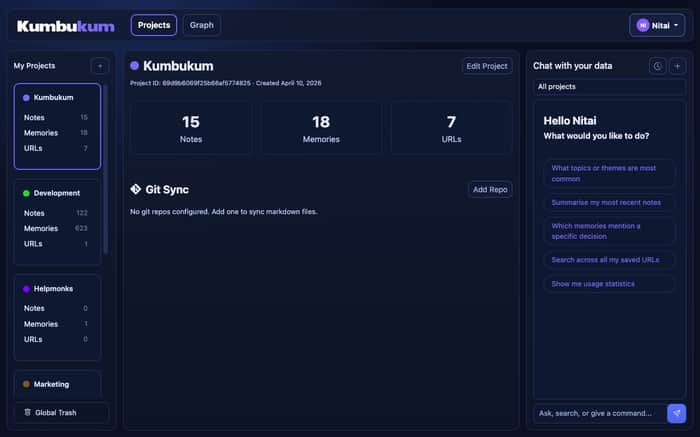
That became painful enough that I ended up building Kumbukum — an open source memory infrastructure for teams and AI tools.
The idea is simple: make context persistent, searchable, inspectable, and editable, so assistants can pull the right information instead of starting from scratch every time. However, and this is key, I wanted to build something that's not just for AI tools, but for teams in general. So you get a clean UI to manage your team's collective knowledge, and an API that any tool can integrate with. I wanted something teams can actually read, manage, edit, and self-host if they want.
Right now it supports things like:
• notes
• memories
• URLs (with whole site indexing)
• relationships between them
• Git sync
• and I'm currently adding email too
It also includes a browser extension that can extract information from any webpage and send it to Kumbukum with one click.
I'm curious how others here are handling this.
Are you:
• just relying on chat history?
• summarizing manually between sessions?
• using RAG on top of docs?
• building your own internal memory system?
• using MCP-based setups already?
Would genuinely love to hear what's working and what still feels broken.
If useful for context:
• https://kumbukum.com
• https://github.com/kumbukum/kumbukum
UPDATE on Benchmark:
Since posting this, we've been optimizing the pipeline, and here are the latest numbers (since everyone loves those benchmarks). This is done with OpenAI Codex and GPT-5.5:
Great result.
| Tool | Before | After | Saved |
|---|---:|---:|---:|
| search_knowledge | 7,804 tokens | 2,293 tokens | 5,511 tokens, 70.6% |
| recall_memory | 2,394 tokens | 1,268 tokens | 1,126 tokens, 47.0% |
| search_notes | 4,074 tokens | 1,027 tokens | 3,047 tokens, 74.8% |
Combined retrieval payload:
14,272 -> 4,588 tokens
Saved: 9,684 tokens, 67.9%
Chars dropped from 57,086 -> 18,349, saving 38,737 chars.
Latency stayed basically noise-level: 300ms -> 321ms combined across the three retrieval calls.
Update to the updated benchmark
In the words of Codex GPT-5.5 again:
Fantastic. Second-stage savings:
| Tool | Before metadata slim | After | Additional saved |
|---|---:|---:|---:|
| search_knowledge | 2,293 | 1,313 | 980, 42.7% |
| recall_memory | 1,268 | 325 | 943, 74.4% |
| search_notes | 1,027 | 326 | 701, 68.3% |
Combined:
4,588 -> 1,964 tokens
Additional saved: 2,624 tokens, 57.2%
From the original baseline:
14,272 -> 1,964 tokens
Total saved: 12,308 tokens, 86.2%
Chars went:
57,086 -> 7,853
Total char reduction: 49,233 chars, also 86.2%.
That is a genuinely excellent optimization: same retrieval intent, same semantic search, much cleaner context. Stored the exact production benchmark in Kumbukum.
Due to the high demand here and in other places (thank you!), I've made a short intro video and just posted it: https://youtu.be/DnNchFuE1Do?si=TqcWHLPm9I1SQqaf
Let me know if you have any further questions.

What’s worked for me is splitting two piles: (1) durable instructions (role, constraints, format) I keep as reusable prompts, (2) session context (decisions, rejected paths) I capture only when something actually lands. I used to dump everything into one giant markdown and re-feed it every time — models got noisier, not smarter. Smaller, win-captured pieces beat a graveyard doc.
This is a real problem. The constant context reset gets frustrating fast.
I like that you’re treating memory as something teams can actually see and manage, not just something hidden behind prompts.
But, how are you thinking about relevance over time though, like what gets surfaced vs ignored as things grow.
I liked your question btw have you come to any solution till now or still facing the same problem..???
Great question, and as a fact, I was just working on this today. As a further point, I'm just about to run some benchmarks to see whether my thinking was correct. Give me 30 minutes, and I'll get back to you with some numbers and an explanation of how I tackled it.
Ha took a bit longer than 30 minutes :) But here are the results that we have so far:
search_knowledge:
Default: ~7804 tokens
Kumbukum: <1000-1500
recall_memory:
Default: ~2394
Kumbukum: <500
search_notes:
Default: ~4074
Kumbukum: <500
Tested on the same number of documents, size, etc. One is the raw ".md" memory in Codex, and the other is the same memory documents in Kumbukum with optimized collections, MCP server, and semantic search.
We continue to tweak it right now.
Sharp problem to build around.
A lot of AI tools compete on intelligence, while users quietly suffer from continuity loss between sessions. Would try it.
Yep totally. Everything is built by developers for developers. Kumbukum's approach is a bit different. Users are at the center. Easy ways to get data in, edit it, and understand it. AI tools crunch it.
Strong direction. A lot of AI workflows don’t fail because the model is weak, they fail because context retrieval is noisy, bloated, or missing. Better memory systems often create more value than switching to a better model.
Those token reduction numbers make that pretty clear.
One store, many adapters. We keep decisions and constraints in a tool-agnostic record and expose it over MCP so Claude, Cursor and the rest read the same truth (this became our product, Decispher). Migrating between tools stopped being a context loss event, which quietly changed how willing we are to try new tools.
try decispher
Honestly the only thing that has stuck for me across tools is treating the context the user is already in as the unit of context. When the trigger is "selected text or annotated screenshot of the page" the user provides the context in their own words at the moment they ask, which sidesteps the whole server-side session memory problem because there is no session to forget. The per-question destination switch helps a lot too, since different models remember different shapes of context well. The piece I am still figuring out is the long-running project memory: weekly notes that survive across both model swaps and tool swaps.
On the cross-AI memory problem the layered answer that worked for us fits the IH default of keeping persistence local. (1) The browser-side trigger is selected text or an annotated screenshot of the page; that captures the context the user is actually working with, in their own words, not a server-side session. (2) The AI destination is switchable per question from the same trigger: ChatGPT for quick answers, Claude for long context, DeepSeek for cost-sensitive code, Gemini for grounded queries. (3) For the relay-to-a-person case (the answer goes to a teammate, not an AI) the same side-panel trigger routes to WhatsApp, Telegram, Discord share targets, which avoids retyping. Memory stays human-curated and on the page slice, not in a vendor cloud. Kumbukum is the right framing for the second layer; the first one is the bridge between the page and whichever model fits the question.
On the cross-AI memory problem the layered answer that worked for us fits the IH default of keeping persistence local. (1) The browser-side trigger is selected text or an annotated screenshot of the page; that captures the context the user is actually working with, in their own words, not a server-side session. (2) The AI destination is switchable per question from the same trigger: ChatGPT for quick answers, Claude for long context, DeepSeek for cost-sensitive code, Gemini for grounded queries. (3) For the relay-to-a-person case (the answer goes to a teammate, not an AI) the same side-panel trigger routes to WhatsApp, Telegram, Discord share targets, which avoids retyping. Memory stays human-curated and on the page slice, not in a vendor cloud. Kumbukum is the right framing for the second layer; the first one is the bridge between the page and whichever model fits the question.
On the cross-AI memory problem the layered answer that worked for us fits the IH default of keeping persistence local. (1) The browser-side trigger is selected text or an annotated screenshot of the page; that captures the context the user is actually working with, in their own words, not a server-side session. (2) The AI destination is switchable per question from the same trigger: ChatGPT for quick answers, Claude for long context, DeepSeek for cost-sensitive code, Gemini for grounded queries. (3) For the relay-to-a-person case (the answer goes to a teammate, not an AI) the same side-panel trigger routes to WhatsApp, Telegram, Discord share targets, which avoids retyping. Memory stays human-curated and on the page slice, not in a vendor cloud. Kumbukum is the right framing for the second layer; the first one is the bridge between the page and whichever model fits the question.
Where does context decay hurt most: source material you saved, decisions you made, or notes that made sense at the time but do not rehydrate later?
Surfacing memory as a team-visible layer rather than a hidden prompt is the right framing — most tools bury it because exposing it would reveal how fragile it actually is. One distinction that matters in practice: process "Surfacing memory as a team-visible layer rather than a hidden prompt is the right framing — most tools bury it because exposing it would reveal how fragile it actually is. One distinction that matters in practice: process memory (how we work) degrades much more slowly than project-state memory (where we are right now), and treating them the same creates a specific failure mode where stale state context actively misleads an agent with high
confidence. Are you handling expiration and staleness differently for those two types, or does your current approach treat all context as equally durable?
This is becoming one of the biggest problems in AI workflows honestly. The models are getting smarter, but context continuity is still messy across tools and sessions.
I’ve been using Lumi to store reusable project context instead of relying only on chat history. Makes switching between ChatGPT, Claude, and other tools much smoother.
Ohh Nice!! can you tell me how you do that??
Honestly im still on the "paste a markdown into every session" approach lol. for my side project i have one big context doc with architecture decisions + why we did things a certain way and i just feed it in. ugly but it works for a solo/tiny team. the moment you stop maintaining that doc tho everything goes sideways, the AI starts suggesting stuff you already tried and rejected 3 weeks ago
Ya true you are right "The moment you stop maintaining that doc AI starts suggesting stuff you already tried and rejected 3 weeks ago" Btw have you found a better solution or still using this workflow??
Context drift is the #1 killer of 'Vibe Coding' velocity. I’m currently building an open-core CMS, and we realized that traditional documentation is too verbose for AI agents to ingest efficiently.
We’ve moved to an 'Agent-First' documentation structure. Instead of long-form guides, we use a structured docs README md index that acts as a technical map for LLMs. It defines the strict relationship between our Next.js 16 Server Components and our PostgreSQL JSONB schema.
To solve the 'memory' problem across tools (like switching from Cursor to the browser), we actually built a Gemini Notebook specifically for our architecture. It holds the source-of-truth for our implementation patterns. When the agent starts to hallucinate, we just re-sync it with the Notebook to reset the context window.
Have you tried moving your core architectural rules into a dedicated 'System Prompt' file or a Notebook instead of relying on the agent to just 'figure it out' from the code?
The re-feeding problem is real — we ran into this on the business side too. Not with AI sessions, but with team knowledge getting lost between tools. A decision made in a WhatsApp thread, contradicted by an Asana task, unknown to the person who joined last month. Same root cause, different context. I think the best way would be to have another layer that would hold context and history and push it into perhaps new sessions so you don't have to
We've all felt that — building something solid and then watching context vanish the moment the session ends. Curious how you're handling conflicts when two team members edit the same memory differently.
The context re-feed problem is real and it cuts across more than just developer workflows. I've been thinking about this from the creator side — educators building online courses with AI tools face the exact same amnesia loop. Every new session means re-explaining curriculum structure, tone, audience, and content goals from scratch.
What you're describing with inspectable, editable memory is the piece that's genuinely missing. For creators building courses, the "why" behind content decisions matters as much as the content itself — why a module was structured a certain way, what learning outcome it targets.
Working on iLoquio (an all-in-one platform for creators to sell courses and live events), this kind of persistent context would be a game changer for educators who use AI to help build their programs. Right now they're doing the same manual markdown shuffle everyone here is describing.
The 86% token reduction benchmark stands out the most — that's not just efficiency, that's the difference between AI that feels like a real collaborator and one that just answers in isolation each time.
Memory/context fragmentation across AI tools is probably the biggest unsolved UX problem in 2026. Right now every tool has its own context window, its own memory layer, and zero interoperability.
What I'm seeing work in practice:
The risk with "smart" automatic memory is compound error: the model misremembers something, then uses that misremembered fact as ground truth for future reasoning. I've seen this cascade badly in long-running agent workflows.
For builders: the opportunity isn't just better memory — it's user-controlled, inspectable memory. Give users a dashboard of what the AI thinks it knows about them, and let them correct it. Trust follows transparency.
What's your current stack? Are you building memory yourself, or using something off-the-shelf?
I ran into this exact problem. What worked for us: we write session memory to Google Drive via MCP, index it into a searchable knowledge base, then share one MCP URL across all our coding tools. New session → AI searches the KB → instant context. Happy to share the config if you want
The signal vs noise problem you're describing is the real challenge not storage, but relevance. Most memory systems end up being graveyards of context that never gets retrieved because everything got stored with equal weight. For personal workflows I've found Obsidian with a simple tagging system handles a lot of this without overengineering it the manual friction of actually writing a note is a natural filter for what's worth keeping. But that breaks down completely for teams and multi-tool setups which is clearly what you're solving. The benchmark numbers are impressive 86% token reduction with no latency hit is the kind of result that makes the architecture decision obvious. Curious whether the prioritization is currently user-driven or whether you're building any automatic signal detection for what's worth surfacing.
My setup is also boring but at portfolio scale: 16 apps, each with its own CLAUDE.md plus a shared ~/.claude/rules/common/ for cross-cutting rules (testing patterns, security, RLS gotchas I keep relearning). Memory lives in ~/.claude/projects/<repo>/memory/ as one .md file per topic with an index. The thing nobody tells you about cross-tool memory is the failure mode isn't "tool forgot", it's "tool remembers a stale fact". I had a memory entry pointing at a function that got renamed three weeks ago and the agent kept recommending the dead path. I added a "verify memory before recommending" rule to mitigate but it's still the spookiest class of bug. Curious if Kumbukum has anything for staleness/expiry on memories.
Nitai, the 86.2% token reduction while keeping latency at noise-level is wild — that's the kind of optimization that actually moves the needle when you're chaining agent calls.
The "inspectable and editable" part of Kumbukum is the piece I think most memory tools miss. When an agent does something weird, founders need to see what it remembered and fix it — not pray to the embedding gods.
Git sync is a smart call too. Going to poke at the repo this week. If you ever want to compare notes on agent-side memory patterns, happy to swap. 🙌
That point about latency staying stable despite reduced context is interesting.
I’ve been thinking about how identity vs device plays into system reliability in similar flows.
Curious how you’d approach that tradeoff.
Hi.
The data on token reduction is impressive and encouraging: an 86.2% drop from the baseline is unlikely to be a coincidence; it’s probably a testament to the architecture’s success.
The fact that latency remains stable at around 300 ms, despite such a significant reduction in context, is what reassures me and could make me confident in deploying this solution in production.
My approach so far is rather tedious: a structured system prompt, rebuilt with every call using only the context strictly necessary for that task.
Obviously, this is manual and not scalable at the team level.
How does Kumbukum handle memory conflicts? If two members of the same team store conflicting contexts on the same entity, how does it behave? Is Git synchronization bidirectional or read-only?
Thanks
Hi all,
I want to thank everyone for their interest and questions. I knew that there was interest, but I did not expect so much (many have written to me directly, too).
I've made a short intro video: https://youtu.be/DnNchFuE1Do?si=TqcWHLPm9I1SQqaf
Let me know if you have any questions or feedback. Thank you.
This hits a real pain point—especially the part about context getting lost across sessions.
I’m working on a passwordless identity login flow and trying to simplify that same kind of friction (request → approval → access).
Would love to get your take on the approach if you’re open to it.
This hits a real pain point, most tools solve “storage” of context, but not “continuity of thinking.”
I’ve noticed even with RAG or saved notes, the friction is still in reconstructing the right context at the right time, not just having it available.
Your approach of making memory inspectable + editable feels important, especially for teams where context isn’t just data but decisions and relationships.
Curious how are you thinking about context decay or prioritization over time? Feels like that’s where most systems eventually break.
Yeah, I've written about this in the comments here multiple times. Just published a video too. Check it out: https://youtu.be/DnNchFuE1Do?si=TqcWHLPm9I1SQqaf
Really well thought out post. The benchmark numbers are the most honest thing I've seen shared on here in a while. 86% token reduction without latency penalty is not a marketing claim, that's an engineering result.
The framing of "infrastructure not a memory tool" also clicks. Most tools in this space are just RAG with a nice UI slapped on top. The collections + tags + links + semantic search combination you described is a meaningfully different architecture.
Funny coincidence!! :) I've been building something called Pipnote and when I saw your UI screenshots I did a double take. The side vault panel, note editor, and AI chat layout is almost identical to what I landed on independently. Guess the problem space converges to a similar mental model.
The core difference is Pipnote is purely local-first and solo-focused — no cloud, no team layer, no MCP server. Just a desktop app (Tauri + Rust + React) where your vault never leaves your machine. Different bet, same root pain.
Just joined so can't drop links yet, but if you search Pipnote msftwarelab on GitHub you'll find it. Would genuinely love any feedback from this crowd.
Congrats. Though you missed it, this can also be deployed locally. Cheers.
Honestly my setup is super boring. One markdown file per project that lives next to whatever assistant I'm using, plus a shared notes folder on disk that any tool can read. The built-in memory in each tool always breaks the second I switch between them, so I stopped relying on it. Downside is I have to be the one who actually writes things down. Upside is my context survives a tool dying, getting acquired, or silently changing how memory works overnight. Once you get burned by one "we've updated context handling" email, you learn pretty fast.
Biggest pain point for me is switching between Claude/ChatGPT/Gemini and losing all the context every time. I ended up keeping a markdown file with product context that I paste into every new session. Not elegant but it works. Curious what you're building to solve this.
Just give it a try and you will (hopefully) have the same experience as my whole team that is working with multiple agents at the same time https://kumbukum.com
Honestly the re-explaining part is what kills me. I work with AI tools daily for content and every new session I'm basically onboarding the same assistant from scratch. Copy pasting the same brand guidelines, the same tone rules, the same product details. It works but it's dumb. Haven't tried a dedicated memory layer yet, been just dumping everything into a massive system prompt and hoping for the best. Curious how this compares to just maintaining a really detailed prompt template — is the difference mainly speed or does it actually change the quality of output?
You are doing what I call "hope for the best". With Kumbukum, the AI saves notes, memories, and relationships for you automatically. The next time you start, it checks what is available quickly, if it needs to go further it checks more, etc. Instead of a huge document (it needs to read that each time and eats up all your tokens) with Kumbukum it just gets "breadcrumbs" instead of wasting time and ressources on content that doesn't matter. That's just high level. Best is to try it - https://kumbukum.com
The cross-session context problem is one of those things where people underestimate the friction until they actually measure it.
My current approach: I keep a project-specific context file per project and prepend it manually at the start of longer sessions. It works for small sets of projects, but it doesn't scale and breaks down when switching between multiple active things throughout the day.
The Git sync feature is the design decision that stands out to me most — treating memory as something versionable and inspectable is the right mental model. Most solutions handle memory as a hidden layer, which works fine until you need to understand why an AI made a strange decision based on stale or conflicting context.
One question: how do you handle memory conflicts when the same topic appears in notes vs memories vs indexed URLs with different information? Does the system surface those conflicts or just resolve them silently by recency?
With vector embedding, semantic search, tags, and links on the "same topic" automatically become knowledge.
I've made the whole layer intrasectable so you can add to and modify, i.e., correct, the data directly if something is off.
Running into this from a slightly different angle - I'm building a multi-agent system where different agents hand off tasks across boundaries. The hard problem isn't storing context, it's making memory written by agent A actually legible to agent B who has different tools and assumptions. Supersession (raised above) is part of it but the deeper gap I see is that memories carry the implicit context of the agent that wrote them. Two agents can disagree on what "this is done" means, what "high priority" means, etc. We've been moving toward writing memories with explicit constraints and reasons rather than conclusions, so the next agent can re-evaluate against its own situation. Curious if Kumbukum tackles the cross-author legibility piece or if it's mostly about per-user persistence right now.
Right. The whole reason I built Kumbukum is that I wanted my AI work to be accessible to my whole team.
My team is all over the world, and they all use what they want. In short, some love Claude, others OpenAI, and others, Gemini. Some love the terminal, some love Cursor, some love Sublime Text, and so on.
Kumbukum. It's not a memory tool; it's an infrastructure for AI and people. The main goal is to get data into one place and provide humans the option to feed it.
To solve this:
Retrieve (AI):
MCP
API
Feed (AI and humans):
nice UI
Drag and drop any file to your projects (extract it, store it in AI-friendly format)
Browser extension to add notes, URLs, and now also emails
Git sync: currently just adds all readable text formats
Make sense (AI):
tags
links
knowledge graph
All of the above preformat, categorize, and link content in a way that makes sense to all AI tools and agents.
I hit the same issue—ended up using a simple RAG + notes combo, but still messy to maintain 😅 this “shared memory layer” idea feels way more practical for teams.
Yep, RAG isn't exactly durable and doesn't surface what the AI wants quickly. In any case, just add https://kumbukum.com, and you are set. Eager to hear any feedback.
This is a problem I've been solving manually for the past few weeks building my SaaS, and your timing is perfect.
My approach has been two markdown files that I feed into every new session on the llm I use. An Architecture md file that covers the full tech stack, file structure, key decisions, and component relationships, and a Project_History md file that logs every significant change, bug fix, and decision made since day one with context for why.
It's low tech but surprisingly effective. Any new session starts with "read these two files before we begin" and the LLM picks up almost exactly where the last one left off. No repeated context setting, no explaining what Supabase RLS is for the fifth time, no re-explaining why we consolidated serverless functions to stay under Vercel's 12 function limit.
The painful part is maintaining them manually. After a big session I have to remember to update Project_History.md or the next session is missing critical context. I've forgotten a few times and paid for it.
What you're describing, persistent, searchable, editable context that any tool can pull from is basically what I've been doing with flat markdown files but at a level that actually scales. The Git sync feature especially is interesting since my architecture decisions are already living in the repo anyway.
Curious whether Kumbukum handles the "what changed and why" narrative or is it more structured knowledge storage? The "why" behind decisions is what I find most valuable to preserve across sessions, not just what exists but what was tried and abandoned and for what reason.
Spot on. Please do me a favor and test it. I think you will quickly see that we think alike. If you would Star https://github.com/kumbukum/kumbukum it would mean a lot. Also, any further feedback is welcome.
The pattern I keep hitting is that "memory" in most of these tools is retrieval-conditional. The agent loads memory entries when something in your prompt scores them relevant. If your prompt doesn't trigger that scoring, the memory is effectively invisible. Fine for preferences ("user likes terse responses") but breaks for pending work ("don't forget to clean up flag X next week") because the prompt that should trigger recall might not arrive.
What's working for me is moving anything truly load-bearing out of memory and into a structured file that gets read deterministically. A roadmap with explicit triggers (date, event, cadence) read at the start of every session or scheduled run. The agent surfaces due items because the file said so, not because the prompt happened to evoke recall.
Curious what others are doing for the cross-tool case. The single-tool version is solvable. The "I started a thought in Cursor and want it back in ChatGPT tomorrow" problem is harder because you've got two retrieval graphs that don't talk.
This resonates a lot.
I’m building a SaaS right now, and even at this early stage I can see how quickly context gets fragmented across tools, chats, and docs.
What you’re building feels like a missing layer between “AI tools” and “team knowledge base.”
The Git sync + inspectable memory angle is especially interesting — gives a sense of ownership instead of vendor lock-in.
Have you seen teams actually adopt it beyond AI use cases yet?
You said "I can see how quickly context gets fragmented across tools, chats, and docs." Curious, Could you please tell me a recent task where you felt this?
I've been running https://razuna.com (digital asset management) and https://helpmonks.com (shared inbox) for over 15+ years, and there is a lot of fragmented data.
When AI came along, I immediately thought that it would solve one thing: the fragmented knowledge. However, at the current rate, it just gets smarter, but "holding it all together" remains unsolved. I've figured someone would do it, but... hence Kumbukum!
Regarding adoption, part of Kumbukum is included in my tools (as mentioned above) and provides a layer for over 50 million records from different sources. I've also white-labeled Kumbukum to two healthcare organizations, but I can't mention more. The tool itself is built for a very demanding load.
Let me know if you have any questions.
Have you check MemPalace on github?
This is not "another memory tool". A memory infrastructure is scalable, distributed, etc. = https://kumbukum.com/blog/mempalace-vs-real-persistent-ai-memory/
The repeated context re-feed problem is exactly why stateless AI tools miss structural risk in codebases. I built the structural-awareness layer for that. Happy to send the OpenClaw sample if useful.
This is a real pain point, context reset across sessions kills flow. Interesting approach with making it persistent beyond just AI chats. Curious how you’re thinking about prioritizing what context actually gets pulled vs what stays in the background?
This is the biggest friction point I run into when using AI tools day to day. The context window is a crutch, not a solution, you still have to manually feed it "remember this" or paste in old conversations.
What's worked better for me is structuring inputs around recurring patterns instead of hoping the model infers things. So instead of vaguely saying "that thing we discussed last week," I'll start with "Recap of where we left off: [summary]" at the beginning of each session.
It's manual work, tbh, but it beats the alternative of context getting quietly dropped somewhere in the middle of a 40-message thread.
This is something I keep running into too — context just doesn’t persist in a way that feels usable, even when the model is capable.
What you’re building makes sense, especially the “inspectable + editable memory” part — most setups feel like black boxes.
One thing I’m curious about: how are you thinking about signal vs noise over time?
Because persistent memory sounds great, but I’ve noticed it can degrade quality if irrelevant context keeps accumulating.
Building something that relies heavily on persistent spec context right now, so this hits close.
The pattern I keep running into isn't just "context gets lost" — it's that context gets silently wrong. You re-feed it, the assistant confirms it, and then three prompts later it's drifted back to a stale assumption. That's harder to catch than a blank slate.
Curious how Kumbukum handles versioning on memories. If a fact changes (e.g. an API endpoint gets renamed), how do you prevent the old version from still surfacing in retrieval?
Great idea , Are you integrating this with other product like MS teams or slack ?
Thank you. I'm wondering what an integration should be able to achieve? You mean to be able to search discussions and use them for further projects?
For instance, we just released an option to store your emails in Kumbukum. It works by either using the API or installing our browser extension, then adding emails with one click. The content of those emails can then be used in AI chats and similar contexts.
I would say MS-teams and slack are still the primary source of communication in Corporate. If integrated it could help them to save the current context of the projects and move forward. In turn mangers can get the data of progress of the project in much easier fashion.
Got it. The API and auth mechanism are in place. Just need to build the Slack/Teams plugin. We can add it to the Roadmap to gauge interest. If you want, please add it as a feature request at https://github.com/kumbukum/kumbukum
I've been dealing with this exact problem. My current approach
is keeping a structured briefing document that I paste at the
start of each session. Not elegant, but it works until something
better comes along. Curious if anyone has found a cleaner solution.
Aehm.... that's what Kumbukum is all about :) https://kumbukum.com
Essentially, it’s a persistent context designed as an infrastructure. What I find interesting—and likely applicable—is the ability to use it across different tools rather than within a single one. You make a one-time investment in acquiring the context, and every AI session picks up where you actually left off, not from scratch. This helps everyone.
I think it could prove particularly useful in longer-term projects, where accumulated decisions constitute the real resource—though it depends on whether those decisions are right or wrong.
Interesting! It’s a great idea especially when the leading models keep changing and different models are good for different things
I’ve been running into the same thing — AI is great at reasoning in the moment, but context just falls apart over time.
What’s been tricky for me isn’t just “memory” in the sense of storing everything, but actually being able to reuse specific pieces of context across sessions without dragging the whole history along.
A lot of setups I’ve tried end up either too heavy (full context, RAG, etc.) or too fragmented (notes, bookmarks).
Curious how you’re thinking about that tradeoff — do you see this more as a “store everything and retrieve” problem, or something closer to selectively extracting and reusing smaller bits of context?
This is one of the biggest friction points in AI workflows right now. Every tool starts fresh and you end up re-explaining context constantly. I've been thinking about this too — are you using any specific tools to bridge the context gap between sessions, or mostly manual workarounds?
I understand that pain perfectly, it's exactly what led me to design my own system. To solve that AI "amnesia", I built an infrastructure that I call OMEN, and it's basically the "hippocampus" that my tools were missing.
Here I share with you how I am handling it, in case it helps you to contrast with Kumbukum:
Instead of re-feeding the AI in each session, I designed a local database called Omen with an architecture of 10 relational tables. I don't just save text; I organize knowledge into Projects, Modules, and Input Types. This allows that, instead of starting from scratch, the wizard consults a structure where each piece of information has a logical and permanent place.
Something that seems vital to me and that I integrated in my Stage 6 is the logic_weight (a weight from 0 to 100) and the classification by Functional Type (Axioms, Evidences and Hypotheses).
Unlike many cloud tools, my priority is Digital Sovereignty. My system is 100% local and offline; in my network tests, the indicator shows 0 Kbps input and output. This allows me to manage sensitive or technical knowledge without a single byte leaving my hardware.
For memory to be useful, it has to be large. I developed a ZIM file importer (like those from Wikipedia or Kiwix) and automatic PDF, Word, and Markdown extractors. The system cleans up junk code (HTML/CSS) using a filter_data_zim function so that the AI receives only pure, readable context.
Bottom line: My focus has been to build a sovereign memory infrastructure. It's not just a database; it's a system where I design the logic and architecture, and I use AI as an execution team that queries that technical memory so I never forget the context of my mission.
Kumbukum is pretty much the same. Though I would argue that the "weight" and "hierarchy" can become a bit of a management issue. We solved it with tags and links, and of course, the vector, semantic search. In my experience, all AI tools were able to find everything quickly but the key is to return only "breadcrumbs". Like this the AI knows that there is data and if required can query further down into the links and related tags. I do love your approach of local first.
most of my activity has been manual, I ask Claude to create a md when I believe I'm at key milestones and due to my OCD I keep asking it to update the md more times than necessary (not sure if that's efficient!), then when I need to move to another thread (run out of context window) I ask the new thread to read off the relevant section in the md, this has been working for me so far...If there are tools that claim to handle context across threads my fear is that they will spit out something wrong (silent failure), which is a different kind of problem which means significant time and effort needs to be spent in validation before getting any confidence on it
Hitting this exact problem right now. I'm a researcher building a SaaS tool on the side — 1-2 hours a day after work — and the biggest overhead isn't coding, it's re-explaining context to AI every session.
Currently using a shared project file as a manual "memory layer" — works for now, but definitely doesn't scale.
The Git sync angle is interesting. Does Kumbukum handle non-dev context well too? My use case is more product/workflow decisions than code.
Congrats on working on the side project.
Kumbukum is not a dev tool per se, and yes, Kumbukum can handle any data (except binaries). For example, you can simply drag & drop a PDF, docx, etc., into your project, and it will parse the text and make it available. Add a bunch of documents and new emails, and you should be able to see in the Knowledge Graph how it starts connecting the text.
Start chatting in Kumbukum with your files, or then connect your AI tools with MCP.
Let me know if you have any further questions.
This resonates a lot — the “great at reasoning, bad at remembering” issue is exactly what I keep running into as well.
Right now I’m mostly relying on a mix of manual notes + re-feeding context when needed, which definitely doesn’t scale. I’ve looked into RAG setups, but for smaller projects it often feels like overkill compared to the actual problem.
What I find tricky isn’t just storing context, but deciding what is worth remembering vs what should be ignored — otherwise it quickly turns into noise.
Curious — how are you handling prioritization or filtering in Kumbukum?
Is it mostly user-driven (manual tagging/structuring), or do you have any logic to surface “important” context automatically?
Really like the approach of making context persistent + editable. The memory benchmark numbers are impressive.
From building prompt libraries for indie makers, one pattern I keep seeing: the biggest context loss isn't between tools, it's between SESSIONS. Teams rewrite the same role setups, ICP definitions, and output specs every time. Having that layer as reusable, versioned prompts (with bracketed variables) fixes 70% of the problem before you even need a memory layer.
Might be complementary to what you're building — Kumbukum for long-lived team memory, a solid prompt library for the deterministic parts.
Thank you for your kind words. No problem with long-lived memory here, because that's the reason why I've built it the way it is, i.e., as an infrastructure and not as a memory tool.
From my point of view, storing "memory" in a bunch of markdown as a tree is simply not scalable and distributable. Kumbukum changes all that, and if you insist, you can, of course, add all your markdowns via drag & drop or use the API. Even better, use the Git sync :)
In any case, once your files, URLs, emails, etc., are in Kumbukum, your whole team can use them, and every AI tool will quickly surface the topic. If it needs more, it looks for it. The AI clients are rather smart about it and love to have a place to get data from!
Treating memory as an app layer instead of a model feature has worked better here. A small per-user store with explicit facts, recent actions, and task summaries beats relying on each tool's chat history, especially once people switch models or devices. Shared memory across tools sounds nice, but in practice stale context causes weird behavior, so keeping it scoped and easy to reset matters a lot.
Thank you for your input. People who have used Kumbukum haven't had issues with stale content. Especially not as we provide a solution, i.e., users can add/edit, and further modify the memory in Kumbukum.
It's an actual problem, I use to talk and research with AI specially Gemini, and it got a very bad memory, I need to tell him the same thing the day after tmrw, This app can help me in that thing,
I have one more problem, there should be system with all these chatbots that has some way of feeding the part knowledge and it doesn't affect the chat, What I mean there are a lot of time when I need to know about a specific point or line generated by AI, But If I ask about it that get's messy and breaks the flow of main stream so there must some kind of string that originates from the particular point from that generated response and a new chat window open where we can confirm that thing without compromising the main stream generation, This is also a problem that I think can be fixed!
I am in support of feeding a part of knowledge to AI btw have you found any solution for this like this poor memory and context explaining ??
Yes, this appears very genuine. ~
I’ve run into the same issue; the model is not bad per se, but context seems to escape it.
I've attempted the method of "documents and summaries" as well. It functions for a time, only to drift slowly, as it relies on you.
Your point about what deserves to be remembered may be the hardest part.
Everything that is forgotten becomes a noise.
Being excessively choosy will cause you to lose access to useful context later on.
It’s an interesting idea to think of memory layers; some things are fleeting, some stay, some are reused.
The step you talked about refers to the promotion step.
At some point, something must be deemed worth keeping, rather than merely tucked away in the passive storage.
Or else, you merely replicate the same disorder somewhere else.
I am also interested in maintenance.
I haven’t really seen people stick with them unless they’re super lightweight; something so clearly pays off won’t get extra effort.
I agree with you in this "I haven’t really seen people stick with them unless they’re super lightweight; something so clearly pays off won’t get extra effort." Btw Have you come to any solution till now?
You mentioned documents and summaries drift over time. Can you tell me about a recent project where that happened?
I've run into this exact problem. The context re-feeding overhead is real, and it compounds over time.
On the voice side, I actually think the input modality matters too. When you're constantly switching between the keyboard and AI tool windows, you lose thread continuity.
For me, tools that let you dictate directly into the workflow, without jumping to a browser or document, cut down the friction before the memory problem even starts. You get the thought down faster and cleaner, which means less cleanup work downstream.
Curious if you've looked at input latency as a factor too? Even 200-300ms of friction per input event adds up when you're doing hundreds per day.
Yes, input is important as well. Here is a breakdown that hopefully makes sense:
First and foremost, Kumbukum is not a memory tool; it's an infrastructure for AI and people. The main goal is to get data into one place and provide humans the option to feed it.
To solve this:
Retrieve (AI):
Feed (AI and humans):
Make sense (AI):
All of the above preformat, categorize, and link content in a way that makes sense to AI. Less searching, faster AI, fewer tokens used, etc.
Simple :) https://kumbukum.com
yeah that framing resonates - infrastructure not a document pile. I've been hitting the retrieval problem hard in my own agent setup, that's usually where these things fall apart. curious whether Kumbukum handles cross-session continuity or just same-session context?
I have Claude in VS Code, Codex GPT-5.5, OpenClaw in Telegram, and then tons of MCP calls from customers all going to Kumbukum at the same time.
I've built Kumbukum as a fault-tolerant, load-balanced system. Our production setup includes multiple Caddy instances, a MongoDB ReplicaSet, a Typesense cluster, over 400 containers in Docker Swarm, Cloudflare, etc.
AMA ? :)
UPDATE on Benchmark:
Since posting this, we've been optimizing the pipeline, and here are the latest numbers (since everyone loves those benchmarks). This is done with OpenAI Codex and GPT-5.5:
Great result.
| Tool | Before | After | Saved |
|---|---:|---:|---:|
|
search_knowledge| 7,804 tokens | 2,293 tokens | 5,511 tokens, 70.6% ||
recall_memory| 2,394 tokens | 1,268 tokens | 1,126 tokens, 47.0% ||
search_notes| 4,074 tokens | 1,027 tokens | 3,047 tokens, 74.8% |Combined retrieval payload:
14,272 -> 4,588 tokensSaved:
9,684 tokens,67.9%Chars dropped from
57,086 -> 18,349, saving38,737 chars.Latency stayed basically noise-level:
300ms -> 321mscombined across the three retrieval calls.And we have another benchmark result from our latest extensive metadata slimming without compromising quality.
In the words of OpenAI Codex GPT-5.5:
Fantastic. Second-stage savings:
| Tool | Before metadata slim | After | Additional saved |
|---|---:|---:|---:|
|
search_knowledge| 2,293 | 1,313 | 980, 42.7% ||
recall_memory| 1,268 | 325 | 943, 74.4% ||
search_notes| 1,027 | 326 | 701, 68.3% |Combined:
4,588 -> 1,964 tokensAdditional saved:
2,624 tokens,57.2%From the original baseline:
14,272 -> 1,964 tokensTotal saved:
12,308 tokens,86.2%Chars went:
57,086 -> 7,853Total char reduction:
49,233 chars, also86.2%.That is a genuinely excellent optimization: same retrieval intent, same semantic search, much cleaner context. Stored the exact production benchmark in Kumbukum.
Hey Nitai!
The retrieval problem is real, and I'd add one layer to it: context quality degrades not just across sessions, but across tools in the same session.
I run a SaaS email rebuild tool where Claude generates production HTML from newsletter content. The context I need to preserve isn't just "what the user said" — it's brand voice, conversion patterns, structural decisions made 3 steps back. Right now I handle it by injecting a structured context block at every API call. Works, but it's manual and brittle.
What you're describing with semantic search + tagged collections is essentially what I'm rebuilding by hand on every request. The difference is yours persists and compounds. Mine resets.
The Git sync angle is interesting for dev context. Curious whether you see a use case for creative/marketing workflows too — or is the current focus primarily dev teams?
Ha... I know exactly what you mean -> https://helpmonks.com
Honestly, add Kumbukum. As it's not AI dependend you can create links to URL and emails (about to be released) and then the AI knows the connections between your data (that's what the memory is about).
Use the API, MCP, and be happy :)
RAG over docs helps, but it doesn’t fully solve the living knowledge problem. Notes, decisions, links, and relationships need a cleaner system around them.
Yep, and that's exactly what https://kumbukum.com is. It's not another memory tool. It's a complete infrastructure.
The persistent context problem is actually two distinct problems. Storage is the easier half. The harder part is retrieval precision: which context is relevant now, not which context exists. RAG approaches solve the first and often fail the second. The MCP pattern is interesting here because it moves the retrieval decision to the host, not the model.
Exactly. The whole memory isn't just a bunch of markdown documents or a directory tree. This doesn't provide an AI client with any information.
How Kumbukum does it is:
That's Kumbukum - https://kumbukum.com
Context management is honestly the biggest bottleneck right now. I find myself constantly repeating the same 'architectural rules' to different AI agents just to keep them on track. Are you using any specific vector DBs or tools like Mem0 to handle this, or is it still a manual copy-paste game for you? I feel like we’re all just waiting for a universal 'context layer' that actually works across the stack.
I'm copying what I wrote to someone here earlier.
The whole memory isn't just a bunch of markdown documents or a directory tree.
This doesn't provide an AI client with any information.
How Kumbukum does it is:
That's Kumbukum - https://kumbukum.com
Makes sense?
Can you tell me about a recent project where you had to repeat those architectural rules? What made it so frustrating?
ran into this when swapping providers last month - rebuilt pretty much everything except the memory layer, which survived clean. I've started thinking of it as the job contract: what the agent needs regardless of what model's underneath.
Spot on. What Kumbukum does is creating a memory infrastructure instead of some tree of documents.
This resonates a lot. I've been building production Flutter/Firebase apps and the memory problem hits differently when you're a solo dev — every new session with an AI tool means re-explaining your entire architecture, naming conventions, project context.
I've been handling it by keeping a detailed markdown file with my stack decisions, Firestore structure, and key patterns that I paste in at the start of sessions. Works but feels like a hack.
The Git sync feature you mentioned is interesting — does it index commit messages and PR descriptions too? That would be genuinely useful for keeping AI context aligned with actual codebase changes.
Will check out Kumbukum. Self-hosting support is a big plus for anyone working with sensitive business logic.
Honestly, and without saying "I solved it," but I was exactly in the same boat with our project. One loves Claude, another OpenAI, and another one Gemini. Some love the terminal, some love Cursor, some love Sublime Text, etc.
No AI vendor solved it. Drove me completely nuts.
Hence, I built Kumbukum. It's not a memory tool; it's an infrastructure for AI and people. The main goal is to get data into one place and provide humans the option to feed it.
To solve this:
Retrieve (AI):
Feed (AI and humans):
Make sense (AI):
All of the above preformat, categorize, and link content in a way that makes sense to AI. Less searching, faster AI, fewer tokens used, etc.
Simple :) https://kumbukum.com
Comment:
What you’re describing is exactly where most setups start breaking — not storage, but retrieval under real usage.
In practice, a lot of systems capture context fine, but when you actually need it, the recall depends heavily on how it was structured and labeled in the first place.
I’ve seen cases where better naming + tighter semantic grouping outperforms heavier RAG layers, just because the system can “recognize” what matters faster.
Curious — are you optimizing more on the storage/retrieval side right now, or starting to think about how information gets shaped at input too?
Thank you for your comment and feedback. Your questions are spot on. I've been doing Digital Asset Management with Razuna - https://razuna.com - for over 20 years. This has taught me some things about distributed networks and teams (hopefully) :)
So, with Kumbukum, I took the same approach, built a nice UI (again hopefully), and enable users (not directly developers) with an easy way to get data in and once in, to make it editable.
On input, yes, with our browser extension, you can add notes, URLs, and now emails (will be released in a few days). To answer your question, yes, the input data is being formatted and processed. Once in the database (mongodb) we use Tyoesense to create an index and embeddings. So everything is already pre-formatted for the AI tools.
I've been coding with Codex and the Kumbukum MCP server and it flies!
Will most likely start making some videos.
Let me know if this answers your questions. Happy to discuss further.
That makes sense — you’ve clearly thought through the pipeline side well.
The interesting gap I still see isn’t in how the system works, but in how it gets recognized.
Right now “Kumbukum” doesn’t immediately signal anything about memory, context, or retrieval. So even if the system is strong, the first impression doesn’t help users (or devs) map it to the problem you’re solving.
In something this infra-heavy, that layer matters more than usual — because people are trusting it to remember for them.
Have you thought about tightening that mapping on the naming side, or are you treating the name as neutral for now?
From my experience, and also testing some "memory apps" out there, it all comes down to instructions. For one, the instructions the MCP server provides (which I think many devs are not aware of), and then the instructions you should provide in your AGENTS.md file. We provide a recommended file at https://app.kumbukum.com/docs/mcp/agents
Here a screenshot of a conversation in VS Code. Codex is even better about this.
That helps the model use it better.
It does not help a person understand it faster.
Those are two different problems.
Good instructions improve output.
A clear name improves adoption.
Right now the technical layer sounds solid.
The bigger question is still whether someone seeing “Kumbukum” instantly understands why they should trust it with memory in the first place.
Sounds like a marketing problem to me. Feel free to contribute and help :)
Partly marketing, but mostly positioning.
If the product has to explain what it is before people understand why it matters, the name is already carrying too much friction.
That’s usually where adoption slows in tools like this:
the system works,
the retrieval works,
but the first impression still makes people do one extra translation step.
That’s the part worth tightening.
What would you rename it if the goal was instant trust + instant category recognition?
Check it out: https://youtu.be/DnNchFuE1Do?si=TqcWHLPm9I1SQqaf
Watched it.
The product itself is much clearer than the name.
Once you see it, the value clicks fast:
persistent project memory
structured recall
cross-tool context
retrieval that stays usable after capture
That part is solid.
The friction is still the same one we were circling:
the product explains “memory OS”
the name still reads like something I have to decode first.
And that matters because the video does the heavy lifting right now.
It teaches me what Kumbukum is.
A stronger name should let the video confirm the category, not explain it from scratch.
That’s the real test:
if someone sees the name cold, before the demo,
do they already have the right mental model in their head?
Right now the product earns trust once it’s seen.
The name still delays that trust by a beat.
That’s fixable.
And worth fixing.
If you’re open to it, send me your LinkedIn — easier to pressure-test 2–3 tighter directions there than bury it in a thread.
Nitai, the "re-feeding context" loop is exactly where AI efficiency breaks down, and building Kumbukum as open-source memory infrastructure is a massive step toward fixing that "starting from scratch" problem. By prioritizing searchability and Git sync alongside an API for tool integration, you're shifting context from a temporary chat session to a persistent team asset, ensuring that collective knowledge actually compounds over time.
I’m currently running Tokyo Lore, a project that highlights high-utility logic and validation-focused tools like yours. Since you’re building the definitive infrastructure for persistent context and team memory, entering Kumbukum could be the perfect way to turn your own validation journey into a winning case study while your odds are at their absolute peak.
You are spot on. What is Tokyo Lore about?
Glad it resonated 🙂
Tokyo Lore is a small, focused round where we highlight:
→ early-stage tools
→ strong underlying ideas/logic
→ and builders solving real problems
It’s not a typical “launch platform” — more about getting your idea in front of thoughtful builders and seeing how it actually lands.
For something like Kumbukum, the value would be:
→ how people react to the “persistent context” idea
→ what use cases stand out
→ where it clicks vs where it needs clarity .
Tokyolore.com
Great. Here is what I've been answering:
The whole memory isn't just a bunch of markdown documents or a directory tree.
This doesn't provide an AI client with any information.
How Kumbukum does it is:
Honestly, and without saying "I solved it," but I was in a dilemma with my projects and team members. One loves Claude, another OpenAI, and another one Gemini. Some love the terminal, some love Cursor, some love Sublime Text, etc.
No AI vendor solved it. Drove me completely nuts.
Hence, I built Kumbukum. It's not a memory tool; it's an infrastructure for AI and people. The main goal is to get data into one place and provide humans the option to feed it.
To solve this:
Retrieve (AI):
Feed (AI and humans):
Make sense (AI):
All of the above preformat, categorize, and link content in a way that makes sense to AI. Less searching, faster AI, fewer tokens used, etc.
Simple :) https://kumbukum.com
Makes sense?
Context loss is exactly why most AI workflows break down, Nitai those 86% token reduction benchmarks are seriously impressive! Knowing how to properly position heavy infrastructure tools is tough. To help founders figure out which specific global niches actually need these setups before writing code, we built an AI agent that handles that entire market validation for you. Amazing work on Kumbukum!
we hit this exact problem building Kintsu.ai for WordPress sites. The memory issue gets even worse when you're working with existing sites because the AI needs to understand the current theme, plugins, and site structure every single time.
our approach was different than general memory tools. instead of trying to store everything, we built context awareness directly into the platform. Kintsu maintains perfect memory of your existing WordPress site - knows your theme, content structure, previous changes, everything.
when you ask it to modify something, it's not starting from zero. it already knows "this site uses Elementor with custom CSS in the header" or "the contact form is integrated with Mailchimp in this specific way."
honestly the breakthrough was treating it as a WordPress-native platform rather than a general AI tool that needs external memory. the context is baked into how it understands your site.
for WordPress specifically, this beats any external memory system because the AI actually lives in your site's ecosystem instead of trying to remember it from outside.
This comment was deleted 4 months ago
This comment was deleted 2 months ago
So true. I don't know how other tools handle this, but with Kumbukum, I constantly see the AI chat retrieve previous topics, analyze them, and then respond based on that. I keep on chatting, and when done, the AI doesn't update the existing note, but creates a new one with a link to the discussed note. It has worked quite well for us.
Furthermore, you always have the option to directly change everything that is stored and thus really control the data and not depend on some "black box" thinking.
This comment was deleted 2 months ago
Try it and see how it works for you. Doing is the key :)